- Protocol
- ACP
- Type
- Tool
- Stars
- 408
- License
- MIT
- Last push
- May 16, 2026
 by formulahendry
About ACP Client for VS Code
ACP Client for VS Code is an open-source ACP tool by formulahendry, written mainly in TypeScript. VS Code extension that connects to ACP coding agents. It has 408 GitHub stars and uses the MIT license, and its code was last pushed on May 16, 2026.
New to ACP? Our ACP Protocol guide explains how it works and lists other projects built on it.
At a glance
- Protocol
- ACP
- Type
- Tool
- Language
- TypeScript
- License
- MIT
- GitHub stars
- 408
- Last push
- May 16, 2026
- Latest release
- @vscode/vsce 4.1.1
- Released
- Nov 12, 2026
Listed from public GitHub data, checked 2026-11-08. Not scanned by AgenticMart.
Questions about ACP Client for VS Code
What is ACP Client for VS Code?
VS Code extension that connects to ACP coding agents It is listed as a ACP tool, maintained in the formulahendry/vscode-acp repository on GitHub.
How do I install ACP Client for VS Code?
The project's README gives this command: npx @vscode/vsce package # Create .vsix. Read the README for setup steps and requirements before running it.
Is ACP Client for VS Code an official ACP project?
No. It is a community project built on ACP, not published by the organisation that runs the protocol.
What license does ACP Client for VS Code use?
It is published under the MIT license. Check the license file in the repository before using it commercially.
Is ACP Client for VS Code still maintained?
Its code was last pushed on May 16, 2026, and it had 408 GitHub stars when we checked on 2026-11-08. Look at recent issues and releases in the repository for a fuller picture.
README
ACP Client for VS Code
A Visual Studio Code extension that provides a client for the Agent Client Protocol (ACP) — connect to any ACP-compatible AI coding agent directly from your editor.
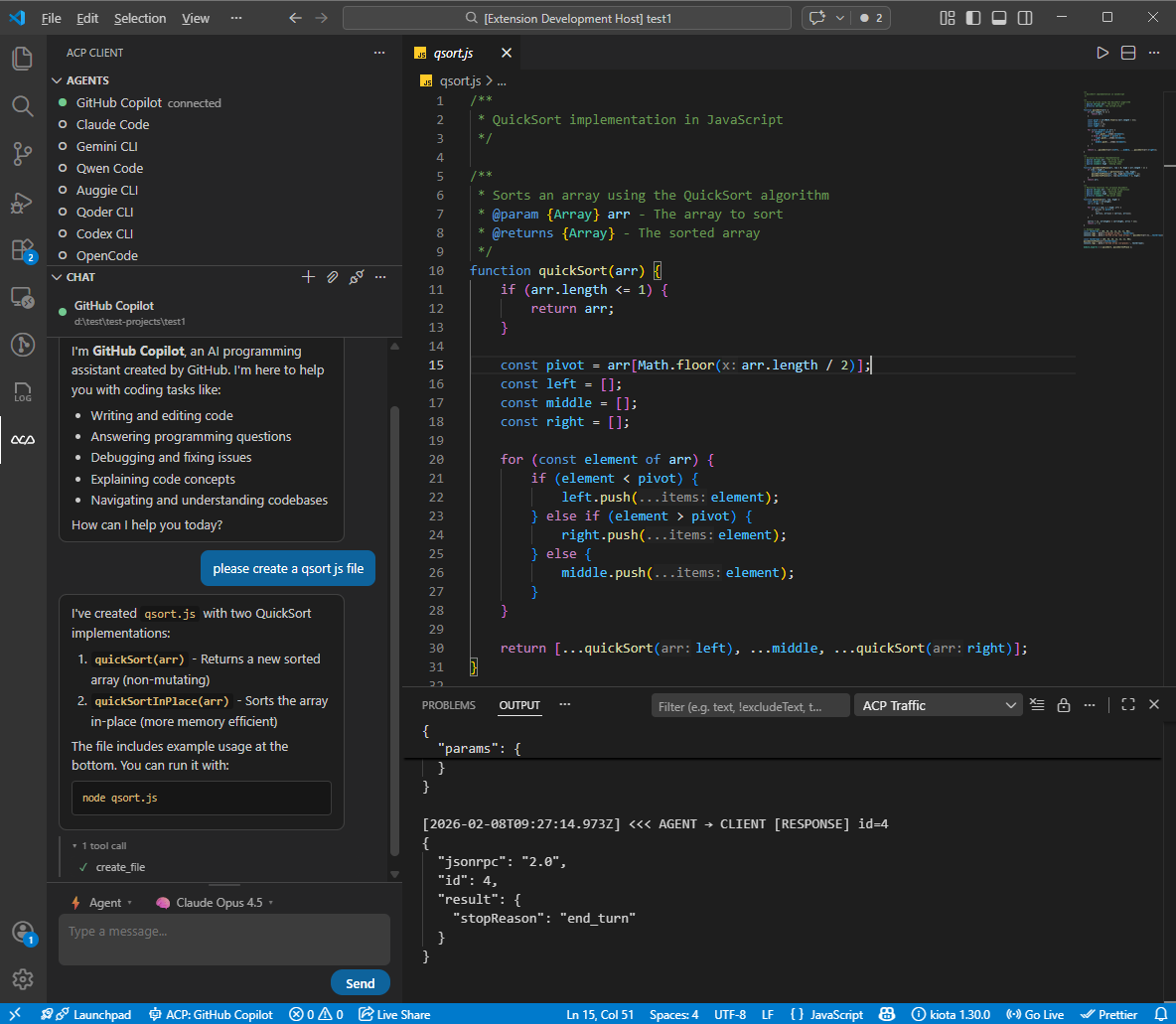
Features
- Multi-Agent Support: Connect to 11 pre-configured ACP agents or add your own
- Single-Agent Focus: One agent active at a time — seamlessly switch between agents
- Per-Agent Session List: Each agent in the Agents view is expandable into its previous sessions. Click a session to restore its history in the chat. Backed by
session/listwhen the agent supports it, or by a local per-workspace cache otherwise. - Session Config Options: Dynamic per-session selectors (mode, model, reasoning level, …) advertised by the agent are rendered automatically in the composer toolbar.
- Interactive Chat: Built-in chat panel with Markdown rendering, inline tool call display, and collapsible tool sections
- Thinking Display: See agent reasoning in a collapsible block with streaming animation and elapsed time
- Slash Commands: Autocomplete popup for agent-provided commands with keyboard navigation
- Mode & Model Picker: Switch agent modes and models directly from the chat toolbar (kept for agents that haven't migrated to Session Config Options yet)
- File System Integration: Agents can read and write files in your workspace
- Terminal Execution: Agents can run commands with terminal output display
- Permission Management: Configurable auto-approve policies for agent actions
- Protocol Traffic Logging: Inspect all ACP JSON-RPC messages with request/response/notification labels
- Agent Registry: Browse and discover available ACP agents
- Chat Persistence: Conversations are preserved when switching panels
Quick Start
- Install: Visual Studio Code Marketplace | Open in VS Code | Open VSX Marketplace
- Open the ACP Client panel from the Activity Bar (ACP icon)
- Click + to add an agent configuration, or use the defaults
- Click an agent to connect
- Start chatting!
Requirements
- Node.js 18+ (for spawning agent processes)
- An ACP-compatible agent installed or available via
npx
Pre-configured Agents
The extension comes with default configurations for:
| Agent | Command |
|---|---|
| GitHub Copilot | npx @github/copilot-language-server@latest --acp |
| Claude Code | npx @agentclientprotocol/claude-agent-acp@latest |
| Gemini CLI | npx @google/gemini-cli@latest --experimental-acp |
| Qwen Code | npx @qwen-code/qwen-code@latest --acp --experimental-skills |
| Auggie CLI | npx @augmentcode/auggie@latest --acp |
| Qoder CLI | npx @qoder-ai/qodercli@latest --acp |
| Codex CLI | npx @zed-industries/codex-acp@latest |
| OpenCode | npx opencode-ai@latest acp |
| OpenClaw | npx openclaw acp |
| Kiro CLI | kiro-cli acp |
| Hermes Agent | hermes acp |
You can add custom agent configurations in settings.
Note on Hermes Agent: Hermes is a Python package, not an npm package. Install it via the Hermes Quickstart (Linux/macOS/WSL2 only — Windows requires WSL2). Make sure
hermesis on yourPATHand launch VS Code from the same shell/venv. Configure credentials withhermes model.
Extension Settings
| Setting | Default | Description |
|---|---|---|
acp.agents | (11 agents) | Agent configurations. Each key is the agent name, value has command, args, and env. |
acp.autoApprovePermissions | ask | How agent permission requests are handled: ask or allowAll. |
acp.defaultWorkingDirectory | "" | Default working directory for agent sessions. Empty uses current workspace. |
acp.logTraffic | true | Log all ACP protocol traffic to the ACP Traffic output channel. |
Commands
All commands are accessible via the Command Palette (Ctrl+Shift+P):
| Command | Description |
|---|---|
ACP: Connect to Agent | Connect to an agent |
ACP: New Conversation | Start a new conversation with the connected agent |
ACP: Send Prompt | Send a message to the agent |
ACP: Cancel Current Turn | Cancel the current agent turn |
ACP: Disconnect Agent | Disconnect from the current agent |
ACP: Restart Agent | Restart the current agent process |
ACP: Open Chat Panel | Focus the chat webview |
ACP: Add Agent Configuration | Add a new agent to settings |
ACP: Remove Agent | Remove an agent configuration |
ACP: Set Agent Mode | Change the agent's operating mode |
ACP: Set Agent Model | Change the agent's model |
ACP: Refresh Sessions | Re-fetch the session list for an agent (also on the agent's right-click menu) |
ACP: Show Log | Open the ACP Client log output channel |
ACP: Show Protocol Traffic | Open the ACP Traffic output channel |
ACP: Browse Agent Registry | Browse the ACP agent registry |
Keyboard Shortcuts
| Shortcut | Action |
|---|---|
Ctrl+Shift+A (Cmd+Shift+A on Mac) | Open Chat Panel |
Escape (when turn in progress) | Cancel Current Turn |
Development
Prerequisites
- Node.js 18+
- VS Code 1.85+
Setup
git clone https://github.com/formulahendry/vscode-acp.git
cd vscode-acp
npm install
Build & Run
npm run compile    # One-time build
npm run watch      # Watch mode for development
Press F5 in VS Code to launch the Extension Development Host.
Testing
npm run pretest    # Compile tests + lint
npm test           # Run tests
Packaging
npm run package    # Production build
npx @vscode/vsce package   # Create .vsix
Architecture
The extension follows a modular architecture:
- Core:
AgentManager,ConnectionManager,SessionManager,AcpClientImpl - Handlers:
FileSystemHandler,TerminalHandler,PermissionHandler,SessionUpdateHandler - UI:
SessionTreeProvider,ChatWebviewProvider,StatusBarManager - Config:
AgentConfig,RegistryClient - Utils:
Logger,StreamAdapter
Communication with agents uses the ACP protocol (JSON-RPC 2.0 over stdio).
Known Issues
- Agents must be available via the system PATH or
npx - Some agents may require additional authentication setup
- File attachment feature is not yet functional
Links
Related Projects
- ACP UI — A modern, cross-platform desktop client for the Agent Client Protocol (ACP)
- WeChat ACP — Bridge WeChat chat messages to any ACP-compatible AI agent (Claude, Codex, Copilot, Qwen, Gemini, OpenCode and more)
License
MIT — see LICENSE for details.
More ACP projects
All 20 →
CodeCompanion
Neovim AI coding plugin with built-in ACP support

Agent Client Protocol
Specification, schema and Rust crate for connecting editors to agents

Jupyter AI
JupyterLab extension that integrates coding agents through ACP