- Updated
- November 12, 2026
- Read
- 6 min
- Sources
- 1
What Is an MCP Server? How MCP Works, With Examples
An MCP server lets AI apps like Claude, Cursor and VS Code use your tools and data. How it works, real examples, how to install one and what to check first.
An MCP server is a small program that lets an AI app use something outside itself, such as your files, a database, a browser or GitHub. The AI app connects to the server, asks what it can do, and the model then uses those tools while it works on your request.
MCP stands for Model Context Protocol. It is an open standard, so one server works in many AI apps: Claude, ChatGPT, Cursor, VS Code and more. This guide is written for the current version of the protocol, revision 2026-07-28.
Why MCP exists
Before MCP, every AI app had to build its own connector for every service. Ten apps and ten services meant a hundred custom integrations.
MCP replaces that with one plug. A service ships one MCP server, and every AI app that speaks MCP can use it. The official docs compare it to a USB-C port for AI.
MCP was introduced by Anthropic in November 2024. Since December 2025 it has been hosted by the Agentic AI Foundation under the Linux Foundation, so no single company controls it.
How an MCP server works
Three parts work together:
- The host is the AI app you use, such as Claude Desktop, Cursor or VS Code.
- The client is a small piece inside the host that holds one connection to one server.
- The server is the program that offers tools, such as "create an issue" or "run a query".
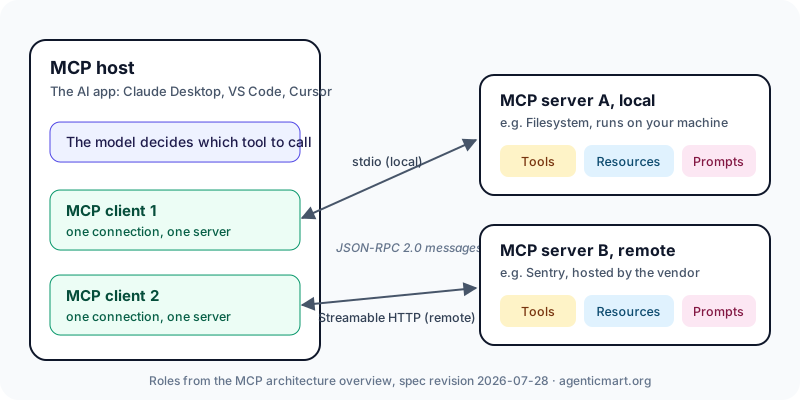
When you ask for something, this is what happens:
- The client asks the server which tools it has.
- The server answers with each tool's name, a description and the inputs it needs.
- The model reads the list and decides which tool helps with your request.
- The client calls that tool, the server does the work and sends back the result.
- The model reads the result and finishes its answer.
What a server can offer
A server can offer three things. Tools are actions the model can take, like writing a file. Resources are data the app can attach, like a database schema. Prompts are ready-made templates you pick, like "summarise this pull request". Most servers are mainly tools.
What changed in 2026: MCP is now stateless
The July 2026 revision removed the old start-up handshake and protocol sessions. Each request now carries everything the server needs, which makes servers simpler to host and scale. Older servers still work, because clients and servers detect each other's version and fall back. The official changelog lists every change.
Local and remote MCP servers
Every MCP server is one of two kinds.
| Local server | Remote server | |
|---|---|---|
| Where it runs | On your computer | On the provider's servers |
| How you add it | A start command, such as npx | A URL, such as https://example.com/mcp |
| What it can reach | Your files and programs, with your permissions | Only the service behind it |
| Best for | Files, Git, browsers, local tools | Shared SaaS tools and teams |
Some providers offer both. If you are unsure which you need, our local vs remote MCP servers guide compares them in detail.
MCP server examples
Popular servers, grouped by the job they do:
- Library docs: Context7 gives the model current documentation for the libraries in your code.
- Browser: Playwright MCP lets the model open pages, click and fill forms.
- Code hosting: the GitHub MCP server works with repositories, issues and pull requests.
- Files: the Filesystem server reads and writes files in folders you choose.
- Databases: servers for Postgres, Supabase and others let the model query your data, often in read-only mode.
- Error tracking: Sentry's server connects the model to your error reports.
You can compare these and thousands more, with install commands for each client, in the MCP server directory.
How to install an MCP server
Most AI apps read a small JSON file that lists your servers. This example adds the Filesystem server to Claude Desktop and limits it to two folders:
{
  "mcpServers": {
    "filesystem": {
      "command": "npx",
      "args": ["-y", "@modelcontextprotocol/server-filesystem", "/Users/you/Desktop", "/Users/you/Downloads"]
    }
  }
}
The steps are the same in every app:
- Find the server's install command or URL in its README.
- Add it to your app's config, or use its add-server command. In Claude Code that is
claude mcp add. - Keep API keys in environment variables, never in a file you share.
- Restart the app and check that the new tools appear.
- Try one small, read-only task first.
Each AgenticMart listing shows the exact install for Claude Code, Claude Desktop, Cursor and VS Code. For troubleshooting, see how to install an MCP server.
Is an MCP server safe to use?
An MCP server is software that acts for you, so treat it like any other code you install. The main risks are:
- Hidden instructions. A tool's description can contain text that steers the model. You rarely see the full description; the model always does.
- Untrusted content. A web page, email or issue the server fetches can contain instructions the model follows.
- Too much access. A server with a broad token or wide folder access can do far more than its job needs.
- Changes after install. A server can change its tools in a later version you never reviewed.
Before you connect one, check who publishes it, read its tool descriptions, pin a version, give it the smallest token that works and keep tool-call approval switched on. The MCP security best practices cover the details.
On AgenticMart, every server listing shows what it can touch, and many have a dated scan report. A scan covers one version and is one input to your decision, not a guarantee.
MCP server vs API
An API is called by code you write, using endpoints you chose in advance. An MCP server describes its tools so the model can choose and call them itself. Most MCP servers sit in front of an API and call it for the model. If your code decides what to call, use the API. If the model decides, use MCP. The full comparison is in MCP vs API.
How to choose the right MCP server
- Start from the job, such as "query our staging database", not from a list.
- Prefer the vendor's own server when there is one.
- Pick local or remote on purpose.
- Look for limits such as read-only mode, tool subsets or folder lists.
- Check it is maintained: recent releases, answered issues and a clear licence.
- Keep your set small. Every server adds tool descriptions the model has to read.
FAQ
What is an MCP server in simple terms?
It is a small program that lets an AI app use something outside itself, such as your files, GitHub or a database. The app asks the server what it can do, and the model uses those tools when they help.
What does MCP stand for?
MCP stands for Model Context Protocol. "Context" means the information and actions an AI app can use beyond the conversation itself.
What is the difference between an MCP client and an MCP server?
The client lives inside the AI app and holds the connection. The server is the separate program that offers the tools. An app runs one client for each server it connects to.
Do MCP servers run locally or in the cloud?
Both. Local servers run on your machine and can reach your files. Remote servers run as hosted services and are added by URL.
Are MCP servers free?
The protocol and most servers are open source and free to install. Many connect to a paid service, so check the pricing of the service behind the server.
Is MCP stateless?
Yes, since revision 2026-07-28. The start-up handshake and protocol sessions were removed, and each request carries what the server needs. Older servers still work through version fallback.
Find the right MCP server
Compare servers by stars, activity and what they can touch, then copy a one-line install for your app in the MCP server directory. Built a server? List it free; paid selling opens soon.
Each server on AgenticMart shows its install command, what it can touch, published advisories and any scan report. Built one? List it free now, paid selling opens soon.