- Updated
- November 12, 2026
- Read
- 6 min
- Sources
- 2
What Are Agent Skills? How SKILL.md Works, With Examples
Agent skills teach AI agents like Claude Code and Codex a new job. How they work, what goes in SKILL.md, examples, how to install one and what to check first.
Agent skills are folders of instructions, and sometimes scripts and reference files, that an AI agent loads only when a task needs them. Each skill is built around one file, SKILL.md, that tells the agent what the skill is for and how to do the job.
A skill teaches an agent to do one kind of work your way: review code against your checklist, write SQL for your database, or build a slide deck in your brand. Skills follow an open standard, so the same skill works in Claude, Claude Code, OpenAI Codex, GitHub Copilot in VS Code, Gemini CLI and other agents.
Why agent skills matter
Without skills, you repeat the same long instructions in every chat, and the agent still forgets your rules. With a skill, you write the instructions once and the agent uses them every time the task comes up.
Skills are also cheap to keep around. An agent only reads a short description of each installed skill until one is needed, so you can install many without slowing it down.
How agent skills work
Agents load skills in three steps, pulling in more only when the task needs it. This is called progressive disclosure.
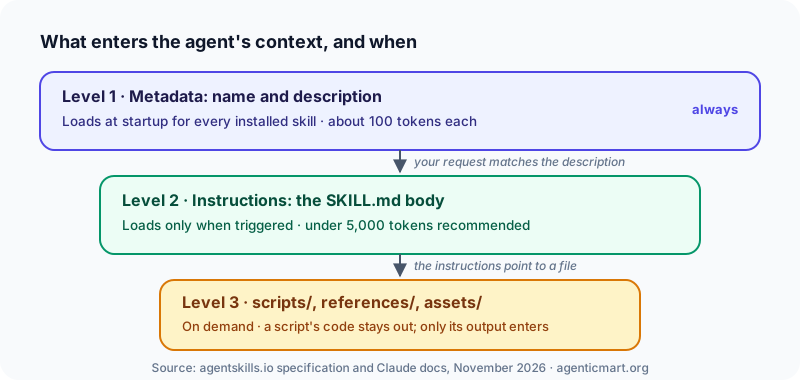
- At start-up, the agent reads each skill's name and description. That costs about 100 tokens per skill.
- When your request matches a description, the agent reads the full instructions in
SKILL.md. - Only if the instructions point to them, the agent opens extra files or runs bundled scripts. A script's code never enters the context; only its output does.
Two things follow. A clear description is what makes a skill fire at the right moment. And scripts are a cheap, repeatable way to handle steps that must be exact.
What goes in a SKILL.md file
A skill is a folder. Only SKILL.md is required:
my-skill/
├── SKILL.md       # required: name, description, instructions
├── scripts/       # optional: code the agent can run
├── references/    # optional: longer docs
└── assets/        # optional: templates and files
SKILL.md starts with a short header, then plain instructions:
---
name: changelog-writer
description: Writes a CHANGELOG entry from the commits since the last git tag. Use when the user asks for release notes or a changelog.
---

1. Find the last tag with `git describe --tags --abbrev=0`.
2. List commits since then with `git log <tag>..HEAD --oneline`.
3. Group them under Added, Changed, Fixed and Removed.
4. Add the entry to the top of CHANGELOG.md with today's date.
The name must match the folder name, use lowercase letters, numbers and hyphens, and be at most 64 characters. The description should say what the skill does and when to use it, in up to 1,024 characters. The Agent Skills specification lists every field. For a walkthrough, read the SKILL.md format explained.
Types of agent skills
The most useful way to sort skills is by what is inside the folder, because that decides how much you need to check:
- Instruction-only skills contain just
SKILL.md: steps, rules and tone. Example: a code review checklist. - Knowledge skills add reference files, such as a database schema or a contract playbook.
- Script skills add code the agent runs for exact steps, such as filling a PDF form.
- Workflow skills run a multi-step job the same way every time, such as a release process.
- Tool skills teach the agent how to use tools it already has, often from an MCP server.
Skills also differ by who gets them. Personal skills live in your home folder, project skills live in a repository for everyone who clones it, and organisation skills are pushed by an admin.
Agent skills examples
Skills people use every day, by job:
- Developers: test a web app in a browser, address pull request comments, build an MCP server.
- Marketing: run an SEO audit, check copy against brand voice, draft a campaign plan.
- Data: write SQL queries, validate a dataset, build spreadsheets.
- Legal: review a contract, triage NDAs.
- Design: build web front ends that follow a design system.
Compare skills by stars and activity, and see what each one can touch, in the agent skills directory. Our pick of the most useful ones is in the best Claude skills.
Where agent skills run
| Agent | Project skills folder | Personal skills folder |
|---|---|---|
| Claude Code | .claude/skills/ | ~/.claude/skills/ |
| OpenAI Codex | .agents/skills/ | ~/.agents/skills/ |
| GitHub Copilot in VS Code | .github/skills/ or .agents/skills/ | ~/.copilot/skills/ |
| Gemini CLI | .gemini/skills/ or .agents/skills/ | ~/.gemini/skills/ |
The .agents/skills/ folder is read by Codex, VS Code and Gemini CLI, so it is the closest thing to a shared location. In claude.ai you upload a skill as a zip in settings instead. Skills do not sync between claude.ai, the Claude API and Claude Code.
How to install an agent skill
- Download or clone the skill folder.
- Put it in your agent's skills folder from the table above.
- Restart the agent, or reload its skills.
- Ask for the task the skill describes and check that the agent uses it.
To write your own, create a folder, add a SKILL.md with a clear name and description, write the steps, and test it with a real request. The full method is in how to write an agent skill.
Agent skills vs MCP servers
An MCP server gives an agent access to something, such as GitHub or a database. A skill tells the agent how to do a task, and it can tell the agent how to use an MCP server's tools well. They work best together: connect a GitHub MCP server for access, then add a skill with your team's triage rules. See what is an MCP server for the other half.
Are agent skills safe to install?
Not automatically. A skill is instructions your agent will follow, and sometimes code it will run with your permissions. Security researchers at Snyk found confirmed malicious skills in public registries in a February 2026 study.
Before you install a skill:
- Read every file, not just
SKILL.md, and look for network calls or file access that do not fit its purpose. - Watch for links it fetches at run time, which can bring in new instructions later.
- Check what it pre-approves. If it allows shell commands without asking, find out why.
- Pin a specific version and read it again when you update.
On AgenticMart, every skill listing shows what it can touch, and scanned listings link a dated report for one exact commit. A scan is one input, not a guarantee.
FAQ
What are agent skills in simple terms?
Saved instructions an AI agent picks up when it needs them, like a how-to guide it reads only for the right task. Each one is a folder with a SKILL.md file, and it can include scripts and reference files.
What is a SKILL.md file?
The one required file in every skill. It starts with a short header holding a name and a description, followed by the instructions the agent follows when it uses the skill.
What is the difference between agent skills and MCP?
An MCP server gives an agent access to an outside system. A skill teaches the agent how to do a task, and it can tell the agent how to use an MCP server's tools. Many setups use both.
Are Claude skills the same as agent skills?
Yes. Claude skills use the open Agent Skills format, so a skill that sticks to the standard fields also works in Codex, Gemini CLI and GitHub Copilot in VS Code.
Where do I put skills in Claude Code?
Personal skills go in ~/.claude/skills/<skill-name>/SKILL.md and project skills in .claude/skills/<skill-name>/SKILL.md inside your repository. You can also call one directly by typing /skill-name.
Do agent skills use up my context window?
Only a little until they are used: about 100 tokens per skill for its name and description. The full instructions load only when a task matches.
Find the right agent skill
Compare skills by stars, activity and what they can touch in the agent skills directory. Built a skill? List it free; paid selling opens soon.
Every skill on AgenticMart shows what it can touch, its install path and any scan report. Built one? List it free now, paid selling opens soon.