2dimg2motion Agent Skill
 by WU-HAOTIAN34
Agent skill for converting 2D character into style-consistent transparent animation sequences and spritesheets for game engines | 用于将静态 2D 角色/物体图片,通过 agent 转化为一致的透明背景游戏动画序列帧。
2dimg2motion is an open-source agent skill by WU-HAOTIAN34, written mainly in Python, with 240 GitHub stars and the MIT license. Its code was last updated Jul 2, 2026.
2dimg2motion.skill
<p align="center"> <strong>English</strong> · <a href="README-CN.md"><strong>简体中文</strong></a> </p>


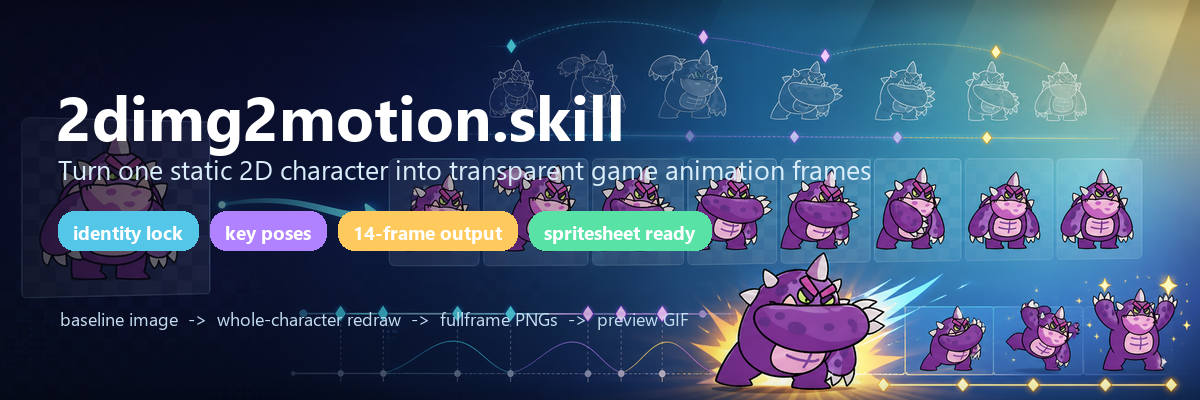
What Is This
2dimg2motion.skill is a 2D game-animation generation skill for Codex / Claude Code / Agent Skills. It takes one static character, creature, vehicle, weapon, or prop image and generates a style-consistent transparent action sequence that can be packed into a spritesheet.
It is not a "single-image motion filter". Filters usually translate, rotate, scale, or warp local image layers; the core of this skill is whole-character key-pose redraw: first lock the character identity, then let the model redraw complete key poses, then generate in-between frames, with local scripts handling transparency, canvas normalization, packing, and validation.
Why It Exists
AI can easily draw characters that look like they belong to the same series, but it is much harder to draw continuous motion for the same character. Game animation adds more requirements:
- every frame must be a transparent RGBA PNG;
- character proportions, foot baseline, and canvas size must stay stable;
- weapons, arms, horns, tails, and wings must not swap sides or disappear;
- keyframes and in-betweens must form readable motion;
- the final output must be directly usable in Godot, Unity, Cocos, or a custom 2D engine.
This repository turns those lessons into an executable workflow: analyze the baseline image, establish the identity lock, design action beats, generate a shared key-pose sheet, generate in-betweens, remove the background, normalize frames, pack assets, validate structure, and visually inspect the result.
Quick Start
1. Install The Skill
Put the repository into your Agent Skills directory. Keep the repository structure intact, because the main skill, sub-skills, scripts, references, and project knowledge files refer to each other.
Codex example:
git clone https://github.com/WU-HAOTIAN34/2dimg2motion.git $env:USERPROFILE\.codex\skills\2dimg2motion
Claude Code example:
git clone https://github.com/WU-HAOTIAN34/2dimg2motion.git ~/.claude/skills/2dimg2motion
You can also run it directly from this repository during local development. Confirm the dependency:
python -m pip install pillow
2. Use The Main Skill To Generate Animation
In Codex or Claude Code, provide a baseline image and describe the motion:
/2dimg2motion use sample/s3.png to generate an arm-swing attack animation
Or:
Generate a walk action from this character image.
/2dimg2motion use sample/s7.png to generate a sword-slash action.
/2dimg2motion use sample/s1.png to make a heavy ground-smash attack animation.
The main skill runs the full workflow: analyze the baseline image, establish the identity lock, design key poses at 02/05/08/11, generate in-betweens, remove the background, normalize frames, pack the spritesheet, and output preview.gif and manifest.json.
3. Use The Baseline Standardization Sub-Skill
If the input image is too large, tightly cropped, visibly white-backed, or lacks enough transparent margin for attacks or walking motion, call the standardization sub-skill first:
/img2mo-std s7
/img2mo-std sample\s7.png
It resolves the image path and calls the script to create a standardized baseline image:
python scripts\standardize_baseline.py sample\s7.png
Useful options:
python scripts\standardize_baseline.py sample\s7.png --check-only
python scripts\standardize_baseline.py sample\s7.png --subject-max 360 --margin-ratio 0.75
python scripts\standardize_baseline.py sample\s7.png --output sample\s7-standard.png
Default output:
sample\<input-stem>-standard.png
The standardized image should become the 00 and 13 baseline frame for later animation generation.
4. Use The Learning Sub-Skill
If you have reference videos, existing outputs, failed attempts, GIFs, spritesheets, Spine assets, or frame folders, the skill can extract reusable project knowledge from them:
/img2mo-learn output\s3-arm-swing-attack
/img2mo-learn motion\some-reference-folder
/img2mo-learn sample\attack-reference.mp4
Learned notes are written to:
img2mo-knowledge/
|-- index.md
|-- learnings.jsonl
|-- action-patterns.md
|-- style-patterns.md
|-- prompt-patterns.md
`-- failures.md
Future animation generations read this project-level knowledge first, improving action timing, prompt clauses, canvas margins, and failure checks.
5. Use Scripts Directly
Scripts are for non-creative post-processing and validation only. They do not draw motion.
Standardize a baseline image:
python scripts\standardize_baseline.py sample\s7.png
Convert transparent fullframe PNGs into a white-background GIF preview:
python scripts\fullframes_to_gif.py output\s3-arm-swing-attack\fullframe --output output\s3-arm-swing-attack\preview.gif --duration-ms 75
Validate the 14-frame delivery structure:
python scripts\validate_14frame_pattern.py --baseline sample\s3-standard.png --keyframes-dir output\s3-arm-swing-attack\keyframe --fullframes-dir output\s3-arm-swing-attack\fullframe --preview output\s3-arm-swing-attack\preview.gif --prefix s3-arm-swing-attack
On success, it prints:
OK
Showcase
<table> <tr> <th align="center"><p align="center">Ronin - Slash</p></th> <th align="center"><p align="center">Golem - Smash</p></th> <th align="center"><p align="center">Monster - Claw</p></th> <th align="center"><p align="center">Giant - Sword Swing</p></th> <th align="center"><p align="center">Worker - Walk</p></th> <th align="center"><p align="center">Beetle - Crawl</p></th> </tr> <tr> <td align="center"><img src="examples/s1.png" width="110" alt="ronin input image"></td> <td align="center"><img src="examples/s2.png" width="110" alt="golem input image"></td> <td align="center"><img src="examples/s3.png" width="110" alt="monster input image"></td> <td align="center"><img src="examples/s5.png" width="110" alt="giant input image"></td> <td align="center"><img src="examples/s6.png" width="110" alt="worker input image"></td> <td align="center"><img src="examples/s4.png" width="110" alt="beetle input image"></td> </tr> <tr> <td colspan="6"><img src="examples/s1-spritesheet .png" width="1200" alt="ronin slash 14-frame spritesheet"></td> </tr> <tr> <td colspan="6"><img src="examples/s2-spritesheet.png" width="1200" alt="golem smash 14-frame spritesheet"></td> </tr> <tr> <td colspan="6"><img src="examples/s3-spritesheet.png" width="1200" alt="monster claw 14-frame spritesheet"></td> </tr> <tr> <td colspan="6"><img src="examples/s5-spritesheet.png" width="1200" alt="giant sword-swing 14-frame spritesheet"></td> </tr> <tr> <td colspan="6"><img src="examples/s6-spritesheet.png" width="1200" alt="worker walk 14-frame spritesheet"></td> </tr> <tr> <td colspan="6"><img src="examples/s4-spritesheet.png" width="1200" alt="beetle crawl 14-frame spritesheet"></td> </tr> </table>Input And Output
The input is usually one static PNG:
sample/s3.png
Describe the action you want:
use sample/s3.png to generate an arm-swing attack animation
The output is a standard delivery bundle:
output/<action-id>/
|-- keyframe-prompts.md   # prompts and identity lock for 02/05/08/11
|-- keyframe/             # 4 keyframes at fixed indices 02, 05, 08, 11
|-- fullframe/            # 14 transparent RGBA sequence frames, fixed indices 00-13
|-- spritesheet.png       # horizontal packed spritesheet
|-- contact-sheet.png     # visual review sheet
|-- preview.gif           # 14-frame white-background playback preview
`-- manifest.json         # canvas, frame order, topology lock, keyframe indices, and processing notes
fullframe/*.png contains the transparent frames you should import into your engine. preview.gif is only a human-readable playback preview.
Core Mechanisms
1. Identity Lock
Before generation, record the character invariants: face, eyes, silhouette, proportions, palette, outline, clothing, weapon, horns, tail, wings, claws, markings, and other accessories. Every later prompt inherits this identity lock.
2. Topology Lock
For attacks, waves, sword swings, tail sweeps, and similar actions, the skill records the active limb and anchor limb in screen space, for example:
activeLimb: screen-right arm
anchorLimb: screen-left arm
This reduces failures like "the right hand suddenly becomes the left hand", "the weapon switches hands", or "the tail root disappears".
3. 14-Frame Structure
Default actions use fixed anchors:
00 -> 02 -> 05 -> 08 -> 11 -> 13
00 and 13 are the baseline image. 02/05/08/11 are the four model-generated key poses. The other frames are in-betweens generated from adjacent anchors. This structure keeps short actions compact and easy to validate.
4. Whole-Character Redraw
Keyframes and in-betweens must be generated by an image model as complete character poses. Scripts may only perform non-creative post-processing: baseline standardization, cell splitting, chroma-key removal, canvas normalization, GIF generation, spritesheet packing, and validation.
5. Verifiable Delivery
The repository includes a validator that checks frame count, naming, RGBA mode, canvas size, transparent corners, whether 00/13 match, whether keyframes are pixel-identical to their corresponding fullframes, and whether the GIF is a 14-frame white-background preview.
Supported Action Types
| Action | Common Beats |
|---|---|
| idle | settle -> rise -> settle |
| walk / move | contact -> down -> passing -> up -> opposite contact |
| attack | guard -> anticipation -> acceleration -> contact -> follow-through -> recovery |
| block | raise guard -> hold -> return |
| hit / suffer | impact -> recoil -> squash/stretch -> recovery |
| death | imbalance -> fall -> impact -> rest |
| born / spawn | small/curled shape -> unfold -> full identity |
| skill / cast | anticipation -> charge -> peak cast -> recovery |
Workflow
- Standardize the baseline image: when needed, crop and resize the input image onto a transparent padded canvas to prevent action poses from going out of bounds.
- Analyze the character: record body structure, colors, style, face, limbs, weapons, accessories, and uncertain areas.
- Establish locks: write the identity lock, topology lock, weapon/prop ownership, and canvas constraints.
- Design key poses: design action beats for
02/05/08/11. - Generate the key-pose sheet: generate the four key poses together to reduce identity drift from independent calls.
- Generate in-betweens: generate 8 in-between frames with the fixed
1/2/2/2/1insertion plan. - Post-process: remove the chroma-key background and normalize canvas, scale, center, and foot baseline.
- Package deliverables: output fullframe, keyframe, spritesheet, contact-sheet, preview.gif, and manifest.
- Validate and visually inspect: run structural validation, then inspect the contact sheet and GIF for hand swaps, clipping, cyan fringe, scale popping, or unreadable motion.
Repository Structure
.
|-- SKILL.md                  # main skill instructions and full generation contract
|-- references/               # key-pose redraw and motion prompt references
|-- skills/img2mo-std/        # baseline standardization sub-skill
|-- scripts/
|   |-- standardize_baseline.py
|   |-- fullframes_to_gif.py
|   `-- validate_14frame_pattern.py
|-- sample/                   # input sample images
|-- examples/                 # README showcase assets
|-- motion/                   # local motion reference library
`-- img2mo-knowledge/         # project-level learned knowledge
Design Principles
- Prefer whole-character generation: do not fake key poses by rotating local limbs with scripts.
- Generate shared key poses together: do not generate 02/05/08/11 as four independent calls.
- Keep 00/13 identical to the baseline: loop endpoints must be the same baseline frame.
- Use one scale strategy per batch: avoid frame-by-frame auto-fit that causes scale popping.
- Do not skip visual inspection: validation scripts catch structural issues, not every animation failure.
- Keep final directories clean: final output directories should contain deliverables only, not failed drafts or model source sheets.
Dependencies
- Python 3.x
- Pillow
- Codex / Claude Code / Agent Skills style runtime
- Available image-generation capability for key poses and in-between frames
License
MIT © 2026 Haotian Wu
Use Case
<div > <table> <tr> <td align="center"> <a href="#小程序://搬家塔防/bQrrvXJtLMv04Bh"> <img src="examples/logo.png" width="120" height="120" alt="Moving Tower Defense Battle"><br> <strong>Moving Tower Defense Battle</strong> </a> <br> <span>WeChat Mini Game · Tower Defense Strategy</span> <br> <img src="https://img.shields.io/badge/WeChat%20Mini%20Game-Live-07C160" alt="WeChat"> </td> </tr> </table> </div>2dimg2motion alternatives
View more →Similar agent skills in Gaming & Game Dev, ranked by GitHub stars. Compare licence, recent activity and scan status before you choose.
| Name | Stars | Licence | Last updated | Scan |
|---|---|---|---|---|
| 2dimg2motion (this page) WU-HAOTIAN34 | 240 | MIT | Jul 2, 2026 | Scanned, no flagged issues |
| Godogen htdt | 7.3k | MIT | Oct 16, 2026 | Scanned, no flagged issues |
| MelonJS melonjs | 6.4k | MIT | Nov 1, 2026 | Scanned, no flagged issues |
| Novel To Game zenstory-ai | 952 | MIT | Oct 30, 2026 | Scanned, no flagged issues |
| Game Dev Agentic Skills thedivergentai | 915 | LGPL-3.0 | Oct 16, 2026 | Scanned, no flagged issues |
| GodotMaker RandallLiuXin | 558 | None found | Oct 23, 2026 | Not scanned yet |