Agent Message Queue Agent Skill
 by avivsinai
File-based message queue for local agent-to-agent communication (Maildir-style)
Agent Message Queue is an open-source agent skill by avivsinai, written mainly in Go, with 88 GitHub stars and the MIT license. Its code was last updated Nov 1, 2026.
Agent Message Queue (AMQ)
Messaging between coding agents.



AMQ lets two coding agents exchange messages through a shared directory. One agent asks for a review; the other reads the message and replies in the same thread. Messages are plain files, so the local queue needs no messaging server or database—and you do not have to relay each request yourself.
Try the queue in a fresh shell on macOS. This example uses two mailbox names; it does not start agents. Other installation methods →
brew install avivsinai/tap/amq
amq init --root .agent-mail/demo --agents alice,bob  # Create two mailboxes for demo.
amq send --root .agent-mail/demo --me alice --to bob --body "Please review the parser."
amq drain --root .agent-mail/demo --me bob --include-body
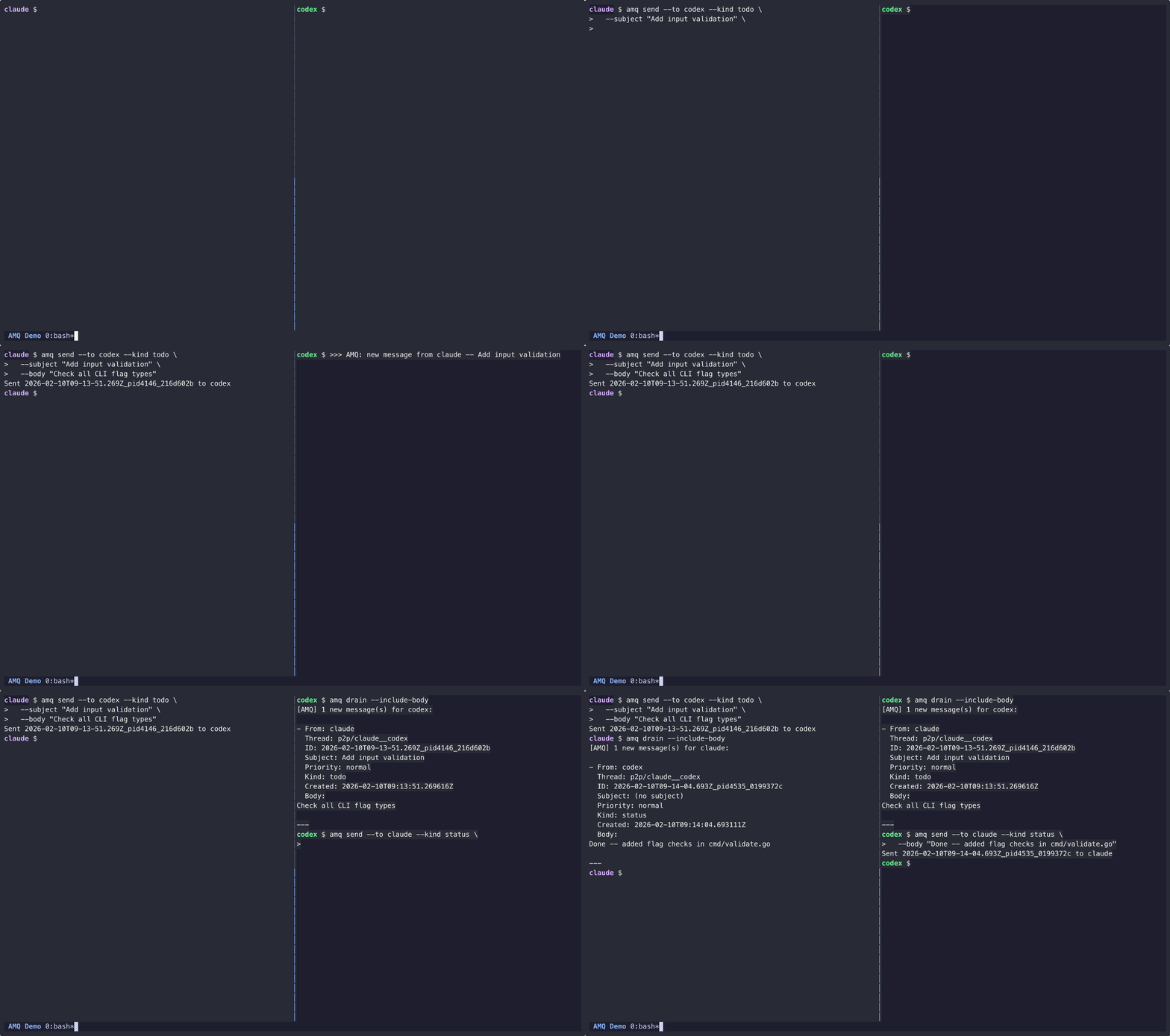
- Keep the conversation together. Reply in threads, attach context, and route messages between sessions or projects.
- Know what happened to a message. Receipts distinguish a queued message from one the recipient drained.
- Bring your own agents. Use the CLI from agent tools or scripts; optional wake notifications prompt running agents to check their inboxes.
- Keep control of the workflow. AMQ handles messages. You and your orchestration tools own tasks, worktrees, permissions, and merges.
<a id="quick-start"></a>
Getting started
This walkthrough connects Claude Code and Codex CLI on one machine.
Install both agent CLIs and put claude and codex on PATH first.
Use macOS, Linux, or WSL; native Windows supports a subset (see the
platform matrix).
1. Install the binary
On macOS:
brew install avivsinai/tap/amq
On Linux, or without Homebrew, use the installer script or a release
download from Installation. Confirm the
install with amq --version.
2. Install Skill
Install the agent instructions so each agent knows how to use AMQ:
npx skills add avivsinai/agent-message-queue -g -y
Restart the agents after installing. Other skill installation methods
are available if you do not use npm. agy (Antigravity CLI) reads skills from
~/.gemini/config/skills, so copy the skill there as INSTALL.md shows.
3. Set up the project
In the repository where the agents will work:
amq setup
Select the agents and launcher, then confirm the preview. Setup writes the
project configuration and creates the default session and its mailboxes.
An agent's handle is its harness name (claude, codex) unless you enter
handle=harness, for example reviewer=claude. Only the handle goes into the
roster and the mailboxes.
4. Start both agents
amq launch
The first launch asks you to trust the launch plan. With tmux, cmux, or
ghostty, AMQ starts the agents in that terminal app. With the commands
backend, it prints one command per agent and exits with code 6 (action
required). Paste each complete command into a separate terminal; do not
shorten or rebuild it.
By default the wake rings a plain doorbell (text and Enter) on every harness,
so it always rings; a doorbell that lands on an open dialog can answer it.
Optional, for Claude Code: amq wake install-dialog-hook keeps the wake from
typing into an open AskUserQuestion, plan, or permission dialog. Add
--harness codex (then trust the entries in Codex /hooks) or
--harness cursor (or --harness all) for their approval prompts.
amq coop exec prints dialog guard: plain or
dialog guard: proper (<harness>) to show which one a seat gets.
If you use only the Claude Code or Codex desktop app, amq launch has no
terminal to start. Skip this step and follow
Claude Code desktop app or
Codex desktop app.
Start both agents before sending the first message. Messages that arrive
before a recipient's wake starts remain unread but do not trigger that new
wake. The recipient can still get them with amq drain --include-body.
<a id="messaging"></a>
5. Exchange a message
Ask Claude to run this command through its shell tool:
amq send --to codex --subject "Hello" --body "Can you see this?"
Ask Codex to check its inbox if it has not already responded to the notification:
amq list --new
amq drain --include-body
list previews new messages. drain reads them, moves them out of the new
inbox, and writes receipts. The output includes the sender and message body.
To reply in the same thread, use the ID from that output:
amq reply --id "<message-id>" --body "Yes, I can see it."
The launched agents already have their identity and session set. You do not
need to repeat --me or --root inside those sessions.
How it works
Each agent has an inbox and an outbox under a local queue root. A message contains a JSON header and a Markdown body. AMQ writes and syncs a temporary file, then publishes it with a rename: a reader sees a complete message or no message, not a partly written body.
A session is a separate queue. Routing checks help prevent a shell pinned to one session from changing another by mistake. A wake notification asks an agent to check its inbox; it is not evidence that the agent read or completed the request. See routing and message tracing for those contracts.
Optional priority holds can delay
the first notification for routine mail while urgent mail skips the hold. Wake
live settings have a machine default
for this user (amq wake config --machine --hold-normal 5m) and per-agent
overrides; use amq wake config --me <handle> --hold-normal 5m to change a
running wake.
AMQ is for local agent coordination, not a distributed broker. The optional bridge companion exchanges messages between hosts; each host keeps control of its own queue.
Remote control
The optional remote companion gives a running
Claude Code or Codex session its own private Buzz channel, so you can write to
that session from the Buzz app or Buzz Desktop. One Buzz agent per machine,
imported once, makes each channel. Inside the session, type /amq-remote
(in Codex, $amq-remote); /amq-remote off disconnects it. Setup, commands,
and the trust model are in that README.
Documentation
| I want to… | Read |
|---|---|
| Install, update, or use another platform | Installation |
| Run agent pairs, isolate sessions, or supervise notifications | Co-op operations |
| Batch routine wake notifications by priority | Wake operations |
| Look up a command or flag | CLI reference |
| Diagnose delivery or wake problems | Wake operations · Trace |
| Attach to a running harness session | amq-remote |
| Build an integration or understand the design | Documentation index |
| Understand the trust model | Security |
<a id="extension-metadata"></a>
Building on AMQ? Use the adapter contract, launch API, and extension metadata. amq-squad is a role-aware team launcher built on these primitives.
Contributing
See the contribution guide for development and review.
Contributor clones should install the git hooks
(./scripts/install-hooks.sh) so pushes run the static checks locally.
Use GitHub issues
for questions and bug reports. Follow the code of conduct
and report security issues through the security policy.
License
MIT.
Agent Message Queue alternatives
View more →Similar agent skills in Communication, ranked by GitHub stars. Compare licence, recent activity and scan status before you choose.
| Name | Stars | Licence | Last updated | Scan |
|---|---|---|---|---|
| Agent Message Queue (this page) avivsinai | 88 | MIT | Nov 1, 2026 | Scanned, no flagged issues |
| Nexu nexu-io | 3.3k | MIT | Apr 26, 2026 | Scanned, no flagged issues |
| Immortal Skill agenmod | 1.1k | MIT | Apr 15, 2026 | Scanned, no flagged issues |
| Metabot xvirobotics | 999 | MIT | Oct 26, 2026 | Scanned, no flagged issues |
| Claude Code Hooks shanraisshan | 563 | MIT | Jun 4, 2026 | Scanned, no flagged issues |
| Customizable GPT Chatbot shamspias | 407 | None found | Jun 18, 2026 | Not scanned yet |