Daves Claude Code Skills
 by DavidROliverBA
Reusable Claude Code skills for architecture, diagramming, and knowledge management
Daves Claude Code Skills is an open-source agent skill by DavidROliverBA, written mainly in Python, with 76 GitHub stars and the MIT license. Its code was last updated Mar 2, 2026.
Dave's Claude Code Skills
A curated collection of Claude Code skills and hooks for software architecture, knowledge management, and engineering. Drop .md files into .claude/skills/ for slash commands, or .py/.sh scripts into your hooks directory for automated guardrails.
42 skills across 8 categories. 17 skills use agent teams — parallel sub-agents launched via the Task tool that analyse different dimensions simultaneously, process batches at scale, or triage before deep-diving. 16 hooks across 6 categories provide automated security, quality, UX, and validation guardrails. Plus boxes-cli, a YAML-to-SVG/PNG diagram renderer, and a meta-agent for creating new skills.
Skills Overview
| Category | Skills | Agent Teams | Focus |
|---|---|---|---|
| Architecture | 8 | 5 | Decisions, impact analysis, NFRs, cost optimisation |
| Content Processing | 10 | 2 | PDFs, PowerPoint, YouTube, web pages, books, CSV |
| Diagramming | 3 | 1 | C4 diagrams, system landscapes, diagram review |
| Vault Health | 9 | 6 | Quality reports, broken links, orphans, auto-tagging, diagnostics |
| Scoring | 2 | 1 | Document scoring, executive summaries |
| Reporting | 2 | 2 | Weekly summaries, project status reports |
| Meetings | 3 | 1 | Meeting notes, voice transcripts, email capture |
| Knowledge | 5 | 0 | Summarisation, related content, decisions, timelines |
| Total | 42 | 17 | |
| Hooks | 16 | — | Security, quality, UX, safety, validation, notifications |
Architecture (8 skills)
Skills for documenting decisions, analysing change impact, comparing scenarios, and managing non-functional requirements. Five of eight skills use agent teams for multi-dimensional parallel analysis.
| Skill | Command | Agents | Description |
|---|---|---|---|
| ADR | /adr | — | Create Architecture Decision Records with structured context, rationale, and consequences |
| Impact Analysis | /impact-analysis | 4 | Analyse cascading impact across technical, organisational, financial, and risk dimensions |
| Scenario Compare | /scenario-compare | 3 | Compare 2-4 architectural scenarios with cost, timeline, complexity, and risk analysis |
| NFR Capture | /nfr-capture | — | Capture non-functional requirements with measurable acceptance criteria (ISO 25010) |
| NFR Review | /nfr-review | 3 | Review NFRs for completeness, measurability, and feasibility |
| Architecture Report | /architecture-report | 5 | Generate comprehensive reports for governance, audit, and stakeholder communication |
| Cost Analysis | /cost-analysis | 3 | Analyse infrastructure, licensing, and operational costs; identify savings opportunities |
| Dependency Graph | /dependency-graph | — | Visualise system dependencies with colour-coded criticality in Mermaid |
Content Processing (10 skills)
Skills for extracting and structuring content from PDFs, presentations, videos, web pages, articles, books, and CSV data. Captures external knowledge into searchable Markdown notes.
| Skill | Command | Agents | Description |
|---|---|---|---|
| PDF Extract | /pdf-extract | — | Extract structured content from PDFs with optional docling support for native table recognition |
| PPTX Extract | /pptx-extract | — | Convert PowerPoint slides to Markdown with docling/python-pptx dual extraction and Visual Mode |
| YouTube Analyze | /youtube-analyze | — | Analyse videos via transcripts with timestamped summaries and key takeaways |
| Video Digest | /video-digest | N | Batch-triage videos by relevance (Haiku), then deeply process the best (Sonnet) |
| Weblink | /weblink | — | Quick web page capture with AI-generated summary |
| Article | /article | — | Quick article capture with summary, key quotes, and relevance scoring |
| Book Notes | /book-notes | 3 | Create book notes with parallel extraction and optional knowledge compounding via spawned Concept/Pattern/Theme notes |
| Document Extract | /document-extract | — | Extract from any format (PDF, DOCX, HTML, CSV) with auto-detection |
| CSV to Page | /csv-to-page | — | Convert CSV data to structured Markdown notes with frontmatter |
| De-AI-ify | /de-ai-ify | — | Remove AI-generated phrasing and rewrite in natural, human voice |
Diagramming (3 skills)
Skills for generating and reviewing architecture diagrams. Built on graph drawing research (Purchase et al.) and real-world C4 modelling experience. See the blog post for the theory.
| Skill | Command | Agents | Description |
|---|---|---|---|
| Diagram | /diagram | — | Generate architecture diagrams in multiple formats (C4, system landscape, data flow, AWS) |
| C4 Diagram | /c4-diagram | — | Specialised C4 generation: Mermaid C4, flowchart LR with C4 styling, or PlantUML |
| Diagram Review | /diagram-review | 4 | Analyse existing diagrams for readability and architecture quality |
Vault Health (9 skills)
Skills for measuring and improving the quality of a Markdown knowledge vault. Six use agent teams — fan-out for multi-dimensional analysis, batch for high-throughput processing. Three additional utilities handle renaming, diagnostics, and URL validation.
| Skill | Command | Agents | Description |
|---|---|---|---|
| Quality Report | /quality-report | 5 | Comprehensive quality metrics with Flesch readability formulas, link density scoring, and type-aware freshness thresholds |
| Broken Links | /broken-links | 3 | Find broken wiki-links, heading anchors, and missing attachment references |
| Orphan Finder | /orphan-finder | 4 | Detect disconnected notes and suggest meaningful connections |
| Auto-Tag | /auto-tag | N | Batch auto-tag notes using type-based rules and customisable keyword-to-tag mapping tables |
| Auto-Summary | /auto-summary | N | Batch-generate one-line summary fields with type-specific patterns and quality validation rules |
| Link Checker | /link-checker | N | Validate external URLs with curl-based checking, frontmatter status tracking, and cross-reference verification |
| Rename | /rename | — | Safely rename notes with automatic backlink updates across the vault |
| Startup Diagnostic | /startup-diagnostic | — | Run vault health checks on session start — stale notes, broken links, orphans |
| Check Weblinks | /check-weblinks | — | Validate external URLs in frontmatter and note body with status reporting |
Scoring (2 skills)
Skills for evaluating documents against rubrics and generating stakeholder-ready summaries.
| Skill | Command | Agents | Description |
|---|---|---|---|
| Score Document | /score-document | 4 | Score documents against customisable rubrics with optional SQLite persistence for querying and multi-scorer comparison |
| Exec Summary | /exec-summary | — | Generate executive summaries tailored to CEO, CTO, board, or PM audiences |
Reporting (2 skills)
Skills for generating periodic status reports by analysing vault content across multiple dimensions in parallel.
| Skill | Command | Agents | Description |
|---|---|---|---|
| Weekly Summary | /weekly-summary | 5 | Generate weekly activity reports from daily notes, tasks, meetings, and projects |
| Project Report | /project-report | 4 | Generate RAG project status reports with tasks, risks, and timeline assessment |
Meetings (3 skills)
Skills for capturing and structuring meeting content from transcripts, voice recordings, and emails.
| Skill | Command | Agents | Description |
|---|---|---|---|
| Meeting Notes | /meeting-notes | 3 | Create structured meeting notes with decision and action item extraction |
| Voice Meeting | /voice-meeting | — | Process voice transcripts with speech-to-text correction into structured notes |
| Email Capture | /email-capture | — | Capture important emails as structured vault notes with action items |
Knowledge (5 skills)
Skills for discovering, connecting, and visualising knowledge across a vault.
| Skill | Command | Agents | Description |
|---|---|---|---|
| Summarize | /summarize | — | Summarise notes with configurable depth (one-liner, paragraph, page) and audience |
| Find Related | /find-related | — | Discover related content via tag overlap, backlinks, keywords, and temporal proximity |
| Find Decisions | /find-decisions | — | Extract and catalogue formal and informal decisions across a date range |
| Timeline | /timeline | — | Generate visual timelines (Mermaid Gantt, table, or list) from vault events |
| Skill Creator | /skill-creator | — | Generate new Claude Code skill files with agent team boilerplate |
How Agent Teams Work
17 of the 37 skills use agent teams — parallel sub-agents launched via Claude Code's Task tool. Each agent runs independently in its own context window, analyses one dimension of the problem, and returns structured results. The coordinator synthesises everything into a unified output.
flowchart TD
    User["/skill invoked"] --> Coord1["COORDINATOR\nGathers input, prepares agent prompts"]

    Coord1 --> A1["Agent 1 · Sonnet\nDimension A\ne.g. Technical"]
    Coord1 --> A2["Agent 2 · Sonnet\nDimension B\ne.g. Cost"]
    Coord1 --> AN["Agent N · Sonnet\nDimension N\ne.g. Risk"]

    A1 --> Coord2["COORDINATOR\nSynthesises all agent results\ninto unified output"]
    A2 --> Coord2
    AN --> Coord2
Three Orchestration Patterns
| Pattern | How It Works | Example Skill | Typical Speedup |
|---|---|---|---|
| Fan-Out/Fan-In | 3-5 agents analyse different dimensions of the same input in parallel; coordinator synthesises | /impact-analysis (technical, org, financial, risk) | 3-4× |
| Batch Processing | Same operation on many items, divided into parallel batches of 15-20 | /auto-tag (N Haiku agents tag notes in parallel) | 4-9× |
| Triage + Selective | Fast agents score everything; only high-scoring items get deep processing | /video-digest (Haiku triages, Sonnet deep-analyses) | 2-3× time, 60-80% cost saving |
For the full explanation with worked examples, anti-patterns, and model selection guidance, see the Agent Teams Guide.
Examples
Worked examples with prompts, outputs, and explanations of what makes each diagram good (or bad).
Diagramming Examples
| Example | What It Shows |
|---|---|
| Declaration Order | Why element declaration order is the single most important factor for diagram readability. Side-by-side comparison of the same 9 elements in random vs. structured order. |
| C4 Context Diagram | How to create a clean Level 1 C4 diagram showing actors, system boundary, and external dependencies. |
| C4 Container Diagram | How to create a Level 2 C4 diagram with system boundaries, technology labels, and database shapes. Includes PlantUML alternative. |
| C4 Component Diagram | How to diagram internal components (controllers, services, repositories) at C4 Level 3. |
| Real-World Example | Complete Context + Container diagrams for a real AI-powered incident management platform. |
Example Screenshots
All examples include rendered diagram screenshots:
 | 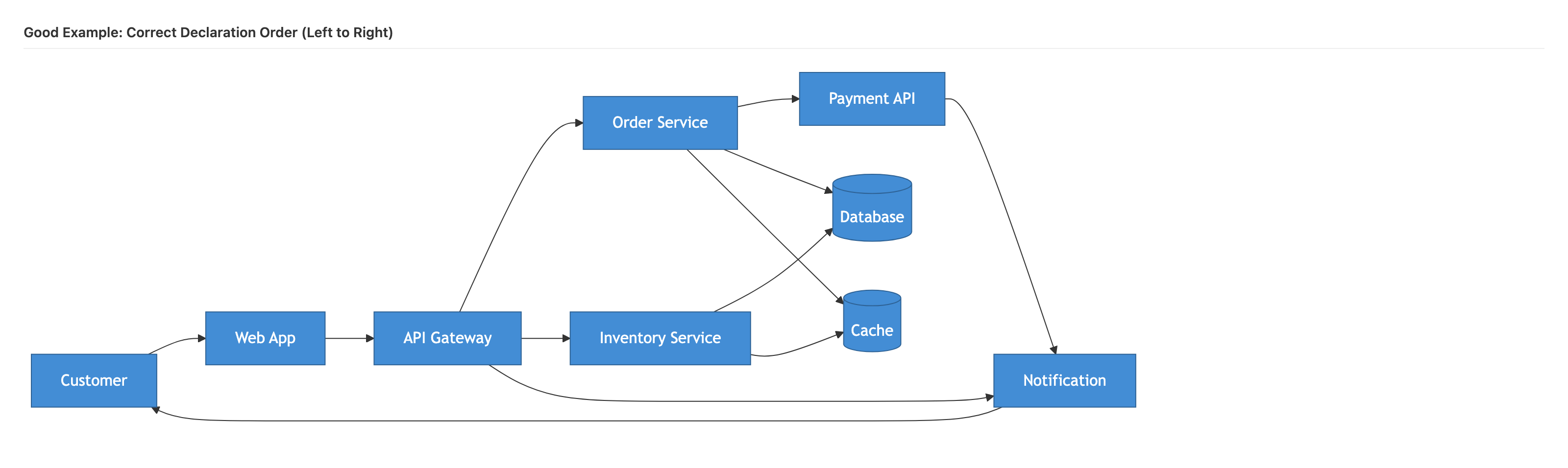 | 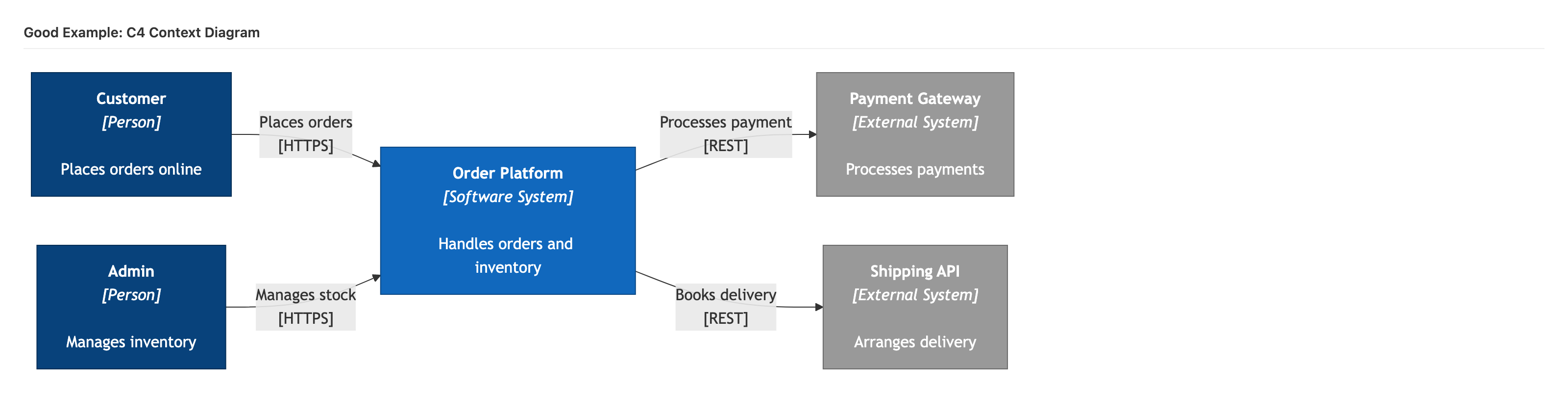 |
| Bad declaration order | Good declaration order | C4 Context |
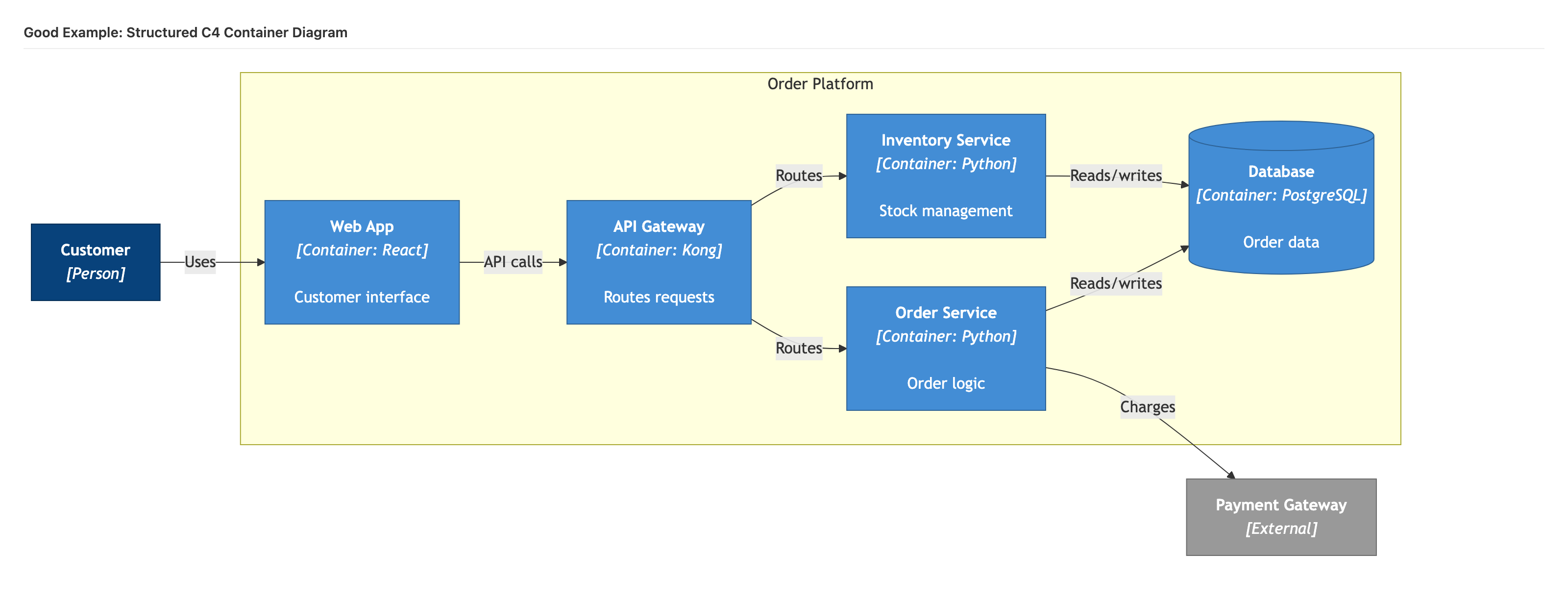 | 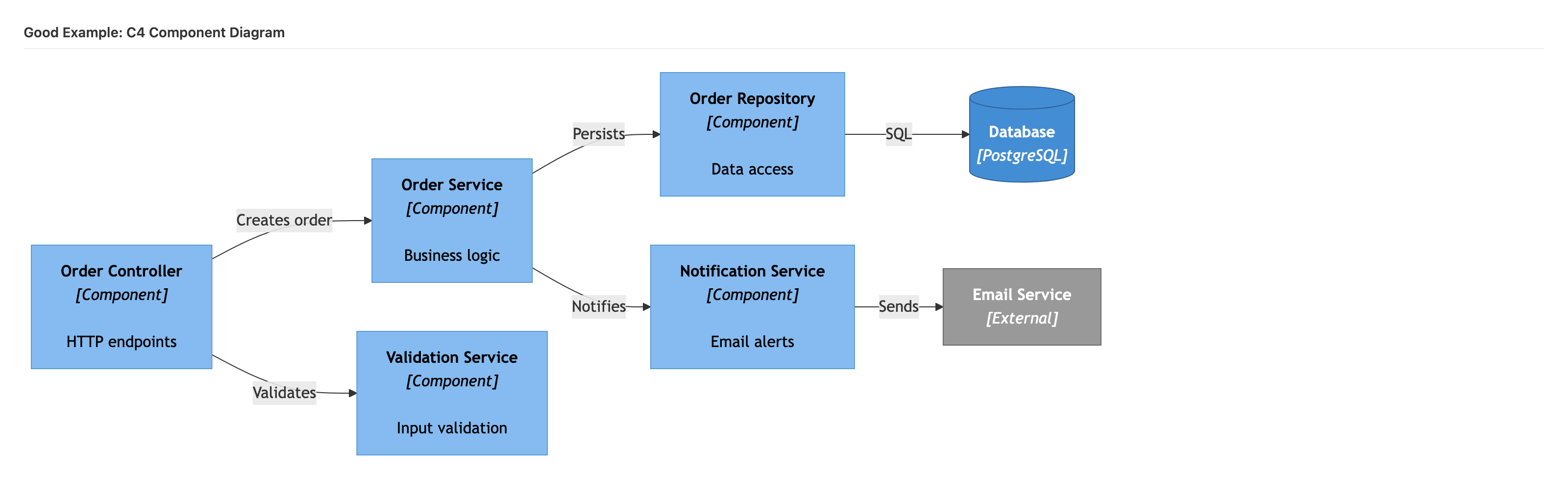 | 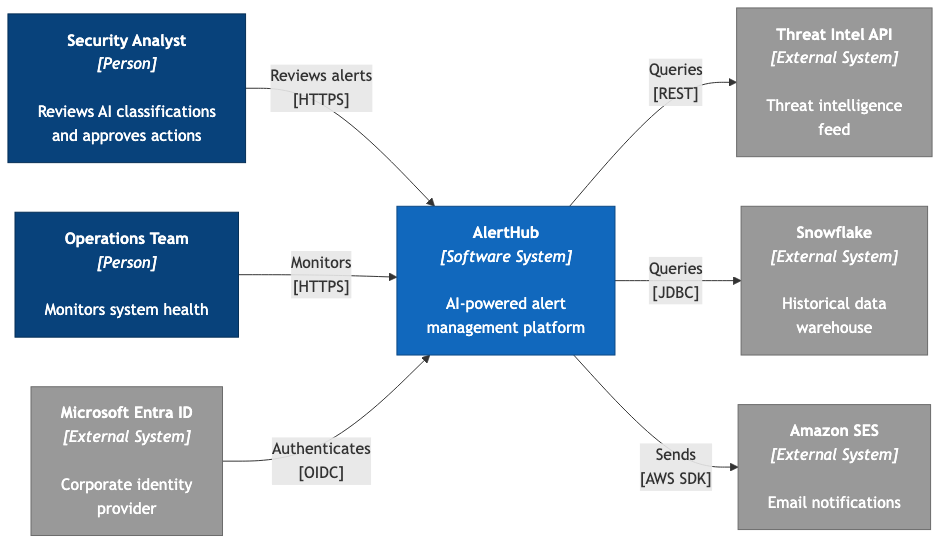 |
| C4 Container | C4 Component | Real-world Context |
Installation
All Skills
mkdir -p .claude/skills
cp skills/**/*.md .claude/skills/
By Category
# Architecture — ADRs, impact analysis, NFRs, cost analysis
cp skills/architecture/*.md .claude/skills/

# Content Processing — PDF, PPTX, YouTube, web, books
cp skills/content-processing/*.md .claude/skills/

# Diagramming — C4 diagrams, system landscapes, diagram review
cp skills/diagramming/*.md .claude/skills/

# Vault Health — quality reports, broken links, orphans, auto-tag
cp skills/vault-health/*.md .claude/skills/

# Scoring — document scoring, executive summaries
cp skills/scoring/*.md .claude/skills/

# Reporting — weekly summaries, project status reports
cp skills/reporting/*.md .claude/skills/

# Meetings — meeting notes, voice transcripts, email capture
cp skills/meetings/*.md .claude/skills/

# Knowledge — summarise, find related, decisions, timelines
cp skills/knowledge/*.md .claude/skills/
Individual Skills
# Pick only the skills you need
cp skills/architecture/adr.md .claude/skills/
cp skills/vault-health/quality-report.md .claude/skills/
cp skills/content-processing/youtube-analyze.md .claude/skills/
Verify Installation
After copying, invoke any skill in Claude Code:
/adr Use Event-Driven Integration for Orders
/impact-analysis Migrate database from Oracle to PostgreSQL
/quality-report --type ADR
/weekly-summary
/youtube-analyze https://www.youtube.com/watch?v=example
Documentation
| Document | Description |
|---|---|
| Agent Teams Guide | How agent teams work: patterns, model selection, best practices, anti-patterns, worked example |
| Skills Reference | Quick-reference card: all 42 skills by category, installation commands, model cost guide |
| Blog Post | Why Your AI-Generated Diagrams Look Terrible — the graph drawing research behind the diagramming skills |
| Hooks Guide | Complete hooks documentation: lifecycle events, patterns, configuration, installation |
| boxes-cli README | YAML-to-SVG/PNG diagram renderer — format reference and usage |
Key Concepts
Diagramming
Built on three insights from graph drawing research:
- Declaration order controls layout. Dagre (Mermaid) and Sugiyama (PlantUML) position elements based on where they appear in the source. Declare elements in reading order — actors left, data stores right.
- Edge crossings are the strongest predictor of comprehension difficulty. Research by Helen Purchase showed reducing crossings improves reader accuracy by 30-40%. Always set an explicit crossing target.
- Gestalt proximity overrides colour. Elements placed close together are perceived as related, regardless of styling. Use subgraphs and boundaries to group related components.
Agent Teams
Built on three orchestration principles:
- Fan-Out/Fan-In for multi-dimensional analysis. When evaluating something from multiple angles (technical, financial, risk), run agents in parallel and synthesise. Used by 13 skills.
- Batch Processing for scale. When the same operation applies to many items, divide into batches and process in parallel with cost-effective Haiku agents. Used by 3 skills.
- Triage before deep processing. When only some items are worth deep analysis, use fast agents to score first, then invest in expensive processing only for high-value items. Used by 1 skill.
Hooks (16 hooks)
Production-tested Claude Code hooks that run automatically during your workflow — blocking secrets, validating content, formatting code, and providing contextual hints. No manual invocation required. Includes 4 standalone validators for CI/CD or pre-commit integration.
How Hooks Work
User submits prompt
  |
  v
[UserPromptSubmit hooks]        -- secret-detection.py scans for API keys
  |                              -- context-loader.sh injects skill context
  v
Claude generates tool call
  |
  v
[PreToolUse hooks]              -- file-protection.py blocks .env edits
  |                              -- secret-file-scanner.py blocks secret writes
  v                              -- search-hint.sh suggests faster tools
Tool executes (if not blocked)   -- bash-safety.py auto-allows safe commands
  |
  v
[PostToolUse hooks]             -- frontmatter-validator.py checks YAML
  |                              -- tag-taxonomy-enforcer.py validates tags
  v                              -- wiki-link-checker.py finds broken links
Response shown to user           -- filename-convention-checker.py checks names
  |                              -- code-formatter.py auto-formats code
  v
[Stop hook]                     -- desktop-notify.sh sends notification
Exit codes: 0 = allow | 1 = warn (show message, continue) | 2 = block (prevent tool execution)
Hook Categories
| Category | Hooks | Event | Description |
|---|---|---|---|
| Security | 3 | PreToolUse / UserPromptSubmit | Block secrets in prompts and file content, protect sensitive files |
| Quality | 4 | PostToolUse | Validate frontmatter, enforce tag taxonomy, check wiki-links, verify filenames |
| UX | 3 | PostToolUse / PreToolUse / UserPromptSubmit | Auto-format code, load context for skills, suggest faster search tools |
| Safety | 1 | PermissionRequest | Auto-allow safe bash commands to reduce permission prompts |
| Notification | 1 | Notification (Stop) | Desktop notifications when long tasks complete (macOS + Linux) |
| Validators | 4 | Standalone | Reusable validation scripts for frontmatter, links, file contents, and new file checks |
Individual Hooks
| Hook | File | Event | What It Does |
|---|---|---|---|
| Secret Detection | secret-detection.py | UserPromptSubmit | Scans prompts for API keys, tokens, passwords, and connection strings (25 regex patterns). Blocks before Claude sees the secret. |
| Secret File Scanner | secret-file-scanner.py | PreToolUse (Edit|Write) | Scans file content being written for embedded secrets. Catches hardcoded credentials that slip into code. |
| File Protection | file-protection.py | PreToolUse (Edit|Write) | Blocks edits to .env, .key, credentials.json, CI/CD configs, and lockfiles. Configurable allow-list for safe directories. |
| Frontmatter Validator | frontmatter-validator.py | PostToolUse (Edit|Write) | Validates YAML frontmatter against configurable note type schemas. Checks required fields, valid values, and date formats. |
| Tag Taxonomy Enforcer | tag-taxonomy-enforcer.py | PostToolUse (Edit|Write) | Enforces hierarchical tag naming (area/engineering not engineering). Configurable taxonomy with approved flat tags. |
| Wiki-Link Checker | wiki-link-checker.py | PostToolUse (Edit|Write) | Warns about broken [[wiki-links]] by scanning the vault for matching files. Supports aliases and type prefixes. |
| Filename Convention | filename-convention-checker.py | PostToolUse (Edit|Write) | Validates filenames match note type conventions (e.g. Meeting - 2026-01-15 Title.md). Checks prefix, casing, and location. |
| Code Formatter | code-formatter.py | PostToolUse (Edit|Write) | Auto-formats files after edit using the right tool: Prettier (JS/TS/CSS), Black (Python), gofmt, rustfmt, or shfmt. |
| Context Loader | context-loader.sh | UserPromptSubmit | Detects skill commands (e.g. /meeting, /adr) and auto-loads relevant .claude/context/ files so Claude has domain knowledge. |
| Search Hint | search-hint.sh | PreToolUse (Grep) | When Claude uses Grep for simple keyword searches, suggests faster alternatives like SQLite FTS or dedicated search indexes. |
| Bash Safety | bash-safety.py | PermissionRequest (Bash) | Auto-allows safe read-only commands (ls, git status, npm test, cat) so you don't get prompted for every harmless command. |
| Desktop Notify | desktop-notify.sh | Notification (Stop) | Sends macOS/Linux desktop notification with sound when Claude finishes a long task. Never miss a completed response again. |
| Validate File Contains | validate_file_contains.py | Standalone | Validate that files contain required content patterns (e.g. frontmatter, headers). Usable as a PreToolUse or PostToolUse hook. |
| Validate Frontmatter | validate_frontmatter.py | Standalone | Validate YAML frontmatter structure against configurable schemas per note type. More thorough than the PostToolUse version. |
| Validate Links | validate_links.py | Standalone | Validate internal wiki-links and external URLs within Markdown files. Checks for broken references and dead links. |
| Validate New File | validate_new_file.py | Standalone | Validate newly created files meet naming conventions, have required frontmatter, and are in the correct directory. |
Quick Start — Copy-Paste Configuration
1. Copy hooks to your project:
cp -r hooks/ your-project/
2. Add to .claude/settings.json (or settings.local.json):
{
  "hooks": {
    "UserPromptSubmit": [
      {
        "matcher": ".*",
        "hooks": [
          {"type": "command", "command": "python3 hooks/security/secret-detection.py", "timeout": 10},
          {"type": "command", "command": "hooks/ux/context-loader.sh", "timeout": 5}
        ]
      }
    ],
    "PreToolUse": [
      {
        "matcher": "Edit|Write",
        "hooks": [
          {"type": "command", "command": "python3 hooks/security/file-protection.py", "timeout": 5},
          {"type": "command", "command": "python3 hooks/security/secret-file-scanner.py", "timeout": 10}
        ]
      },
      {
        "matcher": "Grep",
        "hooks": [
          {"type": "command", "command": "hooks/ux/search-hint.sh", "timeout": 5}
        ]
      }
    ],
    "PostToolUse": [
      {
        "matcher": "Edit|Write",
        "hooks": [
          {"type": "command", "command": "python3 hooks/quality/frontmatter-validator.py", "timeout": 10},
          {"type": "command", "command": "python3 hooks/quality/tag-taxonomy-enforcer.py", "timeout": 10},
          {"type": "command", "command": "python3 hooks/quality/wiki-link-checker.py", "timeout": 15},
          {"type": "command", "command": "python3 hooks/quality/filename-convention-checker.py", "timeout": 10},
          {"type": "command", "command": "python3 hooks/ux/code-formatter.py", "timeout": 10}
        ]
      }
    ],
    "PermissionRequest": [
      {
        "matcher": "Bash",
        "hooks": [
          {"type": "command", "command": "python3 hooks/safety/bash-safety.py", "timeout": 5}
        ]
      }
    ],
    "Notification": [
      {
        "matcher": "Stop",
        "hooks": [
          {"type": "command", "command": "hooks/notification/desktop-notify.sh"}
        ]
      }
    ]
  }
}
3. Pick only what you need:
# Security only (recommended minimum)
cp hooks/security/ your-project/hooks/ -r

# Security + quality (Obsidian vaults)
cp hooks/security/ hooks/quality/ your-project/hooks/ -r

# Everything
cp hooks/ your-project/ -r
Customisation
All hooks include # Customise: comments marking configurable sections:
# Customise: Add your protected file patterns
PROTECTED_PATTERNS = [r"\.env$", r".*\.key$", r"credentials\.json$"]

# Customise: Add directories that are always safe to edit
ALLOWED_DIRECTORIES = ["docs/", "tests/"]
| Hook | What to Customise |
|---|---|
| file-protection.py | PROTECTED_PATTERNS, ALLOWED_DIRECTORIES |
| frontmatter-validator.py | NOTE_SCHEMAS — add your note types and required fields |
| tag-taxonomy-enforcer.py | TAG_HIERARCHIES — define your tag categories and values |
| filename-convention-checker.py | CONVENTIONS — define filename patterns per note type |
| secret-file-scanner.py | SECRET_PATTERNS, SKIP_PATTERNS |
| context-loader.sh | Skill-to-context-file mapping |
| bash-safety.py | SAFE_COMMANDS — commands to auto-allow |
For detailed documentation: Hooks Guide | Lifecycle | Patterns | Configuration | Installation
Tools
boxes-cli
A YAML-to-SVG/PNG diagram renderer using ELK.js for hierarchical layout. Define system diagrams in a simple YAML notation and render to SVG or PNG with automatic layout.
cd tools/boxes-cli
npm install
node bin/boxes.mjs render input.yaml -o output.svg
node bin/boxes.mjs render input.yaml -o output.png --format png
Dependencies: elkjs, js-yaml, sharp, commander
See tools/boxes-cli/README.md for full documentation and YAML format reference.
Agents
Meta-Agent
A specialised Claude agent definition for creating new skills and agents from documentation. Lives in agents/meta-agent.md — copy to .claude/agents/ to use.
The meta-agent analyses existing documentation, code, and patterns to generate well-structured skill files with proper frontmatter, agent team configuration, and output format definitions.
Contributing
Contributions welcome. To add a new skill:
- Create a
.mdfile in the appropriateskills/<category>/directory - Include YAML frontmatter with
descriptionandmodelfields - Follow the skill template: When to Use, Usage, Instructions, Output Format, Examples
- For agent team skills, define each agent with name, model, task, steps, and return format
- Use the
/skill-creatorskill to generate boilerplate - Add a worked example in
examples/<category>/ - Update this README
See the Agent Teams Guide for patterns and best practices when building agent team skills.
Licence
MIT
Daves Claude Code Skills alternatives
View more →Similar agent skills in Other, ranked by GitHub stars. Compare licence, recent activity and scan status before you choose.
| Name | Stars | Licence | Last updated | Scan |
|---|---|---|---|---|
| Daves Claude Code Skills (this page) DavidROliverBA | 76 | MIT | Mar 2, 2026 | Scanned, no flagged issues |
| Skills anthropics | 186k | None found | Oct 28, 2026 | Not scanned yet |
| Agent Skills vercel-labs | 33k | None found | Oct 28, 2026 | Not scanned yet |
| Claude Skills Jeffallan | 12k | MIT | Oct 30, 2026 | Scanned, no flagged issues |
| Lieflat Charts larashero3-dotcom | 6.5k | None found | Oct 15, 2026 | Not scanned yet |
| SwiftUI Agent Skill twostraws | 6.4k | MIT | Oct 26, 2026 | Scanned, no flagged issues |