Light Skills
 by Light0305
An AI workflow skill pack for research, competitions, and innovation projects.
Light Skills is an open-source agent skill by Light0305, written mainly in Python, with 842 GitHub stars and the MIT license. Its code was last updated Jul 6, 2026.
Light-Science (formerly Light-skills) is a research skills pack for AI agents. It connects literature, ideation, design, experiments, analysis, journal selection, writing, figures and review. Project memory keeps the reasons behind research decisions, and a leader skill coordinates the next step, so every revision can be traced back to a concrete source, version and artifact.
Start from scratch, or bring an existing paper, dataset, codebase or set of reviewer comments and go straight to the stage you need.
The skill instructions are written in Chinese, and several skills reply in Chinese by default. Ask your agent to answer in English if you prefer.
Installation
Let your agent install it
Send this to your agent:
Install the research skills from https://github.com/Light0305/Light-Science.
Ask me first whether to install globally or for the current project, then install the skills I need from the skills table in the README.
Use the skills CLI
Windows, in PowerShell:
npx.cmd skills@latest add Light0305/Light-Science
npx.cmd skills@latest add https://github.com/Light0305/Light-Science/tree/master/light-chart/skills/light-chart
macOS / Linux:
npx skills@latest add Light0305/Light-Science
npx skills@latest add https://github.com/Light0305/Light-Science/tree/master/light-chart/skills/light-chart
The first command lists the top-level skills; the second adds Chart, which lives in a nested folder. Pick the same agent and install scope both times, otherwise Chart ends up somewhere else. The Diagram entry keeps its four sub-skill folders, and each sub-skill can also be installed on its own. For a project-level install, change into the target project first. You can also install a single skill:
npx skills@latest add Light0305/Light-Science --skill light-write
More detail on install locations, dependencies and invocation is in the installation guide (Chinese).
Start from a real question
Use light-leader to move this project forward: I want to study <specific question>, and I already have <papers/data/code>.
The project lives at <project path>, and the goal is <a paper / a software copyright and related outputs>.
First read the existing project memory and the actual materials, find the most pressing problem, then complete the step that can be done now.
To continue an existing project:
Continue <project path>. Read Memory and the latest handoff first, then check the adopted versions of the manuscript, figures and analyses.
This round, handle <research question or reviewer comments>, and write the results, the reasons for each decision and the next step back into the project.
Replace everything in angle brackets before sending. For a focused task, just say "use light-chart to plot this data" or "use light-write to revise this section".
Skills
15 main skills plus 4 dedicated Diagram entries: 19 in total.
| Skill | What it does | Main output |
|---|---|---|
| light-literature / literature-search | Literature search, screening, full-text retrieval, close reading, translation, citation checking and evidence synthesis | Literature/ |
| light-idea | Proposes research questions from evidence; compares candidate ideas, competing explanations and minimal discriminating experiments | Idea/ |
| light-design | Turns an idea into an executable, discriminating plan with controls, metrics, budget and an analysis plan | Design/ |
| light-experiment | Runs computational experiments, simulations or benchmarks; keeps configs, environments, logs and raw results | Experiment/ |
| light-analysis | Analyzes results, errors, uncertainty and alternative explanations; decides whether to run more experiments, revise the design or go back to the question | Analysis/ |
| light-crawl | Collects website or app data on demand, keeping access conditions, failure records and data provenance | Acquisition/ |
| light-journal-select | Chooses journals from the actual contribution and evidence, checks official requirements, and writes a recommendation and a writing brief | Journal/ |
| light-write | Drafting, restructuring, polishing, translation and consistency checks for papers; delivers LaTeX plus a compile-checked PDF by default | Write/ |
| light-diagram | Method and mechanism figures: intent, references, prompts, image generation and editable reconstruction | Figure/Methods/, Figure/Mechanisms/ |
| light-chart | Python / R scientific charts, multi-panel figures and paper tables from real data | Figure/Data/ |
| light-review | Internal pre-submission review: checks figures, text and evidence, locates problems and tracks re-checks | Review/ |
| light-patent | Prepares invention disclosures, claims, specifications, abstracts and drawings from real technical material | Patent/ |
| light-software-copyright | Prepares the three DOCX files of a Chinese software copyright filing (feature description, source code, user manual) from real software | SoftwareCopyright/ |
| light-memory | Keeps sourced decisions, failure lessons and constraints; restores context and flags changed or conflicting sources | Memory/ |
| light-leader | Combines memory with the actual materials to coordinate skills, research backtracking, paper revisions and recovery after interruptions | Workflow/ when needed |
The Diagram entries can be used on their own or called by the main entry as needed:
| Skill | Delivers |
|---|---|
| light-diagram-prompt | Scientific brief, structural blueprint, image-generation prompts and checkpoints |
| light-illustrator-diagram | Native Illustrator .ai plus real exports |
| light-powerpoint-diagram | Editable .pptx plus real exports |
| light-visio-diagram | Native Visio .vsdx plus real exports |
light-analysiswas namedlight-anaysisin v2.0.0 and earlier. If you installed the old name, reinstall it under the new one; old project records that mentionlight-anaysisrefer to the same skill.
How a project moves forward
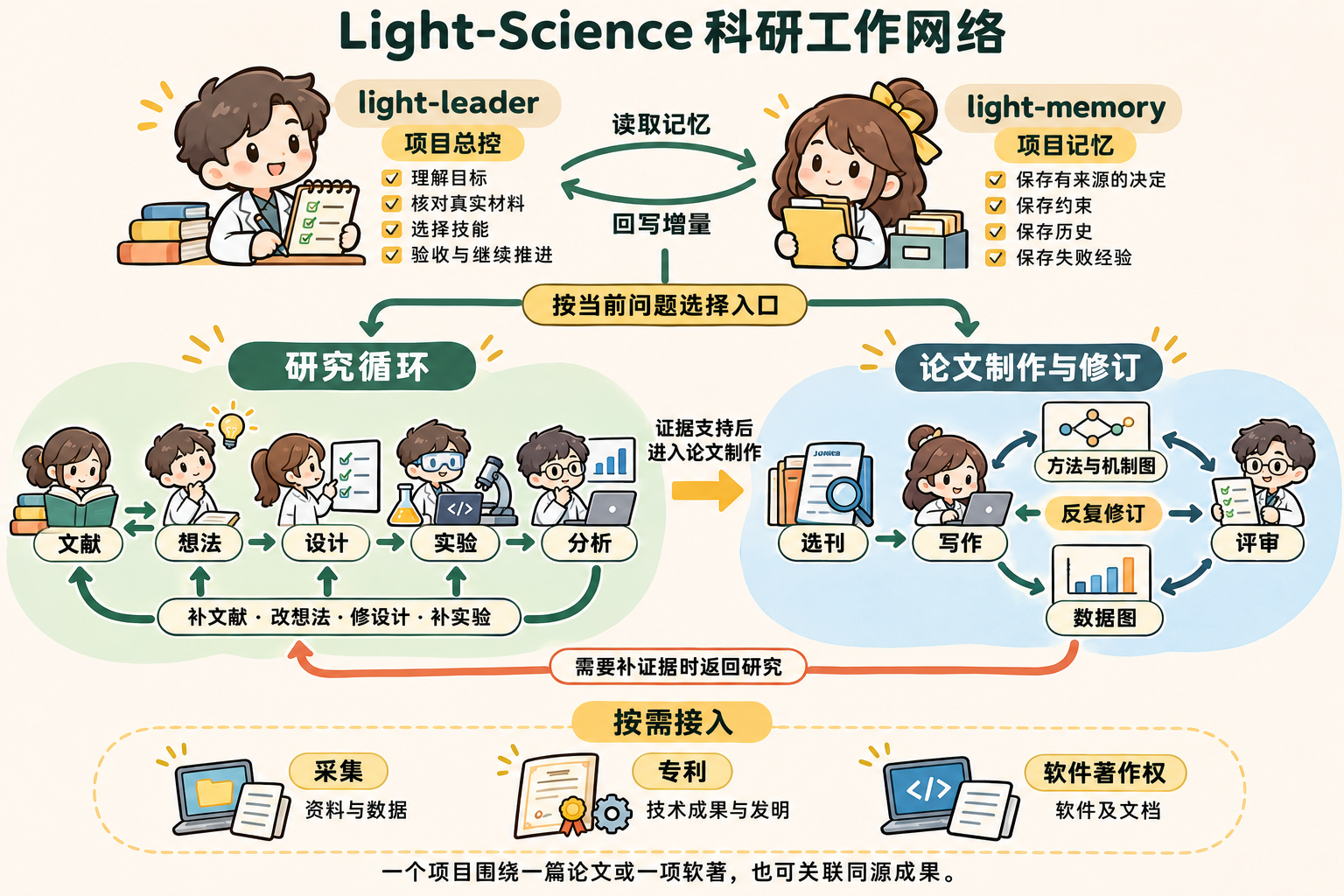
Research is allowed to go backwards: analysis may expose problems in execution, a weak design or a gap in the research question itself, and review may call for more analysis, more experiments or a different target journal. Data acquisition, patents and software copyrights join when the project needs them, and can be prepared early when publication timing matters.
The leader restores, then verifies, then acts. It reads the relevant project memory and handoffs, goes back to the papers, code, run results and adopted figures to check the actual state, and decides which skill takes the next step. Only when several steps need coordinating does it keep goals, dependencies, progress, acceptance criteria and a recovery entry in Workflow/.
Memory lets research pick up where it left off. Why the direction changed, which plan failed and which constraints still hold are all recorded with their sources. When a source changes or sources conflict, it reminds you to re-verify; the scientific facts themselves stay in each stage's original files. Real progress from research or revisions is written back to memory, and the next round starts from there.
<details> <summary>Show the editable Mermaid workflow</summary>flowchart TB
Leader[light-leader · restore and coordinate] <--> Memory[light-memory · sourced project memory]
Leader -. dispatch by goal and actual state .-> Research
Leader -. dispatch by review and delivery needs .-> Manuscript
subgraph Research[Research loop]
direction LR
L[Literature] --> I[Idea] --> D[Design] --> E[Experiment] --> A[Analysis]
A --> I
A --> D
A --> E
I --> L
end
C[Acquisition on demand] -. sources and data .-> Research
A --> J[Journal selection]
subgraph Manuscript[Paper production and revision]
direction LR
W[Writing] <--> F[Method / data figures]
W <--> R[Review]
F <--> R
end
J --> W
R -. more evidence .-> Research
R -. reposition .-> J
Research -. as the project needs .-> IP[Patent / software copyright]
Project layout
The skill install directory holds capabilities; the research project directory holds results. Below are the main parts a project may use. Start from the actual task: files and folders appear only when there is content for them. An existing project structure takes priority. The full rules are in the research project layout spec (Chinese).
ProjectName/
├── README.md                          # Research question, stage, conclusions and next step
├── project.json                       # Optional cross-stage index
├── Memory/
│   └── memory.json / events/ / current.md
├── Workflow/
│   └── workflow.json                  # Goals, tasks and recovery entry, when needed
├── Literature/
│   ├── manifest.json / Searches/
│   └── Year_Author_ShortTitle/
│       └── meta.json / paper.pdf / paper.md / paper.zh.md / note.md / images/
├── Idea/IDEA-0001_Topic/
│   └── context.json / ideas.json / decision.md / cards/
├── Design/PROT-0001_Plan/v01/
│   └── design.json / plan.md / protocols/
├── Experiment/
│   ├── Code/ / Environment/ / Data/    # Code, environment or controlled references
│   └── EXP-0001_Batch/
│       └── campaign.json / execution-report.md / runs/R001/
├── Analysis/AN-0001_Question/
│   └── analysis-plan.json / analysis-report.md / code/ / derived/
├── Journal/JRN-0001_Round/
│   └── selection-report.md / light-write-brief.md
├── Write/PAPER-0001_WorkingTitle/
│   └── outline.md / claim-evidence.md / sections/ / drafts/ / build/
├── Figure/
│   ├── Methods/FIG-0001_MethodFigure/  # Intent, prompts, references, native files and exports
│   ├── Mechanisms/FIG-0002_Mechanism/
│   └── Data/FIG-0003_DataFigure/       # Data mapping, code, caption and exports
├── Review/REV-0001_ManuscriptVersionRound/
│   └── review.md / packet/
├── Acquisition/ACQ-0001_Target/case/
├── Patent/PAT-0001_Invention/
│   └── case.json / work/ / drafts/ / figures/
└── SoftwareCopyright/SWC-0001_SoftwareVersion/
    └── 正式资料/<version>/              # Final filing materials (Chinese file names required by the filing)
        ├── <software>_功能说明.docx     # Feature description
        ├── <software>_软件代码.docx     # Source code
        └── <software>_软件说明书.docx   # User manual
Ideas, designs, runs, analyses and figures can all keep several rounds of versions, all serving the same core output.
Data figures
Choose the chart from the scientific question and the data structure; keep experimental units, repeated measurements, missing values and uncertainty; then handle layout, color, annotation and export. Python and R are both supported, including multi-panel figures, omics, follow-up, signals, ecology, spatial fields and image panels.
<!-- chart-showcase:start --> <table> <tr> <td width="33%"><a href="docs/assets/charts/03.png"><img src="docs/assets/charts/03.png" alt="Measured EEG with fixed-window band power" width="100%"></a><br><strong>01 · Measured EEG</strong><br>Raw time series and band power</td> <td width="33%"><a href="docs/assets/charts/04.png"><img src="docs/assets/charts/04.png" alt="Ecological ordination and community cover heatmap" width="100%"></a><br><strong>02 · Ordination and heatmap</strong><br>Community composition along an environmental gradient</td> <td width="33%"><a href="docs/assets/charts/05.png"><img src="docs/assets/charts/05.png" alt="Isosurface and orthogonal slices of real 3D volume data" width="100%"></a><br><strong>03 · 3D field and slices</strong><br>Volume data, spatial calibration and matching views</td> </tr> <tr> <td width="33%"><a href="docs/assets/charts/06.png"><img src="docs/assets/charts/06.png" alt="Temperature fields, annual difference and time series" width="100%"></a><br><strong>04 · Temperature field and time series</strong><br>Real coordinates, year-over-year comparison and data support</td> <td width="33%"><a href="docs/assets/charts/08.png"><img src="docs/assets/charts/08.png" alt="Repeated measurements and individual trajectories in a plant response" width="100%"></a><br><strong>05 · Plant response, repeated measures</strong><br>Individual trajectories and pairing kept</td> <td width="33%"><a href="docs/assets/charts/09.png"><img src="docs/assets/charts/09.png" alt="Growth trajectories, endpoints and follow-up support" width="100%"></a><br><strong>06 · Growth and follow-up</strong><br>Longitudinal change and the actual number of observations</td> </tr> <tr> <td width="33%"><a href="docs/assets/charts/10.png"><img src="docs/assets/charts/10.png" alt="Iris raincloud plot with quartiles and every raw point" width="100%"></a><br><strong>07 · Raincloud with raw points</strong><br>Distribution shape, quartiles and individual observations</td> <td width="33%"><a href="docs/assets/charts/11.png"><img src="docs/assets/charts/11.png" alt="Method comparison and structured heatmap" width="100%"></a><br><strong>08 · Method comparison and heatmap</strong><br>Organizing reported values, hierarchy and annotation</td> <td width="33%"><a href="docs/assets/charts/12.png"><img src="docs/assets/charts/12.png" alt="Survival curves with confidence bands and number at risk" width="100%"></a><br><strong>09 · Survival and number at risk</strong><br>Follow-up support and uncertainty</td> </tr> </table> <!-- chart-showcase:end -->Data sources and terms for each figure are in the showcase notes and manifest.
Method and mechanism diagrams
Read the project materials first to pin down the scientific question, objects and relationships the figure must explain. Then, figure type and reading path first, domain second, pick visual references from the library, from the user or from related papers. Extract layout, hierarchy, color and arrow language into a structural blueprint and a high-quality prompt, generate the image for real, and check labels, relationships and evidence boundaries.
When the figure needs further editing, break the chosen reference into objects, text, layers and relationships, and rebuild it along one of three routes: Illustrator, PowerPoint or Visio, aiming to match the reference's composition and scientific relationships. The native file is saved, reopened and checked with the matching editing behaviour before previews are exported.
| Tool | Best for | Delivers |
|---|---|---|
| Illustrator | Free-form outlines, fine vectors, complex grouping and visual detail | .ai, plus SVG / PDF / PNG as needed |
| PowerPoint | Group meetings and co-authoring, modular layouts, easy for authors to keep editing | .pptx, plus PDF / PNG as needed |
| Visio | System frameworks, flows, connections and node adjustments | .vsdx, plus SVG / PDF / PNG as needed |
Generated reference vs. native reconstruction
These are real cases. The left column is the generated reference; the right column is the actual export from the matching tool. Click an image to view it at full size; the native files can be downloaded and inspected.
<table> <tr><th>Tool and case</th><th width="42%">Generated reference</th><th width="42%">Native reconstruction export</th></tr> <tr> <td><strong>Illustrator</strong><br>Lithium–sulfur battery mechanism<br><a href="docs/showcase/native/illustrator.ai">AI file</a></td> <td><a href="docs/assets/methods/illustrator-reference.png"><img src="docs/assets/methods/illustrator-reference.png" alt="Generated reference of a lithium–sulfur battery mechanism" width="100%"></a></td> <td><a href="docs/assets/methods/illustrator-reconstruction.png"><img src="docs/assets/methods/illustrator-reconstruction.png" alt="Actual export of the native Illustrator file" width="100%"></a></td> </tr> <tr> <td><strong>PowerPoint</strong><br>CRISPR–Cas9<br><a href="docs/showcase/native/powerpoint-crispr.pptx">PPTX file</a></td> <td><a href="docs/assets/methods/powerpoint-crispr-reference.png"><img src="docs/assets/methods/powerpoint-crispr-reference.png" alt="Generated reference of CRISPR–Cas9" width="100%"></a></td> <td><a href="docs/assets/methods/powerpoint-crispr-reconstruction.png"><img src="docs/assets/methods/powerpoint-crispr-reconstruction.png" alt="Actual export of the native PowerPoint file" width="100%"></a></td> </tr> <tr> <td><strong>Visio</strong><br>MonoFormer architecture<br><a href="docs/showcase/native/visio-monoformer.vsdx">VSDX file</a></td> <td><a href="docs/assets/methods/visio-monoformer-reference.png"><img src="docs/assets/methods/visio-monoformer-reference.png" alt="Generated reference of the MonoFormer architecture" width="100%"></a></td> <td><a href="docs/assets/methods/visio-monoformer-reconstruction.png"><img src="docs/assets/methods/visio-monoformer-reconstruction.png" alt="Actual export of the native Visio file, page reproducing the reference" width="100%"></a></td> </tr> </table>Feedback and support
Use cases, problems, missing domain support and reproducible suggestions are all welcome.
- Open an issue: describe the skill you used, what you expected and what happened, and attach minimal reproducible material.
- Email: 1833058953@qq.com
- GitHub: @Light0305
- Related projects: Light-UI-UX · Light-WeChat
- AI Shop:LightChuan-Shop
License
Original code and documentation are under the MIT License. Third-party code, adapted resources, paper figures, example data and galleries keep their own licenses, so the pack as a whole is not uniformly MIT. See third-party notices (Chinese).
Light Skills alternatives
View more →Similar agent skills in Research & Analysis, ranked by GitHub stars. Compare licence, recent activity and scan status before you choose.
| Name | Stars | Licence | Last updated | Scan |
|---|---|---|---|---|
| Light Skills (this page) Light0305 | 842 | MIT | Jul 6, 2026 | Scanned, no flagged issues |
| RuView ruvnet | 102k | MIT | Nov 1, 2026 | Scanned, no flagged issues |
| AI Research SKILLs Orchestra-Research | 14k | MIT | Oct 11, 2026 | Scanned, no flagged issues |
| Auto Empirical Research Skills brycewang-stanford | 4.9k | None found | Oct 30, 2026 | Not scanned yet |
| Council Of High Intelligence 0xNyk | 4.7k | MIT | Oct 26, 2026 | Scanned, no flagged issues |
| Serenity Skill muxuuu | 4.1k | MIT | Oct 11, 2026 | Scanned, no flagged issues |