Personal Corp Os Agent Skill
 by serejaris
Personal Corp OS — управление личной компанией через AI-агентов: задачи вне головы, отделы вместо памяти, недельное ретро. Открытые скиллы для Claude Code и Codex
Personal Corp Os is an open-source agent skill by serejaris, written mainly in HTML, with 240 GitHub stars and the MIT license. Its code was last updated Nov 1, 2026.
Personal Corp OS
Manager uses your local Manager Config for repositories and boards; the distributed skill contains no personal workspace logs.


Personal Corp is a way to run a one-person company through AI agents: tasks out of your head, departments instead of one person's memory, a weekly retro instead of "I'll sort it out someday".
This repo holds everything you need for that: the story of how the system works, templates for the HQ and a department, and the open skills for Claude Code and Codex.
By Ris — AI development & vibecoding.
Русская версия: README.ru.md.
The problem: you are the bottleneck
Not because you work too little. Because strategy, memory, coordination, execution, and acceptance all sit in one pile — inside your head. While that is true, your department's throughput equals yours.
Hiring does not fix it: a new person takes the work but not the context, so you keep explaining. AI alone does not fix it either: an agent without context is the same new hire, except it does not remember yesterday.
The issue is not model strength. The issue is that context never leaves your head.
What agent rules actually are
Agent rules are a plain text file sitting in a folder. No magic: text you read with your eyes and edit by hand.
Such a file lives in every folder, and its content differs.
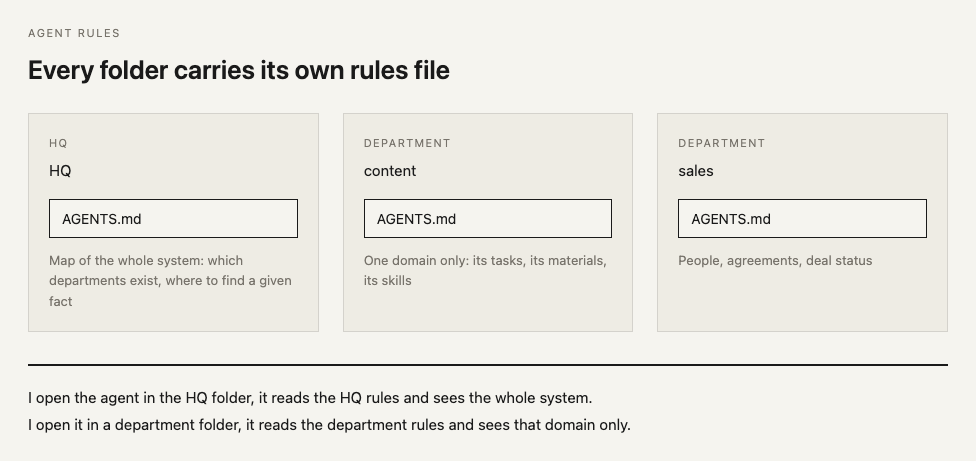
Opening a folder, the agent learns three things from that file.
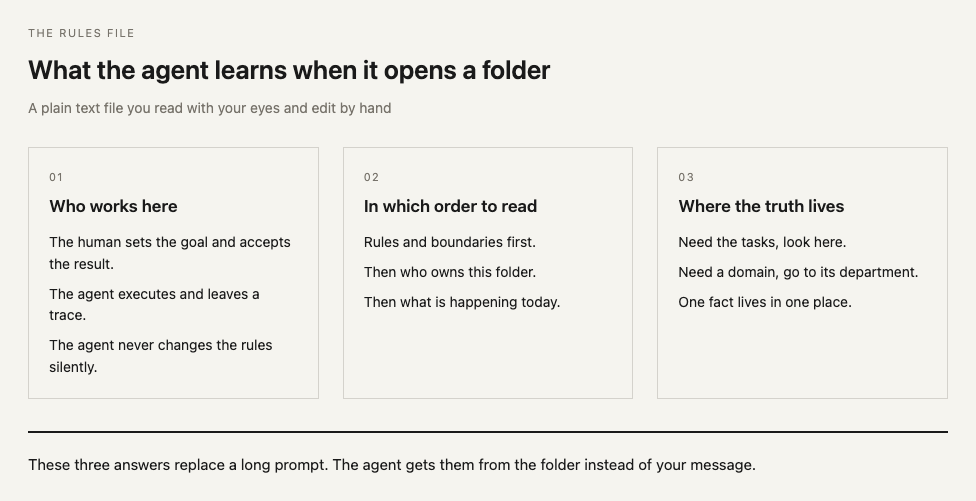
Those three answers replace a long prompt. The agent gets them from the folder instead of your message, so you stop explaining the same thing every time.
The core idea: the folder defines the view
Start the agent from the HQ and it reads the HQ rules and sees the map of the whole system. Start it from a department and it reads the department rules and sees that domain, its tasks, and its skills. Same model, different view, set by the folder rather than by a long prompt.
Everything else follows from that: for this to work, context has to leave your head into files, and those files have to sit in folders that carry rules.
What a department is
A department is a folder that owns one domain and accumulates experience about it. Inside it has its own rules, its own tasks, and its own skills.
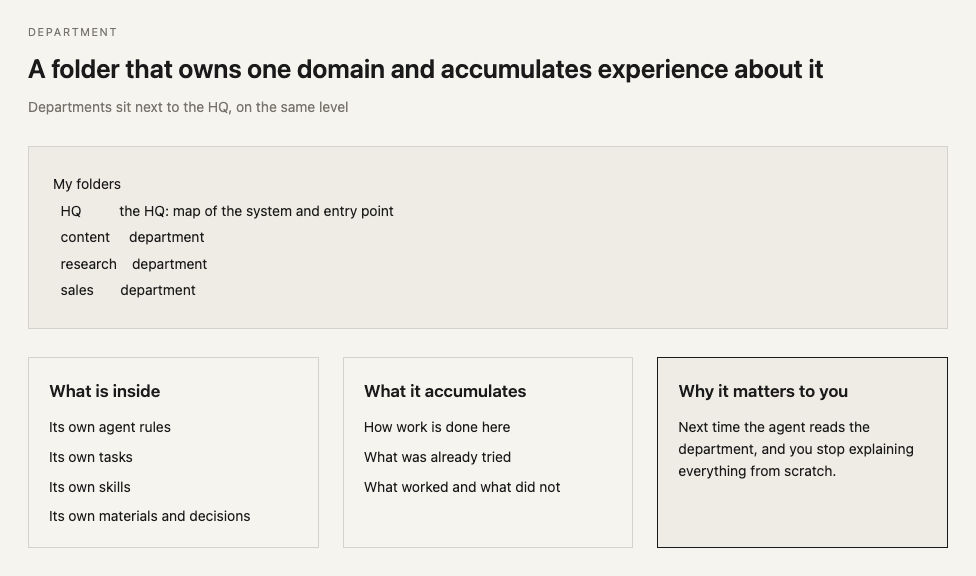
Which departments people start with
I run about thirty. These are the usual first ones:
| Department | What it accumulates | Time to create it |
|---|---|---|
| Content | Voice, topics, finished texts, notes on what landed | You write regularly and re-explain your style every time |
| Research | Questions, found facts, sources, conclusions tied to decisions | You are looking up the same thing a second time |
| Sales | People, agreements, correspondence, deal status | You keep track of who was promised what in your head |
| Media | Briefs, prompts, finished assets, acceptance criteria | You generate images and video and the briefs get lost |
| Legal | Contracts, templates, wording you already agreed to | Every new contract is assembled from scratch |
| Finance | Expenses, subscriptions, recurring payments | You cannot recall what is charged every month |
A department exists for repetition. Work that happened once is fine living in the HQ.
What a skill is
A skill is a written-down way of working that can be repeated. You walk the work by hand once, write the steps down, and from then on the agent runs them.
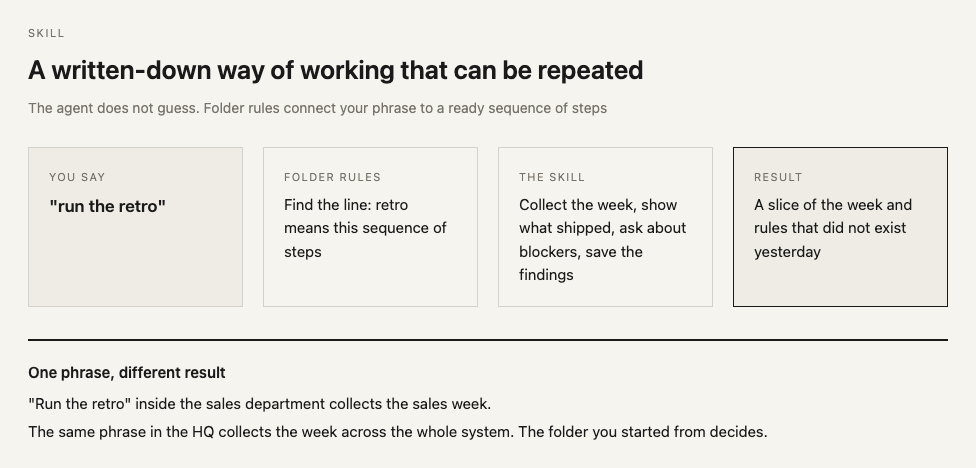
Four layers and who lives where
| Layer | Who acts | What lives here |
|---|---|---|
| Management | The human | Goal, priorities, limits, the right to say "good enough" |
| Truth | The human writes, the agent reads | Rules, memory, indexes, source of truth |
| Operations | The agent executes, the human accepts | Tasks, queue, statuses, runs, departments |
| Observation | The agent collects, the human looks | Dashboards, metrics, blockers |
A subagent lives only in the operations layer: it does not write truth about the system and does not accept results.
One test for any file: is this truth about the system, or is it the result of work? Truth sits in the folder from day one. Results are created by skills once there is something to record. That is why the templates ship no empty files for future reports, decisions, or glossaries.
The route: how experience becomes capital
graph LR
    A["Task<br/>owner + criteria"] --> B["Execution<br/>human or agent"]
    B --> C["Acceptance<br/>good enough or not"]
    C --> D["Pattern<br/>what worked"]
    D --> E["Department memory<br/>rules and decisions"]
    E --> F["Priority<br/>next week"]
    F --> A
    style A fill:#8b5cf6,color:#fff
    style C fill:#f59e0b,color:#fff
    style E fill:#10b981,color:#fff
1. Writing the task down. A thought becomes a task once it has an owner, done criteria, and a place to live. Before that it lives in you. After that both a human and an agent can pick it up.
2. Experience accumulating in departments. Artifacts and decisions settle in a department — a separate folder for its own domain. Next time the agent reads the department instead of reading you.
3. Retro with the agent. Once a week you look at what worked and promote it into rules. Whatever you corrected twice becomes a written rule and stops needing you.
The weekly rhythm
Three links on their own are a feature list. The rhythm turns them into a system.
graph LR
    R["retro<br/>what worked"] --> P["planning<br/>priorities of the week"]
    P --> D["daily<br/>living full-week view"]
    D --> T["tasks<br/>into departments"]
    T --> E["execution<br/>the trace goes back into the task"]
    E --> R
    style R fill:#f59e0b,color:#fff
    style P fill:#3b82f6,color:#fff
    style D fill:#64748b,color:#fff
    style T fill:#8b5cf6,color:#fff
    style E fill:#10b981,color:#fff
The rhythm answers the question that usually stays unanswered: when exactly does experience turn into a rule. Answer: at the retro, once a week, not "someday".
The same word gives a different result depending on the folder: "retro" inside a department means a slice of that department, "retro" in the HQ means a slice of the whole system. Folder rules win over general ones.
Each generated department also includes a local daily skill. It refreshes the living WNN-plan.html: the whole ISO week stays visible, past days keep their facts, today is highlighted, future days remain the plan, and browser-only Wealth habits persist locally.
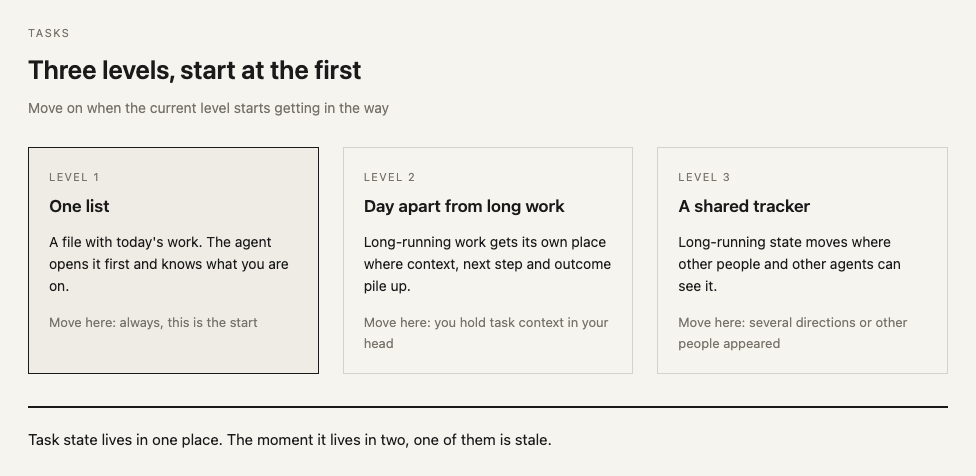
Three levels of task tracking
Templates
| Template | What it is |
|---|---|
templates/hq | The HQ — the agent's entry point and the map of the system |
templates/department | A department — one domain with its own tasks and skills |
Departments sit next to the HQ, not inside it. Every template file opens with a line stating why it is there and which layer it belongs to.
First step: 30 minutes today
- Copy
templates/hqto your machine and fill inme.md. - Open the agent from that folder and ask it to read
AGENTS.md. - Create your first department from
templates/departmentnext to the HQ and put one real task into it. - Install the plugin (see Install) — it brings the weekly-rhythm skills.
- Run the retro at the end of the week and planning at the start of the next one.
After two such weeks the department has its own memory, and part of the decisions stop going through you.
The four skills of the rhythm
| Skill | Link in the route | What it does |
|---|---|---|
| corp-doctor | Loop, department, task | Diagnose and repair the loop, add a department, route a task |
| manager | Execution | Sync session work into task files or GitHub issues and answer "what about this task" |
| weekly-retro | Pattern into memory | Facts, outcome scorecard, Area Interviews, and next-week Area goals |
| weekly-planning | Priority | Outcomes, seven-day living plan, Area Explorer, clocks, and Wealth habits |
Where this leads
| Stage | How you think | Where the bottleneck is |
|---|---|---|
| Vibecoder | "Me and AI" | Context in your head |
| Operator | "I direct agents" | Coordination by hand |
| CEO | "I run a system" | No bottleneck, the system runs |
Your job shrinks to three moves: set the goal, pick the next move, accept the result.
Glossary — CONTEXT.md. Accepted architectural decisions — docs/adr/.
Install
Claude Code
Terminal:
claude plugin marketplace add serejaris/personal-corp-os
claude plugin install personal-corp-os@personal-corp-os
claude plugin details personal-corp-os
Claude Code Desktop or interactive /plugin flow:
- Open Plugins or
/plugin. - Add marketplace:
serejaris/personal-corp-os. - Install
personal-corp-os.
Codex
This repo includes a Codex plugin manifest at .codex-plugin/plugin.json. Add the marketplace from GitHub, then install the plugin:
codex plugin marketplace add serejaris/personal-corp-os
codex plugin add personal-corp-os@personal-corp-os
After installation, start a new Codex thread and try:
Use Personal Corp skills to plan my week.
Migrating from personal-corp-skills
The repository was named personal-corp-skills until 2026-08-06. GitHub redirects the old links. The plugin identifier was renamed along with the repository, so remove the installed personal-corp-skills plugin via /plugin in Claude Code and install the new one using the instructions above.
Single Skill
Use this when you want one skill folder instead of the whole plugin:
Install this skill:
https://github.com/serejaris/personal-corp-os/tree/main/skills/cc-analytics
Replace cc-analytics with any skill name from the table below.
All skills
System rhythm
| Skill | What it does |
|---|---|
| corp-doctor | One entry point to the loop: diagnose, repair, new department, task routing |
| manager | HQ tasks: writes session results to the task file or GitHub issue, answers "what about this task" |
| weekly-retro | Weekly retro: facts, scorecard, Area Interviews, and proposed Area goals |
| weekly-planning | Prioritized outcomes plus a living full-week view refreshed by department daily |
| daily | HQ daily focus: open tasks from all departments in a day file tasks/YYYY-MM-DD.md |
| retro | HQ weekly retro: done, stuck, and repeats across all departments in tasks/retro-YYYY-WNN.md |
From intent to tasks
| Skill | What it does |
|---|---|
| idea | Capture one voiced idea into a provenance-tracked folder with index dedup |
| grill-me | One question at a time until the plan is actually clear |
| harness | One header sets the agent's mode: role, subagent model, effort, subagent limit |
| avatar | Your agent's robot: the model builds its head, the robot is saved in the HQ and opens as a page; joins the Personal Corp live class by link |
| corp-new | Create a new HQ department: rules, skills and tasks folders, two-way link with the HQ; a private repo only if you ask |
| to-prd | Synthesize the conversation into PRD.md with no new interview |
| to-issues | Split a PRD into vertical tasks/NN-slug.md slices with acceptance criteria |
| gh-issues | Manage GitHub Issues through the CLI with session context |
Design and media
| Skill | What it does |
|---|---|
| art-director | Iterative visual style search with a process log and a decision graph |
| html-draft | One technical diagram in flat blueprint style: architecture, flows |
| make-landing | Reference-led design variants: frozen concepts, gallery, human choice and a second round |
| make-3d | 3D variants in scene copies, matching image sheets, human choice and transfer to the canon |
Agent orchestration
| Skill | What it does |
|---|---|
| ceo-council | Parallel subagents as C-level experts for strategic analysis |
| fable-ruki-agenty | Manual orchestration mode: specs into issues, execution to subagents |
| sdlc-milestones | Milestones from the Anthropic AI-Native SDLC Playbook: six stages, a committed artifact (intent, spec, plan, PR) and a human gate at each, plus a status script |
| seo-audit | SEO audit with cross-checking: several auditors on one prompt, two blind critics verify every finding on the live site, fixes ship as three PRs with a change log |
Docs and rules
| Skill | What it does |
|---|---|
| readme-generator | Human-focused README files with proper structure |
| claude-md-writer | Create and refactor the agent rules file following best practices |
| audit-agent-rules | Audit AGENTS.md files and skill descriptions in a folder: report table, edits only after yes |
Operations
| Skill | What it does |
|---|---|
| meeting-copilot | Live meeting dashboard: prepare, update from transcript, close with decisions |
| cc-analytics | HTML report of Claude Code usage statistics |
| benchmark | Measure pipeline variants (ASR engine, notes model, judge) in an isolated container: time, cost per hour with dated prices, quality |
| safe-public-release | Provenance, licensing, allowlist, and fresh-clone checks before publishing |
| tg-bot-ops | Operations playbook for Telegram bots and agent gateways |
| claude-sessions-sync | Sync Claude Code session records between two Anthropic accounts in the desktop app (macOS) when you switch for usage limits |
| it-ram-doctor | Find and kill process tails holding memory: idle Claude Code sessions, closed-app leftovers, orphans; swap and pressure before and after |
Agents
A skill says how to do a job. An agent is who does it: a role with its own instructions and tool set. The plugin ships agents in agents/.
| Agent | Role |
|---|---|
| seo-reviewer | SEO auditor: checks index, links, markup and redirects on the live site, returns the top ten findings with proof and a fix |
| blind-critic | Blind critic: verifies anonymized reports on one task, gives a verdict per finding and ranks the reports |
| uncle-bob | PR and process reviewer: one verdict 🟢 / 🟡 / 🔴 as a PR comment, findings as file:line — fix |
| ilyakhov | Text editor in Maxim Ilyakhov's information style: the reader's point first, facts instead of judgments |
| tufte | Layout and data editor after Edward Tufte: structure first, tables instead of paragraphs with numbers |
| matt-pocock | Matt Pocock on call: proofreads documents for agents (AGENTS.md, CLAUDE.md, skills, agent files) by his writing-for-agents skill for synonyms, tautology and contradictions, and names the route through his open skills for your situation |
| sereja-ris | Guide to Personal Corp OS: sets it up on your machine, picks guides from sereja.tech and the @ris_ai channel for your question, retells what the vibecoders chat is discussing from messages you can read |
Claude Code. The plugin loads the agents; they appear in /agents as personal-corp-os:<name>. Call one in plain words: "have uncle-bob review PR 12".
Codex and other harnesses. Hand the file over as a role: "read agents/uncle-bob.md and review PR 12 by it".
Other
Statusline
Custom statusline showing costs, context usage, and git branch with color-coded indicators.
Archived Skills
Archived skills are preserved for reference and are not part of the active plugin skill set.
| Skill | Notes |
|---|---|
| paperclip-api | Historical Paperclip API helper; kept for reference |
Manual Installation
Skills are plain folders. Copy the whole skill directory so optional references and examples are preserved:
cp -r skills/<name> ~/.claude/skills/
Author
- Telegram: @ris_ai — AI development & vibecoding
- YouTube: @serejaris
- vibecoding.phd
License
MIT
Security
Please report secrets, private data exposure, or exploitable behavior privately. See SECURITY.md.
Personal Corp Os alternatives
View more →Similar agent skills in Productivity & Workflow, ranked by GitHub stars. Compare licence, recent activity and scan status before you choose.
| Name | Stars | Licence | Last updated | Scan |
|---|---|---|---|---|
| Personal Corp Os (this page) serejaris | 240 | MIT | Nov 1, 2026 | Scanned, no flagged issues |
| Eigent eigent-ai | 16k | Apache-2.0 | Nov 1, 2026 | Scanned, no flagged issues |
| Kami tw93 | 12k | MIT | Nov 1, 2026 | Scanned, no flagged issues |
| Skill anbeime | 9k | None found | Nov 1, 2026 | Not scanned yet |
| Refly refly-ai | 7.5k | None found | Oct 21, 2026 | Not scanned yet |
| N8n Skills czlonkowski | 6.6k | MIT | Oct 24, 2026 | Scanned, no flagged issues |