Agentconnect AI Agent
 by agentconnect-md
The open-source, multi-agent alternative to Claude Tag. @ any agent, wherever work happens, they work alongside your team, learning as they go.
Agentconnect is an open-source ai agent by agentconnect-md, written mainly in TypeScript, with 1,510 GitHub stars and the Apache-2.0 license. Its code was last updated Nov 1, 2026.
AgentConnect is an open-source platform where teams and multiple AI agents work together across Slack, Microsoft Teams, Google Chat, Lark, Discord, Telegram, WeChat, and more, with integrations for GitHub, GitLab, Gitea, Azure DevOps, and Linear. Bring Claude Code, Codex, Grok Build, DeepSeek, Pi, or any ACP-compatible agent into the conversations and workflows your team already has open. Use Jev for agent routing and model selection.
Give each agent a role, then let people and agents collaborate in shared conversations. Agents can call one another and remember what they learn, and work can begin from a message, issue, pull request, webhook, or schedule.
<p align="center"> <a href="https://www.agentconnect.md"><img src="docs/assets/agents-across-channels.png" alt="People and agents working together in Slack, Telegram, and Discord conversations and in a GitHub pull request review" width="880" /></a> </p> <p align="center"> <sub>▶ <a href="https://www.youtube.com/watch?v=KA7xHF5JbJc"><strong>Watch the two-minute introduction</strong></a></sub> </p>Why AgentConnect?
AI agents are getting better at doing work. The harder problem is making multiple agents work well with a team—and with each other.
Most agents still live like personal tools, in one person's terminal. Teammates can't see what an agent is doing, can't take over a session, can't review its output, and the context it builds stays on one laptop. So every team writes the same glue: message channels, cron jobs, credential handling, context stitching.
AgentConnect turns that glue into a platform.
Use cases
Teams use it to:
- Triage issues together. Use Jev to route new support conversations to the right specialists. People and agents investigate in one shared thread and keep the fix and verification visible from start to finish.
- Support across trusted workspaces. Start a support conversation in Telegram, involve engineering from a trusted Slack workspace, and return the resolution where the conversation began.
- Run recurring operations. Start work from a schedule or webhook, bring exceptions into a shared conversation, and keep the human decision visible.
- Keep private forks current. Subscribe to upstream changes through GitHub, a GitHub subscription in Slack, webhooks, or schedules. Let agents assess the impact, prepare and test relevant updates, and bring them to the team for review.
- Run customized code review. Use Jev to select the reviewers for new GitHub pull requests and the runtime and model for each new review session. Bring in general, architecture, or security reviewers with their own instructions, repository access, tools, and sandbox policies.
Features
- Work as one team, on any runtime. Create agents with different roles and let them call on one another, while people follow along in the conversations where the work happens. Claude Code, Codex, Grok Build, DeepSeek, Pi, and any other ACP-compatible runtime run side by side, and changing one does not rebuild the workflow around it.
- Keep work where it happens. Link agents to bots in Slack, Microsoft Teams, Google Chat, Lark, Discord, Telegram, WeChat, and more, or to repositories, issues, and workflows on GitHub, GitLab, Gitea, Azure DevOps, and Linear.
- Choose the right agent for every job. Configure each agent's runtime, model, workspace, tools, and machine independently.
- Decide when and how agents act. Use reusable Decisions powered by Jev to decide when agents respond, route new conversations to specialist agents, and choose a runtime and model for each new session.
- Carry context forward. Give each agent its own memory and skills, and publish reviewed Knowledge that every agent can find on demand.
- Set clear boundaries. Decide who can see each agent and session, which repositories and tools it may use, and which other agents it may call.
- Stay in control. Self-host the Apache-2.0 stack and keep agent execution and workspaces in the environment you operate.
One place to operate your whole fleet—agents, sessions, schedules, tools, knowledge, and daemons:
<p align="center"> <a href="https://app.agentconnect.md"><img src="docs/assets/console-agents.gif" alt="AgentConnect console: touring the Agents, Sessions, Schedules, Tools & Skills, Knowledge, and Daemons views" width="880" /></a> </p> <p align="center"> <sub><strong>Don't just take our word for it. Ask your favorite AI about AgentConnect:</strong></sub> </p> <p align="center"> <a href="https://chatgpt.com/?q=I%27m%20evaluating%20AgentConnect%20%28agentconnect.md%29%2C%20an%20open-source%20platform%20where%20teams%20and%20multiple%20AI%20agents%20work%20together%20across%20Slack%2C%20Telegram%2C%20Discord%2C%20Google%20Chat%2C%20GitHub%2C%20and%20GitLab.%20What%20does%20it%20do%2C%20what%20are%20its%20strengths%20and%20weaknesses%2C%20and%20who%20is%20it%20best%20for%3F"><img src="https://img.shields.io/badge/Ask%20ChatGPT-000000?logo=data%3Aimage%2Fsvg%2Bxml%3Bbase64%2CPHN2ZyB4bWxucz0iaHR0cDovL3d3dy53My5vcmcvMjAwMC9zdmciIHZpZXdCb3g9IjAgMCAyNCAyNCI%2BPHBhdGggZmlsbD0iI2ZmZmZmZiIgZD0iTTIyLjI4MiA5LjgyMWE2IDYgMCAwIDAtLjUxNi00LjkxYTYuMDUgNi4wNSAwIDAgMC02LjUxLTIuOUE2LjA2NSA2LjA2NSAwIDAgMCA0Ljk4MSA0LjE4YTYgNiAwIDAgMC0zLjk5OCAyLjlhNi4wNSA2LjA1IDAgMCAwIC43NDMgNy4wOTdhNS45OCA1Ljk4IDAgMCAwIC41MSA0LjkxMWE2LjA1IDYuMDUgMCAwIDAgNi41MTUgMi45QTYgNiAwIDAgMCAxMy4yNiAyNGE2LjA2IDYuMDYgMCAwIDAgNS43NzItNC4yMDZhNiA2IDAgMCAwIDMuOTk3LTIuOWE2LjA2IDYuMDYgMCAwIDAtLjc0Ny03LjA3M00xMy4yNiAyMi40M2E0LjQ4IDQuNDggMCAwIDEtMi44NzYtMS4wNGwuMTQxLS4wODFsNC43NzktMi43NThhLjguOCAwIDAgMCAuMzkyLS42ODF2LTYuNzM3bDIuMDIgMS4xNjhhLjA3LjA3IDAgMCAxIC4wMzguMDUydjUuNTgzYTQuNTA0IDQuNTA0IDAgMCAxLTQuNDk0IDQuNDk0TTMuNiAxOC4zMDRhNC40NyA0LjQ3IDAgMCAxLS41MzUtMy4wMTRsLjE0Mi4wODVsNC43ODMgMi43NTlhLjc3Ljc3IDAgMCAwIC43OCAwbDUuODQzLTMuMzY5djIuMzMyYS4wOC4wOCAwIDAgMS0uMDMzLjA2Mkw5Ljc0IDE5Ljk1YTQuNSA0LjUgMCAwIDEtNi4xNC0xLjY0Nk0yLjM0IDcuODk2YTQuNSA0LjUgMCAwIDEgMi4zNjYtMS45NzNWMTEuNmEuNzcuNzcgMCAwIDAgLjM4OC42NzdsNS44MTUgMy4zNTRsLTIuMDIgMS4xNjhhLjA4LjA4IDAgMCAxLS4wNzEgMGwtNC44My0yLjc4NkE0LjUwNCA0LjUwNCAwIDAgMSAyLjM0IDcuODcyem0xNi41OTcgMy44NTVsLTUuODMzLTMuMzg3TDE1LjExOSA3LjJhLjA4LjA4IDAgMCAxIC4wNzEgMGw0LjgzIDIuNzkxYTQuNDk0IDQuNDk0IDAgMCAxLS42NzYgOC4xMDV2LTUuNjc4YS43OS43OSAwIDAgMC0uNDA3LS42NjdtMi4wMS0zLjAyM2wtLjE0MS0uMDg1bC00Ljc3NC0yLjc4MmEuNzguNzggMCAwIDAtLjc4NSAwTDkuNDA5IDkuMjNWNi44OTdhLjA3LjA3IDAgMCAxIC4wMjgtLjA2MWw0LjgzLTIuNzg3YTQuNSA0LjUgMCAwIDEgNi42OCA0LjY2em0tMTIuNjQgNC4xMzVsLTIuMDItMS4xNjRhLjA4LjA4IDAgMCAxLS4wMzgtLjA1N1Y2LjA3NWE0LjUgNC41IDAgMCAxIDcuMzc1LTMuNDUzbC0uMTQyLjA4TDguNzA0IDUuNDZhLjguOCAwIDAgMC0uMzkzLjY4MXptMS4wOTctMi4zNjVsMi42MDItMS41bDIuNjA3IDEuNXYyLjk5OWwtMi41OTcgMS41bC0yLjYwNy0xLjVaIi8%2BPC9zdmc%2B" alt="Ask ChatGPT about AgentConnect" /></a> <a href="https://claude.ai/new?q=I%27m%20evaluating%20AgentConnect%20%28agentconnect.md%29%2C%20an%20open-source%20platform%20where%20teams%20and%20multiple%20AI%20agents%20work%20together%20across%20Slack%2C%20Telegram%2C%20Discord%2C%20Google%20Chat%2C%20GitHub%2C%20and%20GitLab.%20What%20does%20it%20do%2C%20what%20are%20its%20strengths%20and%20weaknesses%2C%20and%20who%20is%20it%20best%20for%3F"><img src="https://img.shields.io/badge/Ask%20Claude-D97757?logo=claude&logoColor=fff" alt="Ask Claude about AgentConnect" /></a> <a href="https://www.perplexity.ai/search?q=I%27m%20evaluating%20AgentConnect%20%28agentconnect.md%29%2C%20an%20open-source%20platform%20where%20teams%20and%20multiple%20AI%20agents%20work%20together%20across%20Slack%2C%20Telegram%2C%20Discord%2C%20Google%20Chat%2C%20GitHub%2C%20and%20GitLab.%20What%20does%20it%20do%2C%20what%20are%20its%20strengths%20and%20weaknesses%2C%20and%20who%20is%20it%20best%20for%3F"><img src="https://img.shields.io/badge/Ask%20Perplexity-1FB8CD?logo=perplexity&logoColor=fff" alt="Ask Perplexity about AgentConnect" /></a> <a href="https://www.google.com/search?udm=50&q=I%27m%20evaluating%20AgentConnect%20%28agentconnect.md%29%2C%20an%20open-source%20platform%20where%20teams%20and%20multiple%20AI%20agents%20work%20together%20across%20Slack%2C%20Telegram%2C%20Discord%2C%20Google%20Chat%2C%20GitHub%2C%20and%20GitLab.%20What%20does%20it%20do%2C%20what%20are%20its%20strengths%20and%20weaknesses%2C%20and%20who%20is%20it%20best%20for%3F"><img src="https://img.shields.io/badge/Ask%20Google%20AI-8E75B2?logo=googlegemini&logoColor=fff" alt="Ask Google AI about AgentConnect" /></a> </p>Get started
Docker
Start the Web console, Control Plane, Relay, and PostgreSQL with Docker Compose:
git clone https://github.com/agentconnect-md/agentconnect.git
cd agentconnect
docker compose up -d --pull always
Open http://localhost:3000, add a daemon from the console, run its generated
command, and create your first agent. The default stack listens only on
127.0.0.1 and uses local no-auth mode for evaluation.
Kubernetes
The official Helm chart is published on every release under the same version number as the release itself:
oci://ghcr.io/agentconnect-md/charts/agentconnect
A cluster install is three steps — create the namespace and its secrets, write
the values file for your deployment, then install — so follow the
Kubernetes guide
rather than a one-liner. The chart source lives in
charts/agentconnect.
Configure the deployment
Setup Server runs in the base stack at http://localhost:8091, always on
loopback. It configures browser authentication through Logto, the deployment's
GitHub, Slack, Google, and Lark / Feishu apps, the sign-in methods you show, and
preset-agent behavior. Deployment topology — images, ports, public URLs,
database and bootstrap secrets — stays in compose.env or your Helm values.
Prefer to be walked through it? This repository ships a setup skill at
.claude/skills/agentconnect-setup, also exposed at .agents/skills, so Claude
Code, Codex, and other agent harnesses pick it up. Open your coding agent in the
checkout and ask it to set up AgentConnect: it runs the guide as an interactive
tutorial and verifies each checkpoint before continuing, and never asks you to
paste secrets into chat.
For authentication, public URLs, Linux sandbox requirements, provider apps, image pinning, secrets, and optional Mem0 configuration, follow the AgentConnect OSS guide.
Community
If AgentConnect looks useful, here's how you can support the project:
- ⭐ Star this repo to help more teams discover the project.
- 💬 Join the Slack community for questions, ideas, and product discussions.
- 📣 Share AgentConnect on X, LinkedIn, Reddit, or LINUX DO.
- ✍️ Write a review or tutorial on DEV, Medium, or your blog.
- 🙋 Open an issue to report bugs or suggest features.
- 📺 Follow updates on X and YouTube.
Contributing
Contributions are welcome. Development needs Node >= 26.0.0 and pnpm 11;
pnpm install && pnpm dev runs every package in watch mode. The
contributing guide covers the full setup, the pull request
conventions, the monorepo layout, and the deeper design documentation.
Thanks to everyone who has already contributed:
<a href="https://github.com/agentconnect-md/agentconnect/graphs/contributors"> <img src="https://opencollective.com/agentconnect-md/contributors.svg?width=890&button=false" alt="AgentConnect contributors" /> </a>Architecture
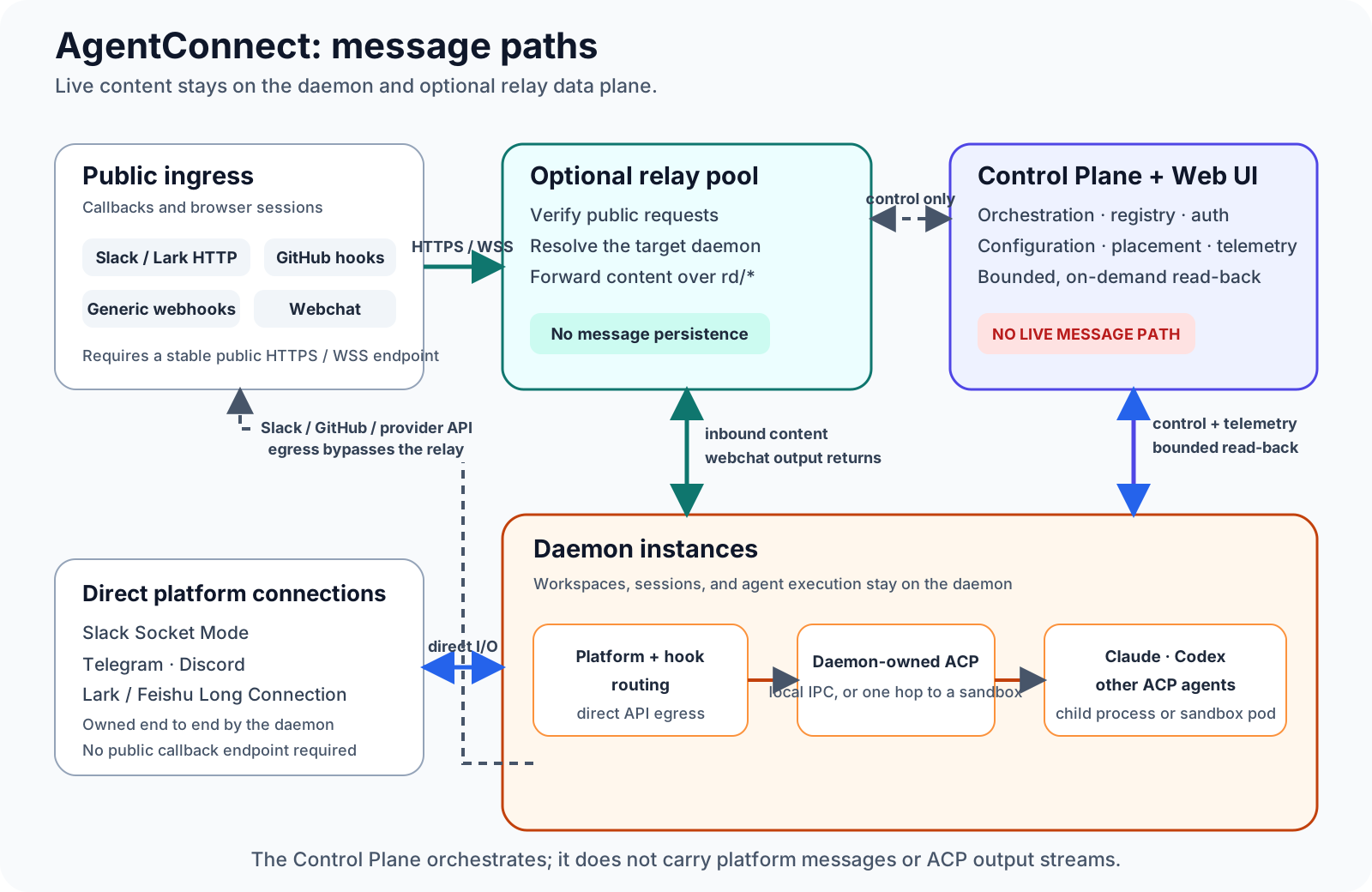
| Component | Responsibility |
|---|---|
| Daemon | Runs placed agents over daemon-owned ACP, owns workspaces and session state, maintains direct platform connections and schedules, and sends model-provider traffic directly |
| Relay (optional) | Accepts callback-based ingress and webchat, proxies centrally managed MCP and OpenConnector access, and forwards message ingress directly to the owning daemon without durable storage |
| Control Plane + Web UI | Manages authentication, configuration, placement, permissions, metadata, and observability; stores explicitly approved organization knowledge/skill revisions and otherwise proxies bounded daemon reads on demand |
Live platform messages and ACP update streams stay on the daemon/relay data plane. Apart from explicitly approved organization knowledge and bounded skill bundles, the Control Plane stores coordination metadata—not message bodies, attachment bytes, pending Dream proposals, or ACP session streams. If it is temporarily unavailable, established sessions and daemon-local schedules continue; new assignments and configuration changes resume after reconnection.
See the architecture design for the complete message paths, trust boundaries, and failure model.
License
AgentConnect is available under the Apache License 2.0.
Agentconnect alternatives
View more →Similar ai agents in Learning Resources, ranked by GitHub stars. Compare licence, recent activity and scan status before you choose.
| Name | Stars | Licence | Last updated | Scan |
|---|---|---|---|---|
| Agentconnect (this page) agentconnect-md | 1.5k | Apache-2.0 | Nov 1, 2026 | Scanned, no flagged issues |
| Prompt Engineering Guide dair-ai | 80k | MIT | Mar 11, 2026 | Scanned, no flagged issues |
| Learn Claude Code shareAI-lab | 80k | MIT | Oct 27, 2026 | Scanned, no flagged issues |
| AI Engineering From Scratch rohitg00 | 76k | MIT | Oct 29, 2026 | Scanned, no flagged issues |
| Front End Checklist thedaviddias | 75k | MIT | Oct 31, 2026 | Scanned, no flagged issues |
| System Prompts Leaks asgeirtj | 71k | CC0-1.0 | Nov 1, 2026 | Scanned, no flagged issues |