Browser Agent by PaulClawX
 by PaulClawX
[browser-agent] Never send a human to do a machine's job.
Browser Agent is an open-source ai agent by PaulClawX, written mainly in Python, with 9 GitHub stars and the MIT license. Its code was last updated May 9, 2026.
Browser Agent
<p align="center"> <img src="docs/images/cover.png" alt="Browser Agent cover" width="70%"> </p> <p align="center"> <strong>CDP-native browser automation runtime for agents, with editable skills and reliable Gemini image workflows.</strong> </p> <p align="center"> • Real Chrome Control • Skill-Driven Automation • Upload-Verified Image Generation • </p> <p align="center"> <a href="#-features">Features</a> • <a href="#-quick-start">Quick Start</a> • <a href="#-workflows">Workflows</a> • <a href="#-safety-model">Safety Model</a> • <a href="SKILL.md">Agent Guide</a> </p> <p align="center"> <a href="LICENSE"><img alt="License" src="https://img.shields.io/badge/license-MIT-green"></a> <img alt="Status" src="https://img.shields.io/badge/status-0.1.0--alpha-orange"> <img alt="Python" src="https://img.shields.io/badge/Python-3.9%2B-blue"> <img alt="CDP" src="https://img.shields.io/badge/CDP-native-111827"> <img alt="Codex" src="https://img.shields.io/badge/Codex-skill--ready-111827"> </p>Quick Navigation
[!TIP] I'm a human -> Read this README for install, setup, and safe workflows.
I'm an agent -> Read SKILL.md for operation rules and execution patterns. (Recommended)
browser-agent is a minimal runtime that lets agents control your real Chrome session directly over CDP, while keeping task logic editable in-repo.
- For operators: one command surface for browser actions, diagnostics, and updates.
- For agents: stable helper APIs (
new_tab,js,click_at_xy,upload_file, rawcdp). - For reliability: interaction skills and domain skills to encode repeatable mechanics.
Quick Start
For Agent (Recommended)
Tell your coding agent:
Install Browser Agent from https://github.com/PaulClawX/browser-agent and set it up to control my Chrome
For Human
git clone https://github.com/PaulClawX/browser-agent && cd browser-agent && uv tool install -e . && browser-agent --doctor
Browser Connection
Attach to your normal Chrome profile
- Open
chrome://inspect/#remote-debugging - Enable
Allow remote debugging for this browser instance - Accept the Chrome allow popup when prompted
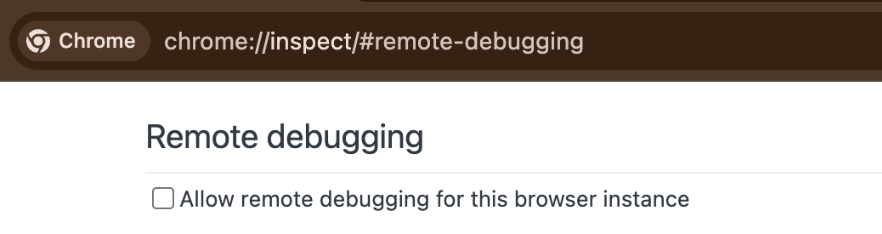
- Re-run:
browser-agent -c 'print(page_info())'
See install.md for full setup.
Workflows
| Tier | Workflow | Expected Behavior |
|---|---|---|
| Stable | General browser automation | Deterministic tab + DOM + input operations through CDP helpers |
| Stable | Upload-driven tasks | Upload confirmation before submit; fail-fast if upload isn't verifiable |
| Stable | Gemini image generation/editing | Prompt + reference flow with strict upload-first gating and export |
| Stable | Diagnostics and lifecycle | --doctor, daemon auto-start, update checks |
| Best-effort | Complex anti-bot sites | Fallback to coordinate actions, retries, and skill-specific patterns |
Project Layout
src/browser_harness/- core runtime modulesSKILL.md- operator rules for day-to-day useinstall.md- first-time install and connectiondocs/interaction-skills/- reusable browser mechanics playbookssrc/agent-workspace/agent_helpers.py- task-specific helper extensionsdocs/domain-skills/- site-specific playbooks
Core Contributors and Maintainers
<table> <tr> <td align="center"> <a href="https://github.com/paulpanwang"> <img src="https://images.weserv.nl/?url=https://paulpanwang.github.io/images/paul.jpg&h=100&w=100&fit=cover&mask=circle&maxage=7d" width="100px;" alt="Panwang Pan"/> </a> <br /> <sub><b>Panwang Pan</b></sub> <br /> <sub><a href="mailto:paulpanwang@gmail.com">paulpanwang@gmail.com</a></sub> </td> <td align="center"> <a href="https://angericky.github.io/"> <img src="https://images.weserv.nl/?url=https://i.loli.net/2019/01/07/5c336be8ba185.jpg&h=100&w=100&fit=cover&mask=circle&maxage=7d" width="100px;" alt="Jingjing Zhao"/> </a> <br /> <sub><b>Jingjing Zhao</b></sub> <br /> <sub><a href="mailto:jingjingbudlet@gmail.com">jingjingbudlet@gmail.com</a></sub> </td> </tr> </table>📧 Contact
Feel free to open an issue if you have any questions or suggestions. If this project helps you, please give it a ⭐ Star!
Acknowledgements
This project builds on and is inspired by the following open-source work:
- browser-use/browser-harness - the primary code and architecture source.
- OpenClaudex/openreview-agent - OpenReview dry-run workflow inspiration.
Browser Agent alternatives
View more →Similar ai agents in Browser Automation, ranked by GitHub stars. Compare licence, recent activity and scan status before you choose.
| Name | Stars | Licence | Last updated | Scan |
|---|---|---|---|---|
| Browser Agent (this page) PaulClawX | 9 | MIT | May 9, 2026 | Scanned, no flagged issues |
| Browser Use browser-use | 120k | MIT | Oct 31, 2026 | Scanned, no flagged issues |
| CloakBrowser CloakHQ | 33k | MIT | Oct 31, 2026 | Scanned, no flagged issues |
| Invisible Dots feder-cr | 32k | MIT | Oct 31, 2026 | Scanned, no flagged issues |
| OpenCLI jackwener | 31k | Apache-2.0 | Oct 26, 2026 | Scanned, no flagged issues |
| Stagehand browserbase | 26k | MIT | Oct 30, 2026 | Scanned, no flagged issues |