Chainlit Langgraph AI Agent
 by brucechou1983
A seamless integration of Chainlit with LangGraph. Ideal for fast prototyping multi-LLM chatbot or AI agents.
Chainlit Langgraph is an open-source ai agent by brucechou1983, written mainly in Python, with 97 GitHub stars and the MIT license. Its code was last updated Dec 19, 2025.



Rapidly build and deploy production-ready conversational AI agents using Chainlit and LangGraph. This powerful integration combines state-of-the-art language models with flexible workflow management, enabling developers to create sophisticated chatbots, virtual assistants, and interactive AI applications in minutes.
Find a way to run your open source models? This is a free tool for you.
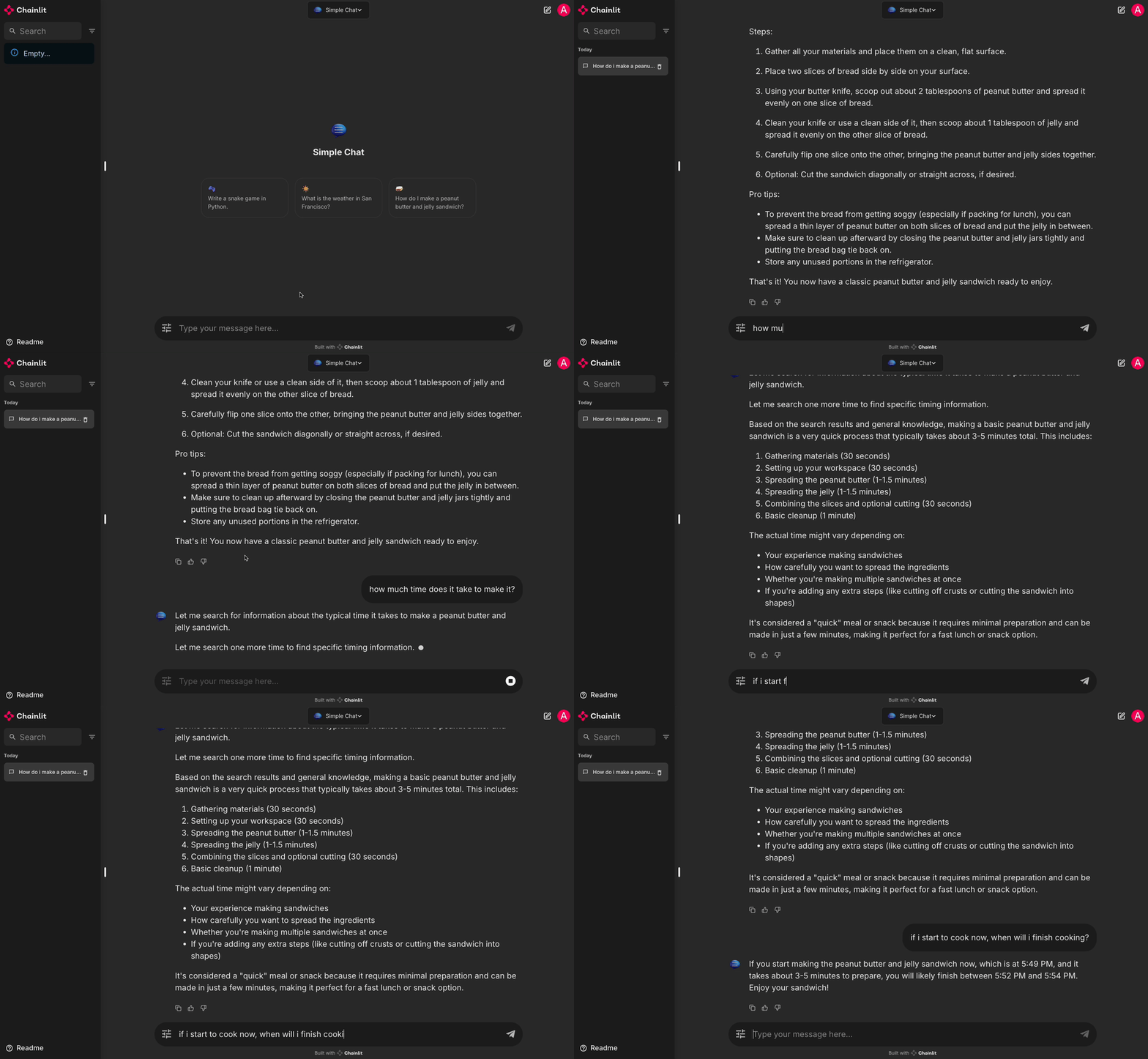
Table of Contents
- Table of Contents
- Why This Project?
- Features
- Getting Started
- Creating Custom Workflow
- Workflows
- Upcoming Features
Why This Project?
Chainlit is a powerful tool for building production-ready conversational AI applications. LangGraph, on the other hand, is a versatile framework for building and managing state graphs in AI applications. This project combines these two to provide a comprehensive solution for building conversational AI agents, in minutes.
Features
- Building Blocks: Utilize a variety of building blocks to create your own conversational AI agents.
- Multiple LLM Support: Automatically detects and uses the following LLMs:
- Ollama: Open source model.
- Claude: Advanced AI models by Anthropic. Apply API Key Here
- GPT: Advanced AI models by OpenAI. Apply API Key Here
- Grok: Grok models by xAI. Apply API Key Here
- Groq: Fast inference service by Groq. Apply API Key Here
- Gemini: Google AI models. Apply API Key Here
- Examples: Explore a variety of use cases with conversational AI agents examples.
Getting Started
Follow these steps to set up and run the project using Docker Compose or in your Python 3.10 virtual environment.
- Make sure you have Docker and Docker Compose installed on your system.
- Clone this repository and navigate to the project directory.
- Copy the
.env.examplefile to.envand update the necessary environment variables:
cp .env.example .env
- Edit the
.envfile and set the required variables, including:
- API keys (
OPENAI_API_KEY,ANTHROPIC_API_KEY): Optional if you use Ollama. - DB volume settings (
POSTGRES_VOLUME_PATH,MINIO_VOLUME_PATH): create mount folders on your host machine and set the paths accordingly. - (Optional)
TAVILY_API_KEYfor enabling search - (Optional) Google OAuth
- (Optional) LangSmith
- Start the services using Docker Compose
docker compose up
This will start all the necessary services, including the Chainlit application, PostgreSQL database, and MinIO object storage.
- The application should now be running at http://localhost:8000. Log in with the default username and password (admin:admin). You can change the default credentials in the
.envfile.
Setting up Ollama (Optional)
- Download and install Ollama.
- Pull whatever model you want to use, for example:
ollama pull cas/ministral-8b-instruct-2410_q4km:latest
ollama pull llama3.2:3b-instruct-q8_0
of any gguf-based model on the HuggingFace.
ollama run hf.co/{username}/{repository}:{quantization}

Creating Custom Workflow
Creating your own custom workflow allows you to tailor the application to your specific needs. Follow the step-by-step guide below to create your own workflow.
- Go to the
chat_workflow/workflowsdirectory in your project, and create a new Python file for your workflow, e.g.,my_custom_workflow.py. - Define Your State Class
- Inherit from
BaseStateto define the state variables your workflow will use. For example:
class MyCustomState(BaseState):
  # Model name of the chatbot
  chat_model: str
  # Add other state variables as needed
- Define Your Workflow
- Inherit from
BaseWorkflowto define your custom workflow logic, and override thecreate_graphmethod to define the state graph.
class MyCustomWorkflow(BaseWorkflow):
  def create_graph(self) -> StateGraph:
      # LangGraph graph definition
      graph = StateGraph(MyCustomState)
      # Add nodes to the graph
      graph.add_node("chat", self.chat_node)
      # Add edges between nodes
      graph.add_edge("chat", END)
      # Set the entry point of the graph
      graph.set_entry_point("chat")
      return graph
- Define node methods like
self.chat_nodein thecreate_graphmethod. - Define default state by overriding the
get_default_statemethod.
def create_default_state(self) -> MyCustomState:
  return {
      "name": self.name(),
      "messages": [],
      "chat_model": "",
      # Initialize other state variables if needed
  }
- Set workflow properties.
- name: The display name of the workflow. For example, "My Custom Workflow".
- output_chat_model: The name of the LLM model to provide final output as a response.
- chat_profile: The profile for the workflow.
- starter: The starter message for the workflow.
Workflows
This project includes several pre-built workflows to demonstrate the capabilities of the Chainlit Langgraph integration:
Simple Chat Workflow
Located in simple_chat.py, this workflow provides a basic chatbot experience:
- Utilizes a state graph with chat and tool nodes
- Supports multiple language models
- Includes basic tools like datetime and web search
Multimodal Chat Workflow
- Supports images and text inputs
Resume Optimizer
Found in resume_optimizer.py, this workflow helps users improve their resumes:
- Features a resume extractor node to process uploaded PDF resumes
- Provides detailed analysis and suggestions for resume improvement
Lean Canvas Chat
Implemented in lean_canvas_chat.py, this workflow assists in business modeling:
- Guides users through the Lean Canvas creation process
- Offers a structured approach to defining business models
Each workflow demonstrates different aspects of the Chainlit Langgraph integration, showcasing its flexibility and power in creating AI-driven applications.
Upcoming Features
- Model Context Protocol: An open protocol that enables seamless integration between LLM applications and external data sources and tools. Open sourced by Anthropic.
- Research Assistant: A research assistant that can help users with their general research tasks, like NotebookLM.
- NVIDIA NIM: Self-host GPU-accelerated inferencing microservices for pretrained and customized AI models across clouds, data centers, and workstations.
- Cloud Deployment: Easy deployment of the application to cloud platforms like AWS, Azure, or GCP.
- Graph Builder: A meta-workflow builder that allows users to create custom workflows with natural language.
- OpenAI o1-like agentic workflow: Advanced self-prompting agentic workflow.
- Image Generation: Generate images based on user input.
Chainlit Langgraph alternatives
View more →Similar ai agents in Coding Agents, ranked by GitHub stars. Compare licence, recent activity and scan status before you choose.
| Name | Stars | Licence | Last updated | Scan |
|---|---|---|---|---|
| Chainlit Langgraph (this page) brucechou1983 | 97 | MIT | Dec 19, 2025 | Scanned, no flagged issues |
| AutoGPT Significant-Gravitas | 188k | None found | Nov 1, 2026 | Not scanned yet |
| Langchain langchain-ai | 149k | MIT | Nov 1, 2026 | Scanned, no flagged issues |
| Gemini CLI google-gemini | 109k | Apache-2.0 | Nov 1, 2026 | Scanned, no flagged issues |
| MetaGPT FoundationAgents | 71k | MIT | Jan 21, 2026 | Scanned, no flagged issues |
| Oh My Openagent code-yeongyu | 71k | None found | Nov 1, 2026 | Not scanned yet |