CyberPenda AI Agent
 by n1majne3
Local-first pentest agent: Go daemon + React dashboard + Codex/Claude Code/Pi runtimes, scoped projects, Blackboard, sandbox runners
CyberPenda is an open-source ai agent by n1majne3, written mainly in Go, with 28 GitHub stars and the MIT license. Its code was last updated Oct 26, 2026.
CyberPenda
Local-first pentest agent for authorized testing: a Go control plane, React dashboard, and Codex / Claude Code / Pi runtimes — with project scope, approvals, a Goal/Step/Fact Blackboard, and tools that run in the sandbox (not proxied through the daemon).
Use only against systems you are authorized to test. Scope, approvals, and host-runner activation are first-class product concepts for a reason.
Open the live demo → · read-only sample project (no pentestd, no runtime, no exploit tools)
https://github.com/user-attachments/assets/97717b99-bdcd-4956-9983-e312c1da0080
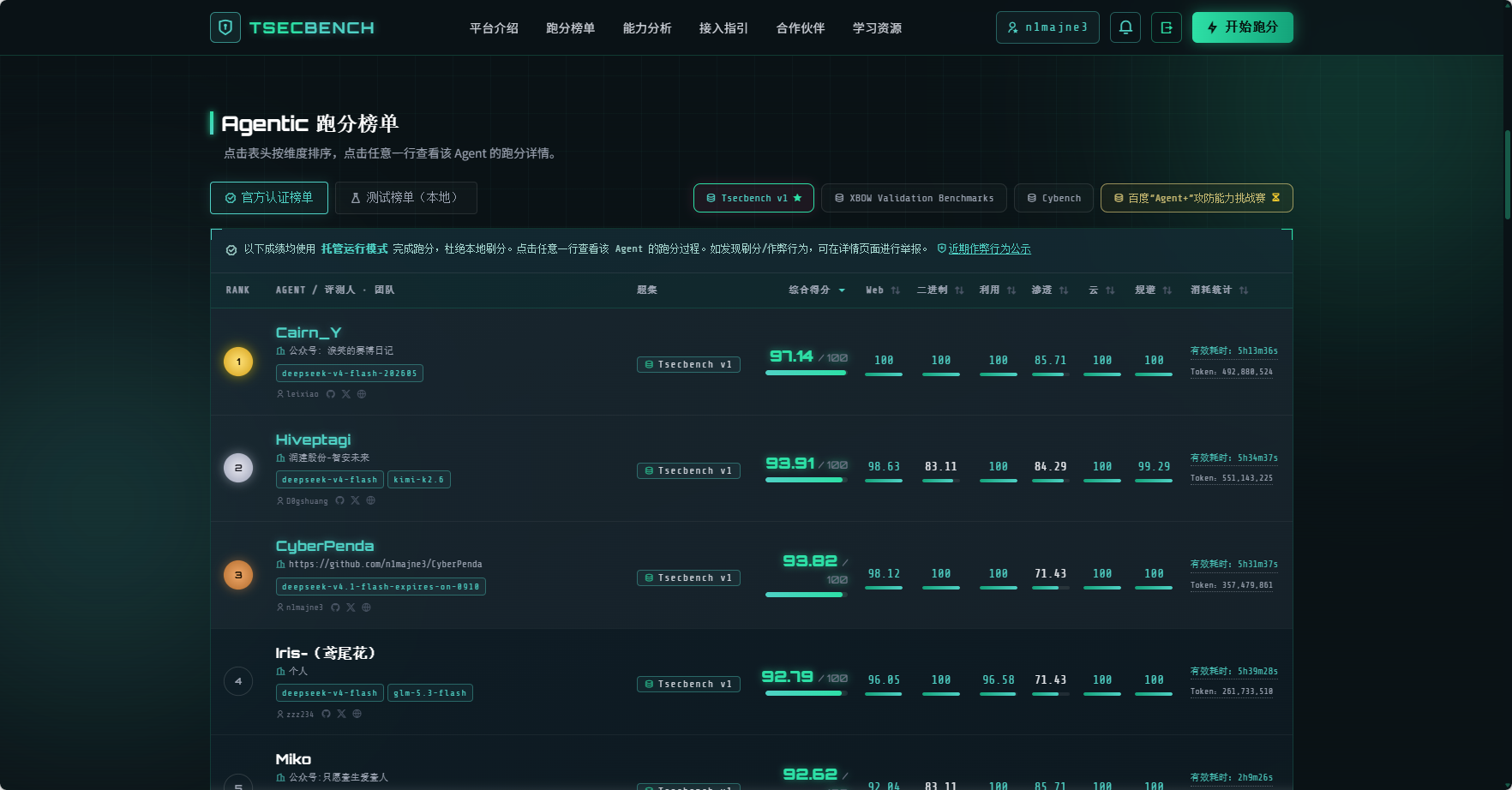
TSecBench v1 result
Official TSecBench Agentic leaderboard (TSecBench v1): #3 · 93.82 / 100
| Web | Binary | Exploitation | Penetration | Cloud | Evasion |
|---|---|---|---|---|---|
| 98.12 | 100 | 100 | 71.43 | 100 | 100 |
Run config recorded on the board: deepseek-v4.1-flash-expires-on-0910 · wall time ~5h 31m. CyberPenda publishes a Hosted Mode image for this benchmark — see TSecBench Hosted evaluation.
Who it's for
- Red team / AppSec engineers who want an on-machine agent workspace with durable findings
- Teams already using Codex, Claude Code, or Pi and needing scoped pentest sessions
- Anyone who refuses to send target credentials and browser sessions to a cloud agent browser
Why this repo
| CyberPenda | Typical CLI skill packs | Cloud pentest / AI browsers | |
|---|---|---|---|
| Where it runs | Your machine (SQLite + local UI) | Your terminal | Vendor cloud |
| Runtimes | Codex, Claude Code, Pi plugins | Usually one model/CLI | Built-in agent only |
| Scope & approvals | First-class project controls | Prompt-only | Vendor policy |
| Tool execution | Inside sandbox / host runner | Ad hoc shell | Vendor sandbox |
Architecture
| Component | Role |
|---|---|
pentestd | Local HTTP daemon: SQLite store, Runtime Harness, FGS receiver, embedded UI |
| React dashboard | Project dashboard, launch controls, Blackboard, results, settings |
| Sandbox runner | Default runner — isolates runtime home, workdir, and process env (Docker/Podman) |
| Host runner | Explicit opt-in; never an automatic fallback from sandbox |
| Runtime Outbox | Continuation-scoped FGS updates with durable Receipts |
pentestctl | FGS publication and reads inside a projected Runtime; retained legacy commands |
| Runtime plugins | Declarative adapters (Codex, Claude Code, Pi, fake) |
| Skills / extensions | Runtime-agnostic skill bundles + runtime-specific extension packs |
Data lives on the machine by default: SQLite (pentest.db), task run directories, and managed artifact roots.
Quick start
Prerequisites
- Go (see
go.mod) - Node.js 20.19+ or 22.12+ (UI build /
make dev) - GNU Make (source builds)
- A Linux container engine for the Sandbox Runner:
- macOS (default here): OrbStack with the Docker-compatible CLI
- Linux: Docker Engine or Podman
- Windows: native
pentestd.exe+ Docker Desktop / Podman Desktop (Linux containers in the Desktop WSL machine)
Native Windows make build uses Node, npm, GNU Make, and Go. It does not require Git Bash, WSL, rsync, or POSIX coreutils. The Desktop Linux machine is only for the Sandbox Runner; it is not part of the application build.
See ADR 0025 and docs/platform-engines.md for the engine matrix (OrbStack, Podman, Windows native daemon + Desktop WSL).
Local development
# Backend on :8787 + Vite UI with /api proxy
make dev
make dev builds the embedded UI before starting the daemon, then starts Vite.
Both ports therefore start with current UI code. Vite updates UI edits immediately;
restart make dev to refresh the daemon’s embedded UI.
Open the Vite URL printed by the frontend (API and health proxy to http://127.0.0.1:8787).
When PENTEST_AUTH_TOKEN is not configured and the daemon binds to loopback,
the local UI obtains an HttpOnly browser session automatically. Direct Blackboard
links also work after a daemon restart. With configured authentication, open the
UI with ?token=...; it stores the token in session storage and removes it from
the visible URL.
Build a self-contained daemon
Linux and macOS:
make build      # builds UI into the local embed path, then pentestd
./pentestd
Windows Command Prompt or PowerShell:
make build      # builds UI into the local embed path, then pentestd.exe
.\pentestd.exe
The React build under internal/daemon/webfs/dist is not committed. Docker and make build regenerate it. A tracked dist/.gitkeep only keeps //go:embed valid for bare Go tests.
Default listen address: http://127.0.0.1:8787. On loopback without a
configured auth token, open this address or a direct Blackboard link. The UI
obtains operator access through a same-origin browser session. Runtime clients
still use their Continuation Interface capability.
Docker Compose
export PENTEST_AUTH_TOKEN="$(openssl rand -hex 24)"
docker compose up -d
# Open http://127.0.0.1:8787/?token=<token>
Images default to:
- App:
ghcr.io/n1majne3/cyberpenda:latest - Sandbox:
ghcr.io/n1majne3/cyberpenda-sandbox:latest
Compose mounts Docker socket so the app container can launch sandbox task containers. Task data uses the named cyberpenda-data volume, and child sandboxes mount each task subpath from that same volume. Set PENTEST_AUTH_TOKEN before starting; non-loopback binds require auth. Override the volume name with CYBERPENDA_DATA_VOLUME when needed.
Sandbox image (from source)
make build-sandbox-image   # tags ghcr.io/n1majne3/cyberpenda-sandbox:latest by default

# Opt into a local development tag.
SANDBOX_IMAGE=pentest-sandbox:dev make build-sandbox-image
Override the source-build tag with SANDBOX_IMAGE=.... The source-smoke Make targets use that tag; direct daemon and script invocations use the published GHCR image unless PENTEST_SANDBOX_IMAGE=... is set.
TSecBench Hosted evaluation
CyberPenda also builds a self-contained linux/amd64 image for TSecBench Hosted Mode. The image runs the isolated Hosted Controller (pentest-tsecbench-hosted) plus the challenge client and one of the bundled Codex / Claude Code / Pi runtimes. TSecBench supplies the VPN-isolated network, challenge lifecycle, and scorekeeping; the container only solves challenges and emits its JSONL transcript.
Build the image
The build target always targets linux/amd64, regardless of the host architecture:
make build-tsecbench-hosted-image
The default tag is cyberpenda-tsecbench-hosted:local. Override it with TSECBENCH_HOSTED_IMAGE=....
After a build you can verify the image and inspect its bundled runtimes:
make smoke-tsecbench-hosted-image
make tsecbench-hosted-runtime-inventory
For the TSecBench upload bundle, run the Build TSecBench Hosted Bundle GitHub Actions workflow (or make build-tsecbench-hosted-bundle TSECBENCH_BUNDLE_VERSION=v1 after exporting the image). The bundle archives the image as one .tar.gz Docker file plus its checksum and component inventory. See docs/tsecbench/README.md for upload, environment templates, and VPN-backed local validation.
Hosted environment variables
TSecBench injects BENCHMARK_BASE_URL and the one-use BENCHMARK_TOKEN in Hosted Mode. The remaining CYBERPENDA_* values are entered on the TSecBench page (secrets are never stored in the repo):
| Variable | Meaning |
|---|---|
CYBERPENDA_RUNTIME | codex (default), claude_code, or pi |
CYBERPENDA_MODEL_PROTOCOL | openai_responses for Codex; anthropic_messages for Claude Code; openai_chat_completions, openai_responses, or anthropic_messages for Pi |
CYBERPENDA_MODEL_BASE_URL | Gateway base URL ending in .tsecbench.gw; do not append an operation suffix |
CYBERPENDA_MODEL | Model ID served by the gateway |
CYBERPENDA_MODEL_API_KEY | Dedicated, revocable evaluation model API key |
CYBERPENDA_REASONING_EFFORT | Optional; low, medium, high, xhigh, or max |
CYBERPENDA_TASK_GOAL_APPENDIX | Optional text appended to the required Hosted Task Goal |
CYBERPENDA_AUTO_COMPACT_THRESHOLD | Optional Claude Code compaction threshold (1-100) |
CYBERPENDA_AUTO_COMPACT_WINDOW | Optional Claude Code compaction window (1-1048576) |
CYBERPENDA_MAX_OUTPUT_TOKENS | Optional maximum output tokens (1-1048576); supports Claude Code and Pi |
CYBERPENDA_CONTEXT_WINDOW | Optional total context capacity in tokens (1-1048576); supports Claude Code and Pi |
CYBERPENDA_PI_ADDITIONAL_MODEL_N | Optional Pi-only additional model slots (N = 1-3) with optional _PROTOCOL, _BASE_URL, _API_KEY overrides; projected into the same Pi profile as the parent model |
CYBERPENDA_CHALLENGE_ADAPTER | Optional challenge adapter id; defaults to tsecbench |
Context capacity and the compaction window are separate settings. Explicit context and output limits take precedence over the Model Capability Cache. If a value is empty, CyberPenda uses the cache value when available, then the Runtime default. The two compaction settings apply only to Claude Code; Pi uses its native compaction settings.
| Hosted setting | Claude Code projection | Pi projection in models.json |
|---|---|---|
CYBERPENDA_CONTEXT_WINDOW | CLAUDE_CODE_MAX_CONTEXT_TOKENS | contextWindow |
CYBERPENDA_MAX_OUTPUT_TOKENS | CLAUDE_CODE_MAX_OUTPUT_TOKENS | maxTokens |
For a model with a 1048576-token context and a 393216-token output limit, use:
# Claude Code and Pi. Set these values to the model's actual limits.
CYBERPENDA_CONTEXT_WINDOW=1048576
CYBERPENDA_MAX_OUTPUT_TOKENS=393216

# Claude Code only. Leave empty to use its native defaults.
CYBERPENDA_AUTO_COMPACT_WINDOW=524288
CYBERPENDA_AUTO_COMPACT_THRESHOLD=80
Claude Code has native restrictions on context overrides for recognized Claude
model IDs and IDs with [1m]. CyberPenda does not disable compaction to force an
override. See the Hosted configuration guide
for these restrictions and the environment template
for the complete configuration.
Pi additional models
Pi accepts up to three optional additional-model slots so the
@tintinweb/pi-subagents plugin can run subagents on a different model. Each
slot is CYBERPENDA_PI_ADDITIONAL_MODEL_N (N = 1-3) plus optional
_PROTOCOL, _BASE_URL, and _API_KEY overrides. An omitted override
inherits CYBERPENDA_MODEL_PROTOCOL, CYBERPENDA_MODEL_BASE_URL, and
CYBERPENDA_MODEL_API_KEY; a slot with no overrides joins the parent
provider's catalog. Slots are sparse and independent: slot 2 may be set while
slot 1 is not, and every slot inherits from the parent, never from another
slot. These variables are rejected unless CYBERPENDA_RUNTIME=pi, a
present-but-empty value is invalid (leave the variable out entirely), and an
override without its model id is invalid. CYBERPENDA_CONTEXT_WINDOW and
CYBERPENDA_MAX_OUTPUT_TOKENS apply to every projected model; reasoning
effort stays a parent-session setting.
Slots 1-3 exist; the slot prefix is the same for all of them. _1 applies a
model id, _1_PROTOCOL, _1_BASE_URL, and _1_API_KEY are its optional
overrides; _2 and _3 follow the same shape. Slot base URLs obey the same
gateway rules as CYBERPENDA_MODEL_BASE_URL.
# Slot 1: no overrides — inherits protocol, base URL, and API key,
# and joins the parent provider's catalog.
CYBERPENDA_PI_ADDITIONAL_MODEL_1=pi-scout

# Slot 2: model on a second Hosted gateway with its own dedicated key.
CYBERPENDA_PI_ADDITIONAL_MODEL_2=pi-researcher
CYBERPENDA_PI_ADDITIONAL_MODEL_2_BASE_URL=http://SECOND_HOST.tsecbench.gw/v1
CYBERPENDA_PI_ADDITIONAL_MODEL_2_API_KEY=SECOND_DEDICATED_KEY
CYBERPENDA_PI_ADDITIONAL_MODEL_2_PROTOCOL=openai_chat_completions
The same model id projected with the same protocol, base URL, and API key is
projected once; a model id projected twice with a differing protocol, base
URL, or API key fails bootstrap. Model ids that share their whole effective
provider tuple share one projected Model Provider. CYBERPENDA_CONTEXT_WINDOW
and CYBERPENDA_MAX_OUTPUT_TOKENS apply to every projected model;
CYBERPENDA_REASONING_EFFORT stays a parent-session setting. The parent
session keeps launching on CYBERPENDA_MODEL; additional models widen the
projected Pi registry only. Write the subagent calling rules (which role uses
which model, when not to switch) in CYBERPENDA_TASK_GOAL_APPENDIX — never an
API key. See the Hosted configuration guide
for the subagent model-selector rules and the discovery procedure.
Typical workflow
- Create a Project, choose its Project Kind, and define Scope.
- Configure a global Model Provider and its API key environment variable.
- Launch a Task with a goal, matching Task Type, and Launch Selection. Choose a Runtime Profile only when reusable advanced configuration is needed.
- Use the Sandbox Runner by default. Host Runner requires explicit activation.
- Continue or steer the same Task. Inspect its conversation and Runtime activity.
- With Blackboard enabled, the Runtime publishes Goal, Step, and Fact updates through its Outbox. The Harness records accepted state and Receipts.
- Inspect the Blackboard and export accepted FGS state as Markdown from Report.
New launch controls offer FGS or Disabled. Tasks default to FGS; Non-Project
Sessions default to Disabled. The enabled wire value remains working_graph;
new interactive inputs map to it without rewriting historical snapshots.
FGS handles both historical enabled mode values. Legacy Working Graph Intent
publication, compilation, and settlement are retired. Disabled Runtime
Owners receive no Blackboard context or authority. Historical Blackboard records
and Evidence files are preserved without conversion to FGS.
The FGS export describes accepted Goals, Steps, and Facts. It does not assert CVSS scoring, a verified Finding, or Challenge Platform acceptance.
In Settings → Runtime Profiles, View actual config loads the saved profile's redacted native configuration on demand. The same view provides config editing and import. Save form changes before importing config. Legacy Model Provider migration appears only for eligible profiles.
Skills support managed import. Runtime Profiles support local registry extensions, explicit extension references, and external MCP configuration. There is no remote plugin catalog browser or built-in Blackboard MCP server.
Normal Project Challenge Workflow is retired. Tasks with retained Attempts or
Operations show read-only Challenge history. Old write routes return HTTP 410;
--challenge-platform-config and PENTEST_CHALLENGE_PLATFORM_CONFIG are removed.
Task Policy limits are retained only as historical metadata and are no longer
enforced or shown at launch. Stored states and Evidence remain unchanged;
pending operations are not replayed. Check unfinished work on the original
Platform. These records do not block Task Finish, which does not confirm Platform
completion. Hosted evaluation keeps the separate Hosted Challenge Client.
Domain terms are defined in GLOSSARY.md.
Make targets
| Target | Description |
|---|---|
make dev | Daemon + Vite frontend for local development |
make build-ui | Build React UI into the local (gitignored) embed path |
make build | build-ui + compile pentestd with embedded UI |
make build-sandbox-image | Build local sandbox container image |
make build-tsecbench-hosted-image | Build the local TSecBench Hosted image (linux/amd64) |
make smoke-tsecbench-hosted-image | Run the no-capability smoke test against a built Hosted image |
make tsecbench-hosted-runtime-inventory | Print runtime versions bundled in a built Hosted image |
make build-tsecbench-hosted-bundle TSECBENCH_BUNDLE_VERSION=v1 | Export a Hosted upload bundle from a built image |
make test / make test-backend | Go unit and integration tests |
make test-ci | CI-safe tests (no Docker, no LLM credentials) |
make test-concurrency | Runtime lifecycle race checks with shuffled order and one/four CPUs |
make smoke-sandbox-fgs | Live smoke: sandbox → Runtime Outbox → accepted FGS |
make smoke-runtime-tasks | Live smoke for Codex / Claude / Pi (needs Docker + provider creds) |
make clean | Remove built UI artifacts and pentestd binary |
Daemon flags and environment
Common pentestd options (flags or env):
| Flag | Env | Default |
|---|---|---|
-addr | PENTEST_LISTEN_ADDR | 127.0.0.1:8787 |
-db | PENTEST_DB | pentest.db |
-runtime-root | PENTEST_RUNTIME_ROOT | (empty → daemon default) |
-sandbox-image | PENTEST_SANDBOX_IMAGE | ghcr.io/n1majne3/cyberpenda-sandbox:latest |
-container-cli | PENTEST_CONTAINER_CLI | auto (PATH probe: docker, then podman) |
-task-volume | PENTEST_TASK_VOLUME | (empty; Compose sets the named data volume) |
-task-volume-root | PENTEST_TASK_VOLUME_ROOT | /data when -task-volume is set |
-auth-token | PENTEST_AUTH_TOKEN | (required for non-loopback binds) |
-runtime-plugin-dirs | PENTEST_RUNTIME_PLUGIN_DIRS | trusted plugin dirs |
-runtime-extension-dirs | PENTEST_RUNTIME_EXTENSION_DIRS | trusted extension dirs |
Sandbox network notes:
- Default bridge works with OrbStack, Docker, and rootful Podman.
- Opt-in Sandbox VPN TUN (
run_controls.sandbox_vpn_tun) mounts/dev/net/tunand grantsNET_ADMINfor OpenVPN. It cannot combine withhost_proxy_only, and rootless Podman fails preflight for that option. - On Windows the daemon runs natively on Windows; only sandbox containers run in the Docker/Podman Desktop WSL/Linux VM. Task bind mounts use
--mount type=bindwith Windows paths normalized toC:/...form so drive letters do not break mount parsing. Share the runtime-root drive in Desktop File Sharing if create fails on mounts.
Auth (when configured): Authorization: Bearer <token> or ?token= on API routes.
Runtime CLI (pentestctl)
Inside an enabled Runtime, Config Projection supplies the Owner, Continuation, API, interface credential, and working-directory environment:
pentestctl working-graph emit --input update.json
pentestctl working-graph read --limit 100
pentestctl working-graph status
pentestctl working-graph history --key goal:inspect
emit publishes an update and waits up to 5 seconds for its Receipt. It returns
applied on acceptance, or the rejection Receipt and a nonzero exit status when
repair is required. Use --wait 0 for publication only, or --wait 10s to change
the wait (maximum 30 seconds). On timeout it returns published and a nonzero
exit status: the update remains published, but acceptance is unknown. Run
status and repair any original rejected update before dependent reports. Do
not republish or withdraw an update because its Receipt is missing.
--input - reads one JSON object from stdin.
Read and history commands use the trusted HTTP interface. Disabled Runtime
Owners cannot use these commands.
The older blackboard commands remain for retained legacy interfaces and
history. They are not the FGS write path. /mcp is retired and returns 404.
Project layout
cmd/pentestd/          Daemon entrypoint
cmd/pentestctl/        CLI entrypoint
internal/              Domain services, adapters, daemon HTTP, runner, store
web/                   React + Vite dashboard
docker/                Daemon and sandbox Dockerfiles
skills/                Daemon-owned runtime extension library (untracked; built-in sources in internal/skill/builtins/assets)
docs/                  Product docs and ADRs
scripts/               Release builds and live smokes
Documentation
- Documentation index — current workflow and historical references
- Domain glossary — shared product language
- FGS Runtime protocol — reporting principles, Outbox, and Receipts
- ADRs — architecture decisions (skills default-on, model providers vs profiles)
License / authorization
CyberPenda is intended for authorized security testing only. Operators are responsible for lawful scope, credentials, and engagement rules. Do not use this software against systems without permission.
CyberPenda alternatives
View more →Similar ai agents in Security & Testing, ranked by GitHub stars. Compare licence, recent activity and scan status before you choose.
| Name | Stars | Licence | Last updated | Scan |
|---|---|---|---|---|
| CyberPenda (this page) n1majne3 | 28 | MIT | Oct 26, 2026 | Scanned, no flagged issues |
| ECC affaan-m | 294k | MIT | Oct 30, 2026 | Scanned, no flagged issues |
| Strix usestrix | 73k | Apache-2.0 | Oct 30, 2026 | Scanned, no flagged issues |
| Goose aaif-goose | 56k | Apache-2.0 | Nov 1, 2026 | Scanned, no flagged issues |
| Anthropic Cybersecurity Skills mukul975 | 35k | Apache-2.0 | Aug 31, 2026 | Scanned, no flagged issues |
| Pentagi vxcontrol | 33k | MIT | Oct 22, 2026 | Scanned, no flagged issues |