Data Enrichment AI Agent
 by langchain-ai
LangGraph Studio template for creating an agent that does web research to genearte or enrich structured data.
Data Enrichment is an open-source ai agent by langchain-ai, written mainly in Jupyter Notebook, with 258 GitHub stars and the MIT license. Its code was last updated Oct 28, 2026.
LangGraph Data Enrichment Template


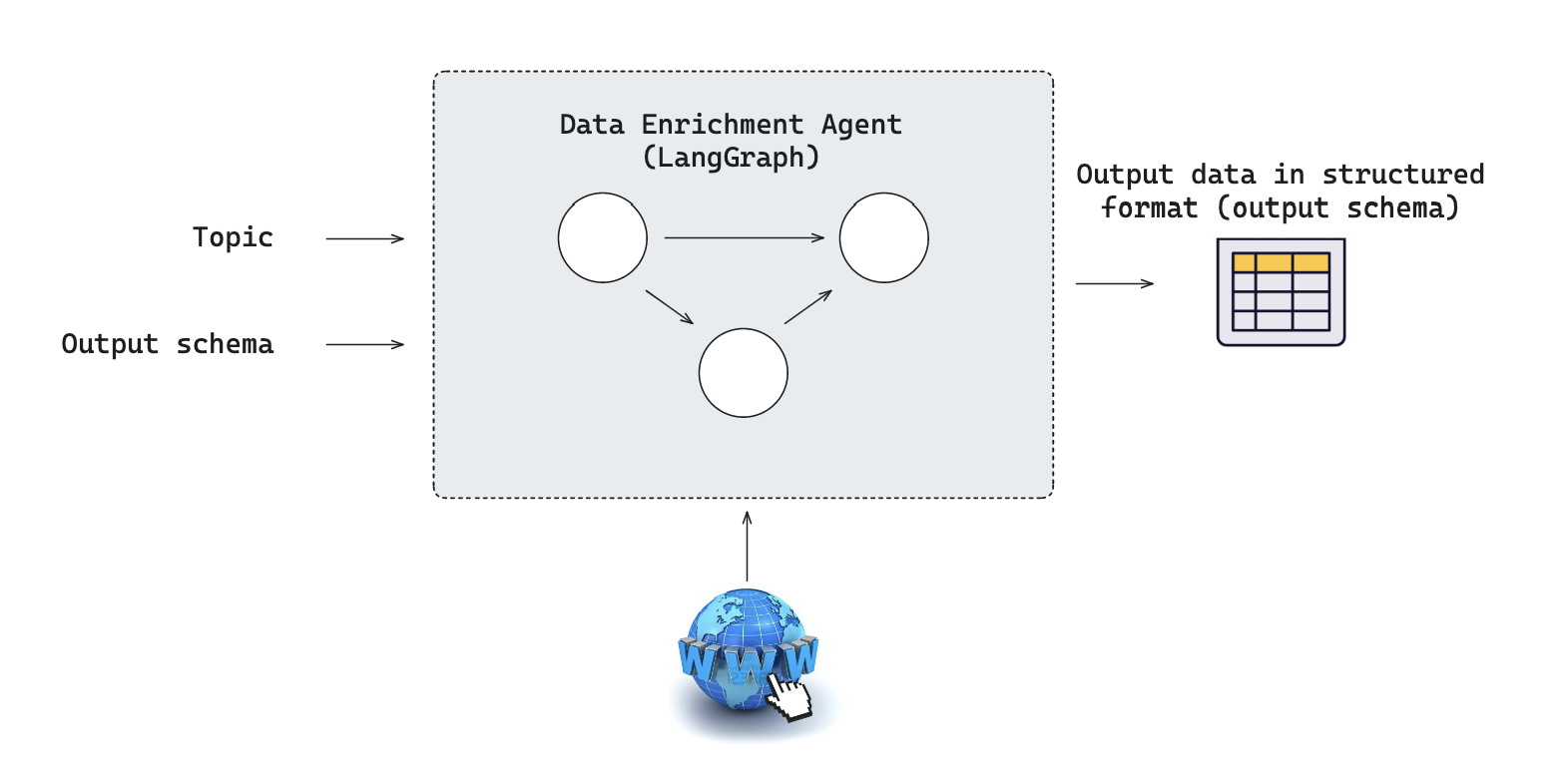
Producing structured results (e.g., to populate a database or spreadsheet) from open-ended research (e.g., web research) is a common use case that LLM-powered agents are well-suited to handle. Here, we provide a general template for this kind of "data enrichment agent" agent using LangGraph in LangGraph Studio. It contains an example graph exported from src/enrichment_agent/graph.py that implements a research assistant capable of automatically gathering information on various topics from the web and structuring the results into a user-defined JSON format.
What it does
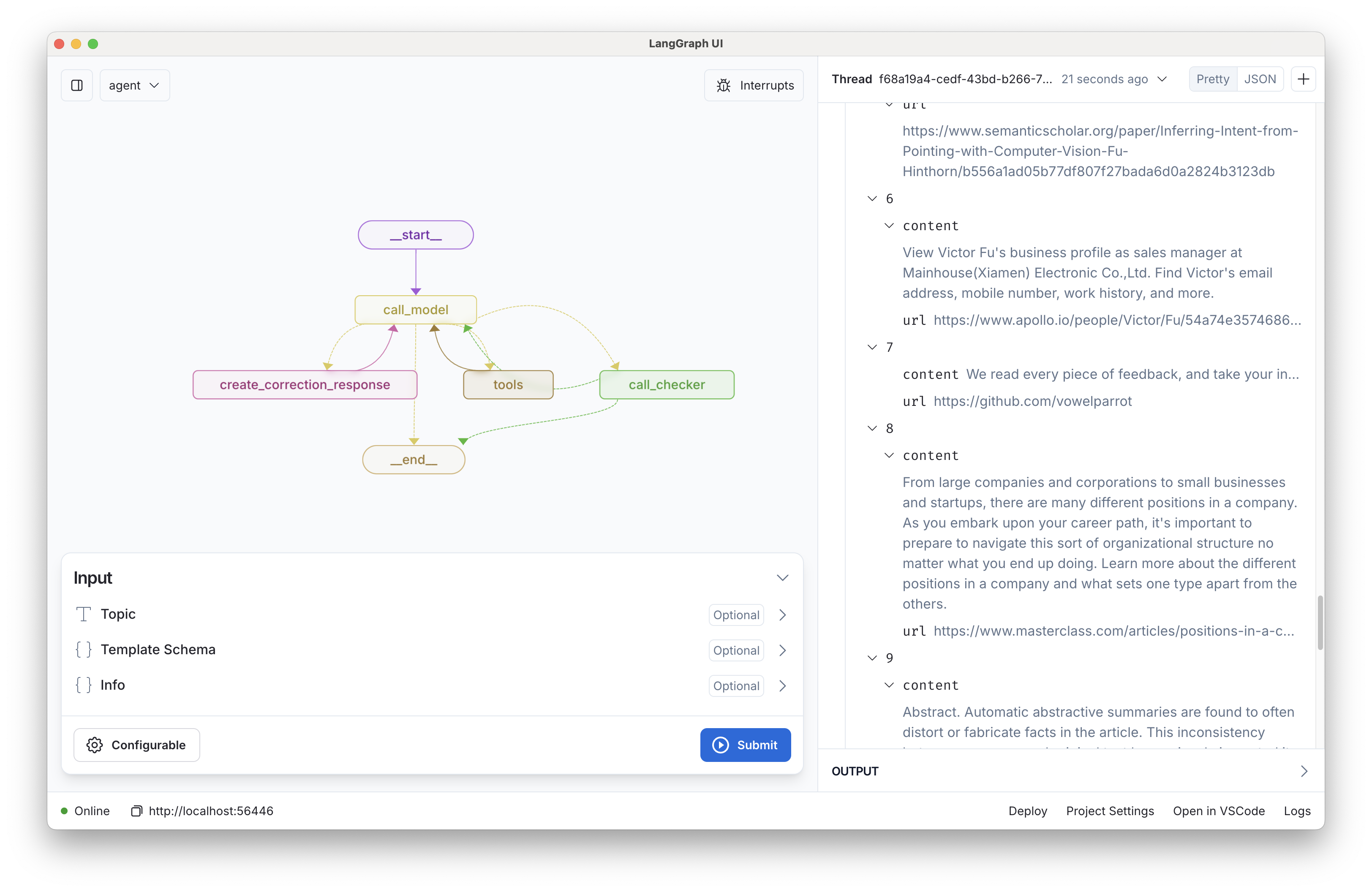
The enrichment agent defined in src/enrichment_agent/graph.py performs the following steps:
- Takes a research topic and requested extraction_schema as input.
- Searches the web for relevant information
- Reads and extracts key details from websites
- Organizes the findings into the requested structured format
- Validates the gathered information for completeness and accuracy
Getting Started
Assuming you have already installed LangGraph Studio, to set up:
- Create a
.envfile.
cp .env.example .env
- Define required API keys in your
.envfile.
The primary search tool 1 used is Tavily. Create an API key here.
<!-- Setup instruction auto-generated by `langgraph template lock`. DO NOT EDIT MANUALLY. -->Setup Model
The defaults values for model are shown below:
model: anthropic/claude-3-5-sonnet-20240620
Follow the instructions below to get set up, or pick one of the additional options.
Anthropic
To use Anthropic's chat models:
- Sign up for an Anthropic API key if you haven't already.
- Once you have your API key, add it to your
.envfile:
ANTHROPIC_API_KEY=your-api-key
OpenAI
To use OpenAI's chat models:
- Sign up for an OpenAI API key.
- Once you have your API key, add it to your
.envfile:
OPENAI_API_KEY=your-api-key
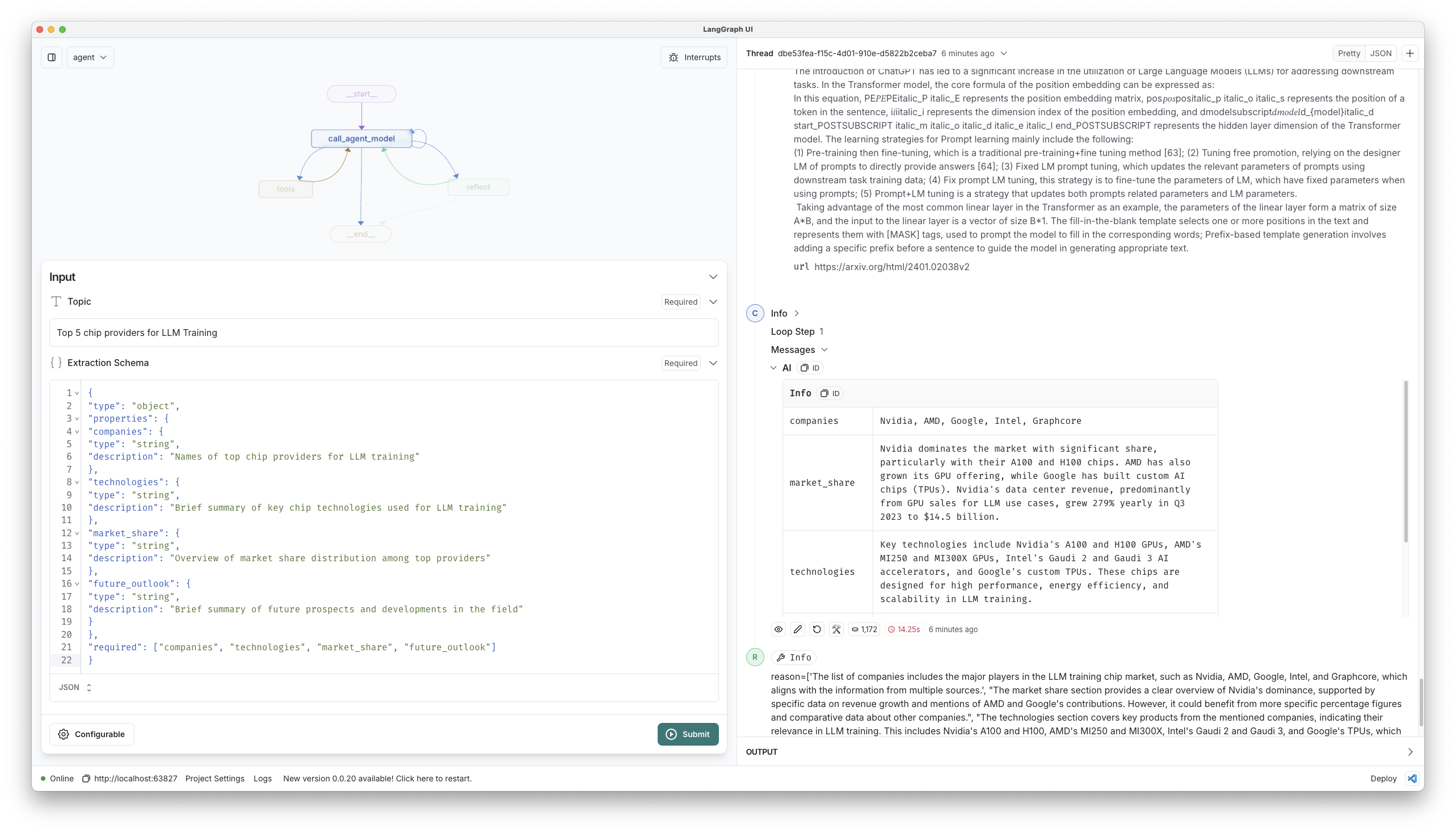
- Consider a research topic and desired extraction schema.
As an example, here is a research topic we can consider.
"Top 5 chip providers for LLM Training"
And here is a desired extraction schema (pasted in as "extraction_schema"):
{
    "type": "object",
    "properties": {
        "companies": {
            "type": "array",
            "items": {
                "type": "object",
                "properties": {
                    "name": {
                        "type": "string",
                        "description": "Company name"
                    },
                    "technologies": {
                        "type": "string",
                        "description": "Brief summary of key technologies used by the company"
                    },
                    "market_share": {
                        "type": "string",
                        "description": "Overview of market share for this company"
                    },
                    "future_outlook": {
                        "type": "string",
                        "description": "Brief summary of future prospects and developments in the field for this company"
                    },
                    "key_powers": {
                        "type": "string",
                        "description": "Which of the 7 Powers (Scale Economies, Network Economies, Counter Positioning, Switching Costs, Branding, Cornered Resource, Process Power) best describe this company's competitive advantage"
                    }
                },
                "required": ["name", "technologies", "market_share", "future_outlook"]
            },
            "description": "List of companies"
        }
    },
    "required": ["companies"]
}
- Open the folder LangGraph Studio, and input
topicandextraction_schema.
How to customize
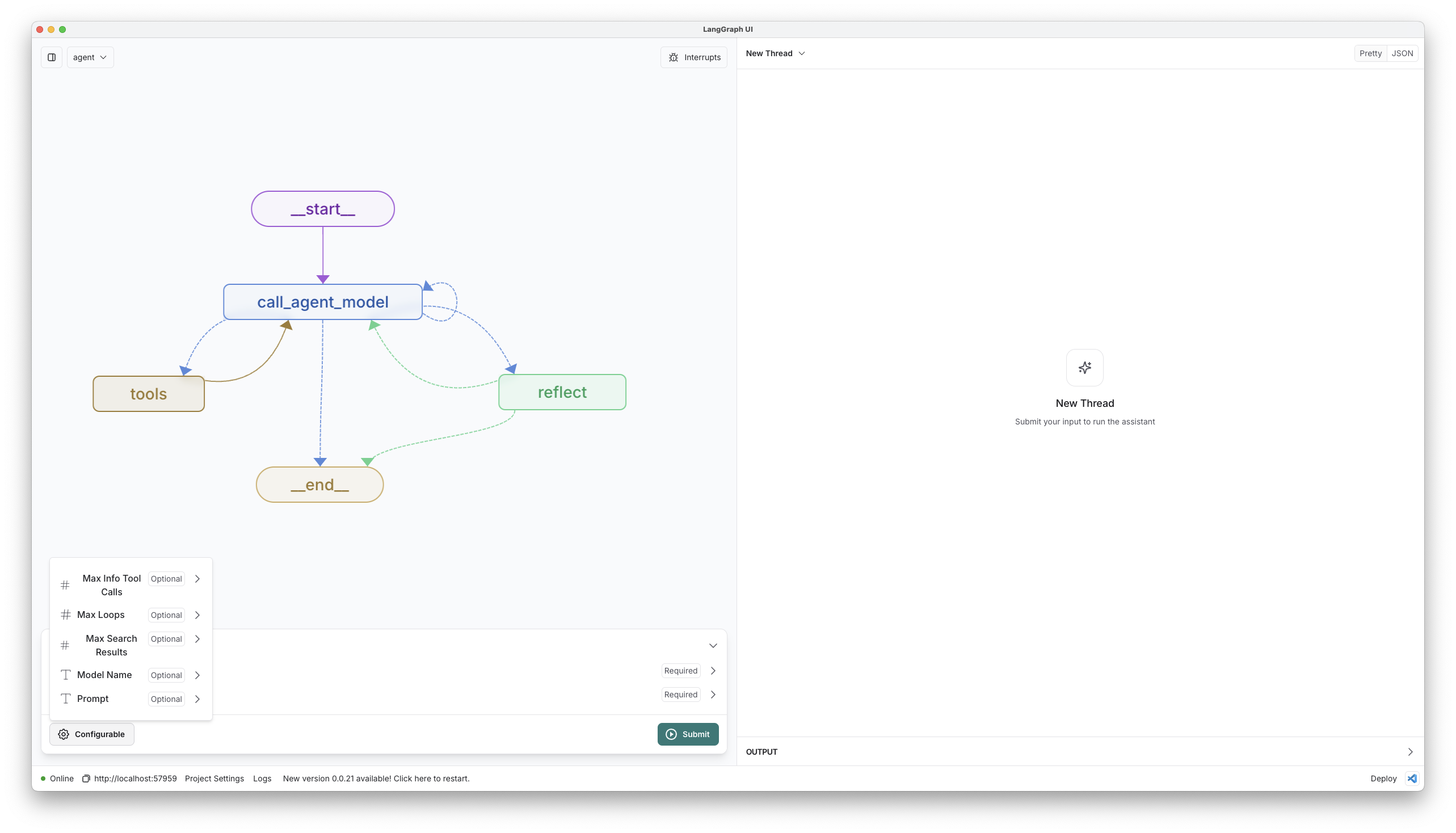
- Customize research targets: Provide a custom JSON
extraction_schemawhen calling the graph to gather different types of information. - Select a different model: We default to anthropic (sonnet-35). You can select a compatible chat model using
provider/model-namevia configuration. Example:openai/gpt-4o-mini. - Customize the prompt: We provide a default prompt in prompts.py. You can easily update this via configuration.
For quick prototyping, these configurations can be set in the studio UI.
You can also quickly extend this template by:
- Adding new tools and API connections in tools.py. These are just any python functions.
- Adding additional steps in graph.py.
Development
While iterating on your graph, you can edit past state and rerun your app from past states to debug specific nodes. Local changes will be automatically applied via hot reload. Try adding an interrupt before the agent calls tools, updating the default system message in src/enrichment_agent/utils.py to take on a persona, or adding additional nodes and edges!
Follow up requests will be appended to the same thread. You can create an entirely new thread, clearing previous history, using the + button in the top right.
You can find the latest (under construction) docs on LangGraph here, including examples and other references. Using those guides can help you pick the right patterns to adapt here for your use case.
LangGraph Studio also integrates with LangSmith for more in-depth tracing and collaboration with teammates.
LangGraph API
We can also interact with the graph using the LangGraph API.
See ntbk/testing.ipynb for an example of how to do this.
LangGraph Cloud (see here) make it possible to deploy the agent.
<!-- Configuration auto-generated by `langgraph template lock`. DO NOT EDIT MANUALLY. { "config_schemas": { "agent": { "type": "object", "properties": { "model": { "type": "string", "default": "anthropic/claude-3-5-sonnet-20240620", "description": "The name of the language model to use for the agent. Should be in the form: provider/model-name.", "environment": [ { "value": "anthropic/claude-1.2", "variables": "ANTHROPIC_API_KEY" }, { "value": "anthropic/claude-2.0", "variables": "ANTHROPIC_API_KEY" }, { "value": "anthropic/claude-2.1", "variables": "ANTHROPIC_API_KEY" }, { "value": "anthropic/claude-3-5-sonnet-20240620", "variables": "ANTHROPIC_API_KEY" }, { "value": "anthropic/claude-3-haiku-20240307", "variables": "ANTHROPIC_API_KEY" }, { "value": "anthropic/claude-3-opus-20240229", "variables": "ANTHROPIC_API_KEY" }, { "value": "anthropic/claude-3-sonnet-20240229", "variables": "ANTHROPIC_API_KEY" }, { "value": "anthropic/claude-instant-1.2", "variables": "ANTHROPIC_API_KEY" }, { "value": "openai/gpt-3.5-turbo", "variables": "OPENAI_API_KEY" }, { "value": "openai/gpt-3.5-turbo-0125", "variables": "OPENAI_API_KEY" }, { "value": "openai/gpt-3.5-turbo-0301", "variables": "OPENAI_API_KEY" }, { "value": "openai/gpt-3.5-turbo-0613", "variables": "OPENAI_API_KEY" }, { "value": "openai/gpt-3.5-turbo-1106", "variables": "OPENAI_API_KEY" }, { "value": "openai/gpt-3.5-turbo-16k", "variables": "OPENAI_API_KEY" }, { "value": "openai/gpt-3.5-turbo-16k-0613", "variables": "OPENAI_API_KEY" }, { "value": "openai/gpt-4", "variables": "OPENAI_API_KEY" }, { "value": "openai/gpt-4-0125-preview", "variables": "OPENAI_API_KEY" }, { "value": "openai/gpt-4-0314", "variables": "OPENAI_API_KEY" }, { "value": "openai/gpt-4-0613", "variables": "OPENAI_API_KEY" }, { "value": "openai/gpt-4-1106-preview", "variables": "OPENAI_API_KEY" }, { "value": "openai/gpt-4-32k", "variables": "OPENAI_API_KEY" }, { "value": "openai/gpt-4-32k-0314", "variables": "OPENAI_API_KEY" }, { "value": "openai/gpt-4-32k-0613", "variables": "OPENAI_API_KEY" }, { "value": "openai/gpt-4-turbo", "variables": "OPENAI_API_KEY" }, { "value": "openai/gpt-4-turbo-preview", "variables": "OPENAI_API_KEY" }, { "value": "openai/gpt-4-vision-preview", "variables": "OPENAI_API_KEY" }, { "value": "openai/gpt-4o", "variables": "OPENAI_API_KEY" }, { "value": "openai/gpt-4o-mini", "variables": "OPENAI_API_KEY" } ] } }, "environment": [ "TAVILY_API_KEY" ] } } } -->Footnotes
Data Enrichment alternatives
View more →Similar ai agents in Research & Analysis, ranked by GitHub stars. Compare licence, recent activity and scan status before you choose.
| Name | Stars | Licence | Last updated | Scan |
|---|---|---|---|---|
| Data Enrichment (this page) langchain-ai | 258 | MIT | Oct 28, 2026 | Scanned, no flagged issues |
| Hermes Agent NousResearch | 259k | MIT | Nov 1, 2026 | Scanned, no flagged issues |
| Anything LLM Mintplex-Labs | 68k | MIT | Oct 30, 2026 | Scanned, no flagged issues |
| Khazix Skills KKKKhazix | 22k | MIT | Oct 1, 2026 | Scanned, no flagged issues |
| Hermes Webui nesquena | 19k | MIT | Nov 1, 2026 | Scanned, no flagged issues |
| DocsGPT arc53 | 18k | MIT | Nov 1, 2026 | Scanned, no flagged issues |