Deepdoc AI Agent
 by Oqura-ai
Deep research tool for local knowledge base.
Deepdoc is an open-source ai agent by Oqura-ai, written mainly in Python, with 315 GitHub stars and the MIT license. Its code was last updated Sep 26, 2026.
Overview
Oqura's deepdoc is a local deep-research tool that turns your own files into a structured Markdown report. It extracts and indexes the content, plans the report, researches every section against the local collection, and combines the results into one final document.
DeepDoc uses TypeSafe's Jev model to improve the research process without replacing the generative LLM. Jev checks and reranks the chunks returned by Qdrant, then checks whether the collected evidence covers every required subsection. The configured LLM still handles planning, query generation, synthesis, and report writing, while Python uses Jev's probabilities to make explicit filtering and retry decisions.
How It Works
- Provide a directory containing PDF, DOCX, PPTX, image, TXT, or Markdown resources.
- DeepDoc extracts the text, keeps page and source metadata, and creates searchable chunks in Qdrant.
- A report planner creates the initial structure from your topic and outline. You can approve it or request changes before research starts.
- One research agent runs for every report section. Each agent:
- Generates focused research queries.
- Retrieves a shortlist of candidate chunks from Qdrant.
- Uses Jev to judge relevance, usable evidence, contradiction, and prompt-injection-like content.
- Filters and reranks the candidates before evidence reaches the writing LLM.
- Uses Jev reflection scores to find subsections that still lack evidence.
- Generates new queries for missing coverage, up to the configured reflection limit.
- Writes the completed section from the accepted local evidence.
- The final report writer combines all completed sections and exports a Markdown file.
Workflow
This diagram shows how Local DeepResearcher takes your local resources and instructions, processes and analyzes the content, and turns it into a structured report.
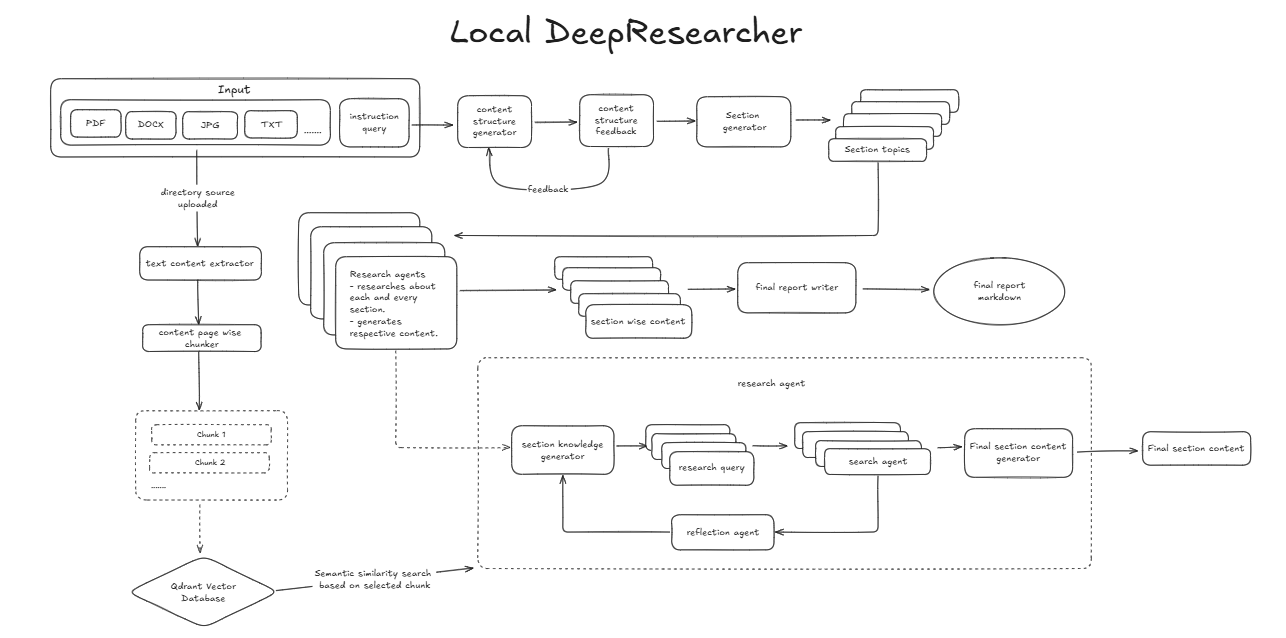
Inside each parallel research agent, the implemented path is:
Query generation
  -> Qdrant retrieval
  -> Jev evidence gate and reranker
  -> Evidence accumulator
  -> Jev subsection coverage reflection
       -> Query generation again when coverage is missing and retries remain
       -> Section writer when coverage is sufficient or the retry limit is reached
Jev returns typed probabilities; thresholds, ranking, retry limits, and graph routing remain ordinary Python logic in the application.
Getting Started
Follow these steps to set up and run the project locally.
Prerequisite: Install uv
uv is required to manage the virtual environment and dependencies.
You can download it from the official uv GitHub repository, which includes platform-specific installation instructions.
1. Clone the Repository
git clone https://github.com/Oqura-ai/deepdoc.git
cd deepdoc
2. Create a Virtual Environment
Use uv to create a virtual environment:
uv venv
3. Activate the Virtual Environment
Activate the environment depending on your OS:
Windows:
.venv\Scripts\activate
macOS/Linux:
source .venv/bin/activate
4. Set Up Environment Variables
Copy the example .env file and add your API keys:
cp .env.example .env
Open the .env file in a text editor and fill in the keys used by your configuration.
OPENAI_API_KEY and TYPESAFE_API_KEY are required for the default setup:
MISTRAL_API_KEY=
TAVILY_API_KEY=
OPENAI_API_KEY=
TYPESAFE_API_KEY=

# Jev / TypeSafe defaults
TYPESAFE_DEFAULT_MODEL=jev-latest
TYPESAFE_LOG_LEVEL=warning

# Default
QDRANT_URL=http://localhost:6333
COLLECTION_NAME=knowledge_base
EMBEDDING_MODEL=BAAI/bge-small-en-v1.5
QDRANT_DISABLE_THREADING=true # Don't change this
Create a TypeSafe API key in the TypeSafe console and
put it in TYPESAFE_API_KEY. Keep .env local and never commit the real key.
TYPESAFE_DEFAULT_MODEL=jev-latest follows the newest stable Jev release. After you
calibrate thresholds for production, pin a versioned Jev model if you need completely
repeatable behavior across future releases.
5. Install Dependencies
Install required packages using:
uv pip install -r requirements.txt
6. Set Up Qdrant with Docker
Make sure you have Docker and Docker Compose installed. Then start the required services (e.g., Qdrant) using:
docker-compose up --build
This starts the Qdrant service used for local vector search.
7. Run the Application
Once the environment and services are ready, start the application:
python main.py
The CLI will ask for a topic, an outline or goal, and the local resource directory.
Completed reports are saved in output_folder.
Optional: configuration.py
You can customize model behavior, parallelism, retrieval size, reflection limits, and
Jev thresholds in configuration.py.
import uuid

LLM_CONFIG = {
    "provider": "openai",
    "model": "gpt-4o-mini",
    "temperature": 0.5,
    "max_retries": 6,
    "timeout": 120.0,
}

THREAD_CONFIG = {
    # Limit simultaneous section branches to reduce provider token bursts.
    "max_concurrency": 2,
    "configurable": {
        "thread_id": str(uuid.uuid4()),
        "max_queries": 3,
        "search_depth": 2,
        "num_reflections": 2,
        "n_points": 6,
        "evidence_keep_per_query": 3,
        "jev_relevance_threshold": 0.45,
        "jev_evidence_threshold": 0.55,
        "jev_contradiction_threshold": 0.70,
        "jev_injection_threshold": 0.70,
        "jev_reflection_threshold": 0.70,
    }
}
The Jev thresholds are starting points rather than universal constants. Evaluate them
on representative local documents before changing them. Increasing n_points can
improve candidate recall, but it also creates more Jev evaluations because every
query/chunk pair is judged independently. evidence_keep_per_query controls how many
of those candidates continue to the evidence accumulator.
max_retries handles temporary model-provider errors such as HTTP 429 responses.
max_concurrency limits how many report sections research in parallel; lower it to
1 for the most conservative token usage, or raise it only when your provider
limits have enough headroom.
Jev requests use a bounded retry policy for temporary 429/5xx, connection, and timeout failures.
Authors
Contributing
If something here could be improved, please open an issue or submit a pull request.
License
This project is licensed under the MIT License. See the LICENSE file for more details.
Deepdoc alternatives
View more →Similar ai agents in Research & Analysis, ranked by GitHub stars. Compare licence, recent activity and scan status before you choose.
| Name | Stars | Licence | Last updated | Scan |
|---|---|---|---|---|
| Deepdoc (this page) Oqura-ai | 315 | MIT | Sep 26, 2026 | Scanned, no flagged issues |
| Hermes Agent NousResearch | 259k | MIT | Nov 1, 2026 | Scanned, no flagged issues |
| Anything LLM Mintplex-Labs | 68k | MIT | Oct 30, 2026 | Scanned, no flagged issues |
| Khazix Skills KKKKhazix | 22k | MIT | Oct 1, 2026 | Scanned, no flagged issues |
| Hermes Webui nesquena | 19k | MIT | Nov 1, 2026 | Scanned, no flagged issues |
| DocsGPT arc53 | 18k | MIT | Nov 1, 2026 | Scanned, no flagged issues |