EAC Desktop AI Agent
 by Ebony-Vinyl
Embracing All Creation (Desktop) — Dedicated to the Harmonious Coexistence of Hundreds of DSH Plugins / 揽尽万象(桌面版) —— 致力于让数百个DSH插件和谐共存
EAC Desktop is an open-source ai agent by Ebony-Vinyl, written mainly in JavaScript, with 2,334 GitHub stars and the MIT license. Its code was last updated Oct 30, 2026.
EAC = Embracing All Creation(揽尽万象)




把 Agent 的能力,组织成一张真正能工作的桌面。
Deepseek Harness EAC 是基于 DeepSeek Harness 的开源桌面工作台。它将对话、项目文件、工具执行与插件生态连接起来,配合原生窗口、独立运行环境和随包运行时,让你从安装直接进入工作。
EAC · Embracing All Creation · 揽尽万象。 开放的是能力,清晰的是边界:桌面壳负责体验,服务层负责运行,Harness 内核负责 Agent,扩展包负责更多可能。
<p align="center"><img src="docs/screenshot-preview.jpg" alt="EAC desktop skin preview" width="960" /><br /><sub>皮肤效果展示 · 界面外观随所安装的皮肤而变化。</sub></p>目录
| 开始使用 | 架构与扩展 | 开发与社区 |
|---|---|---|
| 核心能力<br />快速开始<br />下载与启动<br />数据与环境 | 架构设计<br />从双击到执行<br />让复杂性留在明确的边界里<br />插件与外观<br />桌面配套能力<br />扩展分发<br />皮肤契约 | 开发指南<br />工程导航<br />文档与社区<br />社区与支持<br />贡献者与致谢<br />许可与致谢<br />Star 趋势 |
核心能力
| 从需求到行动 | EAC 提供的能力 |
|---|---|
| 打开就能工作 | 随包准备 Node.js、npm 与 dsh 运行资源,启动本地 Web UI;普通使用无需单独安装 Node.js |
| 围绕项目协作 | 在工作目录中发起任务,查看会话文件变更,并通过文件视图检查与还原修改 |
| 长任务保持上下文 | 请求路径上的上下文压缩与有界溢出恢复,为持续对话管理上下文空间 |
| 配置自己的工作方式 | 通过快速配置入口管理视觉模型与人设相关设置,按任务需求组织工具能力 |
| 扩展保持可管理 | 聚合插件目录、安装与启停入口,配合保护中心的快照、体检和回滚能力 |
| 环境各自独立 | 通过 DPX 管理环境身份、默认数据路径与运行时变量,按发布通道分离环境 |
| 桌面融入日常 | Tauri 原生窗口、托盘、单实例与退出策略,配合进程编排管理服务生命周期 |
| 外观按需组合 | 用户皮肤通过市场包接入;桌面宿主与皮肤资源以明确契约协作 |
模型调用由配置的提供商完成。插件的启用状态、兼容范围与附加依赖由具体发行包和插件配置决定。
快速开始
下载与启动
EAC 启动器(独立的多实例 / 多内核管理器,可与桌面端并存安装):
EAC-Launcher v0.1.0 Windows x64
自带 Node 24.22.1 运行时,无需另装 Node。使用说明见 launcher/README.md。
Windows 最新稳定版:v6.0.0。其余平台按包格式列出最近发布的下载文件,版本分别标注。
| 平台 | 版本 | 直接下载 | 更新时间(北京时间) |
|---|---|---|---|
| Windows x64 | v6.0.0 | Full Setup | 2026-10-05 |
| Windows x64 | v6.0.0 | Lite Setup | 2026-10-05 |
| Linux x64 | v5.3.6 | AppImage | 2026-09-03 |
| Linux x64 | v5.3.6 | deb | 2026-09-03 |
| macOS arm64 | v5.1.0 | dmg | 2026-08-27 |
在 PowerShell 中计算文件摘要,将结果与同一 Release 的校验清单对照:
Get-FileHash -LiteralPath '<下载文件路径>' -Algorithm SHA256
架构设计
一个桌面入口,三层明确分工。 EAC 将操作系统集成、运行编排与 Agent 内核分离,让桌面体验与扩展能力各自演进。
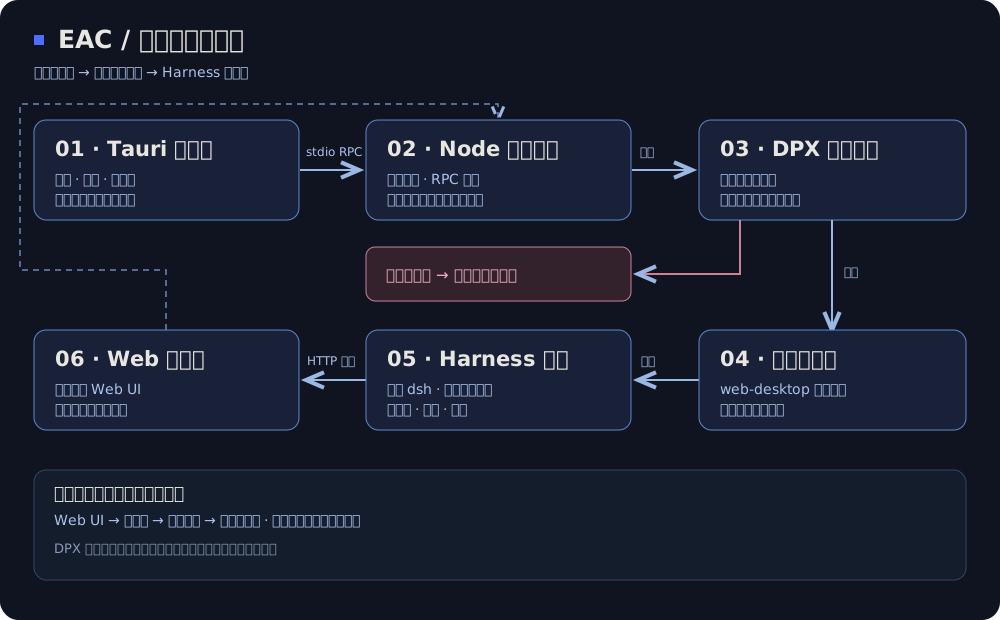
| 层次 | 职责 | 代码入口 |
|---|---|---|
| L1 · 原生桌面 | 窗口、托盘、单实例、退出策略与原生集成 | Rust shell |
| L2 · 运行编排 | 环境初始化、profile、进程启动、桌面 RPC、插件同步与治理 | Node sidecar、桌面服务 |
| L3 · Harness 内核 | Agent 执行、对话、工具、Cordis 插件树与 Web UI | 内核依赖 |
| DPX · 环境基础设施 | 环境注册、目录布局、默认路径与运行时变量 | 环境适配层、dsh-dpx |
从双击到执行
- 桌面壳定位资源并启动 sidecar,传入产品数据根与通道信息。
- DPX 建立或复用环境,在读取用户配置与插件模块前应用运行时变量。
- 服务层准备 profile 与配套插件,启动 dsh 并等待服务就绪。
- 主窗口进入 Web UI,由 Harness 承担会话与工具执行;桌面操作通过桥接层交给宿主。
Rust 与 Node 使用 stdio JSON-RPC 通信,协议输出与诊断日志分开。环境初始化失败会中止启动并记录错误,避免在错误的数据根中继续运行。
让复杂性留在明确的边界里
- 桌面集成不承包业务。 原生能力留在 L1,业务服务放在 L2,扩展优先通过插件契约接入。
- 环境管理复用成熟实现。 DPX 负责注册表、环境身份与默认路径;EAC 通过适配层调用,避免重复维护两套规则。
- 分发以实际装配为准。 插件目录、同步清单与依赖工件共同组成发行包,资源缺失在装配阶段暴露。
- 界面资源有可核对的来源。 UI skin manager 与默认壳资源通过锁文件固定工件,并在装配时校验 SHA-256。
插件与外观
桌面配套能力
配套插件沿 Harness 的 host / client 契约接入。以下模块由 资源装配脚本 组织分发:
| 模块 | 插件 | 作用 |
|---|---|---|
| 文件协作 | dsh-file-changes、dsh-client-file-changes | 会话文件变更投影、变更视图与还原入口 |
| 上下文管理 | dsh-compact | 请求路径压缩与有界溢出恢复 |
| 快速配置 | dsh-easy-setup | 视觉模型、人设与相关配置入口 |
| 插件发现 | dsh-unified-market | 聚合目录与安装管理 |
| 插件保护 | dsh-plugin-shield | 快照、体检与回滚入口 |
| 语言兼容 | dsh-eac-locale-compat | 配套及社区插件的英文界面兼容 |
| 界面稳定 | dsh-viewport-lock、dsh-settings-scroll-fix | 视口约束、设置面板滚轮与溢出滚动修复 |
| 开机动画 | dsh-boot-animation | 启动 / 进入钉住会话时全窗口片头动画(片源内嵌) |
| 微信渠道 | dsh-wechat-plugin | 从微信远程驱动本机会话,无需 OpenClaw 与公网 IP |
| 远程访问 | ds-harness-remote | 端到端加密 P2P 优先的 PC / Android / Web 远程接入 |
扩展分发
插件采用 builtin / recommended / external 分级:随包能力由装配清单定义,推荐集合与外部插件由各自包元数据定义。按功能选择扩展,也按来源、版本约束和许可管理扩展。
开发者可通过 分发规范、插件账本 与 来源记录 查阅接入规则和组件归属。
皮肤契约
用户 Web UI 皮肤通过市场按需安装,未激活皮肤时使用宿主原生外观。壳层的 UI skin manager 与 system.default 资源由 工件锁 管理;区域、插槽与可用能力由 host profile 定义。
皮肤负责呈现,宿主负责能力与窗口边界。 两者通过契约协作,减少界面定制与业务逻辑的相互侵入。
数据与环境
EAC 使用 DPX 独立环境组织桌面数据,桌面 profile 为 web-desktop。环境按 eac-<channel> 命名,同一通道复用环境,不同通道分开存储。
<产品数据根>/
└── dpx/dsh-environments/eac-<channel>/
    ├── .dpx-environment.json      # 环境身份
    ├── dsh-home/                 # profile、会话、skills 与配置
    ├── home/                     # 环境内用户目录
    ├── appdata/                  # 应用数据
    ├── localappdata/             # 本地应用数据
    ├── tmp/                      # 临时文件
    └── workspace/                # 环境工作目录
Windows 默认产品数据根为 %LOCALAPPDATA%\Deepseek Harness EAC;其他平台按系统数据目录推导。宿主 ~/.dsh 仅做检测与提示,不自动迁移、删除或覆盖。
备份时先退出应用,保存实际产品数据根与单独的项目目录。便携包描述的是程序分发方式,数据位置由环境配置决定。
DPX 收容默认路径与环境变量,不提供文件系统沙箱隔离;进程对显式绝对路径的访问仍由操作系统权限控制。实现细节见 environment.ts。
开发指南
工程导航
tauri-shell/       Rust 壳、sidecar、桥接、资源装配与打包
dsh-desktop/       TypeScript 服务、配套插件、构建脚本与测试
third_party/       固定提交的外部依赖
.sync/             插件来源、分发与同步账本
docs/adr/          架构决策与模块边界
构建矩阵覆盖 Windows / Linux 的 x64 与 arm64;仓库同时提供 macOS 平台配置。平台安装包从 Releases 获取,源码构建参考 安装包工作流。
<details> <summary>准备源码与工具链</summary>使用 Git、Node.js 24、pnpm 11.7.0 与 Rust stable。Windows 需要对应 Rust 目标的 C++ 构建工具;Linux 需要 Tauri / WebKitGTK 依赖。
git clone --recurse-submodules https://github.com/says693/Deepseek-Harness-EAC.git
cd Deepseek-Harness-EAC
git submodule update --init --recursive
node tauri-shell/check-dpx-pin.mjs
npm install --global pnpm@11.7.0

cd dsh-desktop
node scripts/fetch-kernel.js
npm run ci:install
npm run typecheck
npm run build
npm run fetch-runtime
npm test
cd ..
内核依赖使用本地 vendor/kernel 工件,先获取固定内核再安装依赖。构建过程需要联网获取依赖。
Windows,在仓库根目录执行:
node tauri-shell/stage-resources.mjs --target=win32 --skip-npm
node dsh-desktop/scripts/verify-staged-runtime.mjs
cd tauri-shell
cargo fetch --locked
npx -y @tauri-apps/cli@2 build --verbose
Linux 使用 --target=linux,构建时设置 APPIMAGE_EXTRACT_AND_RUN=1。Ubuntu 构建环境需要:
sudo apt-get update
sudo apt-get install -y libwebkit2gtk-4.1-dev libappindicator3-dev librsvg2-dev patchelf libfuse2 rpm
便携包装配见 make-portable.mjs。
</details> <details> <summary>验证与贡献</summary>在 dsh-desktop 目录执行类型检查、测试与插件账本检查:
npm run typecheck
npm test
node scripts/plugin-ledger.mjs
node scripts/plugin-sync.mjs validate
启动、桥接、环境与打包修改还需对应运行验证。按 开发指南 选择检查范围,按 贡献规范 提交修改。
</details>文档与社区
- 架构决策:分层、隔离、皮肤与插件分发设计。
- 问题反馈:缺陷复现、功能建议与使用反馈。
- 参与贡献:代码、插件兼容、平台支持与文档改进。
- 贡献者:共同构建 EAC 的开发者。
- 生态致谢:插件作者、皮肤来源与许可记录。
反馈问题时请附应用版本、操作系统、包类型、复现步骤和经过脱敏的日志,便于定位环境与运行链路。
社区与支持
欢迎交流使用技巧、插件开发与问题排查。
| Discord | 问题反馈 | |
|---|---|---|
| 1083832019 | DSH-EAC | GitHub Issues |
贡献者与致谢
感谢为 EAC 的代码、平台支持、插件生态与文档投入时间的开发者。
<div align="center"> <p> <a href="https://github.com/Ebony-Vinyl" title="Ebony-Vinyl"><img src="https://avatars.githubusercontent.com/u/245557608?v=4&s=128" width="64" height="64" alt="Ebony-Vinyl" /></a> <a href="https://github.com/metaone01" title="metaone01"><img src="https://avatars.githubusercontent.com/u/99704629?v=4&s=128" width="64" height="64" alt="metaone01" /></a> <a href="https://github.com/jing-hy" title="jing-hy"><img src="https://avatars.githubusercontent.com/u/281396152?v=4&s=128" width="64" height="64" alt="jing-hy" /></a> <a href="https://github.com/zixin947" title="zixin947"><img src="https://avatars.githubusercontent.com/u/318131693?v=4&s=128" width="64" height="64" alt="zixin947" /></a> <a href="https://github.com/says693" title="says693"><img src="https://avatars.githubusercontent.com/u/317628891?v=4&s=128" width="64" height="64" alt="says693" /></a> <a href="https://github.com/dtyg123" title="dtyg123"><img src="https://avatars.githubusercontent.com/u/171705219?v=4&s=128" width="64" height="64" alt="dtyg123" /></a> <a href="https://github.com/lanyun077" title="lanyun077"><img src="https://avatars.githubusercontent.com/u/186024291?v=4&s=128" width="64" height="64" alt="lanyun077" /></a> <a href="https://github.com/BAIKAI23333" title="BAIKAI23333"><img src="https://avatars.githubusercontent.com/u/196413461?v=4&s=128" width="64" height="64" alt="BAIKAI23333" /></a> </p> <p> <a href="https://github.com/nishantpurohit04" title="nishantpurohit04"><img src="https://avatars.githubusercontent.com/u/116972523?v=4&s=128" width="64" height="64" alt="nishantpurohit04" /></a> <a href="https://github.com/ViscaOwO" title="ViscaOwO"><img src="https://avatars.githubusercontent.com/u/221565198?v=4&s=128" width="64" height="64" alt="ViscaOwO" /></a> <a href="https://github.com/jiang8297" title="jiang8297"><img src="https://avatars.githubusercontent.com/u/242639667?v=4&s=128" width="64" height="64" alt="jiang8297" /></a> <a href="https://github.com/Luoye-hb" title="Luoye-hb"><img src="https://avatars.githubusercontent.com/u/238787898?v=4&s=128" width="64" height="64" alt="Luoye-hb" /></a> <a href="https://github.com/look-back-lysj" title="look-back-lysj"><img src="https://avatars.githubusercontent.com/u/318155171?v=4&s=128" width="64" height="64" alt="look-back-lysj" /></a> <a href="https://github.com/T-Auto" title="T-Auto"><img src="https://avatars.githubusercontent.com/u/183904010?v=4&s=128" width="64" height="64" alt="T-Auto" /></a> <a href="https://github.com/maliang233" title="maliang233"><img src="https://avatars.githubusercontent.com/u/78346713?v=4&s=128" width="64" height="64" alt="maliang233" /></a> <a href="https://github.com/lbn2011" title="lbn2011"><img src="https://avatars.githubusercontent.com/u/89037561?v=4&s=128" width="64" height="64" alt="lbn2011" /></a> </p> </div>特别感谢 @Nuomi9 对 macOS 桌面移植的贡献(PR #234)。插件作者与皮肤来源详见 生态致谢名单。
许可与致谢
EAC 使用 MIT License。感谢 DeepSeek Harness、dsh-dpx、Tauri,以及所有插件、皮肤、平台与文档贡献者。
第三方组件保留各自版权与许可。皮肤来源中包含 CC BY-NC-SA 4.0 内容,使用与再分发须遵守对应组件的许可条款。
Star 趋势
<a href="https://www.star-history.com/#DSH-EAC/EAC-Desktop&Date"> <picture> <source media="(prefers-color-scheme: dark)" srcset="https://api.star-history.com/svg?repos=DSH-EAC/EAC-Desktop&type=Date&theme=dark" /> <source media="(prefers-color-scheme: light)" srcset="https://api.star-history.com/svg?repos=DSH-EAC/EAC-Desktop&type=Date" /> <img alt="Star History" src="https://api.star-history.com/svg?repos=DSH-EAC/EAC-Desktop&type=Date" width="960" /> </picture> </a> <div align="center"><sub>Embracing All Creation </sub></div>EAC Desktop alternatives
View more →Similar ai agents in Developer Tools, ranked by GitHub stars. Compare licence, recent activity and scan status before you choose.
| Name | Stars | Licence | Last updated | Scan |
|---|---|---|---|---|
| EAC Desktop (this page) Ebony-Vinyl | 2.3k | MIT | Oct 30, 2026 | Scanned, no flagged issues |
| Deepseek Harness deepseek-ai | 268k | MIT | Oct 30, 2026 | Scanned, no flagged issues |
| Ponytail DietrichGebert | 182k | MIT | Oct 29, 2026 | Scanned, no flagged issues |
| Orca stablyai | 112k | MIT | Nov 1, 2026 | Scanned, no flagged issues |
| Deer Flow bytedance | 85k | MIT | Nov 1, 2026 | Scanned, no flagged issues |
| Ruflo ruvnet | 80k | MIT | Nov 1, 2026 | Scanned, no flagged issues |