Foundry AI Agent by axislab-top
 by axislab-top
Transform any idea into a running AI-powered company
Foundry is an open-source ai agent by axislab-top, written mainly in TypeScript, with 392 GitHub stars and the GPL-3.0 license. Its code was last updated Jun 30, 2026.
🏭 What is Foundry?
Foundry is an open-source AI-powered digital company platform. Unlike agent frameworks where you have to orchestrate everything yourself, Foundry provides a ready-to-use AI company — just input a strategic goal and the AI company runs autonomously.
💡 In one sentence: If CrewAI is "building blocks for agents", Foundry is "the company already built."
Typical scenario: You say "Analyze competitors and create a report" in a group chat. The CEO Agent automatically breaks down the task, assigns it to the analysis department, executes in parallel, and summarizes the results — all you need to do is approve key decisions.
📸 Product Preview
| Registration | Organization Chart |
|---|---|
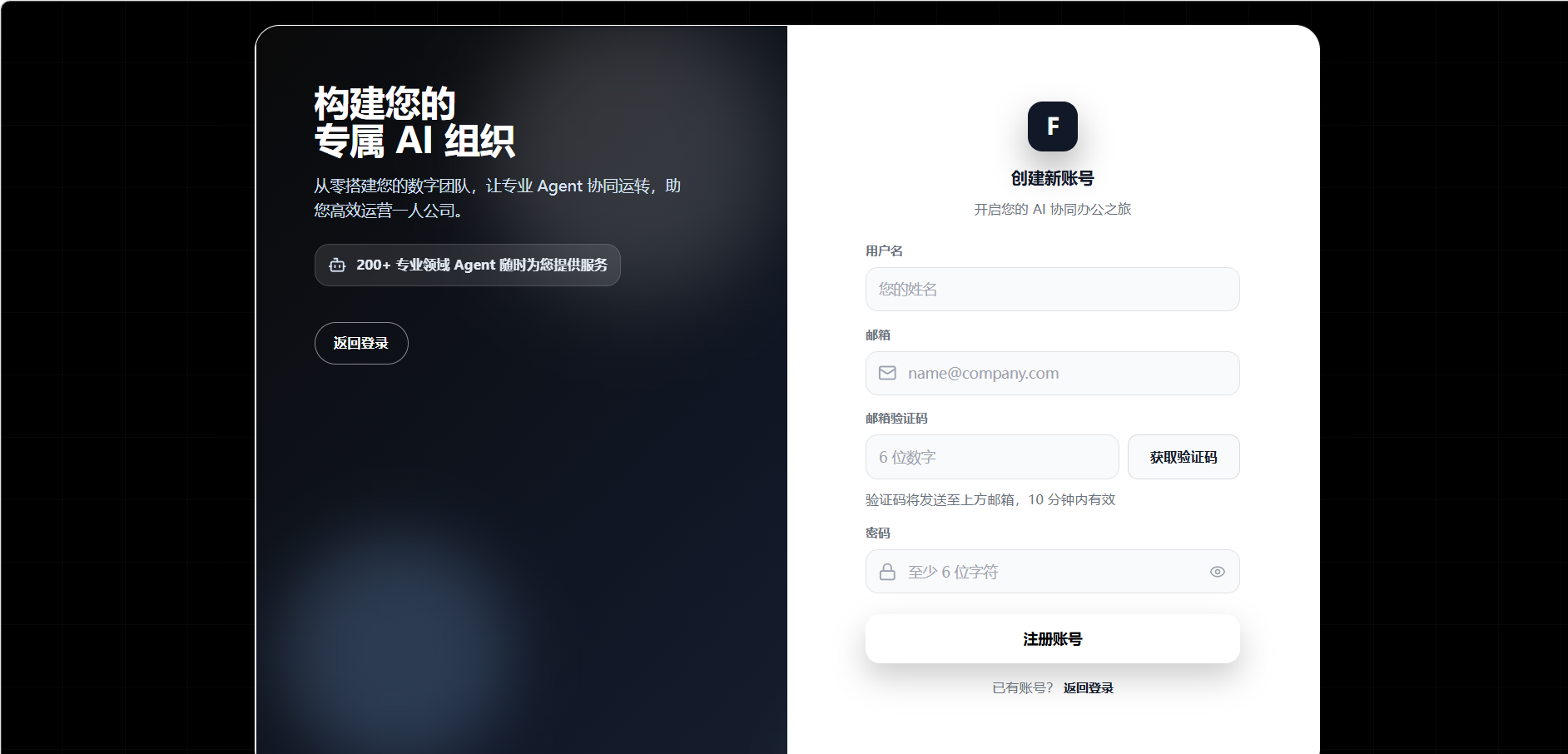 | 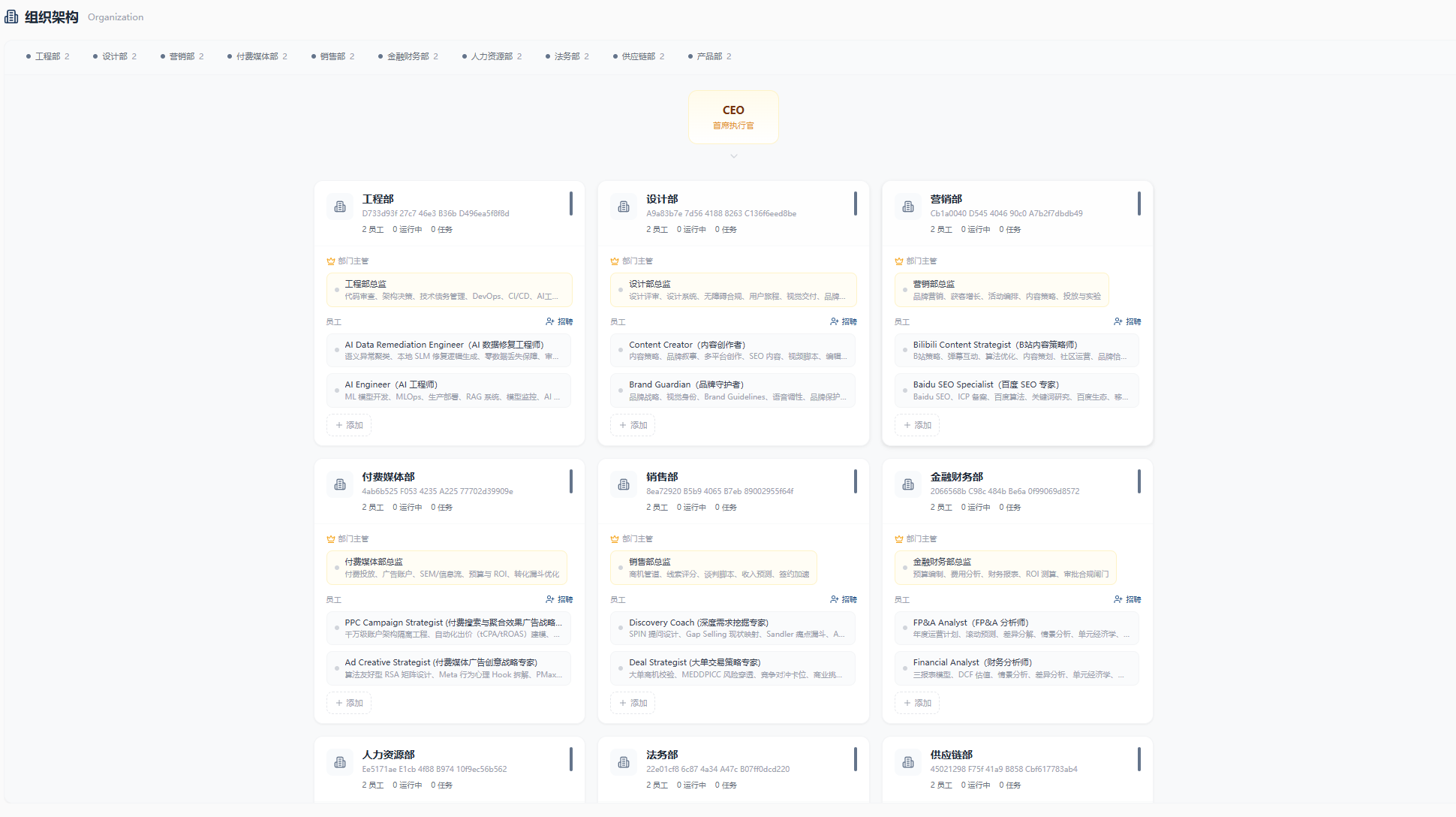 |
| Group Chat | Admin Dashboard |
|---|---|
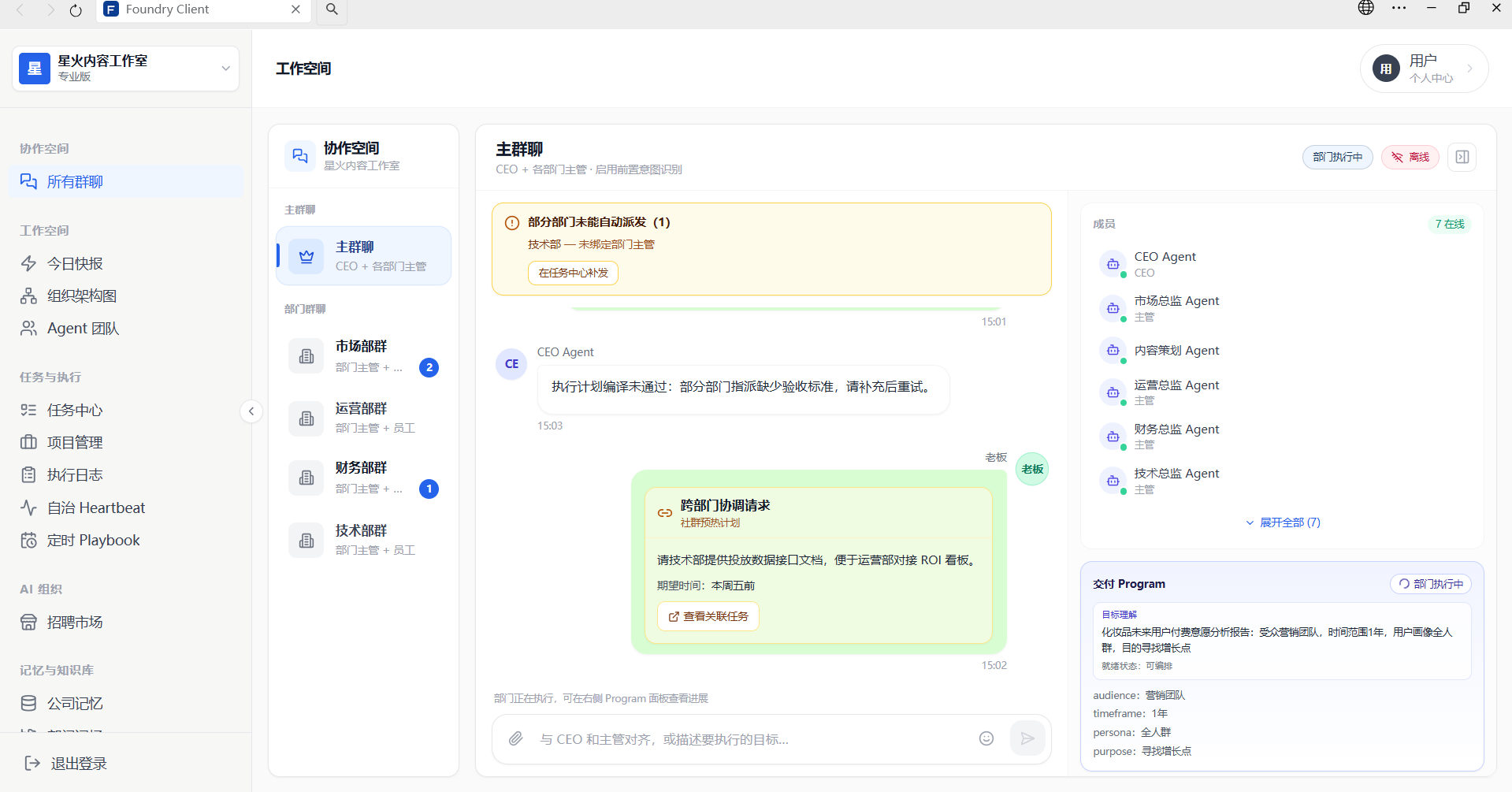 | 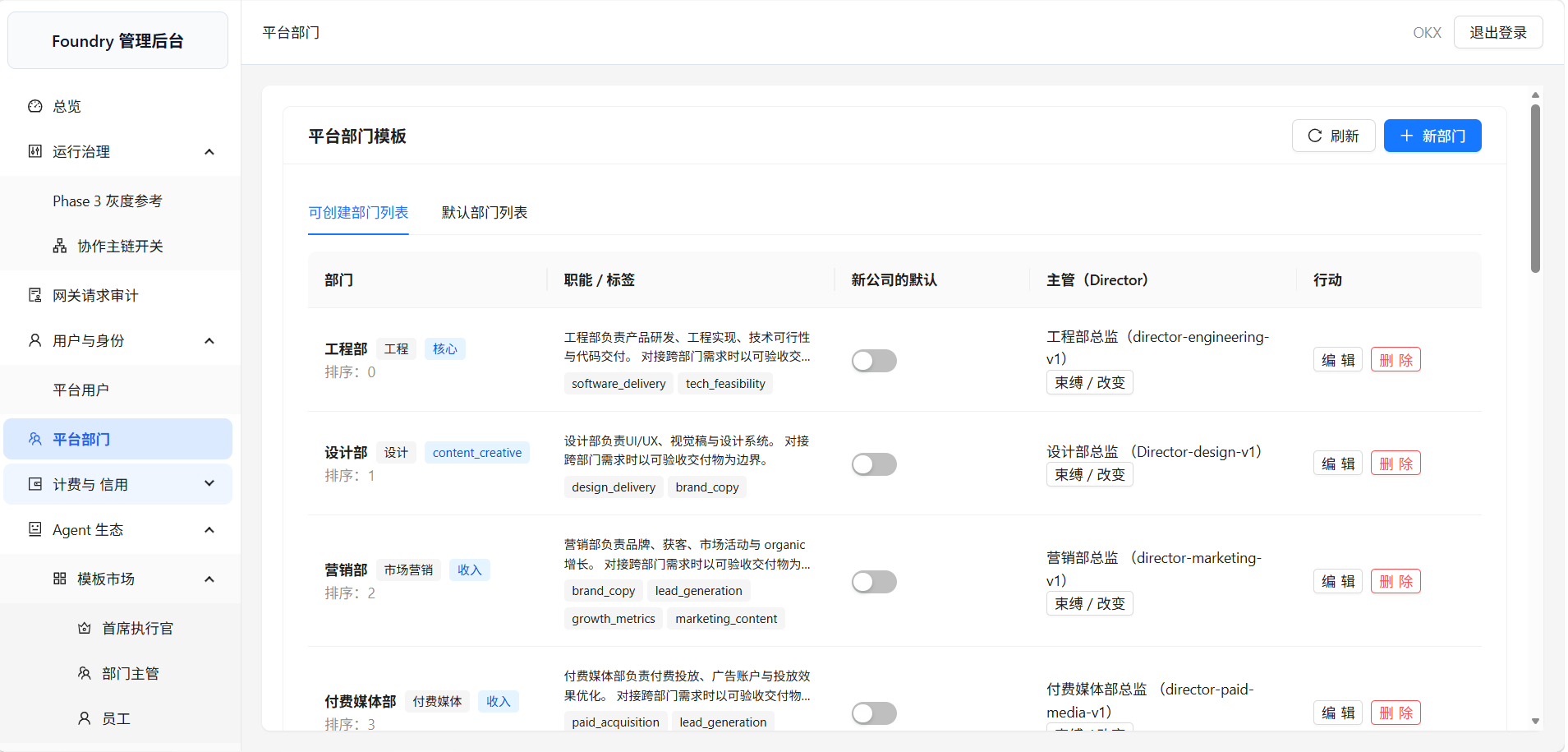 |
🚀 Quick Start
System Requirements
| Requirement | Minimum | Recommended |
|---|---|---|
| OS | Windows 10+, macOS 12+, Ubuntu 20.04+ | Any 64-bit OS |
| CPU | 2 cores | 4+ cores |
| RAM | 8 GB | 16 GB |
| Disk | 5 GB free | 10 GB+ free |
| Docker | 20.10+ | Latest stable |
| Node.js | 20+ | 22 LTS |
| pnpm | 10+ | Latest |
💡 Disk breakdown: Project ~1.5 GB + Docker images ~1 GB + build cache ~1 GB. SSD recommended for faster Docker startup.
What's Included (No Separate Installation Needed)
All infrastructure runs in Docker — you don't need to install these separately:
| Service | Purpose | Docker Image |
|---|---|---|
| PostgreSQL 18 | Main database | postgres:18-alpine |
| Redis 7 | Cache & sessions | redis:7-alpine |
| RabbitMQ 3 | Message queue | rabbitmq:3-management |
| Consul | Service discovery | consul:latest |
| Nginx | Reverse proxy | nginx:alpine |
One Command Setup (Recommended)
git clone https://github.com/axislab-top/Foundry.git && cd Foundry
pnpm setup:dev   # env → install → docker → db → start
Or Step by Step
# 1. Clone the repository
git clone https://github.com/axislab-top/Foundry.git && cd Foundry

# 2. Install dependencies
pnpm install

# 3. Configure environment
node -e "fs.copyFileSync('env.shared.example','.env.shared')"

# 4. Generate service .env files
node scripts/env-manager.js

# 5. Start infrastructure (PostgreSQL, Redis, RabbitMQ)
pnpm infra:start

# 6. Initialize database
node scripts/bootstrap-db.js

# 7. Start development server
pnpm dev
⏱️ First launch takes 5-10 minutes — Docker needs to download all images (~2 GB). Subsequent starts take ~30 seconds.
💡 Windows users: Run
pnpm setup:devdirectly in cmd or PowerShell. Run as Administrator if you encounter permission errors.
🇨🇳 China users: Docker Hub may be inaccessible. Configure mirror accelerator in Docker Desktop → Settings → Docker Engine:
{ "registry-mirrors": ["https://docker.1ms.run", "https://docker.xuanyuan.me"] }Then restart Docker Desktop before running setup.
After containers are healthy and migrations complete, visit:
| Service | URL | Description |
|---|---|---|
| 🖥️ Client UI | http://localhost:5173 | Main interface (Vite dev server) |
| 🔧 Admin Panel | http://localhost:3105 | Administrator dashboard |
| 📡 API Service | http://localhost:3000/api-docs | API Swagger docs |
| 📡 Gateway | http://localhost:3002/api-docs | Gateway Swagger docs |
| 📊 Grafana | http://localhost:4000 | Log visualization (admin/admin) |
| 🐰 RabbitMQ | http://localhost:15672 | Message queue management (guest/guest) |
Default Admin Account
The admin account is automatically created on first startup:
| Field | Value |
|---|---|
admin@example.com | |
| Username | admin |
| Password | changeme |
⚠️ Change
DEFAULT_ADMIN_PASSWORDin production environments.
Default Service Accounts
| Service | URL | Username | Password |
|---|---|---|---|
| 🔧 Admin Panel | http://localhost:3105 | admin | changeme |
| 📊 Grafana | http://localhost:4000 | admin | admin |
| 🐰 RabbitMQ | http://localhost:15672 | guest | guest |
Useful Commands
pnpm infra:status    # Check container status
pnpm infra:logs      # View container logs
pnpm infra:stop      # Stop all containers
pnpm infra:restart   # Restart all containers
Troubleshooting
| Problem | Solution |
|---|---|
| Port already in use | Run pnpm infra:stop first, or change ports in env.shared.example |
| Docker not running | Start Docker Desktop and wait for it to be ready |
| Out of memory | Increase Docker memory limit to 8 GB+ in Docker Desktop settings |
| Slow on Windows | Enable WSL 2 backend for Docker Desktop |
getaddrinfo ENOTFOUND postgres | You have a stale .env file with Docker hostnames. Delete .env and re-run pnpm setup:dev |
RabbitMQ ACCESS_REFUSED | RabbitMQ container was created with wrong credentials. Run pnpm infra:stop then pnpm setup:dev again |
| Database connection timeout | PostgreSQL may be slow to start on Windows. The app will retry automatically (10s timeout) |
| Docker image pull timeout | Configure mirror accelerator (see below) or pull images manually: node scripts/pull-docker-images.js |
Docker Image Pull Issues (China Users)
If you see errors like failed to fetch anonymous token or content not found:
-
Configure Docker Mirror (recommended):
- Docker Desktop → Settings → Docker Engine
- Add to JSON:
{ "registry-mirrors": [ "https://docker.1ms.run", "https://docker.xuanyuan.me" ] }- Click "Apply & restart"
-
Pull images manually (if mirror doesn't work):
node scripts/pull-docker-images.js -
Pull specific image (if only one fails):
docker pull node:20-alpine
docker pull node:20-bookworm-slim
💡 Diagnose database issues: Run
node scripts/diagnose-db.jsin a separate terminal while the project is running.
First Time Setup
After completing the steps above:
# 1. Login to Admin Panel at http://localhost:3105
#    Email: admin@example.com  Password: changeme

# 2. Configure LLM Keys (required for AI agents):
#    Admin Panel → LLM Keys → Add your OpenAI/Claude API key

# 3. Open Client UI at http://localhost:5173
#    Register a new account or login to start using the platform
What's NOT Included (You Need to Configure)
| Item | Where to Configure | Why |
|---|---|---|
| LLM API Keys | Admin Panel → LLM Keys | Required for AI agents to work |
| Company Info | Admin Panel → Company | Your company name and industry |
| Agent Skills | Admin Panel → Skills | Enable/disable and configure skills |
| Email Settings | Admin Panel → Settings | For notifications (optional) |
💡 Tip: After logging into the Admin Panel, go to LLM Keys first and add at least one API key (OpenAI, Claude, etc.) — otherwise AI agents won't be able to respond.
✨ Features
<details> <summary><strong>🏗️ One-Click Company Creation</strong> — Input name and industry, auto-generate org structure</summary>- Auto-generates Board → CEO → Department Head → Employee Agent hierarchy
- Built-in industry templates for one-click company initialization
- Drag-and-drop custom organization structure
- CEO Agent handles strategic breakdown and task assignment
- Department Head Agent manages sub-task orchestration
- Employee Agent executes tasks (Skills, APIs, code execution)
- Customizable agent roles and capabilities
- Dynamic group chat + streaming output + @mentions
- Human-in-the-loop approval flow (critical decisions need your confirmation)
- Real-time task progress push notifications
- Multi-company, multi-group-chat parallel operation
- 3-tier memory: Company / Department / Agent level
- RAG intelligent retrieval (powered by pgvector)
- Automatic memory consolidation and decay
- Cross-session context preservation
- CEO Agent periodic Heartbeat review of pending tasks
- Task auto-breakdown → assignment → execution → reporting
- Temporal workflow engine ensures reliability
- Scheduled tasks and event-driven support
- Real-time token consumption and cost tracking
- Company-level budget control
- Intelligent model routing (auto-select best cost-performance ratio)
- Full audit logging
- LLM Key pool management (multi-key rotation)
🏗️ Architecture
System Overview
graph TB
    subgraph user["👤 User Layer"]
        chat["💬 Chat UI<br/><i>Real-time WebSocket</i>"]
        admin["🖥️ Admin Panel<br/><i>Management Dashboard</i>"]
    end

    nginx["🔀 Nginx Reverse Proxy + SSL"]

    subgraph gateway["🚪 Gateway · port 3002"]
        gw_auth["🔐 JWT Auth + RBAC"]
        gw_ws["🔌 Socket.IO Hub"]
        gw_security["🛡️ HMAC / CSRF / Rate Limit"]
        gw_route["🔀 Dynamic Route Proxy"]
    end

    subgraph services["⚙️ Application Services"]
        api["📡 API Service · port 3000<br/><b>Business Control Plane</b><br/>46 entities · RLS multi-tenancy<br/>Billing · Memory+RAG · Skills"]
        worker["🧠 Worker Service · port 3004<br/><b>AI Orchestration Engine</b><br/>LangGraph Pipelines · Task Scheduler<br/>Tool Registry · Memory Consolidation"]
        webhook["🪝 Webhook Service · port 3003<br/>External event receive/forward/retry"]
    end

    subgraph infra["🏗️ Infrastructure"]
        pg[("🐘 PostgreSQL + pgvector<br/>RLS multi-tenancy · 46 tables<br/>Vector embeddings")]
        redis[("⚡ Redis 7<br/>Cache · Session · Pub/Sub")]
        rabbitmq[("🐇 RabbitMQ<br/>Event Bus · RPC Queues<br/>15 event domains")]
        minio[("📦 MinIO / S3 / OSS<br/>File storage")]
        temporal["⏱️ Temporal<br/>Heartbeat fanout · Approval wait<br/>Supervisor review"]
        grafana["📊 Grafana Stack<br/>Loki · Promtail · Grafana"]
    end

    subgraph runners["🔒 Execution"]
        runner["🏃 Runner · gVisor Sandbox<br/>Code execution · Command policy<br/>K8s Jobs isolation"]
    end

    chat --> nginx
    admin --> nginx
    nginx --> gateway

    gw_ws -- "Redis Pub/Sub<br/>collab:notify" --> redis
    gw_route -- "RPC proxy" --> api
    gw_route -- "RPC proxy" --> webhook

    api <== "RPC<br/>api-rpc-queue" ==> worker
    worker ==>|"RPC sandbox"| runner
    runner ==>|"RPC token"| api

    api --> pg
    api --> redis
    api --> rabbitmq
    worker --> rabbitmq
    webhook --> rabbitmq
    api --> minio
    worker --> pg

    style user fill:#e3f2fd,stroke:#1565c0,color:#000
    style gateway fill:#fff3e0,stroke:#e65100,color:#000
    style services fill:#e8f5e9,stroke:#2e7d32,color:#000
    style infra fill:#f3e5f5,stroke:#6a1b9a,color:#000
    style runners fill:#fce4ec,stroke:#b71c1c,color:#000
Core Differentiator: Autonomous Heartbeat Loop
The CEO Agent runs on a ~30min autonomous cycle — no human prompt needed. Each cycle gathers context from 7 sources, plans via LLM, creates tasks, and streams a report back to chat.
graph LR
    subgraph cycle["⏰ Autonomous Heartbeat Cycle"]
        A["📋 TaskHeartbeatScheduler<br/><i>Round-robin across companies</i>"]
        B["📥 Ingest Context<br/>Dashboard · Memory RAG<br/>Budgets · Tasks · Lessons<br/>Org tree · Model routing"]
        C["🧠 CEO LLM Plan<br/><i>Structured output + Zod repair</i><br/>nextStep: generate_tasks | summary_only"]
        D["✅ Validate & Persist<br/>Create tasks via API RPC<br/>Pull agents into rooms"]
        E["📝 Summarize & Notify<br/>Stream report to chat room<br/>Store in memory · Request approval"]
        F["💾 Memory + Approval"]
    end

    A -- "~30min" --> B
    B --> C
    C --> D
    D --> E
    E --> F
    F -.->|"repeat"| A

    style cycle fill:#fffde7,stroke:#f57f17,color:#000
Core Differentiator: Collaboration Pipeline
User messages trigger a LangGraph state machine with 4 intent paths and a human-in-the-loop approval gate (interrupt/resume).
graph TB
    msg["💬 User message in chat<br/><i>@CEO or @Agent</i>"]

    subgraph pipeline["CollaborationRoomPipeline · LangGraph"]
        classify["🎯 CEO LLM<br/>Classify Intent"]

        discuss["💬💬💬 Discussion<br/><i>Multi-agent moderated</i>"]
        direct["🤖 Single Reply<br/><i>@Agent direct answer</i>"]
        execute["📋 Task Execution<br/><i>CEO breaks down into tasks</i>"]
        gate["⏸️ Approval Gate<br/><i>LangGraph interrupt()</i><br/>Waits for human decision"]

        approve{"👤 Human<br/>Approve?"}
    end

    out["Agent responses → API persist<br/>→ Redis Pub/Sub → Socket.IO<br/>→ Client (200-char streaming chunks)"]

    msg --> classify
    classify -->|"discussion"| discuss
    classify -->|"direct"| direct
    classify -->|"execution"| execute
    classify -->|"approval"| gate

    gate --> approve
    approve -- "✅ 批准/approve" --> execute
    approve -- "❌ 拒绝/reject" --> out

    discuss --> out
    direct --> out
    execute --> out

    style pipeline fill:#e8eaf6,stroke:#283593,color:#000
    style gate fill:#fff9c4,stroke:#f9a825,color:#000
End-to-End Core Flow
The full lifecycle: from user goal to agent execution, cost tracking, failure review, and memory feedback — forming a self-improving loop.
graph TB
    subgraph trigger["🎯 Triggers"]
        user["💬 User @CEO in chat"]
        heartbeat["⏰ Heartbeat ~30min"]
        webhook_trig["🪝 External Webhook"]
    end

    plan["🧠 CEO LLM<br/>Break down goal into tasks<br/><i>Structured output + Zod repair</i>"]

    assign["📋 Task Assignment<br/>DAG: parent → sub-tasks<br/>Assign to department agents"]

    subgraph exec["⚙️ Agent Execution"]
        agent["🤖 Agent LLM<br/>Execute with skills + context"]
        skills["🔧 Skill Engine<br/>Tool calling (function schema)"]
        runner["🏃 Runner Sandbox<br/>gVisor K8s Job"]
    end

    result{{"✅❌ Task Result"}}

    subgraph cost["💰 Cost Control"]
        billing["📊 Token Billing<br/>per LLM call"]
        budget["💵 Budget Check<br/>company / dept / agent"]
        degrade["📉 Model Degradation<br/>fallback to cheaper model"]
        pause["🚫 Budget Exceeded<br/>pause autonomous ops"]
    end

    subgraph feedback["🔄 Memory Feedback Loop"]
        sup["🔍 Supervisor Review<br/>Post-mortem on failures"]
        lessons["📝 Lessons Learned<br/>LLM-generated insights"]
        memory["🧠 Memory RAG<br/>pgvector embeddings<br/>company → dept → agent"]
    end

    chat_out["💬 Streaming Report<br/>→ Chat Room (200-char chunks)<br/>→ Socket.IO → Client"]

    trigger --> plan
    plan --> assign
    assign --> exec
    agent --> skills
    skills -->|"code/commands"| runner
    runner --> result
    agent --> result

    result -->|"completed"| chat_out
    result -->|"failed"| sup
    sup --> lessons
    lessons --> memory
    memory -.->|"RAG search<br/>next heartbeat"| plan

    agent --> billing
    billing --> budget
    budget -->|"warning"| degrade
    budget -->|"exceeded"| pause
    degrade -.->|"cheaper model"| agent

    style trigger fill:#e3f2fd,stroke:#1565c0,color:#000
    style cost fill:#fff3e0,stroke:#e65100,color:#000
    style feedback fill:#e8f5e9,stroke:#2e7d32,color:#000
    style exec fill:#f3e5f5,stroke:#6a1b9a,color:#000
📄 Full architecture documentation → docs/ARCHITECTURE.md
🆚 Comparison
| Feature | Foundry | CrewAI | MetaGPT | ChatDev | AutoGen |
|---|---|---|---|---|---|
| Positioning | AI Digital Company Platform | Agent Orchestration Framework | AI Software Company | Zero-code Dev Platform | Agent Programming Framework |
| Ready to Use | ✅ Complete platform | ❌ Needs orchestration | ⚠️ Code generation only | ⚠️ Code generation only | ❌ Needs coding |
| Real-time Chat | ✅ WebSocket | ❌ | ❌ | ❌ | ❌ |
| Org Chart Visualization | ✅ Drag-and-drop | ❌ | ⚠️ Fixed roles | ⚠️ Fixed roles | ❌ |
| Layered Memory | ✅ 3-tier + RAG | ❌ | ❌ | ❌ | ❌ |
| Cost Control | ✅ Budget + Routing | ❌ | ❌ | ❌ | ❌ |
| Multi-tenancy | ✅ RLS isolation | ❌ | ❌ | ❌ | ❌ |
| Approval Flow | ✅ Human-in-loop | ❌ | ❌ | ❌ | ❌ |
| Admin Panel | ✅ Separate frontend | ❌ | ❌ | ❌ | ✅ Studio |
| Tech Stack | NestJS + React | Python | Python | Python | Python + .NET |
| License | GPL-3.0 | MIT | MIT | Apache-2.0 | MIT |
💡 Key difference: Competitors are "frameworks" — you write code to orchestrate agents. Foundry is a "platform" — register and use it. Like the difference between Slack and IRC.
🛠️ Tech Stack
| Layer | Technology |
|---|---|
| Backend | NestJS (TypeScript) · 7 microservices |
| Frontend | React 18 · Vite · TypeScript |
| Build | pnpm workspace · Turborepo |
| Database | PostgreSQL (TypeORM + RLS multi-tenancy) · pgvector |
| Message Queue | RabbitMQ |
| Cache | Redis |
| AI Orchestration | LangChain · LangGraph |
| Real-time | Socket.IO (WebSocket) |
| Object Storage | MinIO / S3 / OSS / Local |
| Workflow | Temporal (optional) |
| Containerization | Docker Compose |
📁 Project Structure
Foundry/
├── apps/                    # Microservices
│   ├── api/                 #   API service (core business)
│   ├── gateway/             #   Gateway (auth, rate limiting, routing)
│   ├── worker/              #   Background tasks
│   ├── webhooks/            #   Webhook handling
│   ├── runner/              #   Code execution sandbox
│   ├── temporal-worker/     #   Temporal workflows
│   └── logging/             #   Logging service
├── admin-system/            # Admin panel frontend
├── client-frontend/         # Client frontend
├── packages/                # Shared packages (messaging, security, tenant...)
├── infrastructure/          # Infrastructure configs
├── contracts/               # Event contracts & OpenAPI
├── deployment/              # Docker Compose deployment
└── docs/                    # Documentation
⚙️ Environment Variables
Core configuration is documented in env.shared.example. Key variables:
# 🔴 Required (production)
JWT_SECRET=<openssl rand -base64 32>
DB_PASSWORD=<strong-password>
DEFAULT_ADMIN_PASSWORD=<strong-password>

# 🟡 Optional
TEST_AUTH_ENABLED=false          # Test user injection (dev only)
FILE_UPLOAD_MAX_SIZE=52428800    # File upload limit 50MB
KIBANA_ENCRYPTION_KEY=<key>      # Kibana (if using ELK)
❓ FAQ
<details> <summary><strong>Q: How is Foundry different from CrewAI/AutoGen?</strong></summary>CrewAI/AutoGen are agent orchestration frameworks — you write Python code to define agents, set up tools, and orchestrate workflows.
Foundry is an AI digital company platform — you register, create a company, and the AI runs automatically. No coding required.
Analogy: CrewAI is like building a PC from parts. Foundry is like buying a ready-to-use computer.
</details> <details> <summary><strong>Q: Which AI models are supported?</strong></summary>Through LLM Key pool management, all major models are supported: OpenAI, Anthropic Claude, Azure OpenAI, and Chinese models (Qwen, Wenxin, etc.). Features multi-key rotation and intelligent routing.
</details> <details> <summary><strong>Q: Can I use it commercially?</strong></summary>Yes. This project is open-sourced under GPL-3.0. Commercial use requires compliance with GPL-3.0 terms (derivative works must also be open-sourced). Contact us for commercial licensing.
</details> <details> <summary><strong>Q: How is data security ensured?</strong></summary>- Multi-tenant RLS (Row-Level Security) isolation
- LLM Key encrypted storage (AES-256-GCM)
- JWT + RBAC access control
- Full audit logging
- All credentials managed via environment variables, never hardcoded
- Development: 4GB RAM + 2 CPU (Docker)
- Production: 8GB RAM + 4 CPU (recommended)
- Storage: PostgreSQL + Redis + RabbitMQ + MinIO
🤝 Contributing
We welcome all forms of contribution!
| Type | How |
|---|---|
| 🐛 Bug Report | Open an Issue |
| 💡 Feature Request | Open an Issue |
| 📝 Documentation | Submit a PR directly |
| 🔧 Code | Fork → Branch → PR |
See CONTRIBUTING.md for details.
Contributors
<a href="https://github.com/axislab-top/Foundry/graphs/contributors"> <img src="https://contrib.rocks/image?repo=axislab-top/Foundry" /> </a>📜 License
This project is licensed under GPL-3.0.
⭐ Star History
<p align="center"> If you find this useful, please give us a ⭐ Star!<br> <a href="https://github.com/axislab-top/Foundry/stargazers">⭐ Star</a> • <a href="https://github.com/axislab-top/Foundry/fork">🍴 Fork</a> • <a href="https://github.com/axislab-top/Foundry/issues/new?template=bug_report.yml">🐛 Report Bug</a> </p>
Foundry alternatives
View more →Similar ai agents in Coding Agents, ranked by GitHub stars. Compare licence, recent activity and scan status before you choose.
| Name | Stars | Licence | Last updated | Scan |
|---|---|---|---|---|
| Foundry (this page) axislab-top | 392 | GPL-3.0 | Jun 30, 2026 | Scanned, no flagged issues |
| AutoGPT Significant-Gravitas | 188k | None found | Nov 1, 2026 | Not scanned yet |
| Langchain langchain-ai | 149k | MIT | Nov 1, 2026 | Scanned, no flagged issues |
| Gemini CLI google-gemini | 109k | Apache-2.0 | Nov 1, 2026 | Scanned, no flagged issues |
| MetaGPT FoundationAgents | 71k | MIT | Jan 21, 2026 | Scanned, no flagged issues |
| Oh My Openagent code-yeongyu | 71k | None found | Nov 1, 2026 | Not scanned yet |