Liliumai AI Agent
 by beidald
Lilium AI: The ultimate personal AI agent framework for autonomous computer control. Featuring browser automation, shell execution, and multi-channel integration (WeChat/Telegram/Discord).
Liliumai is an open-source ai agent by beidald, written mainly in TypeScript, with 93 GitHub stars and the MIT license. Its code was last updated Feb 25, 2026.
Lilium AI
Not just a chatbot, but your AI Co-pilot for total computer automation. liliumai.cn
Lilium AI is a powerful personal AI agent framework designed for autonomous execution. It connects Large Language Models (LLMs) like OpenAI and Ollama to browser automation, system-level shell control, deep file integration, and omni-channel communication, enabling AI to perform complex end-to-end tasks just like a human.
✨ Key Features
- 🌐 Browser Automation: Built-in browser driver for autonomous navigation, searching, clicking, and data extraction.
- 🤖 Autonomous Sub-Agents: Spawn background sub-agents to handle complex tasks asynchronously without interrupting your main chat.
- 💻 Total Computer Control: Equipped with Shell execution, Filesystem I/O, and Cron scheduling for true automation.
- 🔌 Omni-Channel: The only framework supporting WeChat, Feishu, DingTalk, Telegram, WhatsApp, Discord, and more.
- 🧠 Memory & Knowledge: Long-term memory (SQLite/LanceDB) and RAG-based knowledge base for personalized workflows.
- 🧠 Multi-LLM Support: Seamlessly switch between OpenAI, Claude, Ollama (local models), and more.
- 🧩 Minimalist Extension: Add new skills in minutes by dropping JS files into the
plugins/folder. - 🗣️ Voice-to-Action: Automatic voice transcription (Whisper) to control your computer via voice commands.
🚀 Core Scenarios (What can it do?)
- Automated Workflows: "Every morning at 9 AM, log into my GitHub, summarize all new issues, and send the report to my WeChat."
- Web Intelligence: "Monitor this page for price drops; notify me via Slack as soon as it's below $1000."
- System Ops: "Analyze the server logs in the current directory, find all 500 errors from the last hour, and generate a root-cause summary."
- Cross-Platform Assistant: "Take all voice messages I send you on Telegram, transcribe them into text, and save the summary to a local Markdown file."
💡 Why Choose Lilium AI?
🌟 For Everyone: Your All-in-One Digital Assistant
- Simple as Chatting: No coding required. Just tell it, "Compare the price of these headphones across major sites," and it will browse the web for you.
- 24/7 Personal Agent: Let it monitor web pages or summarize documents while you sleep, and report back via WhatsApp or Telegram.
- Privacy First: Your chats, files, and account info stay on your own device—safe and secure.
🛠️ For Developers: Ultimate Extensibility
- Node.js Ecosystem: Built on Node.js, leveraging millions of npm packages for easy extension.
- Powerful Toolbox: Integrated Puppeteer, SQLite, LanceDB, Whisper, and RAG capabilities.
- Flexible Plugin System: Define new AI skills simply by dropping a JS file into the
plugins/folder.
🚀 Getting Started
Prerequisites
- Node.js: v18 or higher
- pnpm: Recommended package manager (
npm install -g pnpm) - Python 3: (Optional) For macOS permission checking script (
check-permissions).
Installation
-
Clone the repository
git clone https://github.com/beidald/liliumai.git cd liliumai -
Install dependencies
pnpm install -
Configure the project Copy the example configuration file to create your local config.
cp config.example.json config.json -
Edit
config.jsonOpenconfig.jsonand fill in your details:- LLM: Add your OpenAI API Key or Ollama base URL.
- Channels: Enable desired channels (e.g.,
wechat,telegram) and add tokens. - Admin: Critical! Change the default password in the
adminsection.
Security Note: Never commit your
config.jsonto version control. The project is configured to ignore it by default. -
Check Permissions (macOS only) If running on macOS and using Wechaty/Puppeteer, you may need to grant accessibility permissions.
pnpm check-permissions
Running the Bot
Start the agent in development mode:
pnpm start
Or build and run for production:
pnpm build
node dist/index.js
⚠️ Disclaimer
- Terms of Service: Automated interactions with some platforms (e.g., WeChat, WhatsApp) may violate their Terms of Service. Users are responsible for ensuring compliance with platform rules.
- Account Risk: Using this software with personal accounts (especially on WeChat via Puppet) carries a risk of account restriction or banning. It is highly recommended to use a dedicated test account.
- Data Privacy: While this project is designed to be "Local First" and privacy-focused, users are responsible for securing their own server environments and configuration files.
🗺️ Roadmap
- Enhanced Web Dashboard: Richer data visualization and easier configuration management.
- Plugin Ecosystem: A marketplace or easier discovery mechanism for community plugins.
- Multi-modal Support: Ability to process images (Vision) and generate audio (TTS).
- RAG Improvements: Better knowledge base retrieval strategies and document parsing.
- Mobile App: A companion mobile app for managing the bot on the go.
⚙️ Configuration Guide
The config.json file is the heart of Lilium AI. Here are key sections:
Admin Authentication
Secure your Web Interface and API endpoints.
"admin": {
  "email": "admin@example.com",
  "password": "YOUR_STRONG_PASSWORD"
}
LLM Providers
Configure multiple providers with priorities.
"llm": [
  {
    "provider": "openai",
    "model": "gpt-4",
    "apiKey": "sk-...",
    "priority": 1
  },
  {
    "provider": "ollama",
    "model": "llama3",
    "baseUrl": "http://localhost:11434/v1",
    "priority": 2
  }
]
Voice Transcription
Enable automatic voice-to-text for audio messages.
"transcription": {
  "provider": "local",  // "local" or "groq"
  "model": "base",      // "tiny", "base", "small", "medium", "large"
  "apiKey": ""          // Required for cloud providers
}
Note: Local models will be automatically downloaded on first use from HuggingFace (with domestic mirror support).
Channels
Enable channels as needed. For example, to enable the Web UI:
"channels": {
  "web": {
    "enabled": true,
    "port": 3000
  }
}
🖥️ Web Interface
Once running, access the Web UI at:
http://localhost:3000
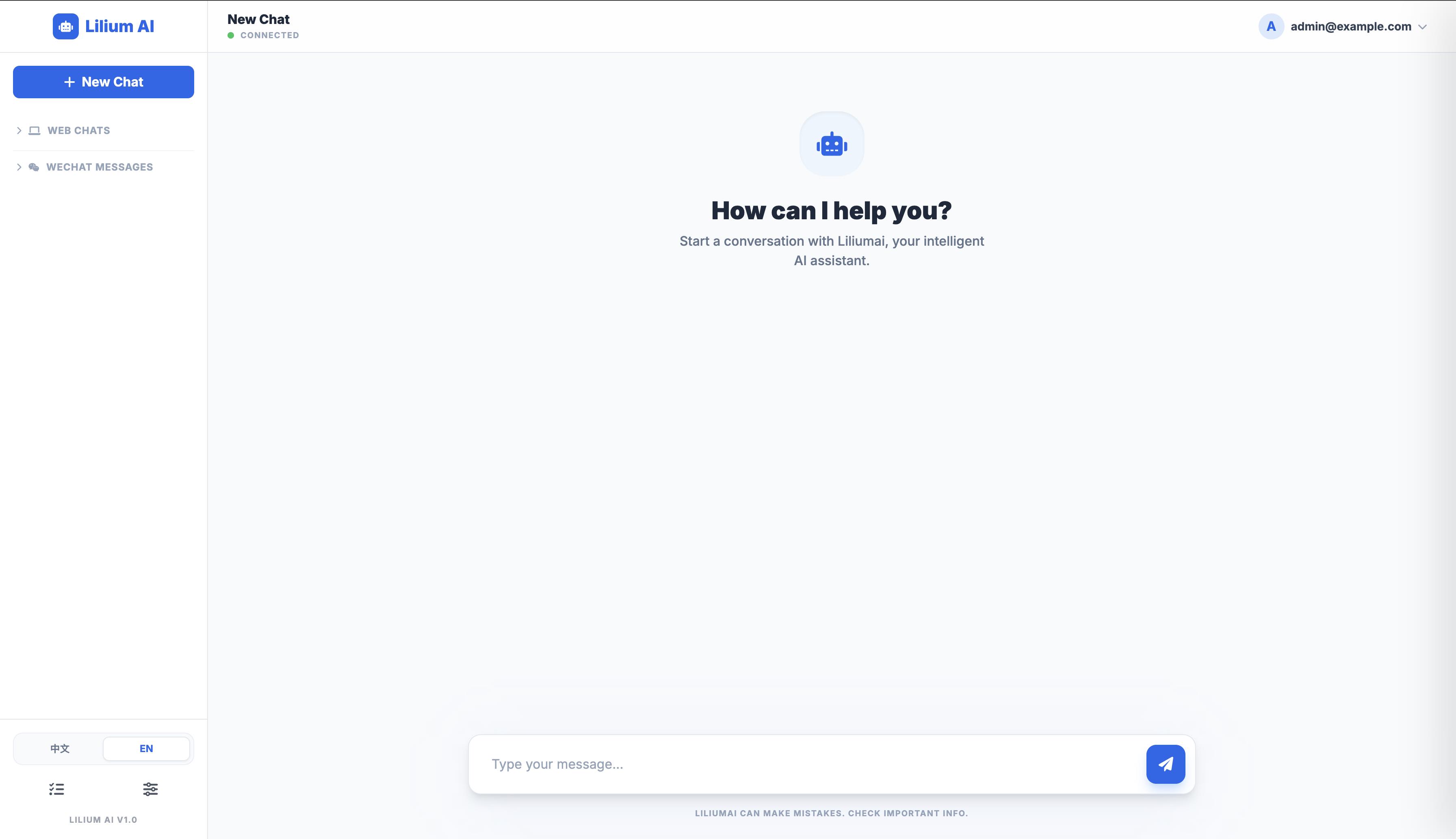
- Chat: Interact with Lilium directly from your browser.
- Stop Generation: Click the "Stop" button to immediately halt the AI's current output.
- Admin: Some features require the Admin credentials configured in
config.json.
🧩 Skills Showcase
Lilium AI's true power lies in skill composition. You can give complex natural language instructions:
- Browser Automation: "Log into GitHub and star the specified repository."
- System Analysis: "Analyze the log files in the current directory, identify the root cause of 500 errors, and generate a summary."
- Autonomous Tasks: "Spawn a sub-agent to continuously monitor price changes on a competitor's website and report to me every hour."
- Smart Scheduling: "Every morning at 9 AM, summarize all my unread Feishu messages and send them to Telegram."
- Multi-step Collaboration: "Search for the latest research on DeepSeek, download the PDF, extract the key findings, and save them to the local knowledge base."
🤝 Join the Evolution (Contributing)
Lilium AI is an open project, and we welcome developers to join us in building the most powerful personal AI agent!
- Develop New Skills: Want the AI to support more tools? You can easily extend its capabilities by writing simple TypeScript/JavaScript classes (Check TOOLS.md).
- Build Plugins: Our plugin system allows you to add features directly to the
plugins/directory without touching the core code (Check PLUGINS.md). - Improve Channels: Help us integrate more communication platforms like Slack, Discord, or deeper Feishu/DingTalk integrations.
- Submit Issues/PRs: Whether it's a bug fix or a feature proposal, we value every contribution.
Check out our CONTRIBUTING.md for more details. Let's define the future of AI automation together!
📬 Contact
Email: beidaliudong@pku.org.cn
📝 License
MIT License.
Liliumai alternatives
View more →Similar ai agents in Communication, ranked by GitHub stars. Compare licence, recent activity and scan status before you choose.
| Name | Stars | Licence | Last updated | Scan |
|---|---|---|---|---|
| Liliumai (this page) beidald | 93 | MIT | Feb 25, 2026 | Scanned, no flagged issues |
| ChatTTS 2noise | 40k | AGPL-3.0 | Apr 10, 2026 | Scanned, no flagged issues |
| Nanoclaw nanocoai | 31k | MIT | Oct 30, 2026 | Scanned, no flagged issues |
| AgenticSeek Fosowl | 28k | GPL-3.0 | Oct 22, 2026 | Scanned, no flagged issues |
| Leon leon-ai | 18k | MIT | Oct 31, 2026 | Scanned, no flagged issues |
| SurfSense MODSetter | 17k | Apache-2.0 | Oct 30, 2026 | Scanned, no flagged issues |