Moltstream AI Agent
 by skaggsxyz
Agent-native streaming infrastructure. The streaming runtime built for non-human broadcasters.
Moltstream is an open-source ai agent by skaggsxyz, written mainly in TypeScript, with 64 GitHub stars and the MIT license. Its code was last updated Apr 9, 2026. The latest npm release is moltstream 0.7.0, published Mar 24, 2026, with 12 downloads last week.
🔴 MoltStream
The streaming runtime built for non-human broadcasters.
Deploy autonomous AI streamers on Kick with one command. No OBS manual setup, no bot scripts, no duct tape.


Built with Gemini · Fish Audio · Kick · OBS · Turborepo
What is MoltStream?
<img src="assets/logo.jpg" alt="MoltStream" width="80" align="left" style="margin-right: 16px;" />MoltStream is an agent-native streaming runtime. It turns an LLM into a live broadcaster — reading chat, generating responses, speaking through TTS, animating an avatar with lip sync, and pushing it all to Kick via OBS.
Without MoltStream: a week of manual setup — OBS scenes, chat bots, TTS wiring, avatar rendering, deployment scripts.
With MoltStream: npx moltstream start. 30 seconds.
What it looks like
💬 Viewer: "yo what do you think about rust vs go?"
🧠 Agent thinks: compares languages, considers chat context, picks a hot take
🔊 Agent speaks: "Rust if you hate yourself, Go if you hate your coworkers. Next question."
🎭 Avatar: lip syncs the response, chat overlay updates in real-time
💬 Viewer: "play something chill"
🧠 Agent thinks: interprets mood request, selects response
🔊 Agent speaks: "I don't have Spotify access yet, but I can vibe verbally. Here's my impression of lo-fi beats: bmmm tss bmmm tss..."
💬 Chat: explodes
Quick Start
# Configure your agent
npx moltstream init

# Go live
npx moltstream start

# Control from Claude / Cursor (MCP)
npx moltstream mcp
Your AI agent is now streaming on Kick with:
- 💬 Real-time chat — reads and responds to viewers via Kick WebSocket
- 🧠 LLM brain — Gemini 2.5 Flash (default) or Anthropic Claude
- 🔊 TTS voice — Fish Audio, ElevenLabs, or OpenAI
- 🎭 Animated avatar — character with lip sync + chat overlay
- 📡 OBS integration — streams to Kick via RTMP/RTMPS
- 🤖 MCP server — control from Claude, Cursor, or any MCP client
MCP Server
Control your AI streamer from Claude Desktop, Cursor, Windsurf, or any MCP-compatible client.
Add to claude_desktop_config.json:
{
  "mcpServers": {
    "moltstream": {
      "command": "npx",
      "args": ["moltstream", "mcp"],
      "env": { "MOLTSTREAM_CONFIG": "/path/to/moltstream.yaml" }
    }
  }
}
Available tools:
| Tool | Description |
|---|---|
get_status | Is the streamer live? Uptime, message count, OBS/TTS state |
start_stream | Launch AI streamer (optional channel + personality override) |
stop_stream | Graceful shutdown |
send_chat | Send message to Kick chat as the bot |
get_chat_log | Recent viewer + bot messages |
get_traces | Reasoning traces — what the AI was thinking per response |
update_personality | Hot-swap system prompt without restart |
obs_control | Start/stop OBS streaming, switch scenes, mute sources |
configure | Read or update moltstream.yaml |
Example Claude prompt:
"Start a stream on the moltstream channel with Tyler Skaggs personality, then check the traces after 5 minutes and tell me what the agent was thinking."
How It Works
Kick Chat (WebSocket)
    │
    ▼
┌──────────────────────────────────────┐
│            MoltStream                │
│                                      │
│  ┌─────────┐   ┌─────┐   ┌───────┐  │
│  │ Kick    │──▸│ LLM │──▸│  TTS  │  │
│  │ Chat    │   │     │   │       │  │
│  └─────────┘   └──┬──┘   └───┬───┘  │
│                   │           │      │
│              Gemini 2.5    Audio     │
│              Flash         Buffer    │
│                   │           │      │
│              ┌────▼───────────▼───┐  │
│              │      Avatar        │  │
│              │  Lip Sync + Chat   │  │
│              │     Overlay        │  │
│              └────────┬───────────┘  │
│                       │              │
└───────────────────────┼──────────────┘
                        │ Browser Source
                        ▼
                  OBS → Kick RTMP
Pipeline
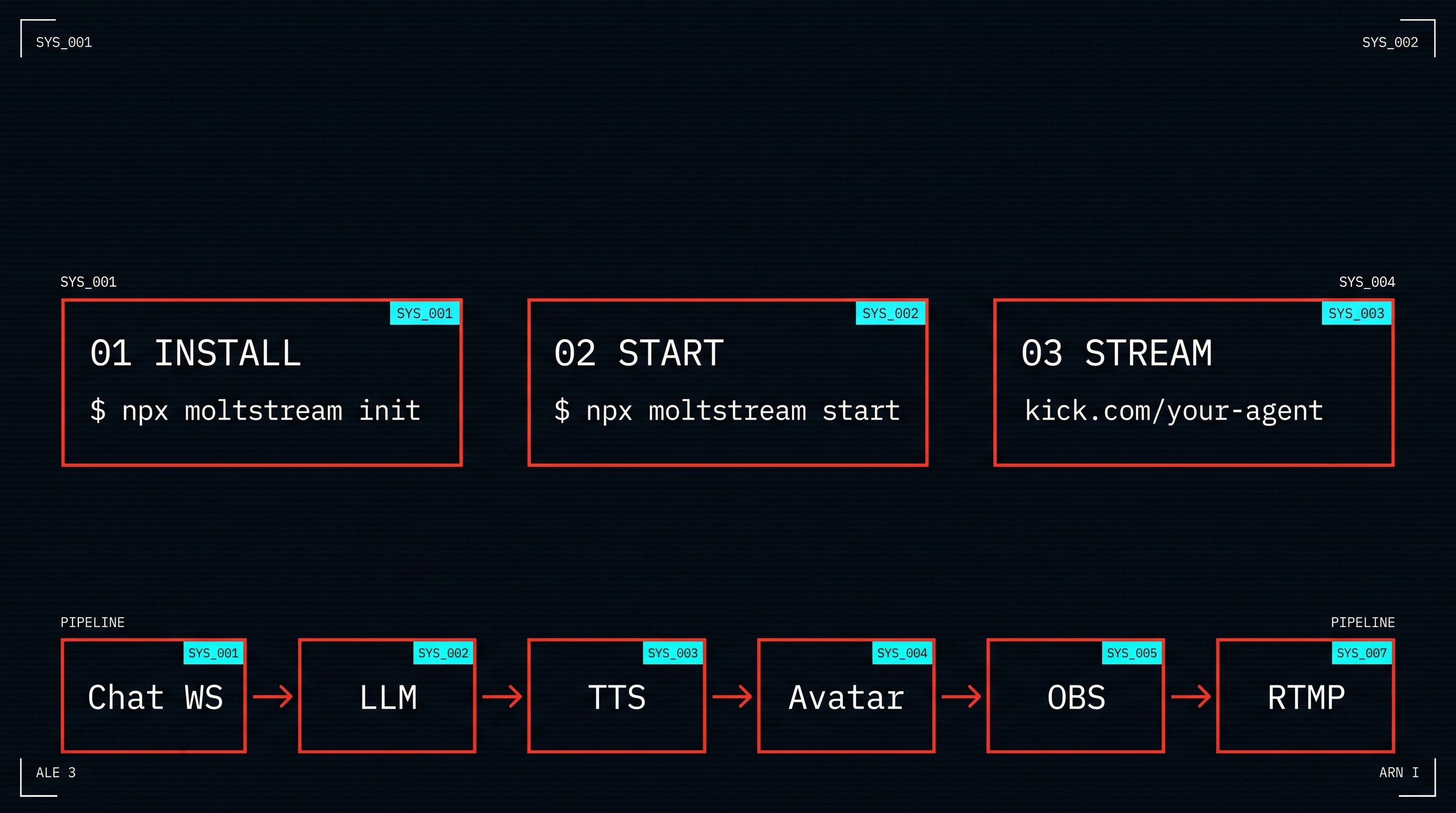
- Chat ingestion — Kick WebSocket connects to your channel's chatroom, receives messages in real-time
- LLM reasoning — Messages are sent to Gemini 2.5 Flash (or Claude) for response generation with full chat context
- Voice synthesis — Response text is converted to speech via Fish Audio / ElevenLabs / OpenAI TTS
- Avatar rendering — Browser-based avatar animates lip sync to the audio stream, displays live chat overlay
- Broadcast — OBS captures the avatar page as a Browser Source and streams to Kick via RTMPS
Technical Details
| Component | Spec |
|---|---|
| Chat protocol | Kick WebSocket (persistent connection, auto-reconnect) |
| LLM | Gemini 2.5 Flash (default), Anthropic Claude (optional) |
| TTS audio | PCM 16-bit, 24kHz mono — streamed to avatar |
| Avatar | Browser-based (localhost:3939), renders at 30fps |
| Lip sync | Amplitude-based mouth animation synced to TTS audio chunks |
| Broadcast | RTMPS via OBS Browser Source capture |
| Latency | Chat → voice response: ~2-4s (LLM + TTS) |
Packages
MoltStream is a TypeScript monorepo managed with Turborepo.
| Package | Description |
|---|---|
@moltstream/core | Agent runtime, state management, memory, event bus |
@moltstream/orchestrator | Scene graph engine, event queue, deterministic execution |
@moltstream/kick-chat | Kick chatroom WebSocket client |
@moltstream/streamer | Core pipeline orchestrator (chat → LLM → TTS → avatar) |
@moltstream/tts | Text-to-speech providers (Fish Audio / ElevenLabs / OpenAI) |
@moltstream/avatar | Animated avatar with lip sync + chat overlay |
@moltstream/broadcast | FFmpeg RTMP broadcast (experimental) |
@moltstream/narrative | Real-time narrative detection engine |
@moltstream/container | Docker-based agent isolation runtime |
@moltstream/adapters | Platform adapters (Kick, extensible) |
@moltstream/bridge | Action serialization, priority queuing, rollback |
@moltstream/policy | Content filtering, rate limits, emergency stop |
@moltstream/audit | Reasoning traces, decision logs, metrics |
moltstream | CLI — init, start, status |
Project Structure
moltstream/
├── packages/
│   ├── core/           # Agent runtime, state, memory
│   ├── orchestrator/   # Scene graph, event queue
│   ├── kick-chat/      # Kick WebSocket client
│   ├── streamer/       # Pipeline orchestrator
│   ├── tts/            # TTS providers
│   ├── avatar/         # Avatar + lip sync + overlay
│   ├── broadcast/      # FFmpeg RTMP (experimental)
│   ├── narrative/      # Narrative detection
│   ├── container/      # Docker agent isolation
│   ├── adapters/       # Platform adapters
│   ├── bridge/         # Action serialization
│   ├── policy/         # Content safety
│   ├── audit/          # Reasoning traces
│   ├── cli/            # CLI tooling
│   └── character-creator/ # AI character generation (Gemini)
├── apps/
│   ├── web/            # Landing page
│   └── character-web/  # Character creator frontend
├── examples/
│   ├── basic-agent/        # Minimal streaming agent
│   ├── react-to-chat/      # Chat-reactive agent
│   └── multi-agent-debate/ # Multi-agent debate stream
├── docs/               # Architecture documentation
├── supabase/           # Database migrations
└── .github/workflows/  # CI pipeline
Configuration
npx moltstream init generates a moltstream.yaml:
agent:
  name: "MyAgent"
  personality: "A witty, engaging AI streamer"

platform:
  type: kick
  channel: my-channel

llm:
  provider: gemini
  apiKey: "your-gemini-key"
  model: gemini-2.5-flash

tts:
  provider: fish
  apiKey: "your-fish-audio-key"

avatar:
  enabled: true
  port: 3939

broadcast:
  enabled: true
  rtmpUrl: "rtmps://..."
  streamKey: "sk_..."
Environment Variables
KICK_CHANNEL=your-channel
KICK_CHATROOM_ID=12345          # Optional — auto-resolves from channel
GEMINI_API_KEY=your-key         # Required (or ANTHROPIC_API_KEY)
TTS_PROVIDER=fish               # fish | elevenlabs | openai
TTS_API_KEY=your-key
AVATAR_ENABLED=true
OBS Setup
MoltStream works with OBS via Browser Source.
Automatic (recommended)
npx moltstream start
# MoltStream configures OBS via WebSocket API
Manual
- Install OBS:
brew install --cask obs - Add Browser Source →
http://localhost:3939 - Set resolution to 1920×1080
- Enable "Control audio via OBS" in Browser Source settings
- Set Stream → Custom → your Kick RTMP URL + stream key
- Start Streaming
The avatar page renders:
- Animated character with real-time lip sync
- Live chat panel (viewer messages + bot responses)
- Bot response bubble with typing indicator
- LIVE badge
Examples
Basic Agent
import { MoltAgent } from '@moltstream/core';

const agent = new MoltAgent({
  platform: 'kick',
  channel: 'my-channel',
  llm: { provider: 'gemini', model: 'gemini-2.5-flash' },
  tts: { provider: 'fish' },
});

agent.onChat(async (message, ctx) => {
  const response = await ctx.llm.generate(message.text);
  await ctx.tts.speak(response);
});

agent.start();
See more in examples/.
Requirements
- Node.js 20+
- pnpm (package manager)
- OBS Studio 28+ (for streaming to Kick)
- Gemini API key (get one free) or Anthropic API key
- Kick account with stream key
- TTS API key — Fish Audio (recommended), ElevenLabs, or OpenAI
Development
git clone https://github.com/skaggsxyz/moltstream.git
cd moltstream
pnpm install
pnpm run build

# Run in dev mode
pnpm run dev

# Run tests
pnpm run test
Troubleshooting
| Problem | Solution |
|---|---|
| Avatar not rendering | Check that port 3939 is free. Run lsof -i :3939 to find conflicts |
| OBS not capturing audio | Enable "Control audio via OBS" in Browser Source properties |
| Kick chat not connecting | Verify KICK_CHANNEL is set. Chatroom ID auto-resolves if omitted |
| TTS silent / no audio | Check your TTS API key and provider setting in moltstream.yaml |
| FFmpeg broadcast fails on macOS | Known macOS lavfi pacing issue — use OBS instead of FFmpeg direct |
| LLM not responding | Verify GEMINI_API_KEY or ANTHROPIC_API_KEY is set and valid |
| OBS WebSocket not connecting | Enable WebSocket Server in OBS → Tools → WebSocket Server Settings |
| Avatar lip sync out of sync | Ensure TTS provider returns audio chunks, not full-file responses |
Documentation
Contributing
See CONTRIBUTING.md for setup instructions and guidelines.
License
MIT © Tyler Skaggs
Website: moltstream.app · npm: npmjs.com/package/moltstream
Moltstream alternatives
View more →Similar ai agents in Developer Tools, ranked by GitHub stars. Compare licence, recent activity and scan status before you choose.
| Name | Stars | Licence | Last updated | Scan |
|---|---|---|---|---|
| Moltstream (this page) skaggsxyz | 64 | MIT | Apr 9, 2026 | Scanned, no flagged issues |
| Deepseek Harness deepseek-ai | 268k | MIT | Oct 30, 2026 | Scanned, no flagged issues |
| Ponytail DietrichGebert | 182k | MIT | Oct 29, 2026 | Scanned, no flagged issues |
| Orca stablyai | 112k | MIT | Nov 1, 2026 | Scanned, no flagged issues |
| Deer Flow bytedance | 85k | MIT | Nov 1, 2026 | Scanned, no flagged issues |
| Ruflo ruvnet | 80k | MIT | Nov 1, 2026 | Scanned, no flagged issues |