Phi AI Agent
 by pulseaiclub
A fast coding agent, rpc plugin, sub-agents, sloppy edits, and mcp
Phi is an open-source ai agent by pulseaiclub, written mainly in Go, with 798 GitHub stars and the MIT license. Its code was last updated Nov 1, 2026.
- 15 MB · ~31 ms · sub-agents · anchored sloppy edits · permission gate · progressive MCP · PXB extensions · native diff review & code selection · OpenAI / Anthropic / Gemini


- Sponsors
- Docs
- Quick start
- Footprint
- Configuration
- Interactive mode
- Diff review
- Code viewer
- Commands
- Sessions
- Headless mode
- Skills
- Permissions
- Extensions
- MCP
- Tools
- Project layout
Sponsors
Interested in sponsoring phi? Reach out at <a href="mailto:zhengel2022@163.com">zhengel2022@163.com</a>.
<table> <tr> <td align="center" width="50%"><a href="https://www.infistar.cc/register?aff=287HW56S&ref_source=link"><img src="assets/infistar.png" alt="Infistar.cc" width="100%" /></a></td> <td valign="top" width="50%"><strong>phi is sponsored by <a href="https://www.infistar.cc/register?aff=287HW56S&ref_source=link">Infistar.cc</a></strong> — one API key for every major model, priced for people who run agents all day.<br/><br/>⚙️ <strong>Plug and play</strong>: set the base URL, API key, and model name, then call it directly.<br/>🧩 <strong>One key, every model</strong>: switch between Claude, GPT, Gemini, DeepSeek, and other leading models without editing config again.<br/>💰 <strong>Cheap and simple</strong>: some models cost as little as 1% of official rates, with RMB billing and invoices.<br/>🎁 <strong>phi perk</strong>: <a href="https://www.infistar.cc/register?aff=287HW56S&ref_source=link">register through our link</a> and get <strong>$5 in trial credits</strong> 👉<br/><br/><strong>Free <code>~/.phi/config.yaml</code></strong> — phi ships the whole model block; paste it, swap in your key, start.<br/><br/><pre> models: - name: claude-opus-5-5 api_key: "" base_url: https://infistar.cc api: Anthropic - name: gpt-6-astra api_key: "" base_url: https://infistar.cc/v1 api: OpenAIResponses - name: gemini-3-pro api_key: "" base_url: https://infistar.cc api: Gemini </pre></td> </tr> <tr> <td align="center" width="50%"><a href="https://mozhenzhen.com/go/phi"><img src="assets/sponsor/mozz-en.png" alt="Mozhenzhen" width="100%" /></a></td> <td valign="top" width="50%">🐼 <strong>Partner Pick: Stop overpaying for AI! Overpriced APIs? Fake models? Getting ripped off? Check <a href="https://mozhenzhen.com/go/phi">Mozhenzhen</a> before you buy:</strong><br/><br/>🏷️ <strong>Tired of overpaying for tokens? [Price Check]</strong> 2,000+ models · 350K+ listings. Compare official subscriptions, API relays, and pay-as-you-go rates side-by-side.<br/>🛡️ <strong>Worried about fake or nerfed models? [Verification]</strong> 5,000+ API relays · 100K verification reports. Check real developer reviews and audit model authenticity.<br/>🧭 <strong>Looking for reliable accounts or top-ups? [Account & Top-Up Directory]</strong> 1,200+ sellers · 20K+ products (accounts, top-ups, team seats) with upfront pricing, delivery speed, and warranty terms.<br/>🎁 <strong>Looking for free API credits? [Free Perks]</strong> Daily updated free tiers, promos, and community relay hubs you can claim anytime.<br/>⭐ <strong>Always Free · Mozhenzhen doesn't sell AI services — rankings are purely data-driven</strong> 👉 Check now: <a href="https://mozhenzhen.com/go/phi">mozhenzhen.com</a></td> </tr> </table>Quick start
Install the latest release (macOS / Linux):
curl -fsSL https://raw.githubusercontent.com/pulseaiclub/phi/main/scripts/install.sh | bash
Windows (PowerShell 5.1+):
irm https://raw.githubusercontent.com/pulseaiclub/phi/main/scripts/install.ps1 | iex
First launch needs a model. Open the config editor (creates ~/.phi layout
and writes ~/.phi/config.yaml):
phi config
Or set env vars for a one-off run:
export PHI_MODEL=gpt-4o
export PHI_API_KEY=sk-...
Then start the TUI:
phi
Or build from source (Go 1.26.3+, see go.mod):
make build          # produces ./phi
make install        # build and install into $GOBIN
On first start, phi automatically creates these directories under ~/.phi/:
bin/— downloaded search tools (fd,rg)skills/— globalSKILL.mdfilesextensions/— installed extensions (see doc/extensions.md)session/— persisted sessions, one folder per project directoryjobs/— sub-agent transcripts, one folder per job
Search tools (fd, rg) download into ~/.phi/bin in the background when missing.
The TUI gives the model four core tools — read, write, edit, and
bash — plus grep, find, and ls. The model uses these to
fulfill your requests. External HTTP fetch is available via MCP when configured.
Footprint
Lean is not enough — phi is built to feel instant and stay cheap under load.
phi numbers are a stripped release build (CGO_ENABLED=0, -ldflags="-s -w")
on macOS arm64. Other harnesses use published Linux PSS / interactive PTY
figures.
Time to first frame
<p align="center"> <img src="assets/perf-first-frame.png" alt="Time to first frame: phi 0.031s vs other terminal harnesses" width="900"> </p>Idle RAM · 1 session
<p align="center"> <img src="assets/perf-ram-1.png" alt="Idle RAM, 1 session: phi 21.2 MB vs other terminal harnesses" width="900"> </p>Idle RAM · 10 sessions
<p align="center"> <img src="assets/perf-ram-10.png" alt="Idle RAM, 10 sessions: phi 221 MB vs other terminal harnesses" width="900"> </p>| Metric | phi |
|---|---|
| Release binary | ~15 MB |
| Idle RSS (1 session) | ~21 MB |
| 10 idle sessions (total RSS) | ~221 MB |
| Time to first frame | ~31 ms (26–49 ms) |
Cold go build (empty GOCACHE) | ~5.5 s |
| Warm rebuild | ~0.7 s |
| Go source (excl. tests) | ~54k lines (~49k non-blank) / 345 files |
| Go packages | 84 |
| Direct module deps | 8 |
| Linked runtimes | system libs only (no Node / Electron / Python) |
Timing, memory, and size rows were measured on the macOS arm64 setup above and have not been re-run since they were first published. The source, package, and dependency rows were re-measured in November 2026 (2026-11-11) against the main branch:
- Source: non-test
*.gofiles tracked by git in the root module (excludingext/), counted withwc -l(lines) andgrep -cv '^\s*$'(non-blank lines), becauseclocandtokeiwere not available. - Packages: directories containing
.gofiles in the root module (excludingext/, a separate module), equivalent togo list ./.... - Direct deps: non-
// indirectentries in therequireblocks ofgo.mod.
Configuration
phi reads ~/.phi/config.yaml (standard YAML). Environment variables
override it for one-off runs. phi config opens a full-screen terminal editor
for the same file — nothing is written until you save, and the previous file is
kept as config.yaml.bak.
phi config keys
  ↑↓ ←→      move / cycle a value        a   add a model
  ⏎          edit or open a picker       d   delete the focused row
  esc        close, or quit              f   fetch model ids from the provider
  ^s         save                        s   save        q  quit
An empty field means "not set", i.e. the value the loader would fill in; the placeholder shows that value.
# ~/.phi/config.yaml
models:
  - name: gpt-4o
    api: OpenAI             # OpenAI | OpenAIResponses | Anthropic | Gemini (empty → OpenAI-compatible)
    api_key: sk-...         # or set PHI_API_KEY
    base_url: https://api.openai.com/v1   # default; PHI_BASE_URL overrides
    context_window: 128000  # optional
    default: true           # the model used at startup; first entry wins if absent
  - name: claude-sonnet-4-20250514
    api: Anthropic          # required — no name/URL guessing
    api_key: sk-ant-...
    base_url: https://api.anthropic.com
    context_window: 200000
  - name: deepseek-flash    # built-in preset: base_url / context / thinking filled in
    api_key: sk-...
  - name: gemini-2.5-flash  # built-in preset (api: Gemini)
    api_key: ...
    think_level: high       # optional: off | minimal | low | medium | high | …

skill_path: ~/.phi/skills # where SKILL.md files are loaded from; "~/…" is expanded

agents:
  enabled: true           # default; set false to disable agent_* sub-agent tools
  models:                 # optional per-role defaults; omit → inherit parent model
    explore: cheap-model
    review: strong-model
    worker: coding-model

permissions:
  mode: interactive       # interactive | readonly | autopilot | headless-strict | allow-all
  bash:
    default: ask          # ask | allow | deny
    allow:
      - "go test ./..."
    deny:
      - "rm -rf *"
  rules:                  # extra rules; deny > ask > allow, always
    - kind: read
      resource: url
      decision: ask
      reason: external lookup needs approval
Built-in presets and thinking wire formats: doc/models.md.
Environment overrides:
| Variable | Overrides |
|---|---|
PHI_API_KEY | models[].api_key (default model) |
PHI_MODEL | models[].name (default model) |
PHI_BASE_URL | models[].base_url (default model) |
PHI_SKILL_PATH | skill_path |
PHI_THINK_LEVEL | models[].think_level (default model; off disables) |
PHI_PROMPT_HISTORY | Composer prompt recall (on enables; off by default, writes prompts.json in the project's session directory) |
Provider routing uses the explicit api field (OpenAI / Anthropic /
Gemini). See Supported models.
Workspace layout
~/.phi/
├── config.yaml   # global configuration
├── bin/          # downloaded search tools (fd, ripgrep)
├── skills/       # SKILL.md skill directories
├── extensions/   # PXB binaries + phi.yaml
├── jobs/         # sub-agent job artifacts (meta, logs, result.md)
└── session/      # persisted sessions, one dir per working directory
    └── <encoded-cwd>/
Interactive mode
phi starts the TUI: a chat transcript on top, an editor at
the bottom, and a footer with the current activity. When a newer release is
available, the footer shows a hint like 0.2.0 available · phi update.
Assistant output is rendered as Markdown (CommonMark/GFM): headings, emphasis,
strikethrough, links, blockquotes, lists, task checkboxes, and tables are
styled with the active theme; fenced code blocks get a muted language caption and per-language
syntax highlighting. Structural markers (#, `, *) are stripped.
The editor supports:
@— fuzzy file mention picker (type@and start typing a path)/— slash command picker (/sessions,/branch,/skill,/new,/fork,/diff,/code)?— shortcut help picker (lists/,!,!!,@, and key bindings;Esccloses)!command— run a shell command locally and stream its output into the transcript (see Commands)Ctrl+K— command palette: settings → model / theme / permissions / agents (incl. per-role models), hooks
Keyboard shortcuts
| Key | Action |
|---|---|
Ctrl+C | Quit phi |
Esc | Cancel the running agent / close pickers |
Ctrl+K | Toggle the command palette |
Ctrl+A | Jump to the start of the line |
Ctrl+E | Jump to the end of the line |
Ctrl+U | Clear the composer input, images, and skills |
Ctrl+V | Paste text, or attach an image from the clipboard |
Shift+Enter | Insert a newline in the composer |
Ctrl+Shift+C | Copy the selected transcript text |
Themes: Dark (default), Darcula, Pink, and Terminal, switchable from
the palette under settings → theme.
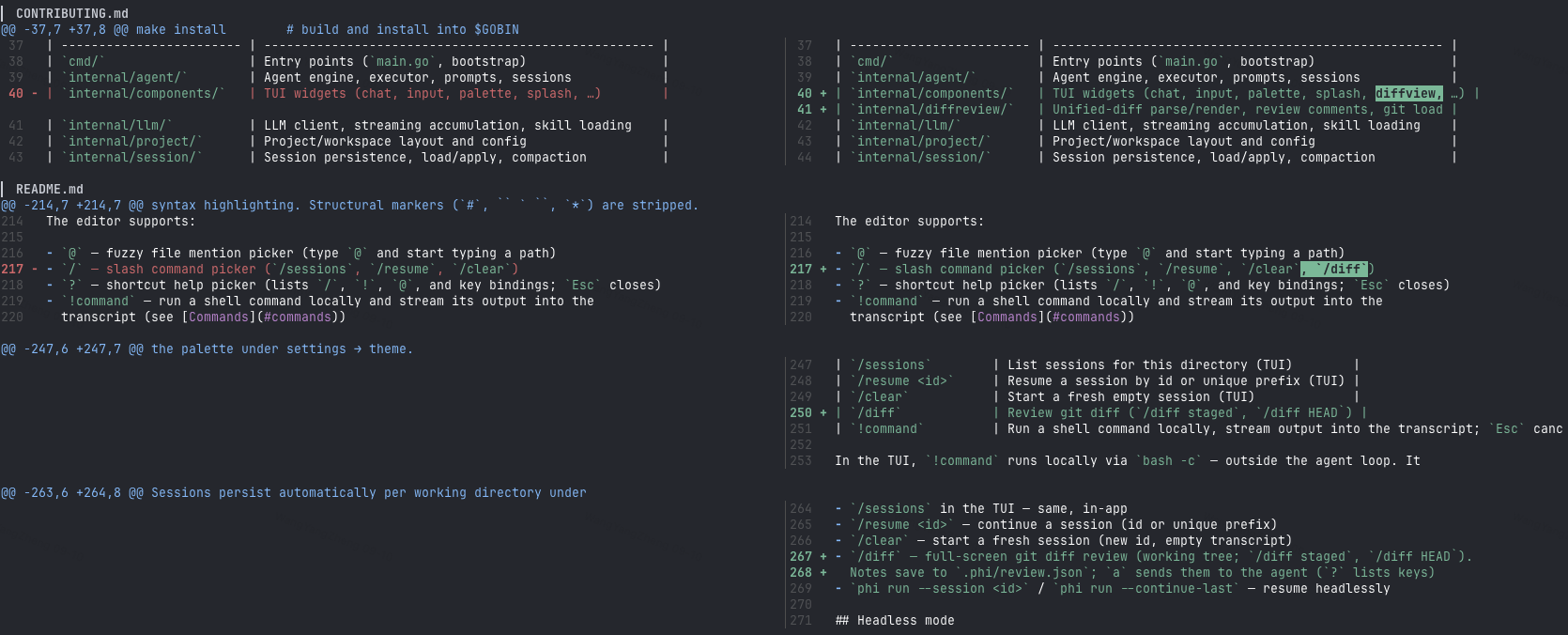
Diff review
/diff is a full-screen git review inside the TUI — read the change, leave
line notes, then hand them to the agent without leaving the terminal.
| Command | What opens |
|---|---|
/diff | Working tree (git diff) |
/diff staged | Staged changes |
/diff HEAD | Last commit (git show) |
/diff @path | Only that file — @ comes from file completion, the -- separator is added for you |
/diff staged @a.go @b.go | Staged changes in two files |
/diff HEAD @path | That file against HEAD |
/diff main..feat @path | That file across a range |
/diff -- <argv> runs the given git command instead of a diff —
/diff -- git show HEAD~1 for one.
Slash-picker Enter inserts /diff plus a trailing space into the composer; submit to open. Inside the overlay:
s side-by-side, i add/edit a note, x delete, a send notes to the agent,
? help, q / Esc close. Notes live in the overlay's memory only — switching
diffs drops them and nothing is written to disk.
Code viewer
/code <path>[:line] opens a full-screen source viewer: syntax highlighting, a
CJK-aware caret (j/k, h/l, gg/G), in-file search (/, then n/N),
:line to jump to a line, and v for lines or p for the paragraph under the
caret, then a to hand the selection to the chat input as a path:12-18
reference the model reads. The pane reads files itself and answers to the same
deny list as the tool gate, so sensitive paths (~/.ssh, .env, …), binaries
and files over 8 MiB are refused with a toast.
Esc closes, or cancels a search back to where / was pressed. The status row
shows the path, caret and line count while reading, the selection size while v
is active, and the match counter (2/5) while a search is live.
Branch switching
/branch opens the branch picker for the working directory. Two columns: the
branch name, and its most recent commit. A ● marks the branch HEAD is on. Rows
are ordered where you are, where you came from (git reflog), the other local
branches, then remote-tracking branches.
Enter runs git switch on the selected row — off the UI goroutine, so a slow
checkout does not freeze the composer. Picking a remote row checks out the local
branch that tracks it, the same thing git switch feat does for origin/feat.
Ctrl+X asks to delete the selected local branch. Confirming deletes it whether
or not it has been merged, then refreshes the list. Current branches and branches
in use by another worktree cannot be deleted.
/branch <name> skips the picker: it switches to that branch, or creates it
from HEAD when no branch carries the name yet. Naming is the whole "new branch"
flow — three characters typed beat a form.
Uncommitted work is never touched: git refuses rather than lose it, and its reason is toasted verbatim. Switching is blocked while a reply or command is running, and while a merge, rebase, cherry-pick, revert, or bisect is unfinished.
Commands
| Command | Description |
|---|---|
phi | Start the interactive TUI |
phi run -p "…" | Run one agent loop headlessly (see below) |
phi update | Download and install the latest GitHub release |
phi update --check | Query the latest release without installing |
phi sessions | List persisted sessions for this directory |
phi sessions fork <id> | Copy a session at its current point, print the new id |
phi sessions remove <id> | Delete a persisted session for this directory (alias rm; unique id prefix ok) |
phi mcp … | Manage MCP servers (list, add, remove, call, doctor) — see MCP |
phi plugin … | Manage extensions (install, list, update, remove) — see Extensions |
phi config | Edit the meta config in a terminal UI — see Configuration |
/sessions | List sessions for this directory (TUI) |
/branch | Switch the working branch — see Branch switching |
/new | Start a fresh empty session (TUI) |
/fork | Copy this session at its current point into a new one (TUI) |
/diff | Full-screen git review — see Diff review |
/code | Full-screen source viewer — see Code viewer |
!command | Run a shell command locally, stream output into the transcript; Esc cancels it |
!!command | Same as !command, and also adds the output to the model context |
In the TUI, !command runs locally via bash -c — outside the agent loop. It
doesn't count toward agent busy state, and the running command can be cancelled
with Esc without touching an in-flight agent turn.
Sessions
Sessions persist automatically per working directory under
~/.phi/session/<encoded-cwd>/ as JSONL trajectories.
phi sessions— list session id, mtime, and preview for the current directory/sessionsin the TUI — same, in-app/new— start a fresh session (new id, empty transcript)/fork— copy the current session at its current point into a new session (new id, same conversation) and switch to it; the source keeps running untouchedphi sessions remove <id>— delete a session (rmalso works; a unique id prefix is enough)phi sessions fork <id>— copy a session at its current point and print the new id; continue it headlessly withphi run --session <new-id>phi run --session <id>/phi run --continue-last— resume headlessly
Headless mode
phi run -p "fix the failing test in internal/tools"
Runs one agent loop without a TUI. Human logs go to stderr; with --jsonl,
machine-readable events go to stdout, one JSON object per line.
Flags:
| Flag | Description |
|---|---|
-p, --prompt STRING | Prompt to run (required) |
--jsonl | Emit JSONL events to stdout |
--yolo | Skip all permission checks for this run (benchmarks / CI only) |
--timeout DURATION | Limit the agent run wall-clock time (e.g. 10m; disabled by default) |
--session ID | Resume a persisted session by id or unique prefix |
--continue-last | Resume the newest persisted session for this directory |
--session-dir DIR | Override the session storage directory |
--tools LIST | Enable only these comma-separated built-in tools |
--tools accepts built-in names such as read,ls,grep. MCP and agent tools
still append when configured; the flag only scopes the built-in toolset.
Exit codes: 0 success · 1 runtime/LLM error ·
3 config/usage error.
In headless mode, permission ask decisions are denied (there is no approval
UI): unless permissions.mode is set, phi run uses headless-strict. This
is not readonly — anything the policy already allows still runs, including
writes inside the workspace and allowlisted bash. For benchmarks that need
arbitrary shell (pytest, npm test, …), pass --yolo to skip the
permission gate for that run only.
Skills
Skills are directories containing a SKILL.md file with YAML frontmatter and
a Markdown body. They are loaded from ~/.phi/skills/ (or skill_path /
PHI_SKILL_PATH) and injected into the agent's context, letting you give the
model reusable procedures:
The Agent Skills locations ~/.agents/skills/ and .agents/skills/ are read
too, so a skill pack installed for another agent works here without
configuration. Project .agents/skills/ directories are discovered from the
working directory upward, stopping at the repository root when there is one.
Roots are searched in order — skill_path first, then ~/.agents/skills, then
the project directories — and the first root wins when two of them define the
same skill name. A leading ~ in skill_path or PHI_SKILL_PATH expands to
your home directory.
Security: skill files are workspace content, not trusted input — a project
.agents/skills/is picked up without confirmation. Review skills the way you reviewAGENTS.mdbefore trusting a checkout.
---
name: My Skill
 description: What this skill does
license: MIT
compatibility: claude, openai
disable-model-invocation: false
---
Instructions the agent should follow when this skill is relevant.
disable-model-invocation: true keeps a skill out of the system prompt catalog
— good for the ones you only want on explicit request. It stays in the /skill
list and is still applied when you pick it there. Only a case-insensitive
true counts; any other value means false. This is a catalog filter, not
access control: the model can still find the file with ls / find.
In the TUI, type /skill and pick a row from the list, then submit the message
with the selected skills applied.
Permissions
Tool execution is gated by a permission policy, so the agent can run read-only
by default and ask before anything destructive. Configure it under
permissions: in ~/.phi/config.yaml.
Modes:
| Mode | Behavior |
|---|---|
interactive | Default. ask decisions prompt in the TUI. |
readonly | Deny writes and ask; policy-allowed bash still runs. |
autopilot | Fold ask → deny (same as headless-strict today). |
headless-strict | Fold ask → deny (used by phi run). |
allow-all | Skip every permission check. |
readonly does not block every bash command: a command the underlying policy
allows (bash.allow, or bash.default: allow) still runs after the deny list
is checked. Writes, other ask decisions, and agent_spawn are denied.
Per-tool rules: bash.default / bash.allow / bash.deny (regexes against
the command). permissions.rules adds your own rules by tool, kind, command,
path, or workspace scope; they are evaluated strictest-first (deny > ask >
allow), so a rule can tighten a policy but never loosen one. Global keys:
workspace_only_writes (default true) and ask_timeout_sec. The deprecated
dangerously_allow_all: true still loads as mode: allow-all. Full semantics
and examples: doc/permissions.md.
In the TUI, an approval dialog replaces the editor with options to approve, deny with feedback, or allow all for the session / for every session. The palette's settings → permissions entry toggles session-wide bypass.
Extensions
Extensions are native binaries speaking the PXB binary protocol over
stdin/stdout (author SDKs: Go github.com/pulseaiclub/phi/ext/go/phi, Rust
ext/rust (phi-ext), and TypeScript
ext/ts (@pulseaiclub/phi-ext)). They
subscribe to tool/session events, register LLM tools, and add slash commands.
go get github.com/pulseaiclub/phi/ext/go@v0.21.0
package main

import (
	"github.com/pulseaiclub/phi/ext/go"
	"github.com/pulseaiclub/phi/ext/go/phi"
)

func main() {
	m := phi.New("hello", "0.1.0")
	m.OnToolCall(func(ev ext.ToolCallEvent) *ext.ToolCallResult {
		// return &ext.ToolCallResult{Block: true, Reason: "..."}
		return nil
	})
	_ = m.Run()
}
Install under ~/.phi/extensions/<name>/ with a phi.yaml pointing at the
binary. In the TUI: Ctrl+K → extensions. Disable with
PHI_EXTENSIONS=off. Full guide: doc/extensions.md.
Codec throughput on Apple Silicon (release, single-threaded):
| Implementation | Hello encode+decode | Frame write+read (in-memory) | Allocs |
|---|---|---|---|
Rust PXB (phi-ext) | ~0.12 µs | ~0.06 µs | — |
Go PXB (ext/go/pxb) | ~0.11 µs | ~0.05 µs | 3 / op |
| Go JSON lines | ~1.2 µs | — | 15 / op |
The ~10× gap over JSON lines is the protocol (fixed header + tagged fields), not
the language — Rust and Go are within noise on the same codec work. Real
extension latency is dominated by process spawn and pipe RTT anyway. Re-probe:
cargo run --release --example bench in ext/rust.
MCP
Configure 100 MCP servers. Pay ~0 schema tokens until you call one.
Most MCP hosts dump every tools/list schema into the model context before
you ask a question — browser stacks alone can burn 50k+ tokens. phi does not.
Instead MCP is a URL namespace on the regular tools, and the system prompt lists configured server names (no schemas):
| Action | Call |
|---|---|
| List tools on a server | ls mcp://<server>/tools/ |
| Fetch a slim parameter summary | read mcp://<server>/tools/<tool> |
| Invoke | write mcp://<server>/tools/<tool> with content = JSON args |
Flow: pick a server from the prompt → ls → read → write. Subprocesses start lazily on first use.
Browsing is read-tier; invokes still go through PreHooks → write Gate / Ask → Run → PostHooks.
phi mcp add browsermcp -- npx @browsermcp/mcp@latest
phi mcp doctor
# In the TUI, the model can use configured servers without guessing MCP exists
Config: ~/.phi/mcp.json (project <cwd>/.phi/mcp.json overrides by name).
Disable with PHI_MCP=off. Stdio and HTTP in v1.
Full guide: doc/mcp.md.
Sub-agents
Sub-agent tools (agent_spawn, agent_wait, …) are on by default. To
keep a session lean, disable them in ~/.phi/config.yaml:
agents:
  enabled: false
Or toggle for the current session via the palette: settings → agents. When disabled, those tools are not registered and the model cannot spawn jobs.
Per-role model defaults (optional) under agents.models pick which configured
model name each role uses when spawned. Omitted roles inherit the parent
session model. Switch for the current session only via
settings → agents → models → explore|review|worker (same session-only semantics
as Enter in settings → model; does not write config.yaml). In the model
picker, Ctrl+S then Y/Enter also saves the highlighted model as the global default.
Sub-agents themselves use a role (explore default | review | worker):
| Role | Tools | Use for |
|---|---|---|
explore | no write/edit; bash except hard denies | Multi-hop recon / map structure |
review | same as explore | Diffs / checks; report only |
worker | full tools except nesting; bash except hard denies | Scoped, self-contained edits |
Default stays explore (no edits). Prefer worker when the task is to implement a scoped change in an isolated context.
Tools
Built-in tools the model can call (see internal/tools/):
| Tool | Purpose |
|---|---|
bash | Run a shell command in the working directory |
read | Read a file |
write | Write a file (gated by permissions) |
edit | Targeted edit of a file |
grep | Regex search across files |
find | File patterns (fd) |
ls | Directory listing |
agent_spawn | Start an isolated sub-agent job (async) |
agent_wait | Wait for a job; returns short summary only |
Sub-agent transcripts live under ~/.phi/jobs/<id>/ and are not injected
into the parent context — only the wait/task summary is.
Fast search tools (fd, ripgrep) are downloaded on first startup into
~/.phi/bin when missing.
See Project layout for the source tree map.
See CONTRIBUTING.md for development setup, code style, and commit conventions.
Phi alternatives
View more →Similar ai agents in Coding Agents, ranked by GitHub stars. Compare licence, recent activity and scan status before you choose.
| Name | Stars | Licence | Last updated | Scan |
|---|---|---|---|---|
| Phi (this page) pulseaiclub | 798 | MIT | Nov 1, 2026 | Scanned, no flagged issues |
| AutoGPT Significant-Gravitas | 188k | None found | Nov 1, 2026 | Not scanned yet |
| Langchain langchain-ai | 149k | MIT | Nov 1, 2026 | Scanned, no flagged issues |
| Gemini CLI google-gemini | 109k | Apache-2.0 | Nov 1, 2026 | Scanned, no flagged issues |
| MetaGPT FoundationAgents | 71k | MIT | Jan 21, 2026 | Scanned, no flagged issues |
| Oh My Openagent code-yeongyu | 71k | None found | Nov 1, 2026 | Not scanned yet |