Portal AI Agent
 by hosenur
Mobile first batteries included web ui for sst/opencode. Git integration, in browser terminal, isolated workspaces.
Portal is an open-source ai agent by hosenur, written mainly in TypeScript, with 814 GitHub stars and the MIT license. Its code was last updated May 12, 2026.
OpenCode Portal
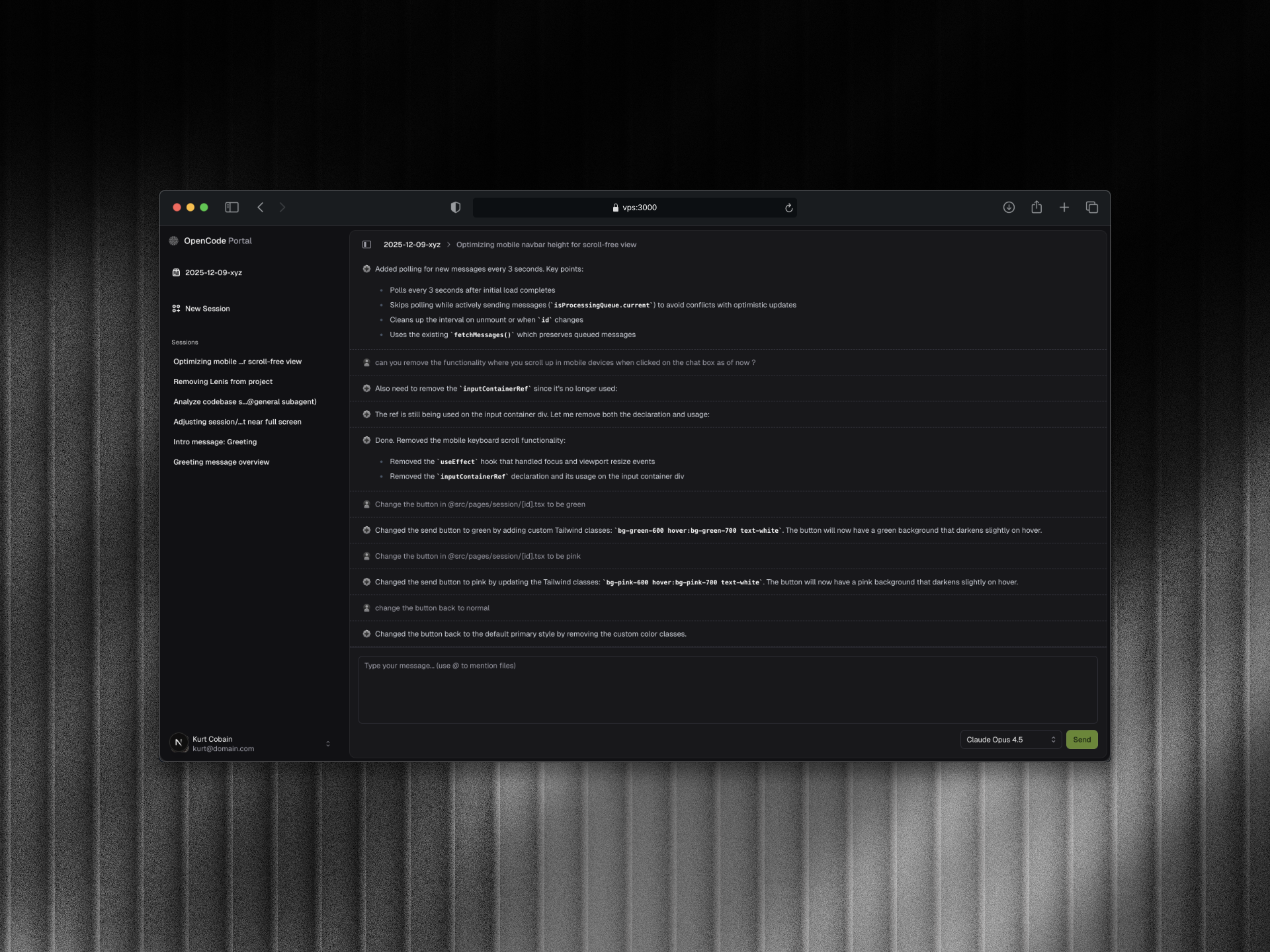
Disclaimer: This is a personal project and is not related to https://github.com/sst/opencode or the SST team. This portal is a personal-built interface for interacting with OpenCode instances.
A web-based UI for OpenCode, the AI coding agent. This portal provides a browser interface to interact with OpenCode sessions, view messages, and chat with the AI assistant.
Quick Start
Using bunx (Recommended)
The easiest way to run OpenCode Portal is using bunx:
# Navigate to your project directory
cd /path/to/your/project

# Run OpenCode Portal
bunx openportal
Note: OpenPortal works best when paired with Bun. Node.js may have some rough edges.
This will:
- Start the OpenCode server (default port: 4000)
- Start the web UI (default port: 3000)
- Automatically find available ports if defaults are busy
Installation
You can also install globally:
bun install -g openportal

# Then run in any project directory
openportal
CLI Commands
openportal                    # Start OpenCode + Web UI
openportal run                # Start only OpenCode server (no Web UI)
openportal stop               # Stop running instances
openportal list               # List running instances
openportal clean              # Clean up stale entries
CLI Options
openportal [command] [options]

Options:
  -h, --help              Show help message
  -d, --directory <path>  Working directory (default: current directory)
  -p, --port <port>       Web UI port (default: 3000, auto-finds if busy)
  --opencode-port <port>  OpenCode server port (default: 4000, auto-finds if busy)
  --hostname <host>       Hostname to bind (default: 0.0.0.0)
  --name <name>           Instance name (default: directory name)
Prerequisites
OpenCode must be installed on your system. Install it using one of these methods:
# Using bun
bun install -g opencode

# Using Homebrew (macOS)
brew install sst/tap/opencode
Overview
OpenCode Portal connects to a running OpenCode server and provides:
- Session management (create, view, delete sessions)
- Real-time chat interface with the AI assistant
- File mention support (
@filenameto reference files) - Model selection
- Dark/light theme support
Why This Project?
OpenCode comes with its own official web UI that you can access by running:
opencode --port 4096
However, the official UI is currently under development and has some limitations:
- Not mobile responsive
- Limited mobile experience
This project was inspired by my personal need to access OpenCode from my mobile device when I don't have my laptop around. The goal is to provide a mobile-first, responsive interface for interacting with OpenCode instances remotely.
Use Case
This portal is designed for remote access to your OpenCode instance. Deploy the portal on a VPS alongside OpenCode, then use Tailscale (or similar VPN) to securely connect from your mobile device or any other machine.
Example setup:
[Your Phone] ---(Tailscale)---> [VPS running Portal + OpenCode]
Tech Stack
- React Router - React framework
- IntentUI - UI library
- Tailwind CSS - Styling
- Nitro - Server
- OpenCode SDK - OpenCode API client
Contributing
Contributions are welcome! Here's how you can help:
Feedback & Feature Requests
Visit oc-portal.userjot.com to submit feedback and feature requests.
Reporting Issues
- Bugs: Report bugs by opening an issue with a clear description and steps to reproduce
Development Setup
- Fork the repository
- Clone your fork:
git clone https://github.com/YOUR_USERNAME/portal.git cd portal - Install dependencies:
bun install - Run the development server:
bun dev
Pull Request Process
- Create a feature branch from
main - Make your changes following the existing code style
- Test your changes thoroughly
- Update documentation if needed
- Submit a pull request with a clear description
Code Style
- Use TypeScript for all new code
- Follow the existing component patterns in
apps/web/src/components/ - Use Tailwind CSS for styling
- Maintain consistent naming conventions
- Add proper TypeScript types
Getting Help
- Join our Discord community
- Check existing issues before creating new ones
- Join the discussion in existing issues
- Be respectful and constructive in all interactions
License
MIT
Portal alternatives
View more →Similar ai agents in Coding Agents, ranked by GitHub stars. Compare licence, recent activity and scan status before you choose.
| Name | Stars | Licence | Last updated | Scan |
|---|---|---|---|---|
| Portal (this page) hosenur | 814 | MIT | May 12, 2026 | Scanned, no flagged issues |
| AutoGPT Significant-Gravitas | 188k | None found | Nov 1, 2026 | Not scanned yet |
| Langchain langchain-ai | 149k | MIT | Nov 1, 2026 | Scanned, no flagged issues |
| Gemini CLI google-gemini | 109k | Apache-2.0 | Nov 1, 2026 | Scanned, no flagged issues |
| MetaGPT FoundationAgents | 71k | MIT | Jan 21, 2026 | Scanned, no flagged issues |
| Oh My Openagent code-yeongyu | 71k | None found | Nov 1, 2026 | Not scanned yet |