VoLN UAV AI Agent
 by Admire-ljb
Official code for VoLN: Vision-Only Long-Horizon Navigation—Paradigm, Benchmark, and Method. An embodied AI UAV benchmark and VoLN-MLLM agent bridging VLN and multimodal LLMs across 7,210 episodes, AirSim, and real-world flights.
VoLN UAV is an open-source ai agent by Admire-ljb, written mainly in Python, with 47 GitHub stars and the MIT license. Its code was last updated Aug 4, 2026.
VoLN: Vision-Only Long-Horizon Navigation—Paradigm, Benchmark, and Method
<p align="center"> <a href="https://admire-ljb.github.io/VoLN-UAV/">🌐 <strong>Project Page</strong></a> · <a href="https://arxiv.org/pdf/2607.21400">📄 <strong>Paper</strong></a> · <a href="https://huggingface.co/datasets/Louj/VoLN-UAV-dataset">🤗 <strong>Dataset</strong></a> · <a href="https://huggingface.co/datasets/Louj/VoLN-UAV-ENV">🧭 <strong>Simulator Environments</strong></a> </p> </div>Visual Demonstrations
<table> <tr> <th width="50%">Simulation — First-Person View</th> <th width="50%">Physical Flight — First-Person View</th> </tr> <tr> <td><img src="assets/readme/demos/simulation_demo.gif" alt="VoLN first-person simulation demonstration" width="100%"></td> <td><img src="assets/readme/demos/physical_flight_demo.gif" alt="VoLN first-person physical-flight demonstration" width="100%"></td> </tr> </table>Reproduction Scope
This README is the reproducibility guide for the released VoLN training and evaluation code. For the method overview, headline results, dataset visualizations, qualitative cases, and simulation/real-world videos, visit the project page.
The repository covers:
- VoLN-MLLM adapter and planner training;
- VoLN-adapted Seq2Seq-VG, CMA-VG, and LAG-VG baselines;
- AirSim closed-loop benchmark evaluation;
- the No-Align, No-LoRA, and CLIP-Input ablations;
- metric reporting for NE, SR, OSR, nDTW, SPL, CT, and EER.
The navigation dataset and simulator environments are released separately and are not duplicated in this repository.
Experimental Protocol
Dataset splits
The manuscript uses 7,210 episodes. Validation-Seen contains disjoint trajectories from five environments represented in the training pool, while Test-Unseen contains five held-out environments:
| Split | Episodes | Ratio | Evaluation name |
|---|---|---|---|
| Train | 5,047 | 70% | Train |
| Validation-Seen | 1,082 | 15% | Validation-Seen |
| Test-Unseen | 1,081 | 15% | Test-Unseen |
Difficulty is defined by reference path length:
- Easy: less than 300 m
- Normal: 300–450 m
- Hard: at least 450 m
Model stages
VoLN-MLLM has two stages:
- Visual-semantic alignment. A lightweight adapter maps frozen DINOv3 ViT-B/16 features into the frozen CLIP ViT-B/16 image-embedding space using cosine distillation.
- Trajectory planning. A frozen Vicuna-7B-v1.5 backbone jointly encodes aligned observation history, three terminal goal views, proprioception, and top-(k) category tokens retrieved from the fixed semantic bank. The released configuration uses (k=8). Rank-16 LoRA modules adapt its attention and feed-forward projections; learned heads predict eight body-frame relative 3D waypoints and a stop signal.
Evaluation rules
The trained baselines are visual-goal adaptations of instruction-following navigation models. All methods receive the same VoLN observations and share waypoint supervision, action interface, stopping rule, and evaluation protocol.
The policy receives onboard RGB and deployable body-frame proprioception; world-frame poses remain supervision/evaluation metadata. Training samples use the final three consecutive RGB frames as the visual goal and body-frame relative waypoint targets. The paper protocol uses at most 128 decisions per episode and a 4 m three-dimensional goal region. SR and SPL require the policy to issue an explicit stop inside that region; OSR records whether the executed trajectory enters it at any time. The stop threshold is calibrated on Validation-Seen and stored in planner_best.pt.
Configuration index
| Experiment | Configuration or launcher |
|---|---|
| Adapter training | configs/train_adapter_dataset_release.yaml |
| Planner training | configs/train_planner_dataset_release.yaml |
| AirSim evaluation | configs/eval_airsim_dataset_release.yaml |
| Ablation experiments | scripts/run_ablation_experiments.py |
| Benchmark evaluation suite | scripts/run_benchmark_evaluation.py |
| Benchmark protocol audit | scripts/validate_benchmark_protocol.py |
| Experiment tables and figures | scripts/compile_experiment_results.py |
| Seq2Seq-VG / CMA-VG / LAG-VG | Baseline documentation |
Installation
conda create -n voln-uav python=3.10 -y
conda activate voln-uav
pip install -e .
Install the CUDA-specific PyTorch build first if the default wheel does not match your system. The default package installation includes the training, AirSim, real-world, and plotting dependencies used by the released scripts.
Ubuntu quick start
chmod +x scripts/*.sh
DEVICE=cuda ./scripts/train_planner.sh
DEVICE=cuda ./scripts/eval_offline.sh
For online evaluation, start a Linux Unreal/AirSim build and run the same baseline wrapper:
./scripts/launch_simulator.sh --scene BrushifyUrban --executable /path/to/VolnEnv.sh
BASELINE=reference TRIALS=10 EVAL_MODE=normal \
  ./scripts/run_online_baseline.sh --work-dir runs/reference_test_10_normal
To use AirSim on another machine, additionally set AIRSIM_IP and
AIRSIM_PORT.
Dataset Release Plan
- ✅ Initial release: 1,786 episodes across four environments: Brushify,
BrushifyCountryRoads, BrushifyUrban, and BrushifyForestPack.
- Train: 1,067 episodes (59.7%)
- Validation-Seen: 319 episodes (17.9%)
- Test-Unseen: 400 episodes (22.4%)
- Difficulty: 917 Easy (51.3%), 627 Normal (35.1%), and 242 Hard (13.5%)
- ✅ Simulator release: AirSim environments are available separately from the navigation dataset.
- ⏳ Full release: expand the public benchmark to all 7,210 episodes across 17 environments.
Ground-Truth Trajectory Replay
Online evaluation requires the matching AirSim/Unreal scene to be running. After extracting the separately downloaded simulator package into simulator_environments/, launch the default Urban scene with:
cd VoLN-UAV
.\scripts\launch_simulator.cmd --scene BrushifyUrban --env-root simulator_environments
The launcher resolves the scene executable from configs/airsim_scene_mapping_dataset_release.json and waits until the AirSim RPC port is ready. Keep the simulator open while evaluation is running. Use --env-root when the simulator package is stored elsewhere.
The following commands run Ground-Truth Trajectory Replay (a reference oracle) using the recorded ground-truth waypoint sequence. This diagnostic validates AirSim coordinate alignment, beacon/target placement, episode transitions, and metric logging. It is not a learned navigation baseline and should not be included as a competing method in benchmark tables. The wrapper reads data/benchmark/episodes.jsonl and selects the released BrushifyUrban training trajectories by default; set EPISODES_FILE or SCENE to override either choice. Select the execution mode with EVAL_MODE.
For online evaluation, active beacons are placed from the reference-route motion using the original fixed-count selector. The release configuration uses three active beacons, with deterministic candidate sampling, spacing checks, and route-based fallback positions. The target is placed separately and is not counted as an active beacon.
<details open> <summary><strong>Ground-truth trajectory replay — normal speed</strong></summary>cd VoLN-UAV
$env:BASELINE="reference"
$env:TRIALS="10"
$env:EVAL_MODE="normal"
$env:EPISODES_FILE="episodes.jsonl"
$env:SCENE="BrushifyUrban"
.\scripts\run_online_baseline.cmd `
--episode-index 0 `
--episode-stride 1 `
--reference-stride 1 `
--work-dir runs/reference_test_10_normal
This mode teleports the vehicle to the exact episode start, clears residual motion, enters hover, and then follows the route with AirSim move_to_position commands. Route cues use direction-icon assets rather than text-label beacons. After the final waypoint, the vehicle brakes to zero velocity and remains hovering.
cd VoLN-UAV

$env:BASELINE="reference"
$env:TRIALS="10"
$env:EVAL_MODE="fast"
$env:EPISODES_FILE="episodes.jsonl"
$env:SCENE="BrushifyUrban"

.\scripts\run_online_baseline.cmd `
  --episode-index 0 `
  --episode-stride 1 `
  --reference-stride 1 `
  --work-dir runs/reference_test_10_fast
This mode uses setVehiclePose teleportation, pose-only reset, zero settling time, and a 10 m maximum teleport step.
Use scripts\report_metrics.cmd on Windows or
./scripts/report_metrics.sh RUN_DIR on Ubuntu to summarize a run directory.
Training
Run the complete real-data pipeline:
python scripts/run_dataset_release_pipeline.py --device cuda
Run selected stages when resuming or debugging:
python scripts/run_dataset_release_pipeline.py --stages build train-adapter train-planner --device cuda
The VoLN-adapted baselines have separate training entry points and checkpoints. See baseline documentation for Seq2Seq-VG, CMA-VG, and LAG-VG.
Run the three manuscript ablations (No-Align, No-LoRA, and CLIP-Input) with their independent checkpoints:
python scripts/run_ablation_experiments.py --stages train airsim --device cuda
No-Align saves an untrained dimensional adapter without CLIP-teacher supervision, No-LoRA freezes Vicuna without inserting LoRA branches, and CLIP-Input feeds frozen CLIP ViT-B/16 image features directly to the planner.
Evaluation
AirSim preflight and closed-loop evaluation:
python -m voln_uav.cli.eval_airsim --config configs/eval_airsim_dataset_release.yaml --preflight
python -m voln_uav.cli.eval_airsim --config configs/eval_airsim_dataset_release.yaml --device cuda
For a one-episode AirSim health check, run scripts/run_airsim_eval_smoke.cmd on Windows or bash scripts/run_airsim_eval_smoke.sh on Ubuntu.
The default evaluation controller is the checkpoint-free random baseline. To evaluate VoLN-MLLM, select the learned policy explicitly:
python -m voln_uav.cli.eval_airsim \
  --config configs/eval_airsim_dataset_release.yaml \
  --controller policy \
  --device cuda
Run all manuscript methods on Validation-Seen and Test-Unseen:
python scripts/run_benchmark_evaluation.py \
  --methods random seq2seq_vg cma lag voln_mllm \
  --splits validation_seen test_unseen \
  --device cuda
The manuscript launcher verifies the complete split before evaluation. For a selected-scene diagnostic on a partial release, run:
python -m voln_uav.cli.eval_airsim \
  --config configs/eval_airsim_dataset_release.yaml \
  --split test_unseen \
  --scenes Campus Park Tunnel Ruins \
  --allow-partial-diagnostic \
  --device cuda
Each run writes scene_coverage.json. Add --strict-scenes to reject a missing
requested scene.
Experimental Results and Consistency Checks
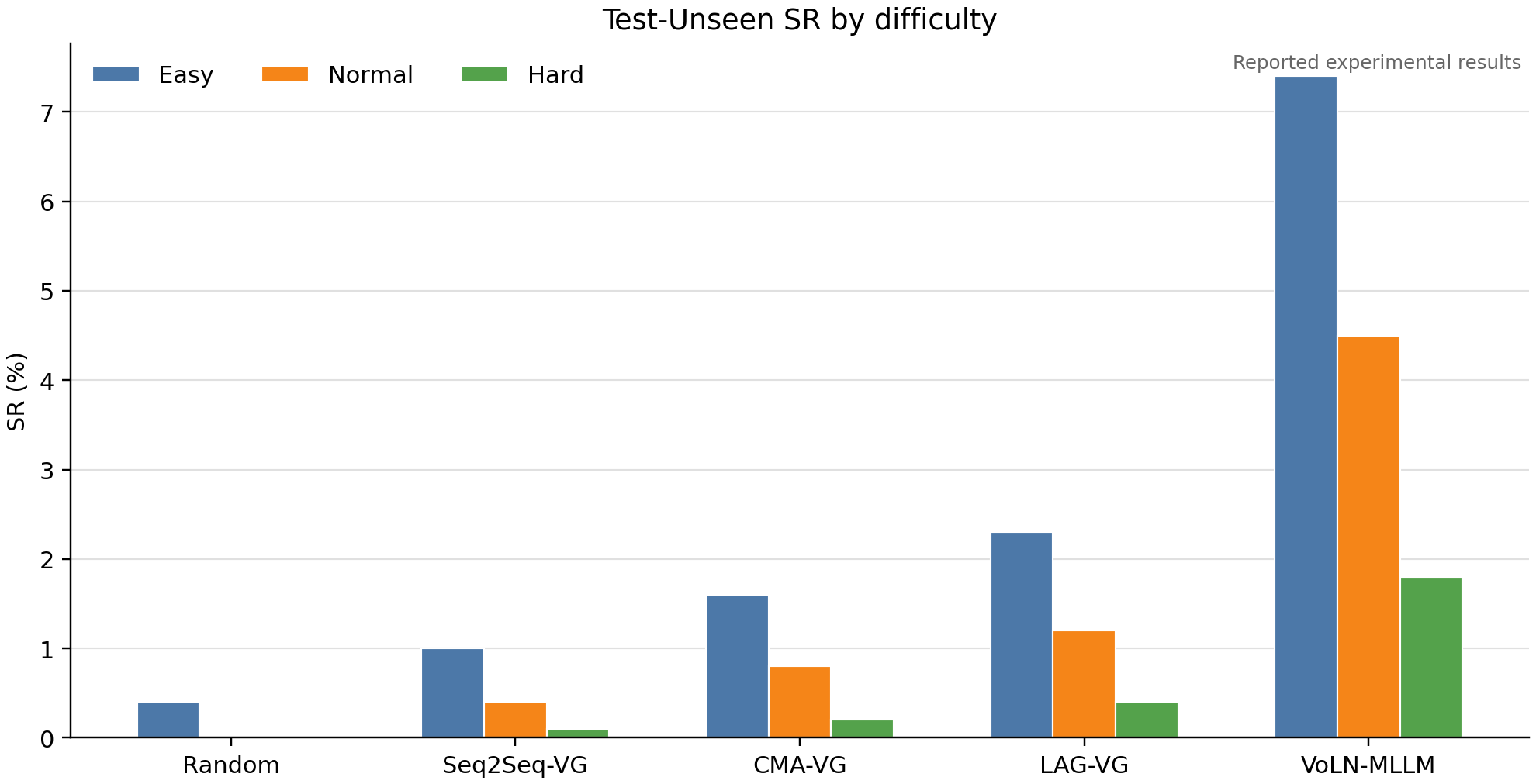
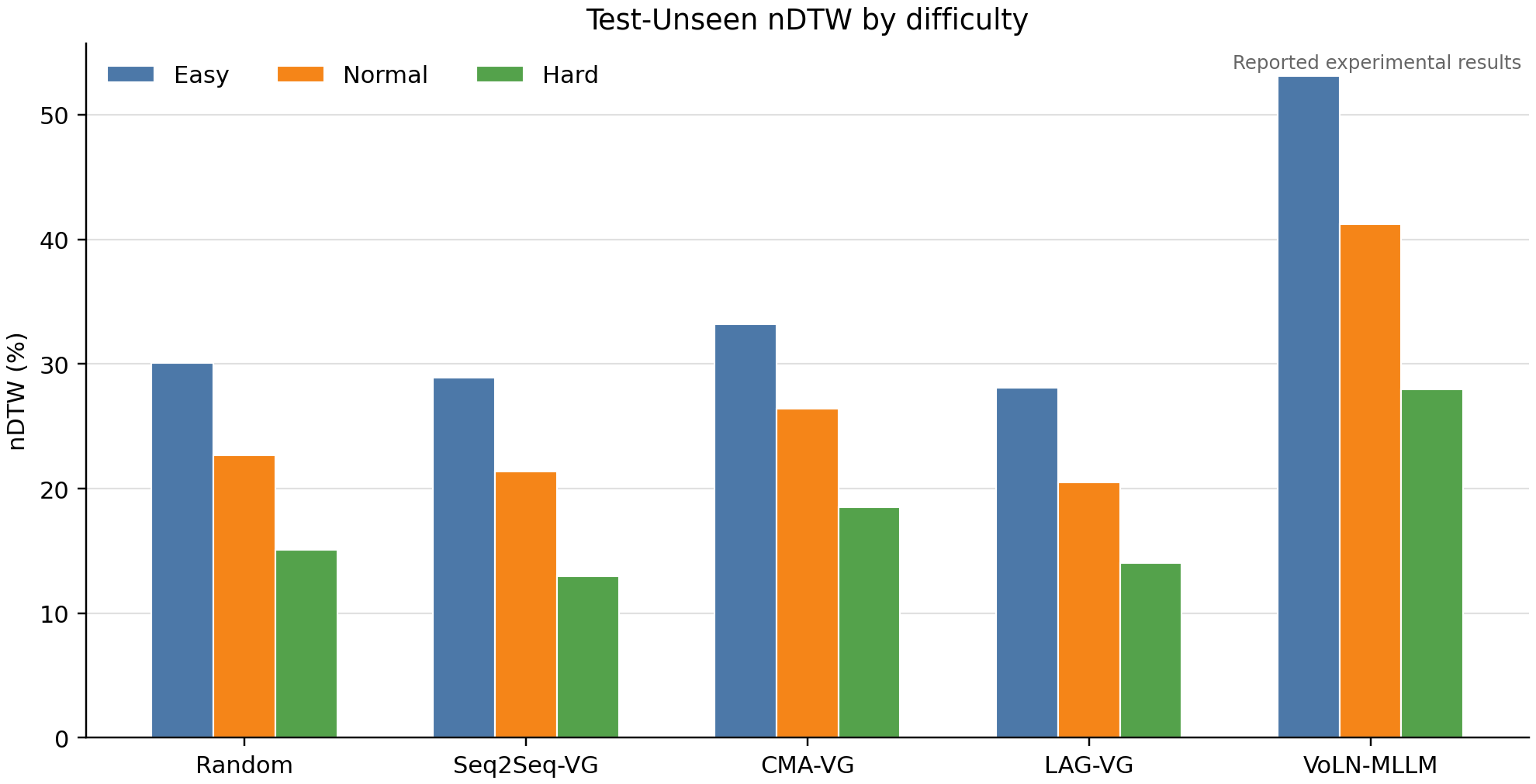
configs/experiment_results.yaml is the machine-readable source for the numbers
reported in the paper. Generated closed-loop logs are compared with this table
and summarized separately in run_coverage.json.
The committed result package is not limited to YAML. It includes normalized JSON, long-form and wide-form CSV files, rendered Markdown tables, PNG/PDF figures, run coverage, and per-metric comparison intermediates:
results/experiments/
  experiment_results.json
  experiment_results.md
  experiment_results_long.csv
  run_coverage.json
  intermediate/
    README.md
    main_results_wide.csv
    ablation_results.csv
    run_comparison.csv
    result_manifest.json
  figures/
    test_unseen_sr.{png,pdf}
    test_unseen_ndtw.{png,pdf}
Export the experiment tables and plots:
python scripts/compile_experiment_results.py \
  --results configs/experiment_results.yaml \
  --output-dir results/experiments
Compare available closed-loop runs against the reported table:
python scripts/compile_experiment_results.py \
  --results configs/experiment_results.yaml \
  --output-dir results/experiments \
  --runs-root runs \
  --backend airsim
Missing run directories are listed as skipped_missing in
run_coverage.json. Use --strict-runs for release verification that must
include every method and split.
| Test-Unseen SR | Test-Unseen nDTW |
|---|---|
 |  |
Repository Structure
src/voln_uav/
  benchmark/      Benchmark construction, visual goals, and beacon augmentation
  data/           Dataset loaders and release packaging
  models/         DINO–CLIP adapter, semantic bank, planners, and LoRA modules
  training/       Adapter/planner training and DAgger-style collection
  evaluation/     Offline and online metrics
  simulators/     Route replay and AirSim interfaces
  cli/            Command-line entry points
configs/          Dataset, training, and evaluation configurations
scripts/          Reproducible training and evaluation launchers
airsim_plugin/    Unreal/AirSim scene utilities
docs/             Project page, demonstrations, and baseline documentation
Citation
If you find this work helpful, please consider citing our paper:
@article{lou2026voln,
  title  = {VoLN: Vision-Only Long-Horizon Navigation---Paradigm, Benchmark, and Method},
  author = {Lou, Jiabin and Wang, Haopeng and Wang, Yuanshuai and Liu, Xinyu and Lv, Xuxin and Guo, Yuxin and Huang, Lei and Shi, Rongye and Wu, Wenjun},
  journal = {arXiv preprint arXiv:2607.21400},
  year   = {2026},
  eprint = {2607.21400},
  archivePrefix = {arXiv},
  primaryClass = {cs.RO},
  url    = {https://arxiv.org/abs/2607.21400}
}
Acknowledgement
We thank the authors of TravelUAV and AirVLN for releasing their codebases and providing useful engineering references for UAV navigation research.
VoLN UAV alternatives
View more →Similar ai agents in Other, ranked by GitHub stars. Compare licence, recent activity and scan status before you choose.
| Name | Stars | Licence | Last updated | Scan |
|---|---|---|---|---|
| VoLN UAV (this page) Admire-ljb | 47 | MIT | Aug 4, 2026 | Scanned, no flagged issues |
| Hermes Desktop fathah | 15k | MIT | Oct 13, 2026 | Scanned, no flagged issues |
| CubeSandbox TencentCloud | 13k | None found | Nov 1, 2026 | Not scanned yet |
| Openchamber openchamber | 12k | MIT | Nov 1, 2026 | Scanned, no flagged issues |
| Open Swe langchain-ai | 11k | MIT | Nov 1, 2026 | Scanned, no flagged issues |
| Moltworker cloudflare | 9.9k | Apache-2.0 | May 9, 2026 | Scanned, no flagged issues |