Vulnerator AI AI Agent
 by irraz
Autonomous OODA-loop pentesting agent. Hermes brain, Kali + Playwright tools over MCP, ATT&CK as the Orient language.
Vulnerator AI is an open-source ai agent by irraz, written mainly in Python, with 202 GitHub stars and the MIT license. Its code was last updated Oct 30, 2026.
<p align="center"> <a href="https://youtu.be/XpCRds5raVs"> <img src="https://img.youtube.com/vi/XpCRds5raVs/maxresdefault.jpg" alt="Vulnerator-AI Demo Video" width="720"> </a> </p> <p align="center"> <sub>▶️ <a href="https://youtu.be/XpCRds5raVs"><b>Watch the demo</b></a> — OODA loop pentest in action</sub> </p>
OODA pentest driven by Hermes talking directly to a Kali container via MCP.
What it is
vulnerator-ai runs an OODA (Observe-Orient-Decide-Act) pentest loop where
the driving brain is Hermes and the
tools run on a Kali governed by an MCP server. Hermes decides what
to run and launches it directly against the target through the Kali MCP.
It is a deliberately minimal design: no core, no REST API, no UI, no gates.
The agent, two tool MCP servers, the Caido web-security toolkit, the MCP front door, the web GUI
and two live-screen containers (a visible browser and a Caido director), with the agent driving end
to end. To bring everything up from scratch, follow docs/RUNBOOK.md.
Architecture
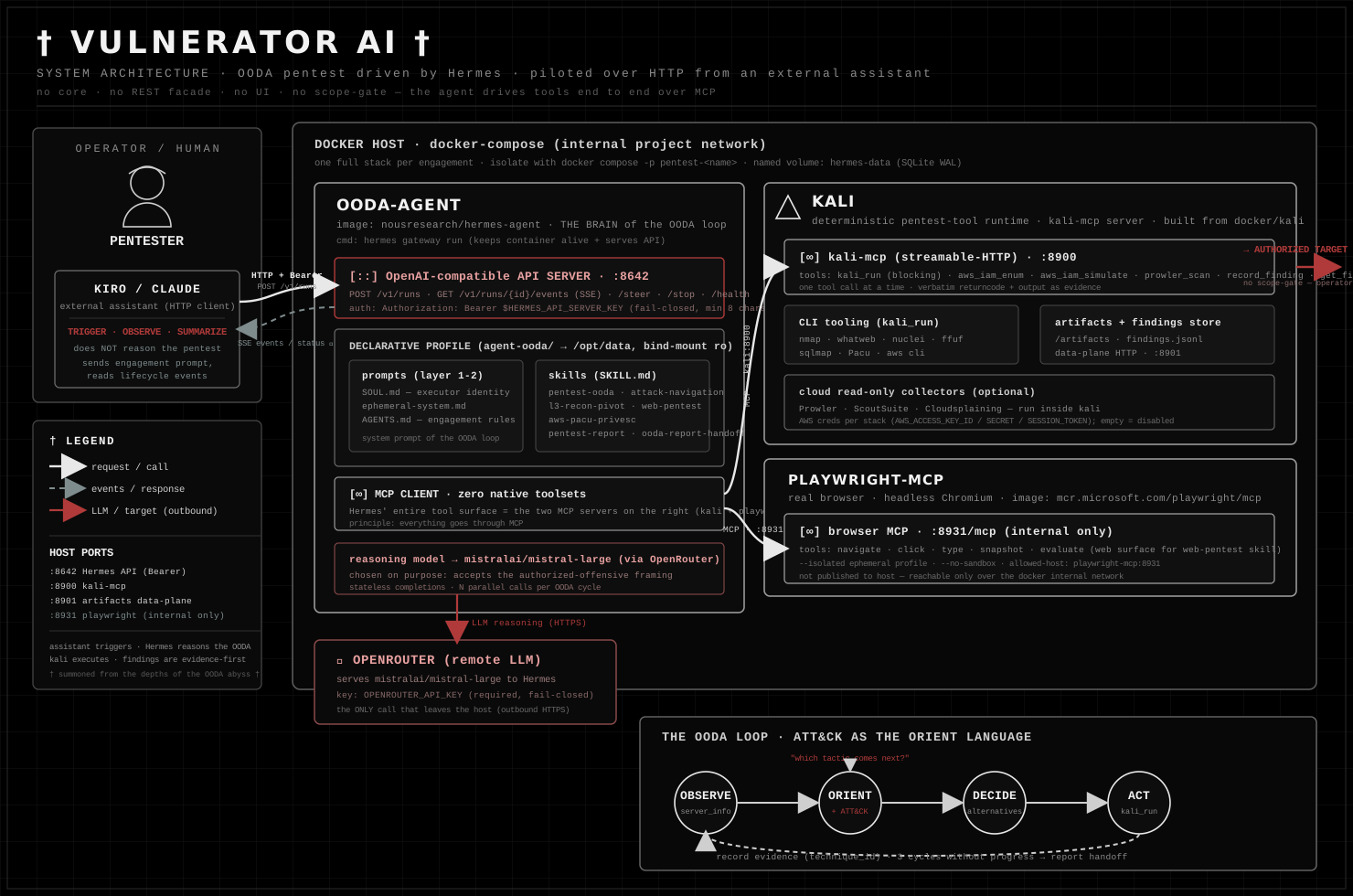
- kali — deterministic runtime for pentest and collection tools (nmap, whatweb, nuclei, ffuf,
sqlmap, Prowler, ...) over a
kali-mcpserver (:8900). - playwright-mcp — real browser (headless Chromium) over MCP (
:8931), the web surface used by theweb-pentestskill. - caido — the Caido web-security toolkit (proxy + Replay + HTTPQL history +
Automate fuzzing + interception), reached by
kali-mcpover its GraphQL API on the internal network (http://caido:8080, not published to the host). It powers thecaido_*tools and optional proxy capture ofkali_runtraffic; fully zero-touch (headless guest login, persistent volume, pinned image). Seedocs/caido.md. - ooda-agent — Hermes (
nousresearch/hermes-agent) as the OODA loop driver and client of both MCPs. Keeps its OpenAI-compatible API server alive on:8642. - vulnerator-mcp — thin MCP front door over Hermes'
:8642runs API so MCP clients (Claude Code / Kiro, BugTraceAI, ...) can trigger/observe/steer/stop a run. Up by default; it exposes only the runs lifecycle, never rawkali_runor/v1/chat/completions. - vulnerator-web — Vulnerator's own web GUI at http://localhost:9100: live OODA
terminal, Copilot (running tools, browser actions, Caido traffic), Langfuse-style traces of every
tool call, and PoCs with the OODA path that led to them and a recorded terminal replay
(
.cast/.md). Links to the Hermes Dashboard (:9119) and Webapp (:9120). Observer only. Terminal client:python3 docker/web/vulnerator_watch.py. Seedocs/web-gui.md. - browser-view — a visible Chromium (Xvfb + x11vnc + noVNC) that
playwright-mcpdrives over CDP, so the agent's browsing is shown live in the console's Screens tab (:6080). - caido-director — a visible Chromium on the pre-authenticated Caido UI, driven by a controller
that re-enacts the agent's
caido_*actions (opens the Replay session, types the HTTPQL filter, opens the packet…), shown live in Screens (:6090).
No api service: the agent talks directly to the MCPs; the GUI only observes. See
docs/design.md for the full architecture and the curated Kali toolset.
Quick Start
The installer is the fast path: the only thing you provide is your OpenRouter API key. It
checks prerequisites (docker, docker compose v2, openssl), auto-generates the two secret
tokens, writes the .env from the template, and brings the default stack up.
./install.sh
Then open the interactive TUI:
docker compose exec -it ooda-agent hermes chat
Useful flags: --with-juice-shop (also start the OWASP Juice Shop practice lab), --no-up
(just write the .env), --force (overwrite an existing .env).
Let an AI assistant set it up for you
Don't want to read any of this? Paste the block below to an LLM coding assistant (Claude Code, Kiro, Cursor, …) that has shell access in this repo. It tells the assistant everything it needs to install the stack and wire up the MCP server — you provide only your OpenRouter key when asked.
You are setting up the "vulnerator-ai" repo for me. Do the following, in order:

1. From the repo root, run the installer:  ./install.sh
   It is interactive and will ask for ONE value, OPENROUTER_API_KEY — ask me for it
   and pass it through (or run it non-interactively as
   `OPENROUTER_API_KEY=<the key> ./install.sh`). The installer auto-generates the two
   secret tokens (HERMES_API_SERVER_KEY, VULNERATOR_MCP_INBOUND_TOKEN), writes the .env,
   and brings the default 4-container stack up (no Juice Shop lab). Do NOT invent or ask
   me for the two tokens — the installer makes them.

2. Wait until the stack is healthy, then verify with:  docker compose ps

3. Register the local MCP server (stdio mode — zero network surface, no inbound token).
   First build the image once:
       docker build -f docker/mcp/Dockerfile -t vulnerator-ai-mcp:dev .
   Then add this entry to my assistant's MCP config (mcpServers), filling HERMES_API_SERVER_KEY
   with the value the installer wrote into the repo's .env (read it from there, do not print it):
       {
         "mcpServers": {
           "vulnerator-mcp": {
             "command": "docker",
             "args": [
               "run", "-i", "--rm",
               "--add-host", "host.docker.internal:host-gateway",
               "-e", "HERMES_API_SERVER_KEY",
               "-e", "HERMES_API_BASE_URL=http://host.docker.internal:8642",
               "vulnerator-ai-mcp:dev"
             ],
             "env": { "HERMES_API_SERVER_KEY": "<value from .env>" }
           }
         }
       }

4. Confirm the MCP tools are available (health(), start_pentest, get_run_status,
   stream_run_events, steer_run, stop_run). Then tell me it's ready and remind me this engine
   has NO scope-guard/consent/audit by default: it must be used only against authorized targets.
cp .env.example .env
# edit .env: set OPENROUTER_API_KEY, and generate the two tokens with `openssl rand -hex 32`:
#   HERMES_API_SERVER_KEY, VULNERATOR_MCP_INBOUND_TOKEN
docker compose up -d --build
Every variable is documented in docs/configuration.md.
Documentation
The README is intentionally short. The detail lives under docs/:
| Topic | Doc |
|---|---|
| Project website | irraz.github.io/vulnerator-ai |
Every .env variable, AWS creds, local Ollama inference | docs/configuration.md |
| Driving a pentest (TUI, MCP client, raw HTTP), the Juice Shop lab, clean restarts | docs/usage.md |
| The no-guardrails model, opt-in scope-guard, MCP inbound token | docs/security.md |
| Automatic LLM fallback (Mistral Large 4 ↔ GLM-5.3 Flash) | docs/llm-fallback.md |
Raw HTTP API reference (:8642) | docs/http-api.md |
| Architecture, OODA design, findings-store schema | docs/design.md |
| Sample redacted deliverable | docs/example-report.md |
Models
Hermes uses Mistral Large 4 as primary with automatic fallback to GLM-5.3 Flash on rate limits or errors. Both models have the same Cyber Index (50%) but different cost/performance trade-offs. See docs/llm-fallback.md for configuration and comparison.
⚠️ Security & authorized use
By default this product has no guardrails: no scope-guard, no consent, no audit, no authorization gate. Hermes runs directly whatever it decides against the target. This is intentional. Use it only against explicitly authorized targets and in a controlled environment. All responsibility for the scope and for lawful use rests with the operator.
There are two opt-in controls (a deterministic scope-guard for kali_run/kali_exec/caido_request/caido_automate, and the MCP
inbound token). Neither is consent or a firewall. See docs/security.md for
what each does and does not cover.
Media & brand assets
Official artwork lives in media/ (see media/README.md for the
full catalog). Death-metal / cyberpunk identity — use it for wallpapers, stickers and shirts.
There's also a theme song (media/vulnerator-ai-song.mp3, lyrics
in docs/lyrics.md) — a nod to the project's death-metal band aesthetic.
🤝 Sponsors
We are grateful for the support of companies that believe in advancing cybersecurity knowledge and making security insights accessible to the community.
<p align="center"> <a href="https://aktios.com/"> <img src="https://sjimnar.github.io/assets/images/aktios.avif" alt="Aktios" height="80"> </a> </p>Special thanks to Aktios: vulnerator-ai was born inside the
Aktios cybersecurity team, and we extend our sincere gratitude for their continued support.
Their commitment to cybersecurity made this project possible.
License
Released under the MIT License. You are free to use, modify and distribute this software, including commercially, as long as the copyright notice and permission notice are preserved. The software is provided "as is", without warranty of any kind.
Note on responsible use. The MIT license governs the code, not how you may use it. This is an offensive security tool with no scope-guard, consent or authorization gate by default (see the ⚠️ Warning above). Use it only against explicitly authorized targets; responsibility for the scope and for lawful use rests entirely with the operator.
Vulnerator AI alternatives
View more →Similar ai agents in Security & Testing, ranked by GitHub stars. Compare licence, recent activity and scan status before you choose.
| Name | Stars | Licence | Last updated | Scan |
|---|---|---|---|---|
| Vulnerator AI (this page) irraz | 202 | MIT | Oct 30, 2026 | Scanned, no flagged issues |
| ECC affaan-m | 294k | MIT | Oct 30, 2026 | Scanned, no flagged issues |
| Strix usestrix | 73k | Apache-2.0 | Oct 30, 2026 | Scanned, no flagged issues |
| Goose aaif-goose | 56k | Apache-2.0 | Nov 1, 2026 | Scanned, no flagged issues |
| Anthropic Cybersecurity Skills mukul975 | 35k | Apache-2.0 | Aug 31, 2026 | Scanned, no flagged issues |
| Pentagi vxcontrol | 33k | MIT | Oct 22, 2026 | Scanned, no flagged issues |