Coddy Agent MCP Server
 by coddy-project
General-purpose agent in one static Go binary: console TUI, ACP server for editors, OpenAI-compatible API with embedded web UI, Telegram gateway, cron scheduler, swarm relay, remote mode. Rules, skills, subagents, hooks, MCP, background tasks, long-term memory, context compaction. Any OpenAI-compatible provider, distroless-ready.
Coddy Agent is an open-source mcp server by coddy-project, written mainly in Go, with 189 GitHub stars and the MIT license. Its code was last updated Nov 1, 2026.
| Desktop (1920×1080) | Mobile (390×844) |
|---|---|
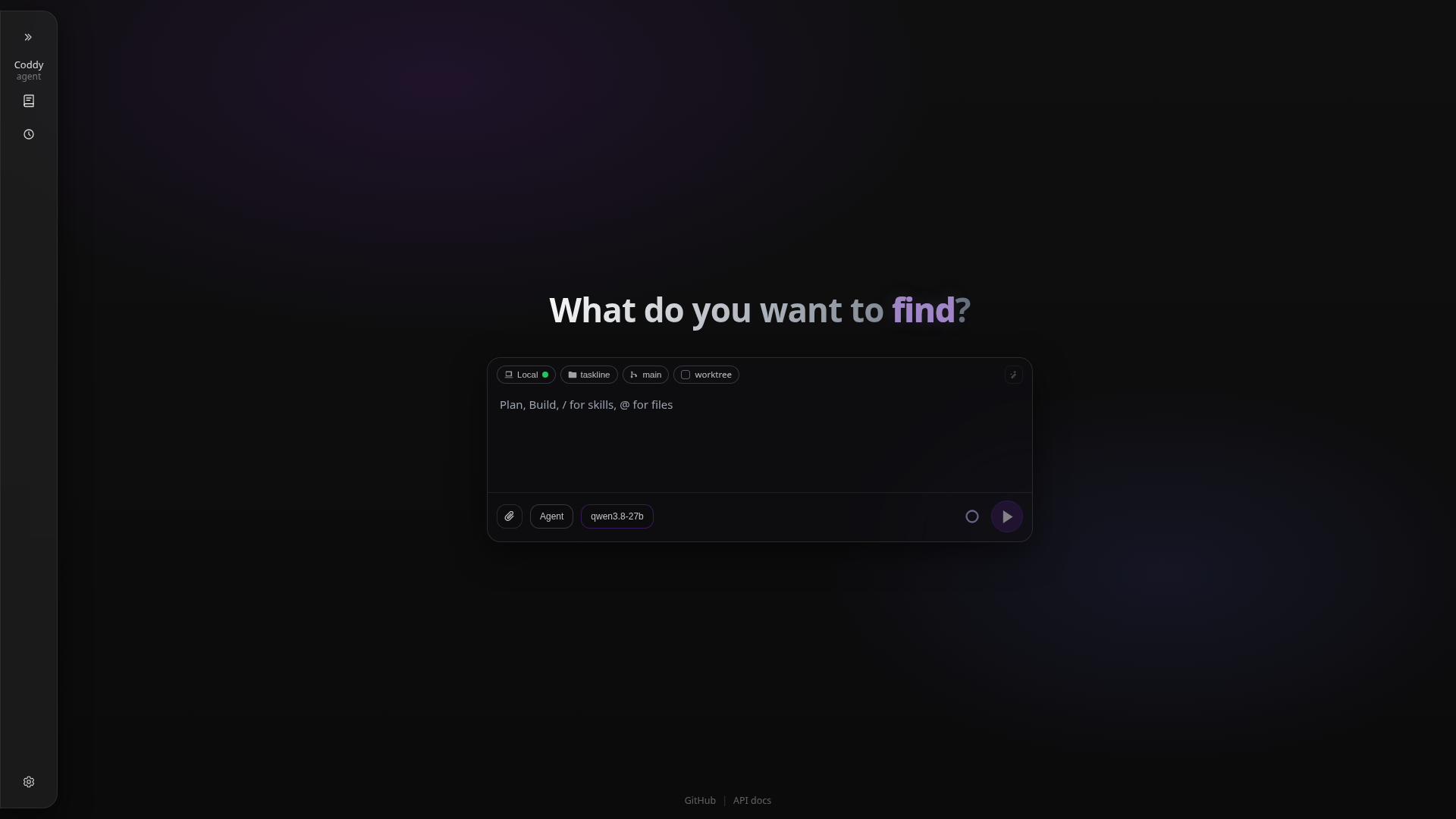 | 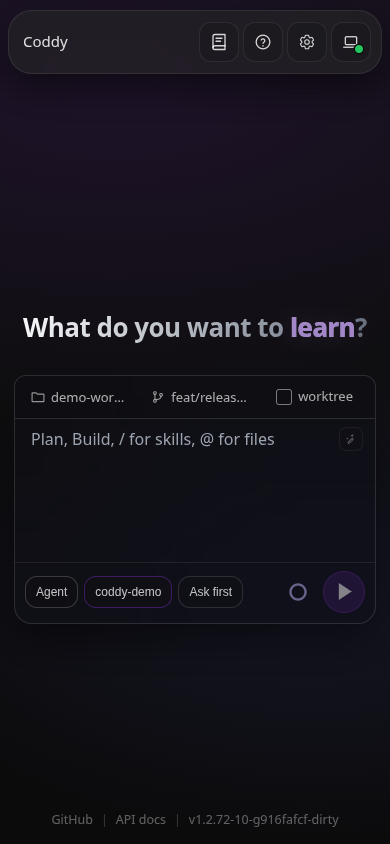 |
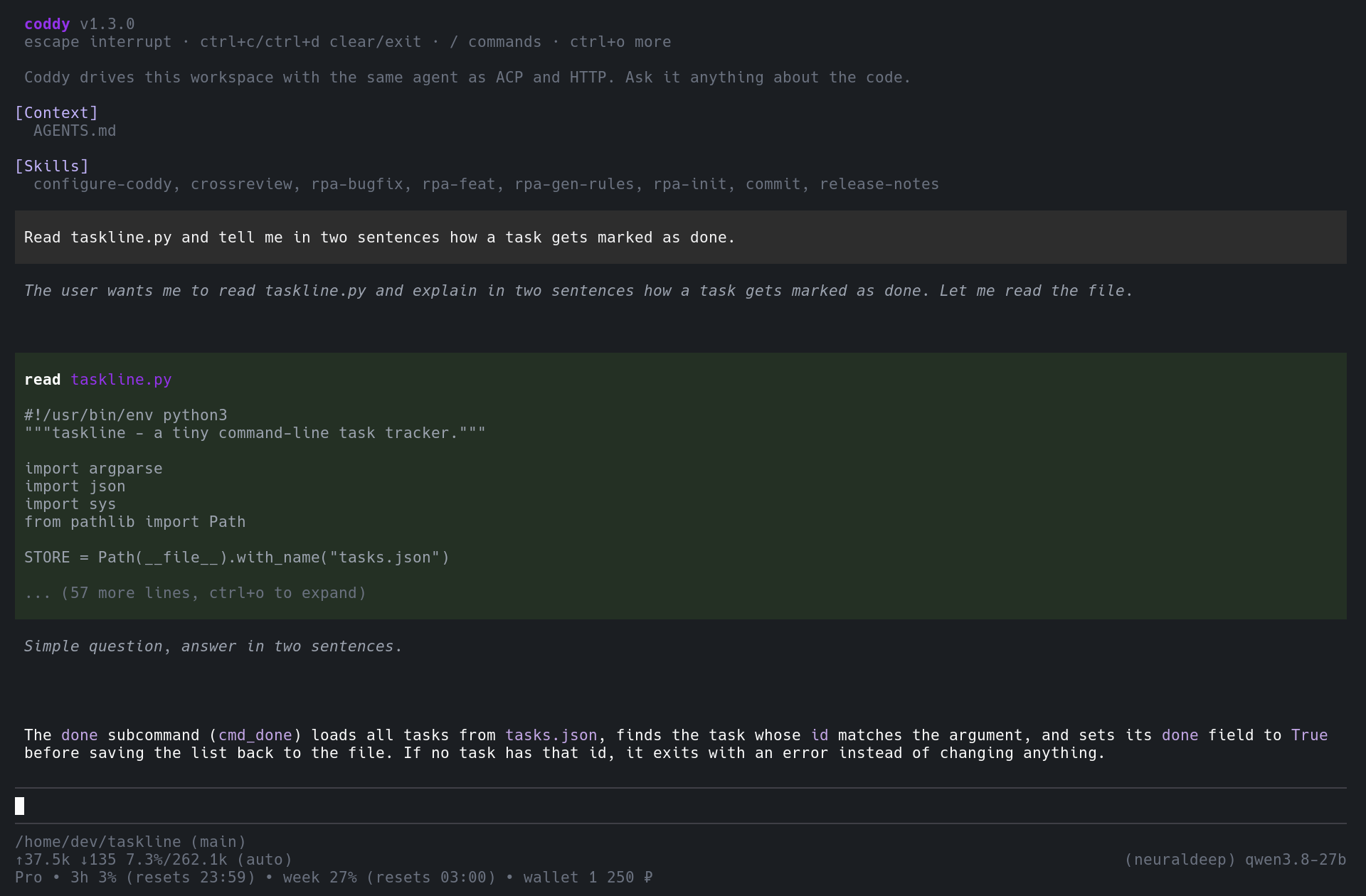
Coddy is a harness: the same agent core is reachable from the desktop app with coddy desktop, from a terminal through the console TUI, from an editor over the Agent Client Protocol, from a browser or any OpenAI client over HTTP, from Telegram through the messenger gateway, and from cron through the scheduler. Every surface shares the sessions under ~/.coddy, so a conversation started in a chat is live in the browser and can be continued in either. It runs in scratch and distroless images with a read-only root filesystem, needs no runtime, and is built for fleets of containers as much as for one laptop.
Install
curl -fsSL https://coddy.dev/install.sh | bash
irm https://coddy.dev/install.ps1 | iex
The installer puts coddy on PATH, creates ~/.coddy/config.yaml from the release config.example.yaml when it is missing and, on Linux, FreeBSD and macOS, installs the man page and the shell completions. Every release also publishes .deb and .rpm packages, a Homebrew cask in the tap coddy-project/homebrew-coddy-agent, archives for Linux, macOS, Windows, FreeBSD and Android under Termux, and the image ghcr.io/coddy-project/coddy-agent for docker compose up -d. The packages and the cask recommend tmux, for a console session that outlives the terminal, without installing it. Details for each route are in Install and Docker; building from source is make build TAGS="http ui scheduler memory cli gateway swarm metrics browser desktop" after git clone, see Build from source.
On macOS, Homebrew installs it from Coddy's own tap and brew upgrade follows the releases:
brew install coddy-project/coddy-agent/coddy
Then give it a model. The quickest way is the console itself: run coddy and type /login, which signs in to NeuralDeep (/login codex, /login devin or /login opencode for the others) and writes the provider and every model it serves into ~/.coddy/config.yaml (Console). Or put a provider key into ~/.coddy/config.yaml, or export OPENAI_API_KEY and let the defaults pick it up:
providers:
  - name: openai
    type: openai
    api_key: "${OPENAI_API_KEY}"

models:
  - model: "openai/gpt-6.1-sol"
    max_tokens: 1050000
    reasoning_default: high

agent:
  model: "openai/gpt-6.1-sol"
coddy -t checks the file and coddy --dry-run probes what it points at. Anthropic, NeuralDeep, ChatGPT sign-in through the Codex backend, a Devin account signed in through the browser (Devin), Ollama, llama.cpp and any other OpenAI-compatible server are covered in Configuration. The first five minutes on every surface are in Quickstart; upgrades are coddy update -y, which ends with the release notes of every version it skipped over (Update).
Surfaces
| Surface | Start it | What you get | Guide |
|---|---|---|---|
| Console | coddy | A terminal chat with streamed tool calls, permission prompts, a model picker, !! for a local shell, coddy -c to continue, coddy -p "..." for one-shot answers, `git diff | coddy -p "review"andcoddy -i brief.md` for piped data and long prompts |
| Web UI and HTTP API | coddy serve | The embedded single-page app on http://127.0.0.1:12345/, OpenAI-compatible /v1/* endpoints and the /coddy REST surface, Swagger at /docs/ | Web UI, HTTP API, video |
| Desktop window | coddy desktop | The web interface as an application window of its own, with chats as tabs, a loopback port it remembers across launches and a browser profile apart from your everyday one. Linux, macOS and Windows; on an X11 session the tab strip is the window's title bar | Desktop window |
| Editors | coddy acp | Zed, VS Code, Obsidian and scripts as ACP clients, with Coddy's modes, models, permissions and skills in the editor's composer | Editors, Zed video, VS Code video |
| Telegram | coddy serve with gateways.telegram.enable | A bot with per-user sessions, access levels and group isolation; the same chat is live in the web UI | Telegram gateway |
| Pachca | coddy serve with gateways.pachca.enable | A Pachca (Пачка) integration bot for direct chats, groups and threads; reads its events history, so no public address is needed | Pachca gateway |
| Scheduler | coddy serve with scheduler.enable | Cron jobs as Markdown files, each run a session of its own | Scheduler |
| Swarm | coddy serve with swarm.enable | A relay that lists and reaches many Coddy nodes, including ones that can only dial out | Swarm, video |
| Metrics | coddy serve with metrics.enable | A Prometheus exporter on a port of its own: provider calls and tokens, turns, background tasks and the session disk, with alert rules for the common failures | Monitoring |
| Remote | coddy --remote host:port | The console, an editor or the browser driving a coddy serve on another machine | Remote mode |
coddy serve runs whatever config.yaml enables in one process. On Linux, coddy serve install runs it as a systemd user service of your account, working in ~/Coddy (coddy serve uninstall removes it); elsewhere coddy serve --daemon keeps it running in the background with status, stop and restart (coddy serve and the daemon).
What it does
-
Your own browser: the chats work in your Chrome, Yandex Browser or Firefox through the Coddy for Browser extension - open tabs, read pages, click, type, take screenshots and move files - in the tab groups you share, after you approve each website; its side panel is the web UI next to the page, and a console, an editor or another node of the swarm reaches the same browser through its home server (Coddy for Browser).
-
Three operating modes:
agentwith every tool,planfor planning and text files,askfor read-only research, switched from any surface (Operating modes). -
Rules and project files: the first of
.coddy/rules,.agents/rules,.cursor/rules,.claude/rulesand.codex/rulesthat holds rules, so a mirror kept for another agent is not loaded twice, and nestedAGENTS.mdare picked up as the agent works without moving the cached system prompt; your own~/.coddy/AGENTS.md,~/.coddy/DESIGN.mdand~/.coddy/rulesapply in every workspace (Rules and instructions). -
Skills:
SKILL.mdpacks become slash commands. Six ship inside the binary and are there on the first run -/rpa-init,/rpa-feat,/rpa-bugfix,/rpa-gen-rules,/configure-coddyand/crossreview(a quorum code review over external code-agent CLIs and internal reviewers) - and more install from skills.sh, the skillsbd registry or any repository (Skills). -
Subagents:
spawn_agentdelegates a bounded task to a child with its own context and session, tools and permissions only narrowing; a child rides out a dropped provider connection, andresumecontinues a run that stopped short in its own session instead of starting over (Subagents). -
Session goal:
/goal <objective>keeps the agent working until a second model, judging the tool results rather than the agent's claims, finds the objective met and a read-only verifier confirms it in the files; a watchdog cuts stalled or looping turns, and the goal shows in the web UI and the console (Session goal and supervisor). -
Feature worktrees:
worktree_openmoves the active session into the worktree of a branch, creating one from the fresh default branch (or stacked on the current commit) when there is none,worktree_listshows where every worktree stands, andworktree_exitbrings the session back to the main checkout, removing a worktree that holds nothing of its own (uncommitted work an explicit removal discards is kept as a snapshot); a new worktree gets the ignored files.worktreeincludenames, and a subagent can work in a worktree of its own;/worktreedoes the same for the operator, and the web UI shows the branch under the main project, with the way back on the plate (Git worktrees). -
Hooks: your own commands at every lifecycle point, in Claude Code's
hooks.jsonshape, able to deny, approve or rewrite a tool call (Hooks). -
MCP servers over stdio, streamable HTTP and SSE, from the global and project
mcp.jsonfiles or the editor, with a trust gate for what arrives with a checkout; connected all at once and, in the console, after the first frame (MCP servers). -
Mentions:
@points at a file anywhere on disk, a line range, a folder, another session, a rule, a subagent or a web page, with the same fuzzy completion in the console and the browser; each is read once into the message that names it, so the provider's prompt cache holds (Mentions). -
Documentation built in: this documentation ships inside the binary - a reader in the web UI, F1 in the console,
coddy docsin the shell - searched offline, and the agent looks itself up with its owncoddy_docs_searchandcoddy_docs_readtools or a@coddy:<page>mention (Built-in documentation). -
Pictures in a prompt: paste a screenshot with ctrl+v in the console or into the web composer and mark it up first - pencil, ellipse, rectangle, arrow, text, crop, rotate and undo - in a window on the desktop or over the chat (Pasting and marking up pictures).
-
Message queue: steer a running turn at its next step or queue a separate turn after it, with images attached; every browser and console viewing the session sees the same queue (Message queue).
-
Background tasks: detached commands and subagent runs that wake the agent when they finish, in the Tasks panel of the web UI and
/tasksin the console (Background tasks). -
Canvas: pages the agent writes run as live frames on a board in the Files window of the web UI, at phone, tablet and desktop sizes at once; point at an element to ask for a change, and the agent reads the browser's console itself. Every board is an Obsidian
.canvasfile of the workspace, so it is in git and keeps its notes, groups and arrows (Canvas). -
Preview server: "run this on a web server, I want to try it myself" - the agent serves the project directory on a free localhost port and hands you the link, no
python -m http.serverneeded (Preview server). -
Context compaction and long-term memory:
/compactand automatic summarisation at a threshold, result eviction withkeep_result, a memory subagent that runs per turn in the background, recalls what the notes hold and saves what you ask it to keep (Compaction, Memory). -
Self-configuration: the agent edits its own YAML through staged
config_*tools; nothing lands until you approve the commit (config.yaml reference). -
Sessions everywhere: bundles on disk, resume from any surface, history rewind on message edit,
/exportto Markdown, HTML or JSON (Sessions, Session export). -
Any model: OpenAI, Anthropic, NeuralDeep, ChatGPT through Codex, the models of a Devin account (Devin), a local ACP agent such as Claude Code, Codex or OpenCode served as a model (ACP agent as a model), Ollama, llama.cpp, vLLM and every OpenAI-compatible API, with reasoning levels and multimodal attachments per model and retries that honour
Retry-After(Configuration). -
Usage and limits: the quota behind the current model in the console footer and in the web UI for providers that publish one (NeuralDeep, Codex, Devin, and OpenAI-compatible endpoints with
GET /v1/limits), and a turn that hits a limit can wait for the reset and resume by itself (Console, config.yaml reference). -
Config check, dry run and hot reload:
coddy -tvalidatesconfig.yamlagainst the embedded schema withfile:line:coland a fix line,--dry-runprobes paths, providers and models, ports, MCP servers, the Telegram token, remotes and swarm joins before anything starts, and a runningcoddy servepicks up an edited file without a restart (Configuration, coddy serve). -
Fleets: a swarm relay lists and reaches many nodes, mounts their sessions into one list, routes across rings and pulls in nodes that can only dial out through a reverse tunnel;
--remotedrives acoddy serveon another machine from the console, an editor or the browser (Swarm, Remote mode). -
In the browser: eight themes, English and Russian,
@mentions and multimodal attachments in the composer, a History grouped by folder with tags, pins and an archive, a plan document card, a Tasks panel, the documentation reader, a scheduler editor and a swarm map with the topology; it installs as an app and notifies you when the agent finishes or waits for you (Web UI). -
Closed when it is on a network: a bearer token gates the API for clients, and an optional password sign-in gates the browser -
coddy serve set-password, orCODDY_HTTP_USER/CODDY_HTTP_PASSWORDin~/.coddy/.env, with one-time codes from an authenticator app and backup codes on top (enrolled in the web UI under Settings, Authentication) - so acoddy serveon0.0.0.0is not readable by whoever finds the port (Remote mode, Security and trust).
Project trust is one decision for MCP servers, hooks and subagents that arrive with a repository: nothing from a checkout runs until you approve that exact file (Security and trust).
Documentation
| Goal | Start here |
|---|---|
| Install and run it for the first time | Quickstart, Install |
| Read this documentation offline, from the app, the console or the shell | Built-in documentation |
| Give it a model or check a config file | Configuration, config.yaml reference |
| Use it from the desktop app, a terminal, a browser, an editor or Telegram | Desktop, Console, Web UI, Editors, Telegram gateway |
| Run it as a service or reach it from elsewhere | coddy serve, Remote mode, Swarm, Scheduler |
| Bound what it may execute | Security and trust, Operating modes |
| Teach it your project | Rules, Skills, Subagents, Hooks, MCP servers |
| Look something up | CLI reference, Environment variables, Slash commands, Tools, HTTP API, ACP protocol |
| Fix something | Troubleshooting, Releases |
| Combine features for a task | Tutorials, the swarm ones included: a relay and its nodes, a chain of relays, working with remote nodes, Android phones as nodes |
| Change Coddy itself | Contributing, Architecture, AGENTS.md, DESIGN.md |
The whole map is docs/README.md. Agents that read documentation get the same pages as https://coddy.dev/llms.txt and https://coddy.dev/llms-full.txt, and the config file carries a JSON Schema at https://coddy.dev/config.schema.json for editor validation. How Coddy compares with other agent harnesses is on coddy.dev/compare.
Contributing
Bug reports and pull requests are welcome at github.com/coddy-project/coddy-agent. CONTRIBUTING.md covers the development environment, the test runs and what a change must carry; AGENTS.md is the map coding agents read before they touch the tree.
License
MIT, see LICENSE.
Coddy Agent alternatives
View more →Similar mcp servers in Communication, ranked by GitHub stars. Compare licence, recent activity and scan status before you choose.
| Name | Stars | Licence | Last updated | Scan |
|---|---|---|---|---|
| Coddy Agent (this page) coddy-project | 189 | MIT | Nov 1, 2026 | Scanned, no flagged issues |
| TrendRadar sansan0 | 63k | GPL-3.0 | Oct 29, 2026 | Scanned, no flagged issues |
| Waha devlikeapro | 7.7k | Apache-2.0 | Oct 28, 2026 | Scanned, no flagged issues |
| Lemonade lemonade-sdk | 6k | Apache-2.0 | Nov 1, 2026 | Scanned, no flagged issues |
| Pipeshub AI pipeshub-ai | 3.9k | Apache-2.0 | Nov 1, 2026 | Scanned, no flagged issues |
| Slackdump rusq | 2.8k | AGPL-3.0 | Nov 1, 2026 | Scanned, no flagged issues |