Datawrapper MCP
 by palewire
A Model Context Protocol (MCP) server and app for creating Datawrapper charts using AI assistants.
Datawrapper MCP is an open-source mcp server by palewire, written mainly in Python, with 61 GitHub stars and the MIT license. Its code was last updated Nov 1, 2026. The latest PyPI release is datawrapper-mcp 0.4.0, published Sep 13, 2026, with 136 downloads last week.



A Model Context Protocol (MCP) server and app for creating Datawrapper charts using AI assistants. Built on the datawrapper Python library.
<!-- mcp-name: io.github.palewire/datawrapper-mcp -->Status: early and experimental. This project — including its Claude Code/Desktop plugin and marketplace listing — is under active development, and behavior can change between releases. In particular, the plugin/marketplace install path has known gaps (see issue #78) — don't treat it yet as a finished, zero-maintenance install path for a wider rollout.
Example Usage
You can provide a data file and simply ask for the chart you want. The draft will soon appear in the panel.
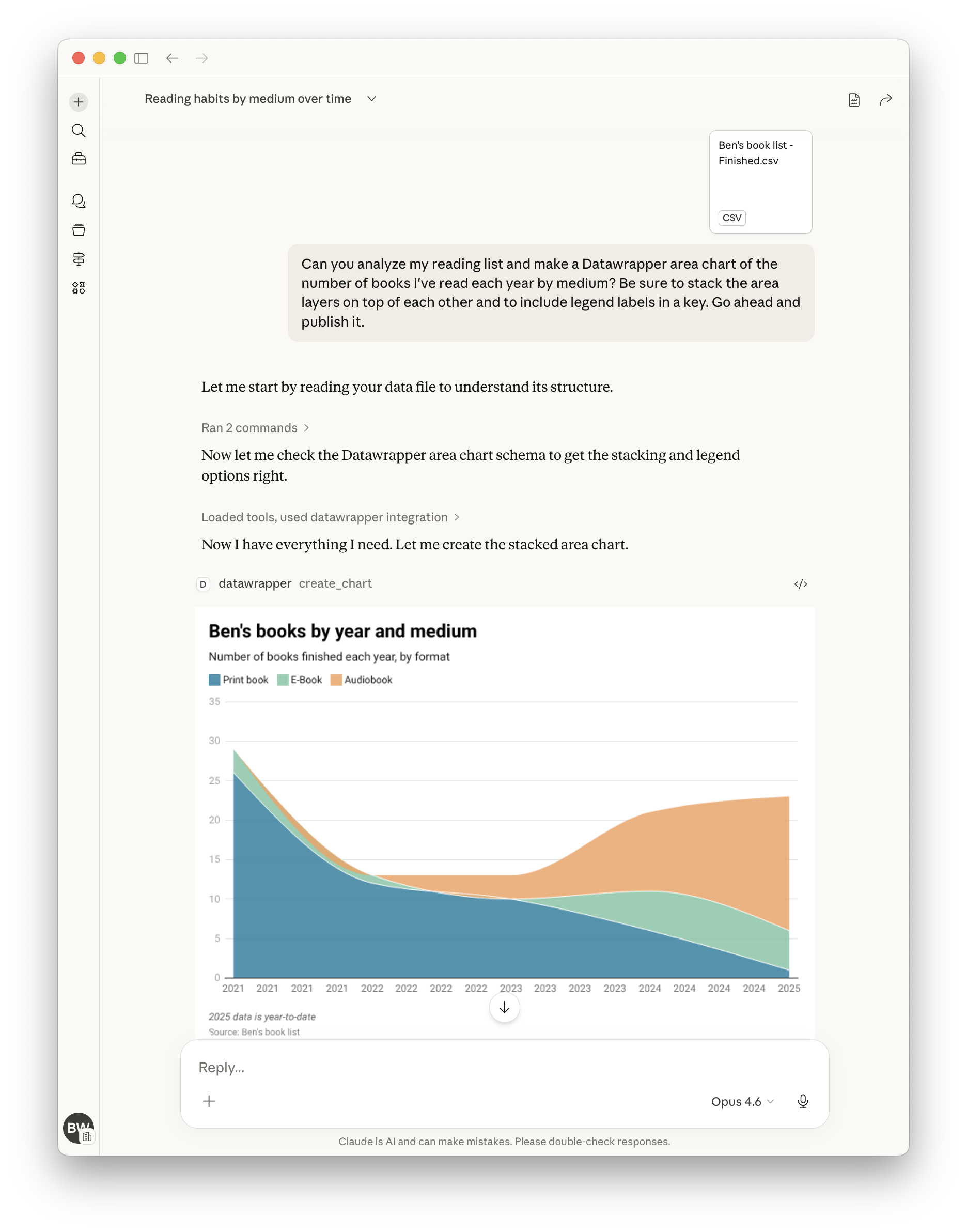
Here's a more complete example showing how to create, publish, update, and display a chart by chatting with the assistant:
"Create a datawrapper line chart showing temperature trends with this data:
2020, 15.5
2021, 16.0
2022, 16.5
2023, 17.0"
# The assistant creates the chart and returns the chart ID, e.g., "abc123"

"Publish it."
# The assistant publishes it and returns the public URL

"Update chart with new data for 2024: 17.2°C"
# The assistant updates the chart with the new data point

"Make the line color dodger blue."
# The assistant updates the chart configuration to set the line color

"Show me the editor URL."
# The assistant returns the Datawrapper editor URL where you can view/edit the chart

"Show me the PNG."
# The assistant embeds the PNG image of the chart in its contained response.

"Suggest five ways to improve the chart."
# See what happens!
Tools
| Tool | Description |
|---|---|
list_chart_types | List available chart types with descriptions |
get_chart_schema | Get the full configuration schema for a chart type |
create_chart | Create a new chart with data and configuration |
update_chart | Update an existing chart's data or styling |
publish_chart | Publish a chart to make it publicly accessible |
get_chart | Retrieve a chart's configuration and metadata |
delete_chart | Permanently delete a chart |
export_chart_png | Export a chart as a PNG image |
Chart Types
bar, line, area, arrow, column, multiple column, scatter, stacked bar
Use list_chart_types to see descriptions, then get_chart_schema to explore configuration options for any type.
Getting Started
Requirements
- A Datawrapper account (sign up at https://datawrapper.de/signup/)
- An MCP client such as Claude or OpenAI Codex
- Python 3.10 or higher
Get Your API Token
- Go to https://app.datawrapper.de/account/api-tokens
- Create a new API token
- Add it to your MCP configuration as shown in the installation guide
Quick Start (Claude Code)
{
  "mcpServers": {
    "datawrapper": {
      "command": "uvx",
      "args": ["datawrapper-mcp"],
      "env": {
        "DATAWRAPPER_ACCESS_TOKEN": "your-token-here"
      }
    }
  }
}
For other clients (Claude Desktop, Claude.ai, Cursor, VS Code Copilot, ChatGPT, OpenAI Codex, OpenClaw) and Kubernetes deployment, see the installation guide.
Installing via a plugin marketplace/directory (Claude Desktop's plugin browser, ClawHub, etc.) is still experimental. These interactive install flows currently have no working way to collect required environment variables like
DATAWRAPPER_ACCESS_TOKEN— see issue #78 for details. The manually-edited config shown above (and throughout the installation guide) is the reliable path today.
Using Your Own Token (Hosted Deployments)
When connecting to a hosted instance of the server over HTTP, you can authenticate
with your own Datawrapper API token by sending it in the Authorization header:
Authorization: Bearer <your-datawrapper-api-token>
This ensures charts are created under your account instead of the server operator's. The token is read from the header automatically — no need to include it in every tool call.
You can also pass access_token directly as a tool argument, which takes precedence
over the header. When neither is provided, the server falls back to its
DATAWRAPPER_ACCESS_TOKEN environment variable.
Custom Instructions
Set DATAWRAPPER_MCP_INSTRUCTIONS to have the server hand your own free-text
guidance to connecting MCP clients (many, including Claude, fold this into
the model's context). Use it for house style rules — required fields, naming
conventions, and the like — without forking the server:
"env": {
  "DATAWRAPPER_ACCESS_TOKEN": "your-token-here",
  "DATAWRAPPER_MCP_INSTRUCTIONS": "Every chart needs alt text and a CMS slug in its notes field."
}
Supported Clients
| Client | Config file | Transport |
|---|---|---|
| Claude Desktop | claude_desktop_config.json | stdio or streamable-http |
| Claude.ai | Personal or org connector | streamable-http |
| Claude Code | Plugin marketplace or .mcp.json | stdio |
| VS Code Copilot | .vscode/mcp.json | stdio |
| Cursor | .cursor/mcp.json | stdio or streamable-http |
| ChatGPT | Dev Mode settings | streamable-http only |
| OpenAI Codex | ~/.codex/config.toml | stdio |
| OpenClaw | ClawHub plugin or openclaw.json | stdio |
Datawrapper MCP alternatives
View more →Similar mcp servers in Coding Agents, ranked by GitHub stars. Compare licence, recent activity and scan status before you choose.
| Name | Stars | Licence | Last updated | Scan |
|---|---|---|---|---|
| Datawrapper MCP (this page) palewire | 61 | MIT | Nov 1, 2026 | Scanned, no flagged issues |
| Context Mode mksglu | 33k | None found | Nov 1, 2026 | Not scanned yet |
| Serena oraios | 31k | None found | Oct 28, 2026 | Not scanned yet |
| Fastmcp PrefectHQ | 28k | Apache-2.0 | Nov 1, 2026 | Scanned, no flagged issues |
| Nuclear nukeop | 19k | AGPL-3.0 | Nov 1, 2026 | Scanned, no flagged issues |
| MCP For Beginners microsoft | 18k | MIT | Oct 30, 2026 | Scanned, no flagged issues |