Freecad Addon Robust MCP Server
 by spkane
The FreeCAD Robust MCP server and MCP Bridge Workbench/Addon
Freecad Addon Robust MCP Server is an open-source mcp server by spkane, written mainly in Python, with 264 GitHub stars and the Apache-2.0 license. Its code was last updated Nov 1, 2026. The latest PyPI release is freecad-robust-mcp 0.7.0, published Nov 6, 2026, with 502 downloads last week.
FreeCAD Robust MCP Server





An MCP (Model Context Protocol) server that enables integration between AI assistants (Claude, GPT, and other MCP-compatible tools) and FreeCAD, allowing AI-assisted development and debugging of 3D models, macros, and workbenches.
Table of Contents
<!--TOC-->- FreeCAD Robust MCP Server
- Table of Contents
- Features
- Security
- Installation Requirements / Dependencies
- For Users
- Robust MCP Server
- Installation
- Configuration
- Usage
- Available Tools
- Execution & Debugging (5 tools)
- Document Management (7 tools)
- Object Creation - Primitives (8 tools)
- Object Management (12 tools)
- PartDesign - Sketching (14 tools)
- PartDesign - Patterns & Edges (5 tools)
- View & Display (11 tools)
- Undo/Redo (3 tools)
- Export/Import (7 tools)
- Macro Management (6 tools)
- Parts Library (2 tools)
- For Developers
- Robust MCP Server Development
- Architecture
- Acknowledgements
- License
The macros that were originally in this repo under the
/macrosdirectory have been permanently moved to two new GitHub repos:
FreeCAD Forum: addon discussion post
Features
- 150+ MCP Tools: Comprehensive CAD operations including primitives, PartDesign, booleans, export
- Multiple Connection Modes: JSON-RPC socket (recommended), XML-RPC, or embedded
- GUI & Headless Support: Full modeling in headless mode, plus screenshots/colors in GUI mode
- Macro Development: Create, inspect, and template FreeCAD macros via MCP
Security
The bridge accepts Python from paired clients and runs it with the FreeCAD user's permissions, including access to files and the network. When a GUI bridge is running, workbench 0.8.0 and later show a persistent, non-modal status warning. The workbench indicator's tooltip includes listener details. Stop the bridge when it is not needed.
In workbench 0.7.0 and later, bridge listeners are restricted to loopback and
require pairing. Older 0.6.x bridges do not provide pairing authentication.
Pairing does
not prevent a trusted client from following malicious instructions in a model
or protect against malicious software running as the same user. The MCP server
does not expose arbitrary Python and macro execution tools by default, but
ordinary modeling tools still execute Python through the bridge. Client tool
approval behavior varies. Starting with version 0.8.0, the optional
execute_python and safe_execute tools require a local FreeCAD approval
dialog by default on a supported GUI/socket connection. Users can disable review
or enable a timed bypass in the workbench preferences. This does not prevent other
paired clients from sending Python directly to the bridge.
Supported file tools also request local review by default. The dialog shows the operation and path, and the preferences offer an explicit override for automation. This is not a filesystem sandbox; see the security guide for connection-mode and CAM output limitations.
The server now defaults to socket mode so the GUI can show these reviews.
Existing client configurations that explicitly set FREECAD_MODE=xmlrpc keep
using XML-RPC; change that setting to socket to use local review.
See the security guide for the warning, pairing, client approvals, file access, and remote-access considerations.
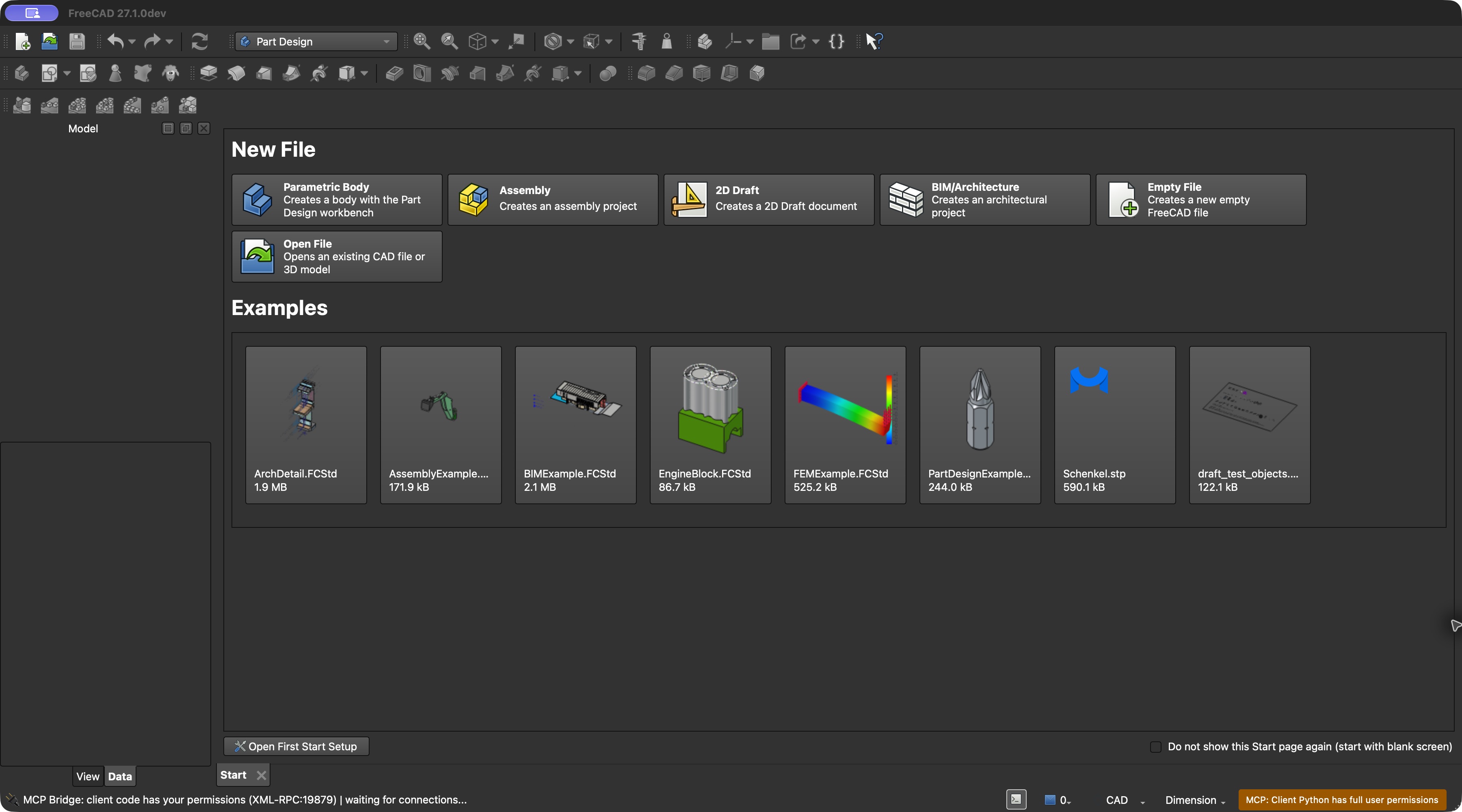
Some MCP clients also request permission before calling an unsafe tool. This example shows Codex asking to run a harmless Python request against the isolated test server:
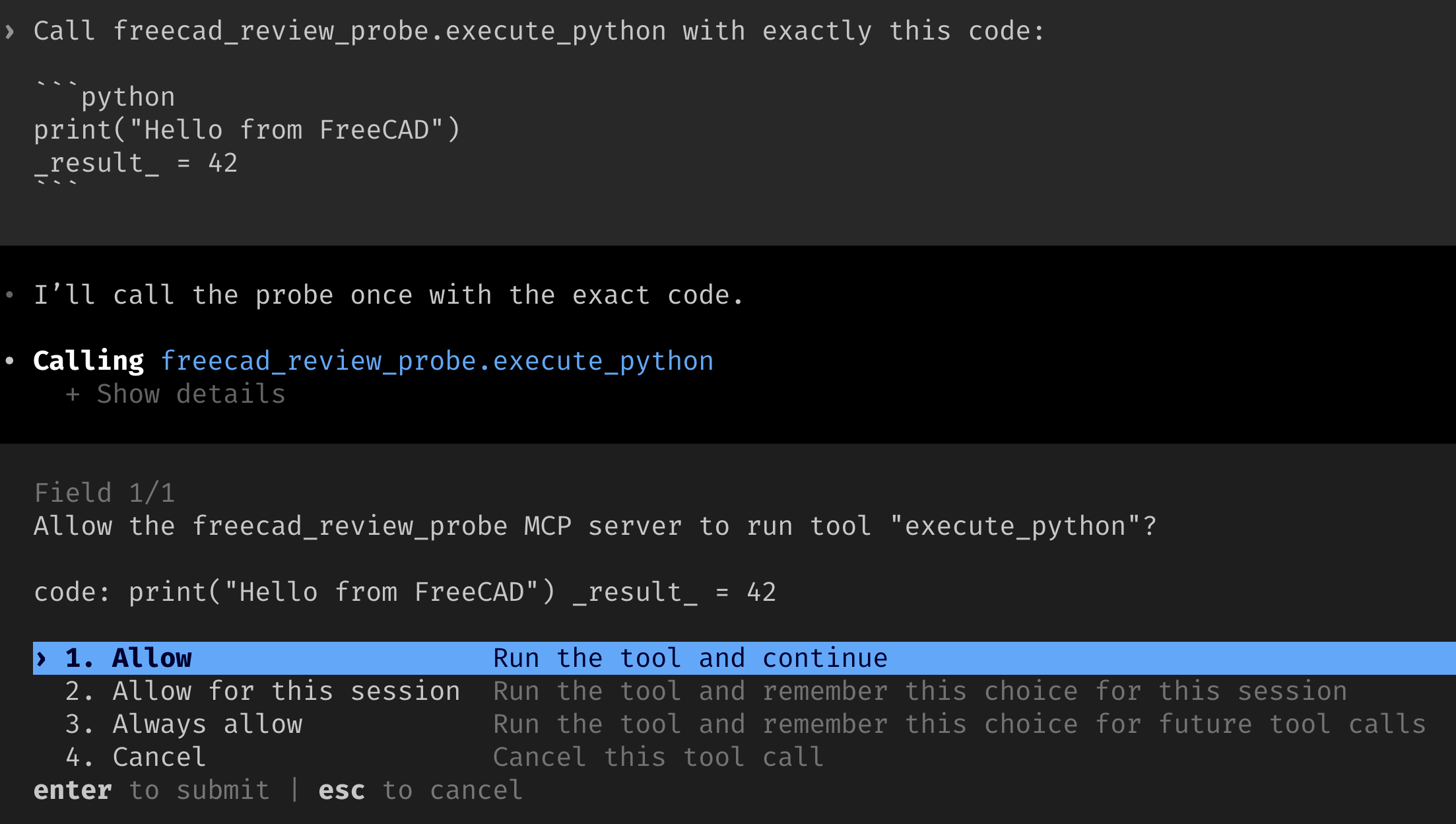
The client prompt depends on its settings and is separate from FreeCAD's local review.
For example, when an agent requests execute_python, FreeCAD can show the
complete code and ask the user to allow it once or deny it:
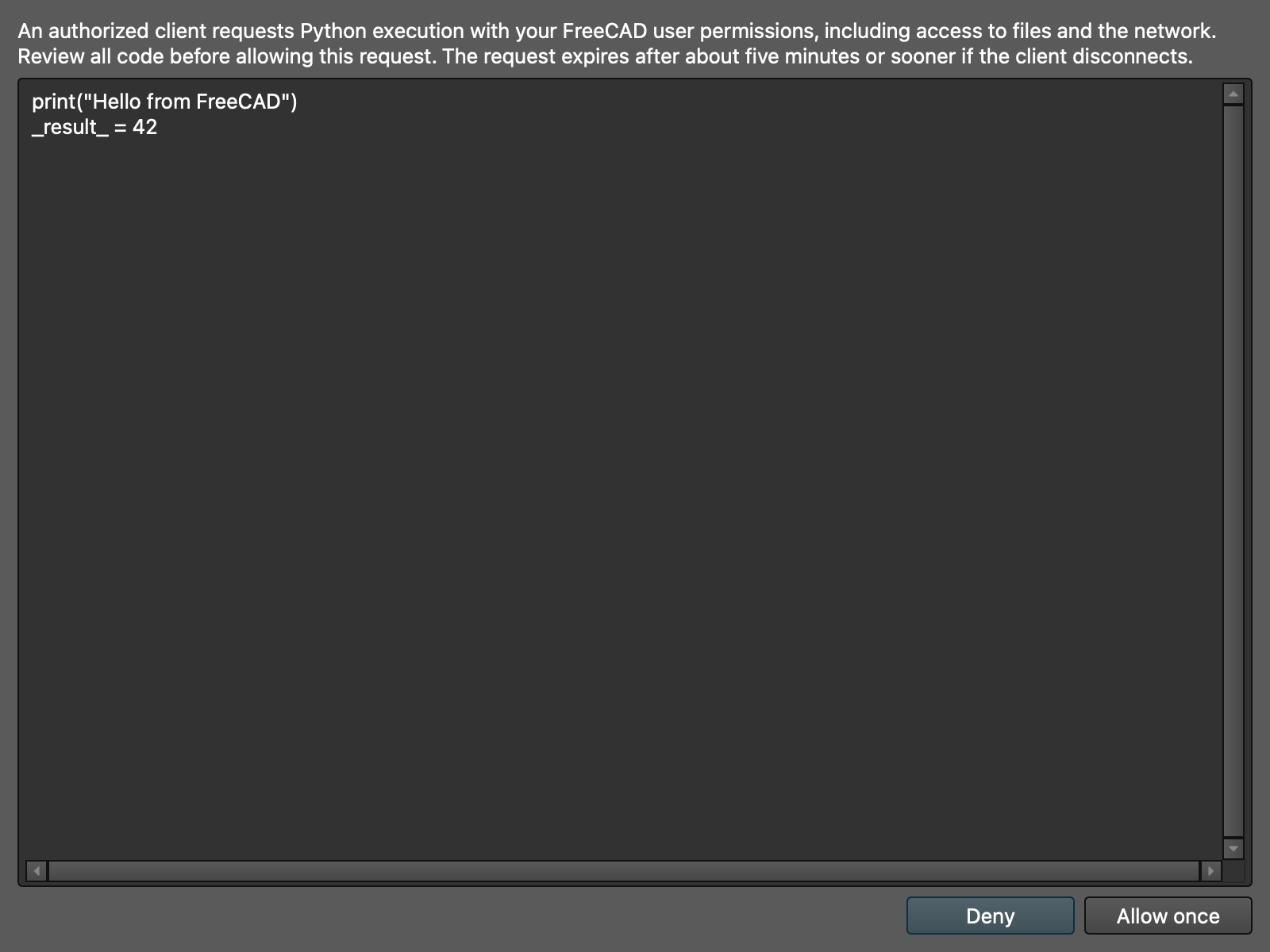
The Python example was captured in an isolated test profile with an MCP test
client. Starting with version 0.8.0, run_macro also requests local
review when unsafe tools are enabled and FreeCAD is connected using a supported
GUI/socket bridge. The dialog displays the macro's path, SHA-256, arguments,
and captured code:
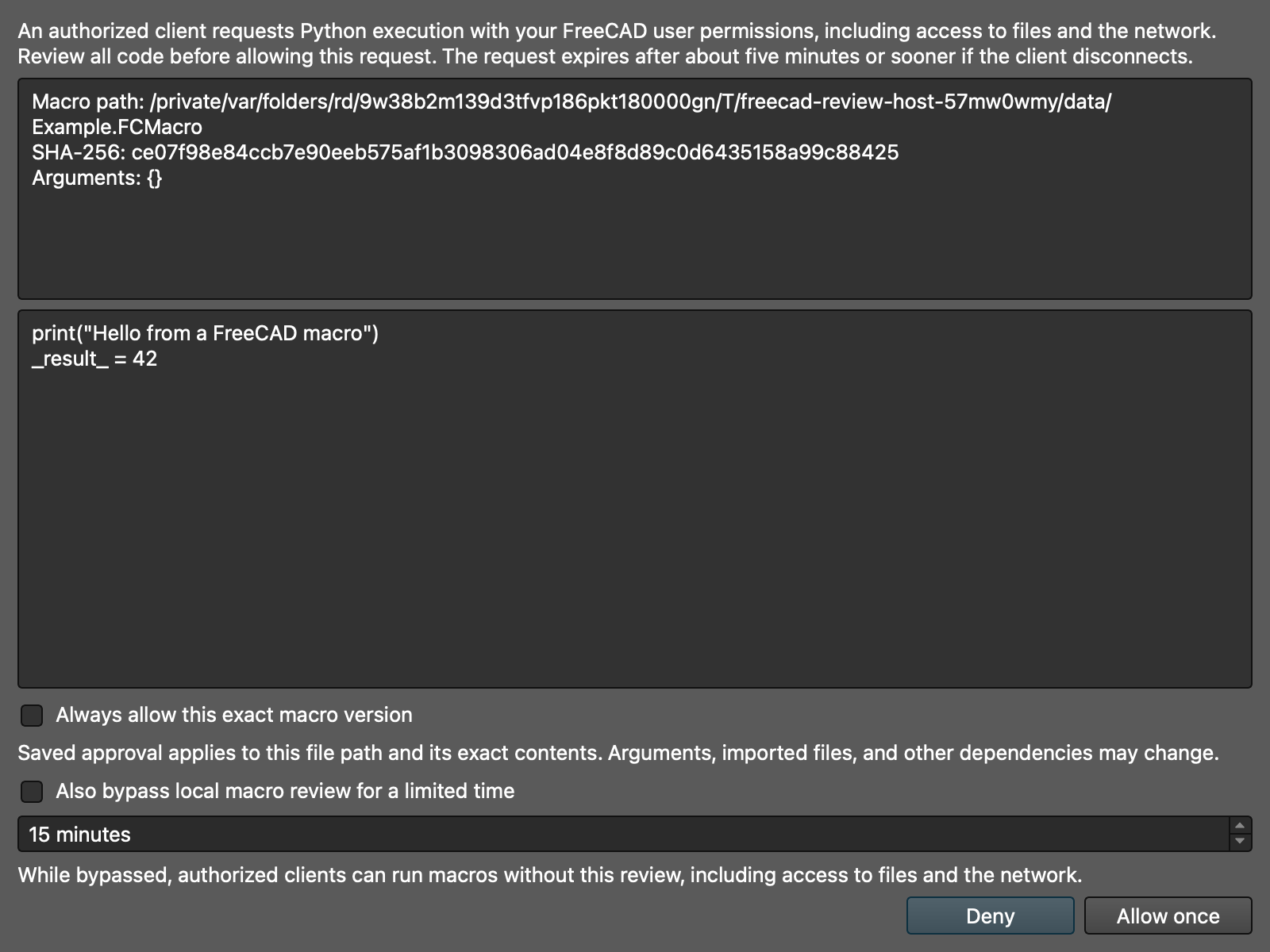
You can allow the request once, deny it, or explicitly save approval for that path and exact file contents. If enabled in preferences, a time-limited bypass is also available. Saved approvals bind only the path and file contents; changes to arguments, imported files, or other dependencies do not require a new review. Manage saved versions in the bridge preferences. See the security guide for screenshots, limitations, and the behavior after timeouts.
Installation Requirements / Dependencies
- FreeCAD 1.0.2 or newer is required. FreeCAD 1.1.4 or newer is recommended for security; older releases have known vulnerabilities when opening untrusted files.
- Python 3.11 or newer for the external server; embedded mode requires a Python minor version matching FreeCAD's bundled Python.
For Users
This section covers installation and usage for end users who want to use the Robust MCP Server with AI assistants.
Quick Links
| Resource | Description |
|---|---|
| Documentation | Full documentation, guides, and API reference |
| Docker Hub | Pre-built Docker images for easy deployment |
| PyPI | Python package for pip installation |
| GitHub Releases | Release archives and changelogs |
Robust MCP Server
Note: The Linux container and PyPI package are both named
freecad-robust-mcpwhich differs slightly from this git repository name.
Installation
For the everyday setup, see the Quick Start for the server, workbench, pairing, and assistant configuration. Install or update both components to compatible versions; pairing requires 0.7.0 or later.
Using pip
pip install freecad-robust-mcp
Using GitHub release assets
Download the server wheel and matching workbench archive for your chosen release.
The release asset installation guide
covers installation, updates, FreeCAD profiles, and release candidates. Install
and update both components; cam-gate-v1.json is not needed for installation.
Using uv (from source)
git clone https://github.com/spkane/freecad-addon-robust-mcp-server.git
cd freecad-addon-robust-mcp-server

uv sync --all-extras
Using Docker
Run the Robust MCP Server in a container. This is useful for isolated environments or when you don't want to install Python dependencies on your host.
# Pull from Docker Hub (when published)
docker pull spkane/freecad-robust-mcp

# Or build locally
git clone https://github.com/spkane/freecad-addon-robust-mcp-server.git
cd freecad-addon-robust-mcp-server
docker build -t freecad-robust-mcp .

# Or use just commands (if you have mise/just installed)
just docker::build        # Build for local architecture
just docker::build-multi  # Build multi-arch (amd64 + arm64)
The containerized Robust MCP Server only supports xmlrpc and socket
modes because FreeCAD runs on the host. This topology currently works only
with Docker Desktop, whose host.docker.internal forwarding can reach a
host-loopback listener.
The container also needs the existing bridge pairing credential; pairing the host account does not provision it in the container. A portable secure provisioning procedure has not yet been validated, so run the MCP server on the host unless the container credential is already provisioned securely.
Security and Linux limitation: The FreeCAD bridge listens on loopback and requires pairing before accepting Python execution. Docker Engine on Linux maps
host.docker.internalorhost-gatewayto a bridge-network address, which cannot reach that loopback listener. Run the MCP server directly on the Linux host instead. Do not expose ports 9875 or 9876 by rebinding the bridge to0.0.0.0; protected remote transport is not implemented yet.
Configuration
Environment Variables
| Variable | Description | Default |
|---|---|---|
FREECAD_MODE | Connection mode: xmlrpc, socket, or embedded | socket |
FREECAD_PATH | Path to FreeCAD's lib directory (embedded mode only) | Auto-detect |
FREECAD_SOCKET_HOST | Socket/XML-RPC server hostname | localhost |
FREECAD_SOCKET_PORT | JSON-RPC socket server port | 9876 |
FREECAD_XMLRPC_PORT | XML-RPC server port | 9875 |
FREECAD_TIMEOUT_MS | Default execution timeout in ms (1000-600000) | 30000 |
FREECAD_ALLOW_UNREVIEWED_FILE_OPERATIONS=true explicitly bypasses local file
review for automation; it defaults to false.
Connection Modes
| Mode | Description | Platform Support |
|---|---|---|
xmlrpc | Connects to FreeCAD via XML-RPC (port 9875) | All platforms |
socket | Connects via JSON-RPC socket (port 9876) | All platforms (recommended) |
embedded | Imports FreeCAD directly into process | Linux only (crashes on macOS) |
Note: Embedded mode crashes on macOS because FreeCAD's FreeCAD.so links to @rpath/libpython3.11.dylib, which conflicts with external Python interpreters. Use xmlrpc or socket mode on macOS and Windows.
MCP Client Configuration
Add something like the following to your MCP client settings. For Claude Code, this is ~/.claude/claude_desktop_config.json or a project .mcp.json file:
{
  "mcpServers": {
    "freecad": {
      "command": "freecad-mcp",
      "env": {
        "FREECAD_MODE": "socket"
      }
    }
  }
}
If installed from source with mise/uv:
{
  "mcpServers": {
    "freecad": {
      "command": "/path/to/mise/shims/uv",
      "args": ["run", "--project", "/path/to/freecad-addon-robust-mcp-server", "freecad-mcp"],
      "env": {
        "FREECAD_MODE": "socket"
      }
    }
  }
}
If using Docker Desktop on macOS or Windows:
{
  "mcpServers": {
    "freecad": {
      "command": "docker",
      "args": [
        "run", "--rm", "-i",
        "-e", "FREECAD_MODE=socket",
        "-e", "FREECAD_SOCKET_HOST=host.docker.internal",
        "spkane/freecad-robust-mcp"
      ]
    }
  }
}
Docker configuration notes:
--rmremoves the container after it exits-ikeeps stdin open for MCP communicationFREECAD_SOCKET_HOST=host.docker.internaltells the Robust MCP Server to connect to FreeCAD on your host machine
This example is not supported on Docker Engine for Linux. Its host gateway
cannot reach the bridge's loopback-only listener. FREECAD_SOCKET_HOST changes
only the address dialed by the MCP server; it does not change the address on
which the FreeCAD bridge listens.
Usage
Starting the MCP Bridge in FreeCAD
Before starting the bridge, pair the MCP server and FreeCAD bridge using the same operating-system user account:
freecad-mcp --pair-bridge
For a source checkout use uv run freecad-mcp --pair-bridge. For container or
different-account setups, see the pairing instructions.
Install compatible server and workbench releases at version 0.7.0 or later;
0.6.x releases predate pairing. For development, use both components from the
same source checkout, as described in the installation guide.
Then start the MCP bridge inside FreeCAD:
Option A: Using the Workbench (Recommended)
-
Install the workbench using the installation guide. The workbench is not currently in the public Addon Manager catalog.
-
Start the bridge:
- Switch to the Robust MCP Bridge workbench
- Click the Start MCP Bridge button in the toolbar
- Or use the menu: MCP Bridge -> Start Bridge
-
You should see in the FreeCAD console:
MCP Bridge started!
  - XML-RPC: localhost:9875
  - Socket: localhost:9876
Option B: Using just commands (from source)
# Start FreeCAD with MCP bridge auto-started
just freecad::run-gui

# Or for headless/automation mode:
just freecad::run-headless
After starting the bridge, start/restart your MCP client (Claude Code, etc.) - it will connect automatically
Uninstalling the MCP Bridge
To uninstall the Robust MCP Bridge workbench:
On Linux or macOS, run just install::uninstall-mcp-bridge-workbench from the
checkout to remove a source installation. The command selects the latest
profile; pass the original profile's Mod directory if it differs. On Windows,
remove the RobustMCPBridge directory from the original profile's Mod
directory. For a release archive, remove its extracted package directory from
the original profile's Mod directory. Restart FreeCAD afterward.
Checking for Legacy Components
If you previously used older versions of this project, you may have legacy components installed. Run this command to check what's installed and get cleanup instructions:
just install::status
Manual Cleanup (if needed)
Check each FreeCAD profile you use for legacy MCPBridge workbench folders
and StartMCPBridge.FCMacro macro files. Move obsolete copies out of the
profile after confirming they are no longer needed. Profile paths vary by
FreeCAD version; see the installation guide
for how to find the active user data directory.
Running Modes
XML-RPC Mode
Connects to a running FreeCAD instance via XML-RPC. Works on all platforms.
FREECAD_MODE=xmlrpc freecad-mcp
Socket Mode (Recommended)
Connects via JSON-RPC socket. Works on all platforms.
FREECAD_MODE=socket freecad-mcp
Headless Mode
Run FreeCAD in console mode without GUI. Useful for automation.
# If installed from source:
just freecad::run-headless
Note: Screenshot and view features are not available in headless mode.
Embedded Mode (Linux Only)
Runs FreeCAD in-process. Only works on Linux - crashes on macOS/Windows.
FREECAD_MODE=embedded freecad-mcp
Available Tools
The Robust MCP Server provides 150+ tools organized into categories. Tools marked with GUI require FreeCAD to be running in GUI mode; they will return an error in headless mode.
Execution & Debugging (5 tools)
| Tool | Description | Mode |
|---|---|---|
execute_python | Execute Python; enable unsafe tools and use socket mode | GUI |
get_freecad_version | Get FreeCAD version, build date, and Python version | All |
get_connection_status | Check MCP bridge connection status and latency | All |
get_console_output | Get recent Report view or available console history | All* |
get_mcp_server_environment | Get Robust MCP Server environment (OS, hostname, instance_id) | All |
Console history depends on FreeCAD session capabilities and is unavailable in embedded mode; an unavailable source returns an error.
Document Management (7 tools)
| Tool | Description | Mode |
|---|---|---|
list_documents | List all open documents with metadata | All |
get_active_document | Get information about the active document | All |
create_document | Create a new FreeCAD document | All |
open_document | Open an existing .FCStd file | All |
save_document | Save a document to disk | All |
close_document | Close a document (with optional save) | All |
recompute_document | Force recomputation of all objects | All |
Object Creation - Primitives (8 tools)
| Tool | Description | Mode |
|---|---|---|
create_object | Create a generic FreeCAD object by type ID | All |
create_box | Create a Part::Box with length, width, height | All |
create_cylinder | Create a Part::Cylinder with radius, height, angle | All |
create_sphere | Create a Part::Sphere with radius | All |
create_cone | Create a Part::Cone with two radii and height | All |
create_torus | Create a Part::Torus (donut) with radii and angles | All |
create_wedge | Create a Part::Wedge (tapered box) | All |
create_helix | Create a Part::Helix curve for sweeps and threads | All |
Object Management (12 tools)
| Tool | Description | Mode |
|---|---|---|
list_objects | List all objects in a document | All |
inspect_object | Get detailed object info (properties, shape, etc.) | All |
edit_object | Modify properties of an existing object | All |
delete_object | Delete an object from a document | All |
set_placement | Set object position and rotation | All |
scale_object | Scale an object uniformly or non-uniformly | All |
rotate_object | Rotate an object around an axis | All |
copy_object | Create a copy of an object | All |
mirror_object | Mirror an object across a plane (XY, XZ, YZ) | All |
boolean_operation | Fuse, cut, or intersect objects | All |
get_selection | Get currently selected objects | GUI |
set_selection | Select specific objects by name | GUI |
clear_selection | Clear all selections | GUI |
PartDesign - Sketching (14 tools)
| Tool | Description | Mode |
|---|---|---|
create_partdesign_body | Create a PartDesign::Body container | All |
create_sketch | Create a sketch on a plane or face | All |
add_sketch_rectangle | Add a rectangle to a sketch | All |
add_sketch_circle | Add a circle to a sketch | All |
add_sketch_line | Add a line (with optional construction flag) | All |
add_sketch_arc | Add an arc by center, radius, and angles | All |
add_sketch_point | Add a point (useful for hole centers) | All |
pad_sketch | Extrude a sketch (additive) | All |
pocket_sketch | Cut into solid using a sketch (subtractive) | All |
revolution_sketch | Revolve a sketch around an axis (additive) | All |
groove_sketch | Revolve a sketch around an axis (subtractive) | All |
create_hole | Create parametric holes with optional threading | All |
loft_sketches | Create a loft through multiple sketches | All |
sweep_sketch | Sweep a profile along a spine path | All |
PartDesign - Patterns & Edges (5 tools)
| Tool | Description | Mode |
|---|---|---|
linear_pattern | Create linear pattern of a feature | All |
polar_pattern | Create polar/circular pattern of a feature | All |
mirrored_feature | Mirror a feature across a plane | All |
fillet_edges | Add fillets (rounded edges) | All |
chamfer_edges | Add chamfers (beveled edges) | All |
View & Display (11 tools)
| Tool | Description | Mode |
|---|---|---|
get_screenshot | Capture a screenshot of the 3D view | GUI |
set_view_angle | Set camera to standard views (Front, Top, etc.) | GUI |
fit_all | Zoom to fit all objects in view | GUI |
zoom_in | Zoom in by a factor | GUI |
zoom_out | Zoom out by a factor | GUI |
set_camera_position | Set camera position and look-at point | GUI |
set_object_visibility | Show/hide objects | GUI |
set_display_mode | Set display mode (Shaded, Wireframe, etc.) | GUI |
set_object_color | Set object color as RGB values | GUI |
list_workbenches | List available FreeCAD workbenches | All |
activate_workbench | Switch to a different workbench | All |
Undo/Redo (3 tools)
| Tool | Description | Mode |
|---|---|---|
undo | Undo the last operation | All |
redo | Redo a previously undone operation | All |
get_undo_redo_status | Get available undo/redo operations | All |
Export/Import (7 tools)
| Tool | Description | Mode |
|---|---|---|
export_step | Export to STEP format (ISO CAD exchange) | All |
export_stl | Export to STL format (3D printing) | All |
export_3mf | Export to 3MF format (modern 3D printing) | All |
export_obj | Export to OBJ format (Wavefront) | All |
export_iges | Export to IGES format (older CAD exchange) | All |
import_step | Import a STEP file | All |
import_stl | Import an STL file as mesh | All |
Macro Management (6 tools)
| Tool | Description | Mode |
|---|---|---|
list_macros | List all available FreeCAD macros | All |
run_macro | Run a macro with local review (socket only) | GUI |
create_macro | Create a new macro file | All |
read_macro | Read macro source code | All |
delete_macro | Delete a user macro | All |
create_macro_from_template | Create macro from template (basic, part, etc.) | All |
Parts Library (2 tools)
| Tool | Description | Mode |
|---|---|---|
list_parts_library | List parts in FreeCAD's parts library | All |
insert_part_from_library | Insert a part from the library | All |
For Developers
This section covers development setup, contributing, and working with the codebase.
Robust MCP Server Development
Prerequisites
Initial Setup
# Clone the repository
git clone https://github.com/spkane/freecad-addon-robust-mcp-server.git
cd freecad-addon-robust-mcp-server

# Install mise via the Official mise installer script (if not already installed)
curl https://mise.run | sh

# Install all tools (Python 3.11, uv, just, pre-commit)
mise trust
mise install

# Set up the development environment
just setup
This installs:
- Python 3.11 - Required for FreeCAD ABI compatibility
- uv - Fast Python package manager
- just - Command runner for development workflows
- pre-commit - Git hooks for code quality
MCP Client Configuration (Development)
Create a .mcp.json file in the project directory:
{
  "mcpServers": {
    "freecad": {
      "command": "/path/to/mise/shims/uv",
      "args": ["run", "--project", "/path/to/freecad-addon-robust-mcp-server", "freecad-mcp"],
      "env": {
        "FREECAD_MODE": "socket",
        "FREECAD_SOCKET_HOST": "localhost",
        "FREECAD_SOCKET_PORT": "9876",
        "PATH": "/path/to/mise/shims:/opt/homebrew/bin:/usr/local/bin:/usr/bin:/bin"
      }
    }
  }
}
Replace the paths with your actual paths:
| Placeholder | Description | Example |
|---|---|---|
/path/to/mise/shims/uv | Full path to uv via mise shims | ~/.local/share/mise/shims/uv |
/path/to/freecad-addon-robust-mcp-server | Project directory | /home/me/dev/freecad-addon-robust-mcp-server |
/path/to/mise/shims | mise shims directory for PATH | ~/.local/share/mise/shims |
Finding your mise shims path:
mise where uv | sed 's|/installs/.*|/shims|'
# Example: /home/user/.local/share/mise/shims (on Linux) or ~/.local/share/mise/shims (on macOS)
Development Workflow
Commands are organized into modules. Use just to see top-level commands, or just list-<module> to see module-specific commands.
# Show top-level commands and available modules
just

# Show commands in a specific module
just list-mcp           # Robust MCP Server commands
just list-freecad       # FreeCAD plugin/macro commands
just list-install       # Installation commands
just list-quality       # Code quality commands
just list-testing       # Test commands
just list-docker        # Docker commands
just list-documentation # Documentation commands
just list-dev           # Development utilities

# List ALL commands from all modules
just list-all

# Install/update dependencies
just install::mcp-server

# Run all checks (linting, type checking, tests)
just all

# Quality commands
just quality::lint       # Run ruff linter
just quality::typecheck  # Run mypy type checker
just quality::format     # Format code
just quality::check      # Run all pre-commit hooks

# Testing commands
just testing::unit       # Run unit tests
just testing::cov        # Run tests with coverage
just testing::integration # Run integration tests

# Run the Robust MCP Server (or with debug logging)
just mcp::run
just mcp::run-debug

# Docker commands
just docker::build        # Build image for local architecture
just docker::build-multi  # Build multi-arch image (amd64 + arm64)
just docker::run          # Run container
Running FreeCAD with the MCP Bridge
GUI Mode (recommended for development)
# Start FreeCAD with auto-started bridge
just freecad::run-gui
Headless Mode (for automation/CI)
just freecad::run-headless
Running Tests
# Unit tests only (no FreeCAD required)
just testing::unit

# Unit tests with coverage
just testing::cov

# Integration tests (requires running FreeCAD bridge)
just testing::integration

# Integration tests with automatic FreeCAD startup
just testing::integration-auto
Code Quality
The project uses strict code quality checks via pre-commit:
- Ruff - Linting and formatting
- MyPy - Type checking
- Bandit - Security scanning
- Codespell - Spell checking
- Secrets scanning - Gitleaks, detect-secrets, TruffleHog
# Run all pre-commit hooks
just quality::check

# Run security/secrets scans
just quality::security
just quality::secrets
Architecture
See the detailed architecture document for design documentation covering:
- Module structure
- Bridge communication protocols
- Tool registration patterns
- FreeCAD plugin architecture
Acknowledgements
This project was developed after analyzing several existing FreeCAD Robust MCP implementations. We are grateful to these projects for their pioneering work and the ideas they contributed to the FreeCAD + AI ecosystem:
Related Projects
-
neka-nat/freecad-mcp (MIT License) - The queue-based thread safety pattern and XML-RPC protocol design (port 9875) were directly inspired by this project. Our implementation maintains protocol compatibility while being a complete rewrite with additional features.
-
jango-blockchained/mcp-freecad - Inspired our connection recovery mechanisms and multi-mode architecture approach.
-
contextform/freecad-mcp - Informed our comprehensive PartDesign and Part workbench tool coverage.
-
ATOI-Ming/FreeCAD-MCP - Inspired our macro development toolkit including templates, validation, and automatic imports.
-
bonninr/freecad_mcp - Influenced our simple socket-based communication approach.
See docs/COMPARISON.md for a detailed analysis of these implementations and the design decisions they informed.
License
Code is distributed under Apache License 2.0; previously MIT-licensed contributions retain their original MIT terms. Workbench icons use CC BY-SA 4.0. See NOTICE for attribution.
Freecad Addon Robust MCP Server alternatives
View more →Similar mcp servers in Other, ranked by GitHub stars. Compare licence, recent activity and scan status before you choose.
| Name | Stars | Licence | Last updated | Scan |
|---|---|---|---|---|
| Freecad Addon Robust MCP Server (this page) spkane | 264 | Apache-2.0 | Nov 1, 2026 | Scanned, no flagged issues |
| Github MCP Server github | 34k | MIT | Oct 30, 2026 | Scanned, no flagged issues |
| Fastapi MCP tadata-org | 12k | MIT | Nov 24, 2025 | Scanned, no flagged issues |
| GhidraMCP LaurieWired | 12k | Apache-2.0 | Oct 10, 2026 | Scanned, no flagged issues |
| MCP Go mark3labs | 9.2k | MIT | Oct 30, 2026 | Scanned, no flagged issues |
| Git MCP idosal | 8.5k | Apache-2.0 | May 8, 2026 | Scanned, no flagged issues |