Hass MCP Server
 by ganhammar
A Home Assistant Custom Component that provides an MCP (Model Context Protocol) server using HTTP transport, allowing AI assistants like Claude to interact with your Home Assistant instance over HTTP
Hass MCP Server is an open-source mcp server by ganhammar, written mainly in Python, with 83 GitHub stars and the MIT license. Its code was last updated Oct 27, 2026.
MCP Server for Home Assistant
Let an AI assistant such as Claude work with your Home Assistant: read what is going on, explain why something happened, and change automations, dashboards and devices for you. It is a custom integration that gives the assistant a set of tools for your Home Assistant, and it works wherever Home Assistant is reachable, including Claude on the web.
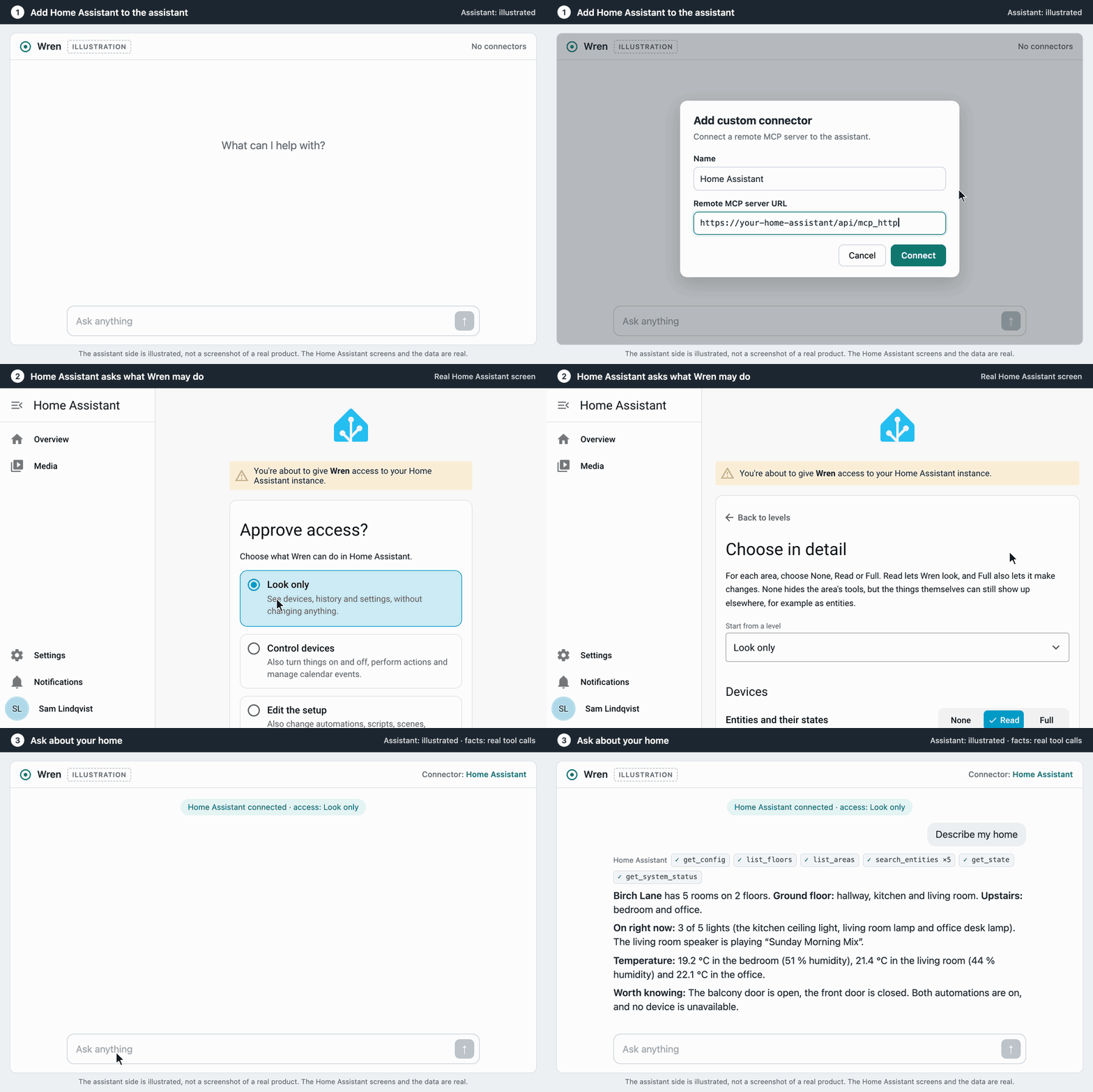
Things you can ask once it is connected:
- "Are any lights still on upstairs?"
- "Why didn't the hallway automation run last night?"
- "Which automations and dashboards still use
light.kitchen? I want to rename it." - "Add a card for the new heat pump to the energy view."
- "Is anything wrong with my system right now?"
- "Create a scene for movie night and an automation that starts it when the TV turns on."
Why this one
- It administers the whole instance, not only the entities exposed to Assist as Home Assistant's built-in MCP Server does: 117 tools for automations, dashboards, the registries, integrations, traces and diagnostics. See how the two differ.
- Everyone signs in as themselves. Clients authenticate through Home Assistant as a real user, with OAuth or a long-lived access token, so there is no shared secret URL and every change is logged with who made it.
- You decide how far it reaches. When an app connects, you choose what it may do, from Look only to Administer or area by area. On top of that come read-only mode, a switch for every tool, and opt-ins for the groups that reach furthest. A tool that is off is not even shown to the client.
- It is tested on each change against Home Assistant 2025.6, the oldest supported version, and three newer releases up to 2026.10.
Quick start
You need: Home Assistant 2025.6 or newer, HACS, an administrator account and, for Claude on the web, an HTTPS address for Home Assistant that can be reached from the internet.
- Install. In HACS, download "MCP Server" and "OIDC Provider", then restart Home Assistant. The OIDC Provider handles the sign-in for Claude; skip it if you will only use long-lived access tokens.
- Add the integrations. Under Settings > Devices & Services > Add Integration, add "OIDC Provider" first, then "MCP Server (HTTP Transport)".
- Connect Claude. In Claude, open Customize > Connectors > Add custom connector and enter
https://your-home-assistant/api/mcp_http. Claude sends you to Home Assistant to sign in, choose what Claude may do, and approve.
Choose Look only, or start in read-only mode, if you want to see what it does before letting it change anything. Connecting a client covers other clients and long-lived access tokens.
What it can do
| Area | Examples |
|---|---|
| Entities and state | Read and search entities, call any service, history, logbook and long-term statistics |
| Automations, scripts and scenes | List, create, update and delete them, and search their config for a reference |
| Traces | See step by step why an automation or script ran, did not run, or took the wrong branch |
| Dashboards | Read an outline, change a single card with a patch, or create and remove whole dashboards |
| Helpers | Create and manage toggles, counters, timers, schedules and the other helper types |
| Areas, floors, devices and labels | Organize the instance: create areas and floors, move and rename devices, label things |
| Integrations (opt-in) | Add an integration, change its options, reload, disable or remove it |
| Diagnostics | System status, repair issues, system health, the list of backups, the error log, config validation |
| Config files (opt-in) | Read and edit YAML files, with a snapshot of the top-level files before every change |
| Cameras and images (opt-in) | Capture a camera frame or read a saved image for the assistant to look at |
| KNX | Manage KNX entities and read recent telegrams, when KNX is set up |
The full reference lists every tool, resource and prompt. A few tools rely on Home Assistant internals and can break on an update; they are marked there.
Staying in control
- Access per app. The consent screen asks what each app may do: Look only, Control devices, Edit the setup or Administer, or None, Read or Full per area. It needs OIDC Provider 1.9.0 or newer. A connection from before keeps Administer until you change it with Change access under Connected applications, and in read-only mode it is held at Read.
- Read-only mode offers only the tools that read, to every connection. Nothing can be changed.
- Disabled tools switches off individual tools, such as
restart_ha. - Opt-in groups stay off until you enable them: config files, cameras and images, templates, AppDaemon apps and integration management.
- The audit log and event record who called what, with secrets masked.
- Only administrators can connect, unless you decide otherwise.
See Configuration and Security and auditing.
Documentation
- Connecting a client: Claude on the web, long-lived access tokens
- Configuration: every option, limiting the tools, the opt-in groups
- Security and auditing: who may connect, what each app may do, the audit log and event
- Tools, resources and prompts: the full reference
- FAQ: what it is, what it can do, and staying safe
- Troubleshooting: setup problems, path conflicts, IP bans
Updating and removing. HACS shows updates as they are released. To remove it, delete the integration under Settings > Devices & Services, remove it in HACS, restart, and remove the connector in your client.
Help. Questions and bugs go to the issue tracker.
License
Hass MCP Server alternatives
View more →Similar mcp servers in Smart Home & IoT, ranked by GitHub stars. Compare licence, recent activity and scan status before you choose.
| Name | Stars | Licence | Last updated | Scan |
|---|---|---|---|---|
| Hass MCP Server (this page) ganhammar | 83 | MIT | Oct 27, 2026 | Scanned, no flagged issues |
| Xiaozhi Esp32 Server xinnan-tech | 11k | MIT | Nov 1, 2026 | Scanned, no flagged issues |
| Esp32 Nat Router martin-ger | 2.2k | None found | Oct 21, 2026 | Not scanned yet |
| Arduino Mcp2515 autowp | 1k | MIT | Feb 27, 2026 | Scanned, no flagged issues |
| Home Assistant Vibecode Agent Coolver | 651 | MIT | Oct 21, 2026 | Scanned, no flagged issues |
| Bagel Extelligence-ai | 400 | Apache-2.0 | Oct 19, 2026 | Scanned, no flagged issues |