MCP Musescore
 by ghchen99
A Model Context Protocol (MCP) server that provides programmatic control over MuseScore!
MCP Musescore is an open-source mcp server by ghchen99, written mainly in Python, with 136 GitHub stars and the MIT license. Its code was last updated Oct 13, 2026.
MuseScore MCP Server
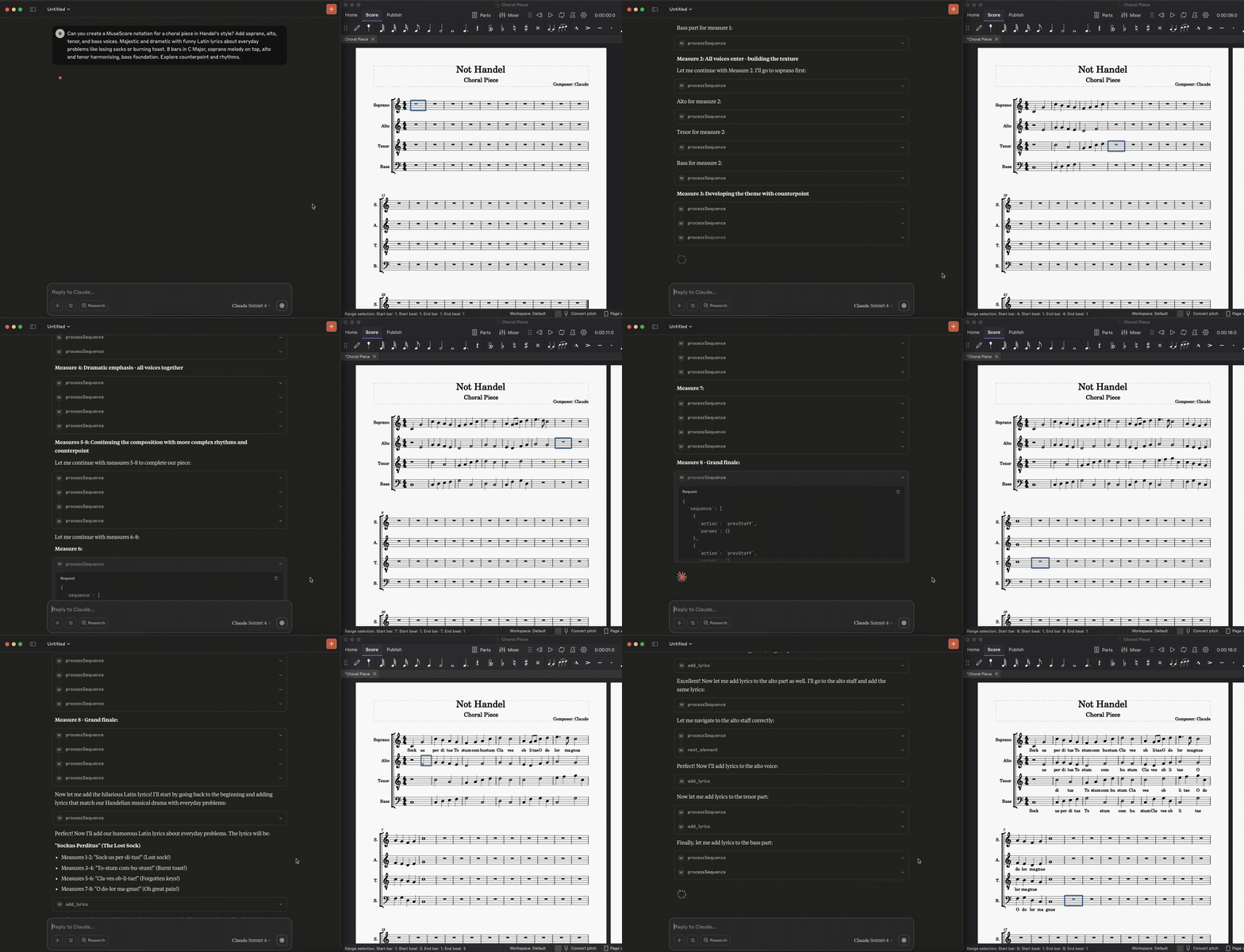
A Model Context Protocol (MCP) server that provides programmatic control over MuseScore, via a WebSocket-based plugin system. This allows AI assistants like Claude to compose music, add lyrics, navigate and analyse scores, restructure them with repeats, and mark them up with colors and highlights, directly in MuseScore.
What you can do
Ask Claude in plain language; it picks the tools. For example:
- Compose and edit: "Write a C major arpeggio in bar 3", "Add the lyrics 'Twin-kle twin-kle' from bar 1", "Set the tempo to 90 at bar 17".
- Read large scores: the score is read 16 bars at a time as compact LilyPond, optionally only some staves, so even a 20-staff score fits.
- Compress a score with repeats: "Find the repeated passages and put them between repeat barlines". The server finds bars and passages that repeat, adds repeat barlines, 1st/2nd endings and play counts, and removes the duplicate bars.
- Build drum charts: "Map the sections of the drum part" gives a road map (groove bar, exact and near copies, fills, and where the crashes fall). "Turn the copies into repeat signs" writes 1-, 2- or 4-bar measure-repeat signs automatically. "Make a drums-only chart with the groove written once and a 7x count" copies the score, keeps only the drums and collapses each run of identical bars. With the drum-chart skill, "make a drum chart from the open score" runs the whole workflow (see the example use case).
- Keep the song's bar numbers: "Number the bars as played" makes the displayed numbers count repeated bars, so a compact chart still matches the original song.
- Highlight and color: "Highlight the crash hits", "Box the dynamics", "Highlight the repeat signs and time signatures in light blue", "Color the fill on beats 3-4 of bar 13 green", "Label bar 6 'Groove x7'", "Add these cues in small grey italics at the start of each section: ...".
- Finish the page: "Tidy the title and call it a drum chart" cleans up the title frame; "Print what changed at the end" adds a summary of the differences from the original after the last bar, so it ends up in the PDF.
- Iterate: everything the tools add can be removed again ("remove the ** marks", "clear the crash highlights", "reset the bar numbers"), so you can refine the result step by step.
Requirements
- MuseScore 4.7 or newer. See Version requirements.
- uv, which installs Python 3.13 or newer for you. Without uv you need Python 3.13+ and pip; see Setup and running.
- An MCP client, such as Claude Desktop or Claude Code.
Quick start
-
Get the code and its dependencies (uv also installs a matching Python if needed):
git clone https://github.com/ghchen99/mcp-musescore.git cd mcp-musescore uv sync -
Install the MuseScore plugin: copy
musescore-mcp-websocket.qmlinto your MuseScore plugins folder (usually~/Documents/MuseScore4/Plugins), then enable MuseScore API Server under Plugins → Plugin Manager. -
Register the server with Claude Desktop (run this in the repository folder):
uv run fastmcp install claude-desktop server.py --name musescore --project . -
Start it: open a score in MuseScore and run Plugins → MuseScore API Server. Then restart Claude Desktop and ask it to work on your score. The plugin has to be running whenever Claude uses the tools.
Other MCP clients, a manual configuration, platform notes and the setup without uv are in Setup and running.
Example use case: a drum chart from a Songsterr tab
How the drum-chart skill is used day to day, from a song on Songsterr to a printable drum chart.
Once: set up the plugin and the server (Setup), then install the skill in Claude Desktop (Installing a skill).
For each song:
-
Songsterr → Guitar Pro. Open the song on Songsterr and export it as a Guitar Pro file (
.gp,.gp5…). -
Import it in MuseScore with File → Open. Don't save it: the skill never saves the full score. If MuseScore says the file is corrupted, carry on: the damage is usually in another instrument, which the skill removes.
-
Focus on the drum part. Open the drum part in its own tab (Parts, then the drum kit), or stay on the full score. Either way the skill keeps only the drum staff, after backing up the full score to
~/.mcp-musescore/backups. -
Start the plugin: Plugins → MuseScore API Server.
-
Call the skill. In Claude Desktop, ask "make a drum chart from the open score".
-
Answer when prompted. Claude proposes a section map (sections, bar ranges, which grooves and phrases collapse into "× N") and asks, in one message:
- which near copies to merge, and what each merge would drop (e.g. "bar 24 like 26: drops the kick on 5.5");
- whether to remove the ghost notes;
- where the hi-hat is half-open;
- which cymbal rolls to simplify.
After your OK it works on its own. The first time it saves the chart, MuseScore asks where (an imported score has no file yet): pick a name like
<song> - drums.mscz. -
The chart, in the same MuseScore tab:
- each groove or phrase written once between repeat barlines, with its play count;
- section labels with their bar counts, e.g. "Chorus 1 (2x4)";
- fills in green, stops in red, crashes, dynamics and time signatures highlighted;
- bar numbers that still match the song;
- a tidy title: song, artist, "Drums";
- the changes from the original after the last bar, and the song structure on its own page.
To change something, ask in the same chat (e.g. "don't merge bar 24", "the hi-hat is half-open in the bridge too"): Claude redoes only that part.
-
Export to PDF: save (Ctrl+S), then File → Export → PDF.
Documentation
| Page | What's in it |
|---|---|
| Setup and running | Prerequisites, installing the plugin, registering the server with Claude Desktop (with uv or a virtual environment), Ubuntu notes, starting order, updating, sample scores |
| Tool reference | Reading and navigating the score, notes, measures, tempo, instruments, highlighting and coloring, batch operations, the score viewer, version requirements, examples |
| Repeats and drum charts | Compressing a score with repeats, drum-chart tools, measure-repeat signs and how they are written, drum notation, chart examples |
| Agent skills | The bundled skills and how to install them in Claude Desktop or Claude Code |
| Development and testing | Tests, the mock plugin, running the real plugin headless, console output, file structure |
| Troubleshooting | Connection, plugin, server, score-file and skill problems, API limitations |
Contributing
Contributions are welcome: fork the repository, work on a branch, and open a pull request against main. To set up and check your changes:
uv sync                            # install the dependencies, including the test tools
uv run prek install                # check every commit (once per clone)
uv run pytest --no-musescore --cov # run the tests with coverage
-
Before every commit, prek checks the dependencies with deptry, lints and formats the code with Ruff and docstring-tailor, checks the types with ty, and the plugin's JavaScript syntax when it changed (needs Node.js). The tests run separately. With
make,make checkandmake testrun the checks and the tests, as CI does. -
Without MuseScore, the tests use a mock plugin, and the tests that need MuseScore skip themselves.
-
CI runs the tests twice more with MuseScore: on 4.7.0, the oldest supported version, and on the latest release. So changes to the plugin are checked too.
-
When you change the plugin (
musescore-mcp-websocket.qml), it is still quicker to run the tests locally with MuseScore installed first. -
When you change dependencies, use
uv addand commituv.lock; the commit hook regeneratesrequirements.txt, and CI checks that the two match.
Development and testing has the details: the checks before committing, the mock plugin, running the real plugin headless, and managing dependencies.
Star History
<a href="https://www.star-history.com/?repos=ghchen99%2Fmcp-musescore&type=date&legend=top-left"> <picture> <source media="(prefers-color-scheme: dark)" srcset="https://api.star-history.com/chart?repos=ghchen99/mcp-musescore&type=date&theme=dark&legend=top-left&sealed_token=odyuE8YGdrYwqllb44_ZA_4jszOPlz9weSOVIc87yiR8SUSbUGaQoLxlylc2J4ZujJBLXPSCBh9dxSpTn9rD1wNfri9JkxySZuf93zfduRtC2cFbRbi0d3REHTcU3W6U0tKKmxu13NwAIo2teYBM3WjkiqauMf04gdfk8t5LM6MQ1oZFcJoY2ZVydzEg" /> <source media="(prefers-color-scheme: light)" srcset="https://api.star-history.com/chart?repos=ghchen99/mcp-musescore&type=date&legend=top-left&sealed_token=odyuE8YGdrYwqllb44_ZA_4jszOPlz9weSOVIc87yiR8SUSbUGaQoLxlylc2J4ZujJBLXPSCBh9dxSpTn9rD1wNfri9JkxySZuf93zfduRtC2cFbRbi0d3REHTcU3W6U0tKKmxu13NwAIo2teYBM3WjkiqauMf04gdfk8t5LM6MQ1oZFcJoY2ZVydzEg" /> <img alt="Star History Chart" src="https://api.star-history.com/chart?repos=ghchen99/mcp-musescore&type=date&legend=top-left&sealed_token=odyuE8YGdrYwqllb44_ZA_4jszOPlz9weSOVIc87yiR8SUSbUGaQoLxlylc2J4ZujJBLXPSCBh9dxSpTn9rD1wNfri9JkxySZuf93zfduRtC2cFbRbi0d3REHTcU3W6U0tKKmxu13NwAIo2teYBM3WjkiqauMf04gdfk8t5LM6MQ1oZFcJoY2ZVydzEg" /> </picture> </a>MCP Musescore alternatives
View more →Similar mcp servers in Other, ranked by GitHub stars. Compare licence, recent activity and scan status before you choose.
| Name | Stars | Licence | Last updated | Scan |
|---|---|---|---|---|
| MCP Musescore (this page) ghchen99 | 136 | MIT | Oct 13, 2026 | Scanned, no flagged issues |
| Github MCP Server github | 34k | MIT | Oct 30, 2026 | Scanned, no flagged issues |
| Fastapi MCP tadata-org | 12k | MIT | Nov 24, 2025 | Scanned, no flagged issues |
| GhidraMCP LaurieWired | 12k | Apache-2.0 | Oct 10, 2026 | Scanned, no flagged issues |
| MCP Go mark3labs | 9.2k | MIT | Oct 30, 2026 | Scanned, no flagged issues |
| Git MCP idosal | 8.5k | Apache-2.0 | May 8, 2026 | Scanned, no flagged issues |