Model Compose MCP Server
 by hanyeol
Declarative AI pipelines in one YAML file. Tokens, audio chunks, and video frames flow between isolated components. Compose 100+ components for models, agents, speech, vision, and live broadcast. Run local models, cloud APIs, or both. Inspired by docker-compose.
Model Compose is an open-source mcp server by hanyeol, written mainly in Python, with 119 GitHub stars and the MIT license. Its code was last updated Nov 1, 2026. The latest PyPI release is model-compose 0.4.125, published Nov 13, 2026, with 433 downloads last week.



model-compose
One YAML file. Any model. Any protocol. Any runtime.
Build chat APIs, RAG pipelines, autonomous agents, and MCP servers without writing orchestration code — then run the same definition anywhere, like docker-compose.
AI systems shouldn't be locked into a single provider, runtime, or cloud. model-compose is built on four principles:
- Composable — Models, agents, workflows, tools, memory, and protocols are interchangeable building blocks.
- Portable — Define your AI system once and run it anywhere without re-engineering.
- Model-Agnostic — Mix local models and cloud APIs in the same system.
- Stream-Native — Tokens, audio, video frames, and events flow through workflows as first-class values.
Quick Start · What You Can Build · Documentation · Examples
</div>Quick Start
Install with uv:
uv pip install model-compose
Or with pip:
pip install model-compose
Create model-compose.yml:
controller:
  adapter:
    type: http-server
    port: 8080
  webui:
    port: 8081

workflow:
  job:
    component: chatgpt
    input:
      prompt: ${input.prompt}
    output: ${output as stream/text}

component:
  id: chatgpt
  type: http-client
  base_url: https://api.openai.com/v1
  action:
    path: /chat/completions
    method: POST
    headers:
      Authorization: Bearer ${env.OPENAI_API_KEY}
      Content-Type: application/json
    body:
      model: gpt-4o
      messages:
        - role: user
          content: ${input.prompt}
      stream: true
    stream_format: json
    output: ${response[].choices[0].delta.content}
Run it:
export OPENAI_API_KEY=your-key
model-compose up
That's it. You're serving GPT-4o at http://localhost:8080 with a web UI at http://localhost:8081. No application code. No framework boilerplate. Same file runs locally, in Docker, or in production.
Automatic Web UI
Every workflow gets a browser UI for free — inputs, outputs, streaming, and file uploads are inferred from the schema. Two lines of YAML, no frontend code.
controller:
  webui:
    driver: gradio
    port: 8081
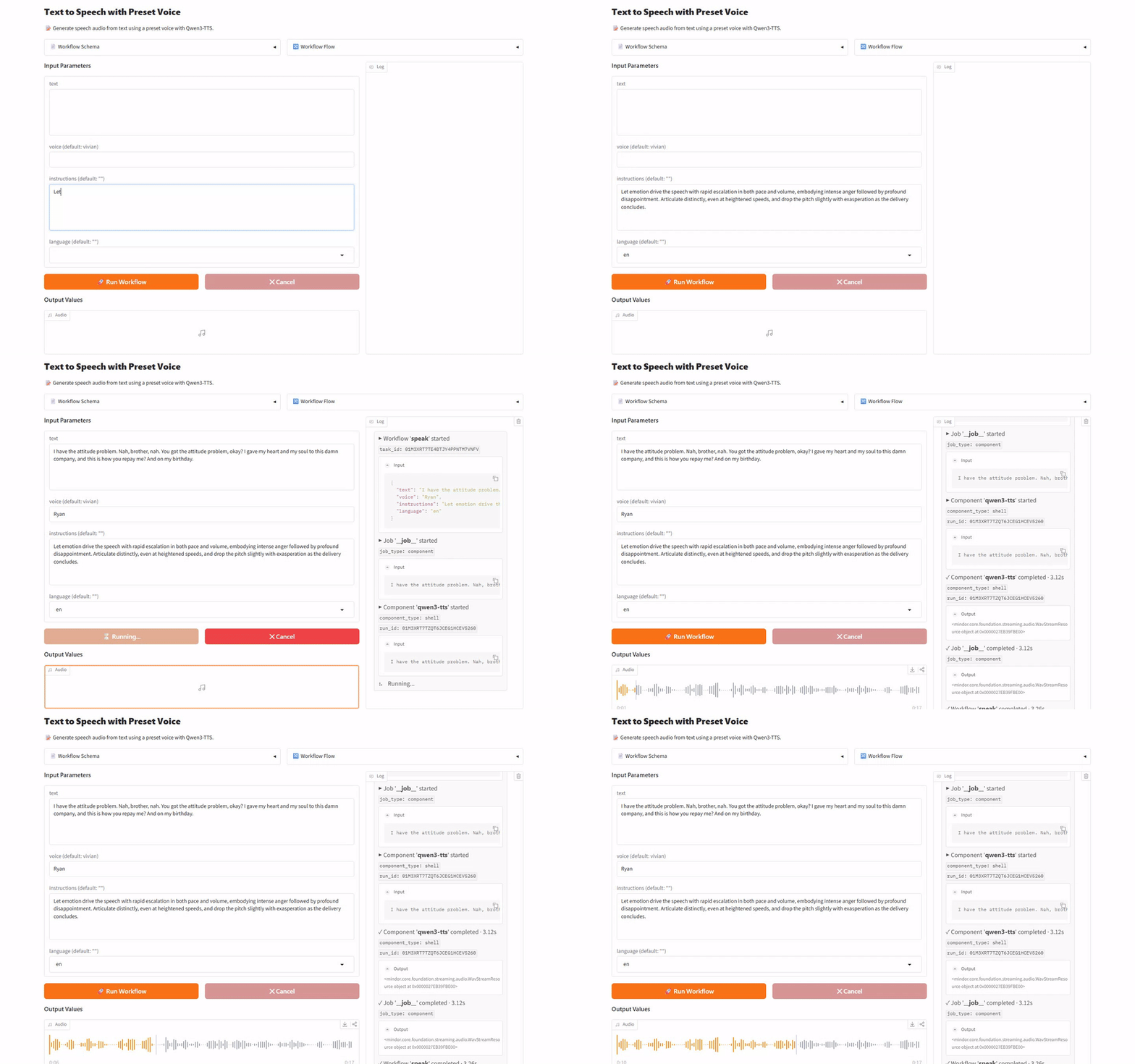
Perfect for iteration, demos, and sharing a workflow with non-engineers before wiring it into production.
What You Can Build
Here's what a single YAML file can serve today — just a few examples.
🤖 Autonomous Agents
Build a ReAct agent that plans, uses tools, and completes multi-step tasks — declaratively.
component:
  id: research-agent
  type: agent
  tools: [search-web, fetch-page]
  max_iteration_count: 10
  action:
    model:
      component: chatgpt
    system_prompt: You are a web research assistant.
    user_prompt: ${input.question}
See simple agents like a code reviewer, a RAG assistant, and a web researcher in agents/.
🧠 Local Models
Run open-weight models on your own hardware with PyTorch, vLLM, or llama.cpp — same YAML surface as cloud APIs, no SDK code.
component:
  type: model
  task: chat-completion
  model: HuggingFaceTB/SmolLM3-3B
  action:
    messages:
      - role: system
        content: ${input.system_prompt}
      - role: user
        content: ${input.user_prompt}
Point model: at any Hugging Face repo, or a local GGUF file via llama.cpp. Browse local chat, embedding, TTS, VLM, image/audio/video tasks under model-tasks/.
🔍 RAG Pipelines
Compose embedding, vector search, and generation into a single workflow — no glue code.
workflow:
  jobs:
    - id: embed
      component: embedder
      input: { text: ${input.query} }

    - id: retrieve
      component: knowledge
      action: search
      input: { vector: ${jobs.embed.output} }

    - id: answer
      component: chatgpt
      input:
        context: ${jobs.retrieve.output}
        question: ${input.query}
Native drivers ship for Chroma, Milvus, Qdrant, FAISS, Neo4j, ArangoDB, and Redis.
🎬 Media Pipelines
Chain audio, video, and image stages across models and native codecs — swap any step without touching the rest.
workflow:
  jobs:
    - id: extract-audio
      component: audio-extractor
      input: { source: ${input.video as video} }

    - id: transcribe
      component: whisper
      input: { audio: ${jobs.extract-audio.output} }

    - id: translate
      component: translator
      input: { text: ${jobs.transcribe.output} }

    - id: dub
      component: tts
      input: { text: ${jobs.translate.output} }

    - id: lip-sync
      component: wav2lip
      input:
        video: ${input.video as video}
        audio: ${jobs.dub.output as audio/wav}
      output: ${output as video/mp4}
See full video dubbing, scene detection, voice cloning, and face mosaic pipelines in media-processing/.
⚡ Streaming Multi-Modal Workflows
Stream tokens, audio chunks, and video frames end-to-end — first-class across every stage.
workflow:
  job:
    component: chatgpt
    output: ${output as sse-text}

component:
  id: chatgpt
  type: http-client
  action:
    body: { stream: true, ... }
    stream_format: json
    output: ${response[].choices[0].delta.content}
Real-time TTS, video-to-frames, and live chat examples live under data-streaming/ and showcase/.
🌐 MCP Servers
Turn any workflow into an MCP server that Claude, ChatGPT, or Cursor can use — one line change.
controller:
  adapter:
    type: mcp-server   # ← was: http-server
    port: 8080
Full examples live in mcp-servers/, including a Slack bot MCP.
From Development to Production
The same YAML that runs on your laptop scales without a rewrite.
1. Develop locally
model-compose up
Runs on your machine with a Gradio web UI at :8081 — perfect for iteration.
2. Deploy as a container
Add a runtime: block. Same file, same behavior:
controller:
  runtime:
    type: docker
    image: my-ai-service:latest
    ports: [ "8080:8080" ]
3. Scale horizontally
Add a queue. Dispatchers accept jobs, subscribers process them across N machines:
controller:
  adapter: { type: http-server, port: 8080 }
  queue:
    driver: redis
    host: redis.internal
    name: my-queue
No shared filesystem. No code changes. Just add more subscribers to scale.
Why model-compose?
| model-compose | Managed APIs (OpenAI, etc.) | Code Frameworks (LangChain, etc.) | |
|---|---|---|---|
| Time to first API | Minutes (one YAML) | Hours (SDK + server code) | Days (framework + integration) |
| Provider Coupling | Multi-provider via config | Single provider per SDK | Multi-provider via abstractions |
| Code Coupling | Declarative YAML — no application code | Application code required | Framework-specific code required |
| Infrastructure Control | Full Sovereignty | Provider-controlled | Heavy Abstraction |
| Runtime Flexibility | Hybrid-First (Local + Cloud) | Cloud Only | Complex to customize |
| Protocol Support | HTTP / WebSocket / MCP | Provider-specific | Limited |
| Data Streaming | First-class across all stages | Response-only (SSE tokens) | Framework-wrapped generators |
| Deployment | Docker / Native / Virtualenv / Process | Provider-managed | Manual integration |
Highlights
- Any model, anywhere — HuggingFace, vLLM, llama.cpp locally, or OpenAI/Anthropic/Google/xAI via HTTP
- Agents in YAML — ReAct loops, tool use, multi-step reasoning — no code
- Human-in-the-loop — pause workflows for approval, resume from CLI/UI/API
- 100+ components — models, agents, HTTP/WebSocket clients, vector/graph stores, shell, browsers, and more
- Any protocol — HTTP REST, WebSocket, or MCP with one line
- Any runtime — Docker, native, virtualenv, process, embedded — switch in one line
- Distributed — Redis queue dispatch for horizontal scaling
- Instant Web UI — Gradio-powered UI in 2 lines of YAML
- Streaming everywhere — SSE, WebSocket, and inter-job streams as first-class values
Examples
Browse examples by category:
| Category | What's inside |
|---|---|
agents/ | Code reviewer, RAG assistant, Web researcher, Web page analyzer, ... |
showcase/ | End-to-end pipelines: disk analysis, face-based scene search, real-time TTS |
model-providers/ | OpenAI, Anthropic, xAI, Google, ElevenLabs, vLLM |
model-tasks/ | Local chat, embedding, TTS, VLM, face embedding, ... |
media-processing/ | Audio/video/image processing: extraction, conversion, scene detection |
media-broadcast/ | Live broadcasting pipelines (e.g. YouTube Live over RTMP) |
web-automation/ | Web scraping, headless browser automation, page capture |
text-processing/ | Text chunking and preprocessing |
mcp-servers/ | Build MCP servers exposed to Claude, Cursor, ChatGPT |
workflow-queue/ | Redis-backed distributed dispatch (streaming + non-streaming) |
data-streaming/ | Video-to-frames, YouTube live chat, streaming inputs |
job-flow/ | Workflow control: conditional routing, hooks, interrupts |
integrations/ | Vector/graph/KV stores, search engines, channels, tunnels |
runtime/ | Component execution runtimes: Docker, Apple Container, virtualenv, ... |
Browse the full catalog in examples/README.md.
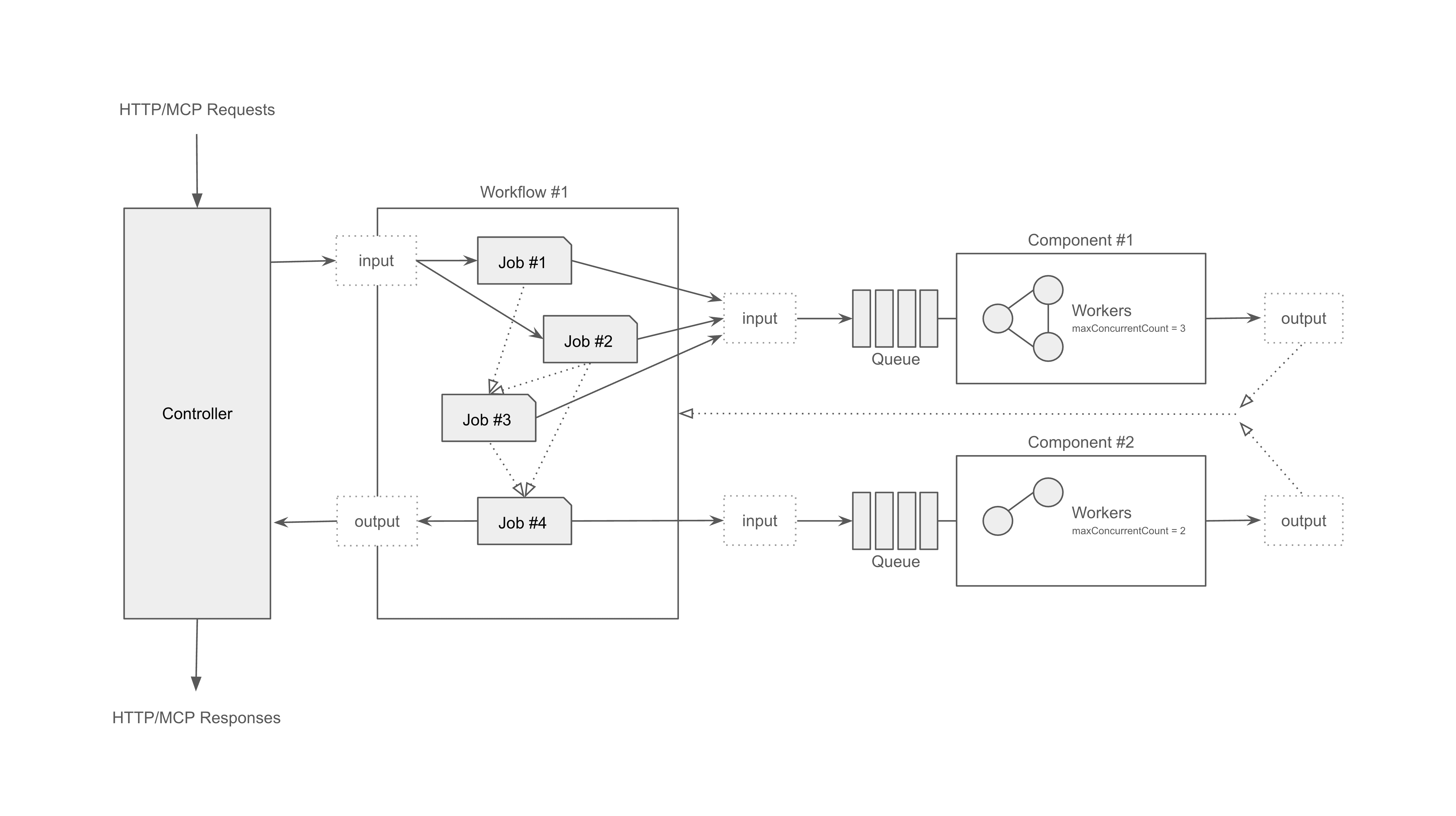
Architecture
Protocol adapters → Composition engine → Runtime executors
Contributing
We welcome all contributions — bug fixes, docs improvements, new examples.
git clone https://github.com/hanyeol/model-compose.git
cd model-compose
pip install -e .
See CONTRIBUTING if available, or open a PR directly.
License
MIT License © 2025-2026 Hanyeol Cho.
Contact
Have questions, ideas, or feedback? Open an issue or start a discussion on GitHub Discussions.
Model Compose alternatives
View more →Similar mcp servers in Data Science & ML, ranked by GitHub stars. Compare licence, recent activity and scan status before you choose.
| Name | Stars | Licence | Last updated | Scan |
|---|---|---|---|---|
| Model Compose (this page) hanyeol | 119 | MIT | Nov 1, 2026 | Scanned, no flagged issues |
| MaxKB 1Panel-dev | 23k | GPL-3.0 | Nov 1, 2026 | Scanned, no flagged issues |
| FunASR modelscope | 21k | MIT | Nov 1, 2026 | Scanned, no flagged issues |
| Ida Pro MCP mrexodia | 13k | MIT | Sep 26, 2026 | Scanned, no flagged issues |
| Pal MCP Server BeehiveInnovations | 12k | None found | Dec 15, 2025 | Not scanned yet |
| Osaurus osaurus-ai | 8.1k | MIT | Nov 1, 2026 | Scanned, no flagged issues |