Qz Browser Agent MCP Server
 by alibaba
Local-first AI agent for Chrome: browser automation, web research, and data extraction with your own model.
Qz Browser Agent is an open-source mcp server by alibaba, written mainly in HTML, with 160 GitHub stars and the Apache-2.0 license. Its code was last updated Oct 30, 2026. The latest npm release is qz-browser-agent 0.1.6, published Nov 14, 2026, with 477 downloads last week.



qz is an open-source browser agent that runs in your own browser as a Chrome extension. Describe a task in one sentence, and it works across the sites you're already signed in to, extracts the data, and delivers tables, files, or reports with sources. Connect any model, including DeepSeek, OpenAI, and Claude, with your own API key; your data stays local and goes only to the model you choose. Agents like Grok Bot, Claude Code, and Codex can also drive your browser or hand whole web tasks to qz through its CLI and MCP.
<p align="center"> <a href="https://chromewebstore.google.com/detail/dknbdgkgoinlgjpfebapkklbmjjgdblm"><img src="docs/images/chrome-web-store-badge.png" alt="Available in the Chrome Web Store" height="58"></a> </p> <p align="center"> <a href="#make-your-agents-actually-good-at-browsing"><img src="docs/images/connect-command.svg" alt="npx skills add alibaba/qz-browser-agent -g" height="52"></a> </p>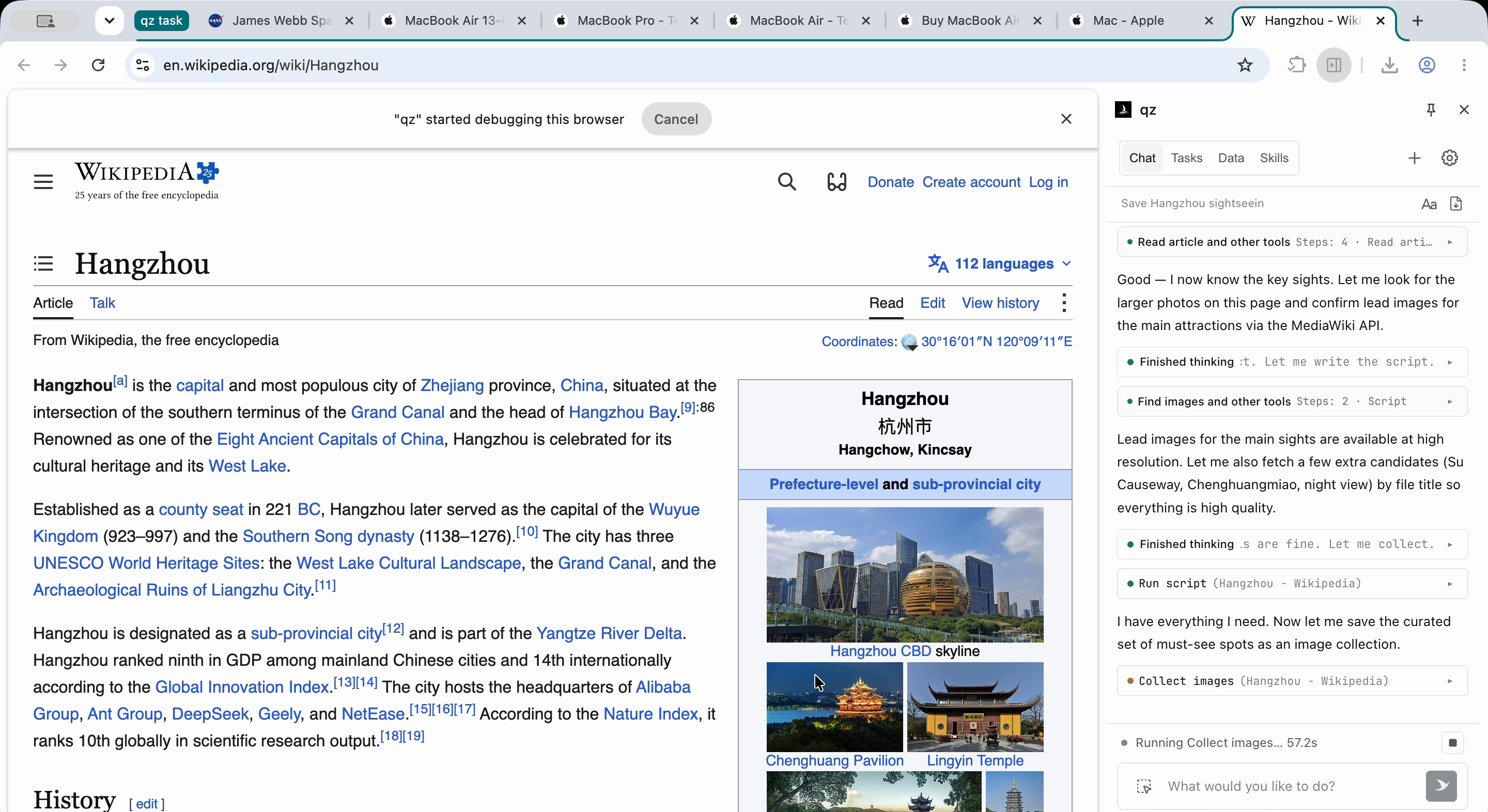
https://github.com/user-attachments/assets/26ee85fd-540f-4427-af59-c196fadfa221
Why qz?
Reliable browser execution for AI agents
General-purpose AI agents often break on real-world browsing: login walls, long click sequences, and pages that load as you scroll. qz runs these flows in your real local Chrome and hands clean results back to your agent.
Visible to you, callable by your agent
Other browser agents usually let you watch them work, but stepping in mid-task is hard, and each is built for either people or agents, not both. qz lives in the side panel, so you see every step and result, and you can step in or stop it at any time. Coding agents such as Claude Code and Codex can also drive the same browser or send tasks to qz through the CLI or MCP.
<p align="center"> <img src="docs/images/agent-drive-en.png" width="800" alt="A coding agent runs one qz script from the terminal while the qz side panel shows each browser step and the saved table"> </p>Parallel research, from web data to reusable Skills
qz runs many tasks at once, and each task can spawn subtasks, so a large research job is split up and worked in parallel instead of stalling a single agent. It pulls the figures you want to compare from scattered, inconsistent websites and turns them into comparison tables or local files. Once a task works, say "Save this as a Skill" and reuse it next time with one sentence.
Your everyday browser, your data stays local
No virtual environment to set up. qz uses the Chrome you already use, so your logins, cookies, and extensions just work. Task data is stored locally, and you choose the model behind it.
What you can ask
Start with a simple task
Plan a 3-day cultural walk through Luxembourg City linking the Old Town, museums, and historic quarters. Check tourism-office and venue websites for opening hours, tickets, and booking rules, build a daily route table with sources, and flag anything unverified.
Pull together multiple sources
Compare the major open-weight LLMs released in the last 6 months, one per row: release date, parameters, context length, license, and key benchmarks, with official sources.
Get it right once, save it as a Skill in one sentence
Find 10 arXiv papers on browser agents from the past month, with titles, one-line takeaways, and links.
Once it works, say "Save this as a Skill". Next time, just say "This week's browser agent papers" to reuse it.
<p align="center"> <img src="docs/images/examples/en/arxiv-skill-browser-en.png" width="800" alt=""> </p> <p align="center"> <img src="docs/images/examples/en/arxiv-skill-saved-en.png" width="320" alt=""> <img src="docs/images/examples/en/arxiv-skill-reuse-en.png" width="409" alt=""> </p>Run research tasks in parallel
Find the 10 fastest-growing AI agent repos on GitHub this week, read their READMEs, and write a weekly report with links.
Let your agent hand tasks to qz
In a coding agent such as pi, say:
Use qz to find this week's hottest AI agent projects on GitHub and send me a weekly report.
The agent opens a qz session in your browser, reads pages, and acts through qz script. It can also hand the whole task to qz's built-in agent with qz create.
Quick start
-
Install: Click Add to Chrome on the Chrome Web Store, then click the qz icon in your toolbar to open the side panel.
-
Connect a model: Open Settings, select a provider (e.g., DeepSeek, Claude), paste your API key, and save. Have a ChatGPT account? Select OpenAI Codex and sign in—no API key required.
<img src="docs/images/settings-model-en.png" alt="qz settings: choose a provider and enter an API key" width="320"> -
Run a task: Enter a prompt in the side panel, for example:
Find this year's Nobel Prize winners in every category and put them in a table with source links. -
(Optional) Connect external agents: CLI commands start the local service and connect the browser when needed. See Make your agents actually good at browsing for the agent guide.
- Download the ZIP from the latest release and extract it.
- Open
chrome://extensionsand enable Developer mode. - Click Load unpacked and select the extracted
qz-browser-agent-extensionfolder. - Open the side panel and configure a model as described above.
Make your agents actually good at browsing
Use Node.js 22+ on the computer running your browser. Reuse qz if it is already on PATH; otherwise, install it once for ongoing use with npm install -g qz-browser-agent. Use npx -y qz-browser-agent@latest in place of qz only as a temporary fallback. Run qz skill with that same CLI and read its matching-version guide rather than copying instructions from another version.
Start with qz session create --title "Read a page" --json. qz prepares its local service and reuses a responding browser connection, or opens a connection page in your default browser. Ask the user to review and accept the first-use data notice in the qz side panel and approve the connection when prompted. If the extension is missing, qz install opens the Chrome Web Store; the user adds the extension, completes setup, and you retry the session command if needed. If qz is installed in another browser profile, open the connection page’s copyable link there. This direct-drive path needs no manual port, service, or qz model setup.
Use the returned result.sessionId in every qz script --session ID task.js call, following the guide and binding pages with qz.tab(tabRef). You plan and drive the task; finish with qz session cancel ID. Use qz create "TASK" --stream only when the user wants qz’s built-in agent to plan and execute the task, including human–agent collaboration; that path uses the provider and model configured in qz.
npm install --global qz-browser-agent
qz session create --title "Compare models" --json
qz script --session SESSION_ID task.js
qz create "your task" --stream
session createopens a browser session without starting a model. With--json,result.qz_skillslists the Skills the session can use right away.scriptruns a JavaScript file in that session with theqzSDK and prints{ok,result,trace}as JSON. Runqz skillfor the full guide.createhands the whole task to qz's built-in agent.--streamshows progress, any questions qz needs you to answer, and the final result.- Without a global install, use
npx qz-browser-agent@latestin place ofqz. - For MCP clients, run
qz mcpand use the HTTP URL it returns. - See the CLI and MCP reference for multi-browser pairing, follow-ups, and exports.
- For DeepSeek Harness, see the Qingzhou dsh plugin.
Comparison
| qz | Nanobrowser | Browser Use | agent-browser | Playwright MCP | |
|---|---|---|---|---|---|
| Delegate the whole task, not every click | ✅ | ◐ | ◐ | ◐ | ❌ |
| Runs in your own logged-in Chrome | ✅ | ✅ | ◐ | ◐ | ◐ |
| Real-time control of every step, for humans and agents | ✅ | ◐ | ◐ | ◐ | ◐ |
| Many tasks in parallel, each with subtasks | ✅ | ◐ | ◐ | ◐ | ◐ |
| Save a run as a reusable Skill | ✅ | ❌ | ◐ | ❌ | ❌ |
<sub>✅ built in · ◐ partial or needs setup/code · ❌ not supported. As of October 2026, based on each project's public docs.</sub>
Local first
qz runs entirely in your browser. Sessions, Skills, and collected data stay on your machine, and the CLI/MCP bridge runs locally too. There's no qz server: your data only goes to the model you configure and the websites you work on.
See privacy policy and browser permissions.
FAQ
Is qz free?
The extension and CLI are free under Apache-2.0. Model costs depend on your provider; compatible local models are supported. ChatGPT access and limits depend on your account and plan.
How do I sign in with ChatGPT?
In Settings, select OpenAI Codex and follow the device-code instructions at auth.openai.com.
Return to qz, select a model, and save. If device-code login is disabled, follow OpenAI's
authentication guidance.
Which models can I use?
Use a provider with a supported protocol and tool calling, including a compatible local server. Presets include OpenAI Codex, OpenRouter, DeepSeek, Kimi For Coding, OpenCode Go, OpenCode Zen, Fireworks AI, and more. See providers.
Does qz support Edge or Firefox?
qz releases run in Chrome and Edge. A signed Firefox listing is not published yet. Temporary loading
for development is in Load temporarily in Firefox.
The CLI is the same daemon for both packages. Pairing is in
Load qz in Firefox.
The packaging convention is in Firefox packaging.
npm run dev and npm run build write the Chrome package. npm run dev:firefox and
npm run build:firefox write the Firefox package. npm run release writes the Chrome zip.
npm run release:firefox writes an unsigned .xpi for a local check or an AMO upload.
Remaining differences from Chrome are in
Firefox differences from Chrome. The API survey is in
Firefox capability gap.
Development
To change qz's behavior or inspect how it runs, build and load the extension locally.
Build from source
Install Node.js 24 LTS and npm, then run from a local checkout:
npm ci
npm run build
Open chrome://extensions, enable Developer mode, click Load unpacked, and select
dist/extension/. To load the same sources in Firefox temporarily, follow
Load temporarily in Firefox.
Develop and test
Set up the test environment, then use:
npm run dev            # Rebuild the Chrome package on source changes
npm run dev:firefox    # Rebuild the Firefox package on source changes
npm test               # Run the default test suites
npm run verify         # Type-check and run the shared suites
npm run verify:chrome  # Chrome package suites on dist/extension
npm run verify:coverage # Shared suites, Chrome package suites, and coverage gates
After a rebuild, reload the extension at chrome://extensions and reopen the side panel.
Add a capability
To add a tool, view, setting, or provider that qz doesn't include yet, see the capability guide.
More docs
License
For reuse or redistribution, follow Apache-2.0 and the dependencies' own licenses listed in THIRD_PARTY_NOTICES.md.
Qz Browser Agent alternatives
View more →Similar mcp servers in Browser Automation, ranked by GitHub stars. Compare licence, recent activity and scan status before you choose.
| Name | Stars | Licence | Last updated | Scan |
|---|---|---|---|---|
| Qz Browser Agent (this page) alibaba | 160 | Apache-2.0 | Oct 30, 2026 | Scanned, no flagged issues |
| Chrome Devtools MCP ChromeDevTools | 55k | Apache-2.0 | Nov 1, 2026 | Scanned, no flagged issues |
| Playwright MCP microsoft | 39k | Apache-2.0 | Oct 31, 2026 | Scanned, no flagged issues |
| MCP Chrome hangwin | 13k | MIT | Jan 6, 2026 | Scanned, no flagged issues |
| Browser Tools MCP AgentDeskAI | 7.3k | MIT | Oct 28, 2026 | Scanned, no flagged issues |
| MCP BrowserMCP | 7.3k | Apache-2.0 | Oct 30, 2026 | Scanned, no flagged issues |