Shotgrid MCP Server
 by loonghao
A Model Context Protocol (MCP) server for Autodesk ShotGrid/Flow Production Tracking (FPT) with comprehensive CRUD operations and data management capabilities.
Shotgrid MCP Server is an open-source mcp server by loonghao, written mainly in Python, with 67 GitHub stars and the MIT license. Its code was last updated Oct 26, 2026. The latest PyPI release is shotgrid-mcp-server 0.17.1, published Sep 23, 2026, with 1,839 downloads last week.
ShotGrid MCP Server
A Model Context Protocol (MCP) server that provides AI assistants with seamless access to Autodesk ShotGrid (Flow Production Tracking)
English | 简体中文





📖 Documentation | 中文文档
</div>Overview
ShotGrid MCP Server enables AI assistants like Claude, Cursor, and VS Code Copilot to interact directly with your ShotGrid (Flow Production Tracking) data. Built on FastMCP, it provides a high-performance bridge between AI tools and production tracking workflows.
Demo
0. Configure ShotGrid MCP in Code Editor
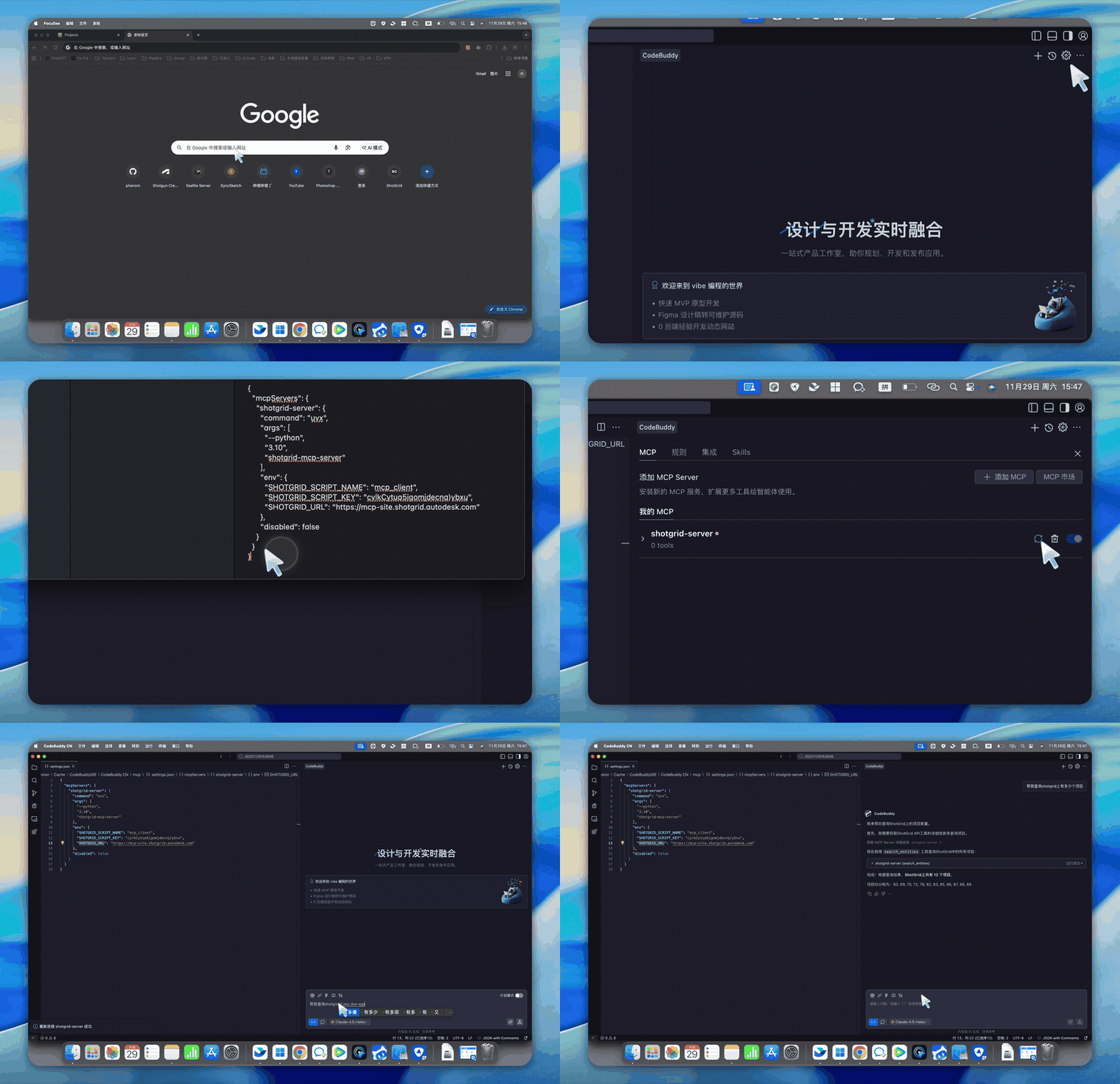
1. Query Task Schedule & Workload Visualization
Prompt: Query the team's task schedule for the past week, calculate workload rate based on 8 hours per day, and visualize it in web format
2. Batch Create Assets & Assign Tasks
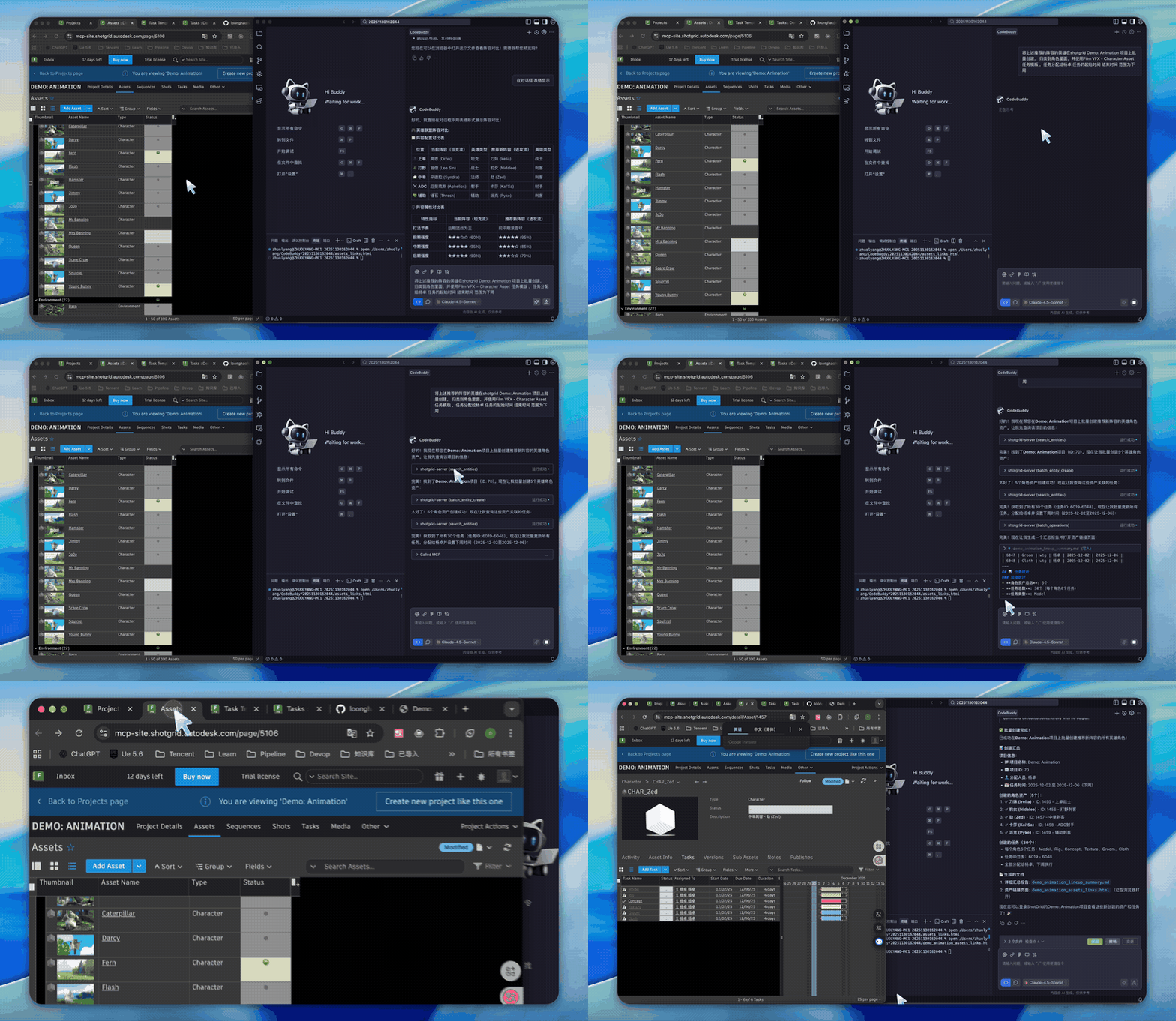
Prompt: Batch create the recommended hero characters in the shotgrid Demo:Animation project, categorize them as characters, use the FilmVFX-CharacterAsset task template, assign tasks to Yang Zhuo, with start and end dates set to next week
3. TimeLog Statistics & Visualization
Prompt: Query timelog data from shotgrid and visualize it in web format
4. Department Efficiency Statistics & Send to WeCom
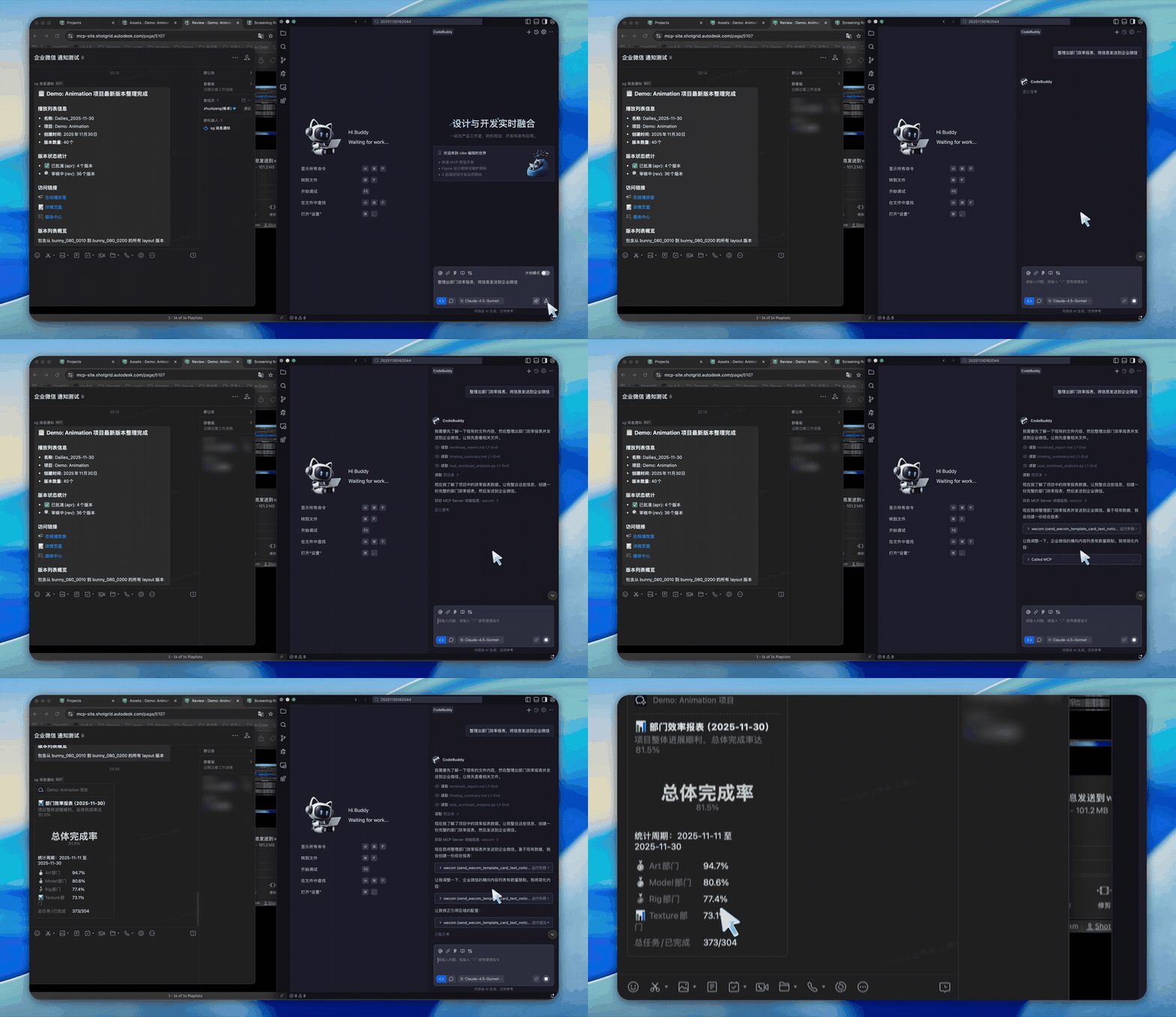
Prompt: Calculate department efficiency and send the data to WeCom. Efficiency formula: Efficiency = Task bid / Timelog hours
More Examples

Features
| Category | Highlights |
|---|---|
| 40+ Tools | Complete CRUD operations, batch processing, thumbnails, notes, playlists |
| Transport | stdio (local), HTTP (remote), ASGI (production) |
| Performance | Connection pooling, schema caching, lazy initialization |
| Skills | Bundled Agent Skills over MCP (io.modelcontextprotocol/skills) |
| Deployment | FastMCP Cloud, Docker, uvicorn/gunicorn, any ASGI server |
| Platform | Windows, macOS, Linux |
Quick Start
Installation
# Using uv (recommended)
uv pip install shotgrid-mcp-server

# Or using pip
pip install shotgrid-mcp-server
Configuration
Set your ShotGrid credentials:
export SHOTGRID_URL="https://your-site.shotgunstudio.com"
export SHOTGRID_SCRIPT_NAME="your_script_name"
export SHOTGRID_SCRIPT_KEY="your_script_key"
Usage
stdio Transport (Default) - For Claude Desktop, Cursor, etc.
uvx shotgrid-mcp-server
HTTP Transport - For Remote Access
uvx shotgrid-mcp-server http --host 0.0.0.0 --port 8000
MCP Client Configuration
Add the server to your MCP client configuration:
Claude Desktop
{
  "mcpServers": {
    "shotgrid": {
      "command": "uvx",
      "args": ["shotgrid-mcp-server"],
      "env": {
        "SHOTGRID_URL": "https://your-site.shotgunstudio.com",
        "SHOTGRID_SCRIPT_NAME": "your_script_name",
        "SHOTGRID_SCRIPT_KEY": "your_script_key"
      }
    }
  }
}
Cursor / VS Code / Other MCP Clients
{
  "mcpServers": {
    "shotgrid": {
      "command": "uvx",
      "args": ["shotgrid-mcp-server"],
      "env": {
        "SHOTGRID_URL": "https://your-site.shotgunstudio.com",
        "SHOTGRID_SCRIPT_NAME": "your_script_name",
        "SHOTGRID_SCRIPT_KEY": "your_script_key"
      }
    }
  }
}
HTTP Transport (Remote)
{
  "mcpServers": {
    "shotgrid": {
      "type": "http",
      "url": "http://your-server:8000/mcp"
    }
  }
}
Deployment
| Method | Command / Setup |
|---|---|
| FastMCP Cloud | Deploy via fastmcp.cloud with fastmcp_entry.py |
| ASGI | uvicorn shotgrid_mcp_server.asgi:app --host 0.0.0.0 --port 8000 |
| Docker | See Deployment Guide |
See the Deployment Guide for detailed instructions.
Available Tools
This server provides 40+ tools for interacting with ShotGrid:
| Category | Tools |
|---|---|
| CRUD | create_entity, find_one_entity, search_entities, update_entity, delete_entity |
| Batch | batch_create, batch_update, batch_delete |
| Media | download_thumbnail, upload_thumbnail |
| Notes | shotgrid.note.create, shotgrid.note.read, shotgrid.note.update |
| Playlists | create_playlist, find_playlists |
| MCP Apps | shotgrid_dashboard (interactive status dashboard) |
| Direct API | sg.find, sg.create, sg.update, sg.batch, and more... |
MCP Apps
shotgrid_dashboard is an MCP App: it returns data and an interactive UI. The tool advertises ui://shotgrid/dashboard in its _meta.ui.resourceUri, and the host renders that resource in a sandboxed iframe.
Hosts without MCP Apps support automatically receive the same summary as plain text.
The UI is bundled into a single self-contained HTML file, so no Node runtime is needed in production. See the MCP Apps guide for the wire format and rebuild instructions.
python scripts/verify_mcp_app.py
Example Prompts
Once connected, you can ask your AI assistant:
- "Find all shots updated last week in Project X"
- "Create a playlist with yesterday's lighting renders"
- "Add a note to SHOT_010 about the background lighting"
- "Summarize time logs for the Animation department this month"
- "Show me a dashboard of Task statuses for Project X"
Development
# Clone and install
git clone https://github.com/loonghao/shotgrid-mcp-server.git
cd shotgrid-mcp-server
pip install -r requirements-dev.txt

# Run tests
nox -s tests

# Development server with hot reload
uv run fastmcp dev src/shotgrid_mcp_server/server.py:mcp

# Verify the Skills extension against a live HTTP server
uv run python scripts/verify_skills_extension.py
Documentation
See the /docs directory for detailed documentation.
Contributing
Contributions welcome! Please follow the Google Python Style Guide, write tests, and use Conventional Commits — commit messages drive versioning and the changelog. See RELEASE.md for how releases are cut.
License
Architecture
flowchart TB
    subgraph Clients["🤖 MCP Clients"]
        direction LR
        CLAUDE["Claude Desktop"]
        CURSOR["Cursor"]
        VSCODE["VS Code"]
        AI["Other AI"]
    end

    subgraph MCP["⚡ ShotGrid MCP Server"]
        direction LR
        TOOLS["40+ Tools"]
        POOL["Connection Pool"]
        SCHEMA["Schema Cache"]
    end

    subgraph ShotGrid["🎬 ShotGrid API"]
        direction LR
        P["Projects"]
        S["Shots"]
        A["Assets"]
        T["Tasks"]
        N["Notes"]
    end

    Clients -->|"MCP Protocol<br/>stdio / http"| MCP
    MCP -->|"REST API"| ShotGrid

    style Clients fill:#2ecc71,stroke:#27ae60,color:#fff
    style MCP fill:#3498db,stroke:#2980b9,color:#fff
    style ShotGrid fill:#e74c3c,stroke:#c0392b,color:#fff
Shotgrid MCP Server alternatives
View more →Similar mcp servers in Other, ranked by GitHub stars. Compare licence, recent activity and scan status before you choose.
| Name | Stars | Licence | Last updated | Scan |
|---|---|---|---|---|
| Shotgrid MCP Server (this page) loonghao | 67 | MIT | Oct 26, 2026 | Scanned, no flagged issues |
| Github MCP Server github | 34k | MIT | Oct 30, 2026 | Scanned, no flagged issues |
| Fastapi MCP tadata-org | 12k | MIT | Nov 24, 2025 | Scanned, no flagged issues |
| GhidraMCP LaurieWired | 12k | Apache-2.0 | Oct 10, 2026 | Scanned, no flagged issues |
| MCP Go mark3labs | 9.2k | MIT | Oct 30, 2026 | Scanned, no flagged issues |
| Git MCP idosal | 8.5k | Apache-2.0 | May 8, 2026 | Scanned, no flagged issues |