WeftCut MCP Server
 by WeftCut
Free, open-source AI video editor for macOS, Windows and Linux — drive the whole timeline from any MCP client.
WeftCut is an open-source mcp server by WeftCut, written mainly in TypeScript, with 295 GitHub stars and the MIT license. Its code was last updated Nov 1, 2026.
<p align="center"> <a href="https://github.com/WeftCut/WeftCut/releases/latest"><img alt="Download the latest release" src="https://img.shields.io/github/v/release/WeftCut/WeftCut?style=flat-square&label=Download&labelColor=475569&color=6696E6&logo=github&logoColor=white" /></a> <img alt="Runs on Windows, macOS and Linux" src="https://img.shields.io/badge/Platform-Windows%20%7C%20macOS%20%7C%20Linux-5B7196?style=flat-square&labelColor=475569" /> <a href="LICENSE"><img alt="License" src="https://img.shields.io/github/license/WeftCut/WeftCut?style=flat-square&label=License&labelColor=475569&color=5B7196" /></a> <a href="https://discord.gg/SjsFCpzDe"><img alt="Join the WeftCut Discord community" src="https://img.shields.io/badge/Discord-Join%20the%20community-5865F2?style=flat-square&labelColor=475569&logo=discord&logoColor=white" /></a> <a href="https://glama.ai/mcp/servers/WeftCut/WeftCut"><img alt="Glama MCP server score" src="https://glama.ai/mcp/servers/WeftCut/WeftCut/badges/score.svg" /></a> </p> <p align="center"> <a href="https://www.producthunt.com/products/weftcut?embed=true&utm_source=badge-featured&utm_medium=badge&utm_campaign=badge-weftcut" target="_blank" rel="noopener noreferrer"><img alt="WeftCut - The open-source video editor your AI agent can drive | Product Hunt" width="250" height="54" src="https://api.producthunt.com/widgets/embed-image/v1/featured.svg?post_id=1266067&theme=neutral&t=1791466936489" /></a> </p>[!NOTE] WeftCut is still under active development, so some features and UI/UX may change before v1.0.0. Join us to improve the project: start with the contributing guide.

Most editors bolt AI on as a feature: a button that generates something, a sidebar that suggests a cut. WeftCut exposes the editor itself as a tool surface. A localhost MCP server publishes all editing tools — place, trim, split, restyle, keyframe, group, caption, mix, checkpoint — and whatever agent you already have open drives them. The intelligence lives outside the app: the installer bundles no model weights, and the local engines for speech and vision are an opt-in download when you want them.
None of that rides on a stripped-down editor. Everything an agent can reach, you can do by hand, in a full NLE: A/B-roll timeline, keyframes with a curve editor, effects, captions, a role-based audio mixer, and hardware-accelerated export.
Quick start
[!NOTE]
We don't have a verified macOS installer yet, so allow it under System Settings → Privacy & Security → Open Anyway
- Download the installer for your platform from the releases page.
- Install the app, open the settings panel, and copy the prompt that teaches your agent how to connect to WeftCut.
- Enjoy your work.
Hand your timeline to an agent
Copy the prompt in settings into your client, and your agent is holding the editor.
- It edits the project you are watching. No import/export round trip, no separate headless copy.
- Every batch is reversible. A work session begins with a checkpoint that is one click from being restored, and every edit the agent commits is a step of your undo history.
- Multi-agent, with rules. Sessions are per-connection. A work session locks undo for everyone but its agent, so a stray Ctrl-Z doesn't land in the middle of its work — the lock and the reason it gave are shown to you, and Unlock is yours.
Watch and review in Agent view
For a longer run, the agent can call begin_agent_session to open Agent view: a preview, a compact review timeline, and an Agent panel with Activity, Tacks and Changes tabs. Follow its tool calls in Activity while you watch the edit play, discuss specific passages with Tacks, then audit the result with Timeline diff in Changes. You can return to the full editor at any time.
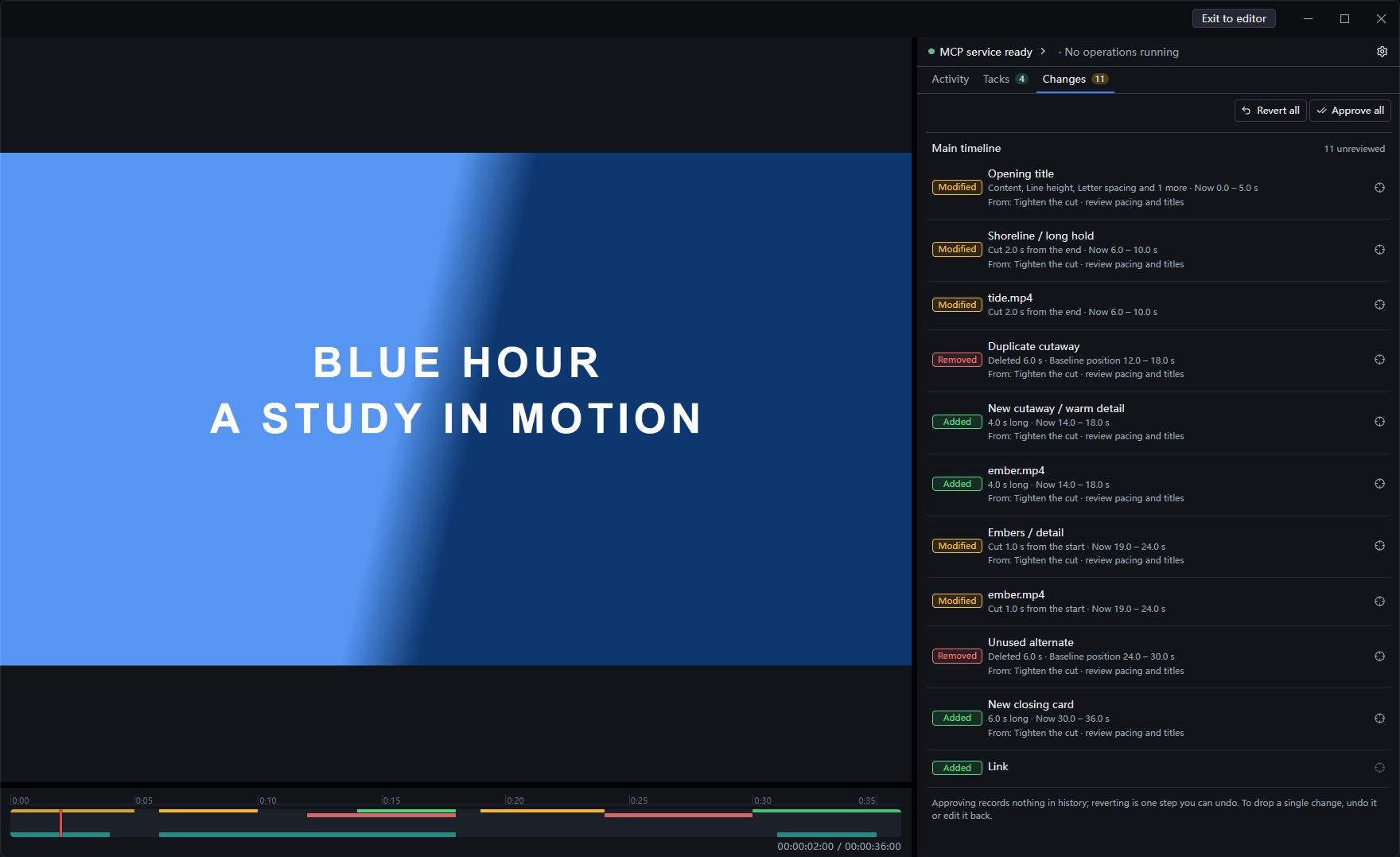
Agent view after an editing pass: Changes lists additions, removals and modifications. The timeline shows them in green, red and yellow, with Tack ranges in teal.
Tacks give the conversation a place. An agent leaves a note, issue or question on a time range; you locate and play it, then resolve, dismiss or convert the Tack into a marker to keep. Tacks follow the content they cover and become outdated when what plays there changes, including on other tracks. The agent can read their statuses and receives feedback when its edits affect its open Tacks.
Timeline diff shows the result of the work. Open Changes to compare the current project with the state when you opened it or last chose Approve all. Inspect additions, removals and modifications, with before/after details and timeline highlights. Approve all makes the result your new review baseline; Revert all restores that baseline in one undoable step. Both include your own edits since the baseline.
Try: “Find the pauses in this interview and leave Tacks on the ones worth cutting. Let me review them before you edit.” Review the passages, tell the agent which cuts to make, then use Timeline diff to approve or revert the result.
Tacks last only for the current project opening. They are not saved or exported, and managing them adds nothing to undo history.
<sub>Agent: create_tacks · read_project { view: "tacks" } · update_tack · delete_tacks</sub>
Code as video: Motifs
A Motif is an on-screen element written as code — a real web page (HTML, CSS, SVG, canvas, WebGL, whatever you reach for) dropped on the timeline as a layer. It isn't a fixed preset: the author declares the knobs, and the inspector builds the form from that declaration, so seconds, label and accent below are editable in the app.
The one rule that makes it an editor feature instead of a screen recording: a Motif renders as a pure function of time. It never advances itself. The harness owns the clock and drives the page to each composition frame, so the same t always yields the same pixels — when you scrub, when you re-export, and in preview and export alike.
// The built-in Countdown's whole script, near enough verbatim — the rest of the
// file is the SVG ring it animates. `props` is whatever the manifest declares;
// `frame` runs once per composition frame and keeps no state of its own.
motif.define({
  setup: async function (props, ctx) {
    _label = props.label != null ? String(props.label) : "GO";
    num.style.color = props.accent;
    ring.style.stroke = props.accent;
    ring.setAttribute("stroke-dasharray", C);
    ring.animate([{ strokeDashoffset: 0 }, { strokeDashoffset: C }],
      { duration: ctx.duration * 1000, easing: "linear", fill: "both" });
  },
  frame: function (t, ctx) {
    var n = Math.max(0, Math.ceil(ctx.duration - t));
    num.textContent = n > 0 ? String(n) : _label;
  },
});
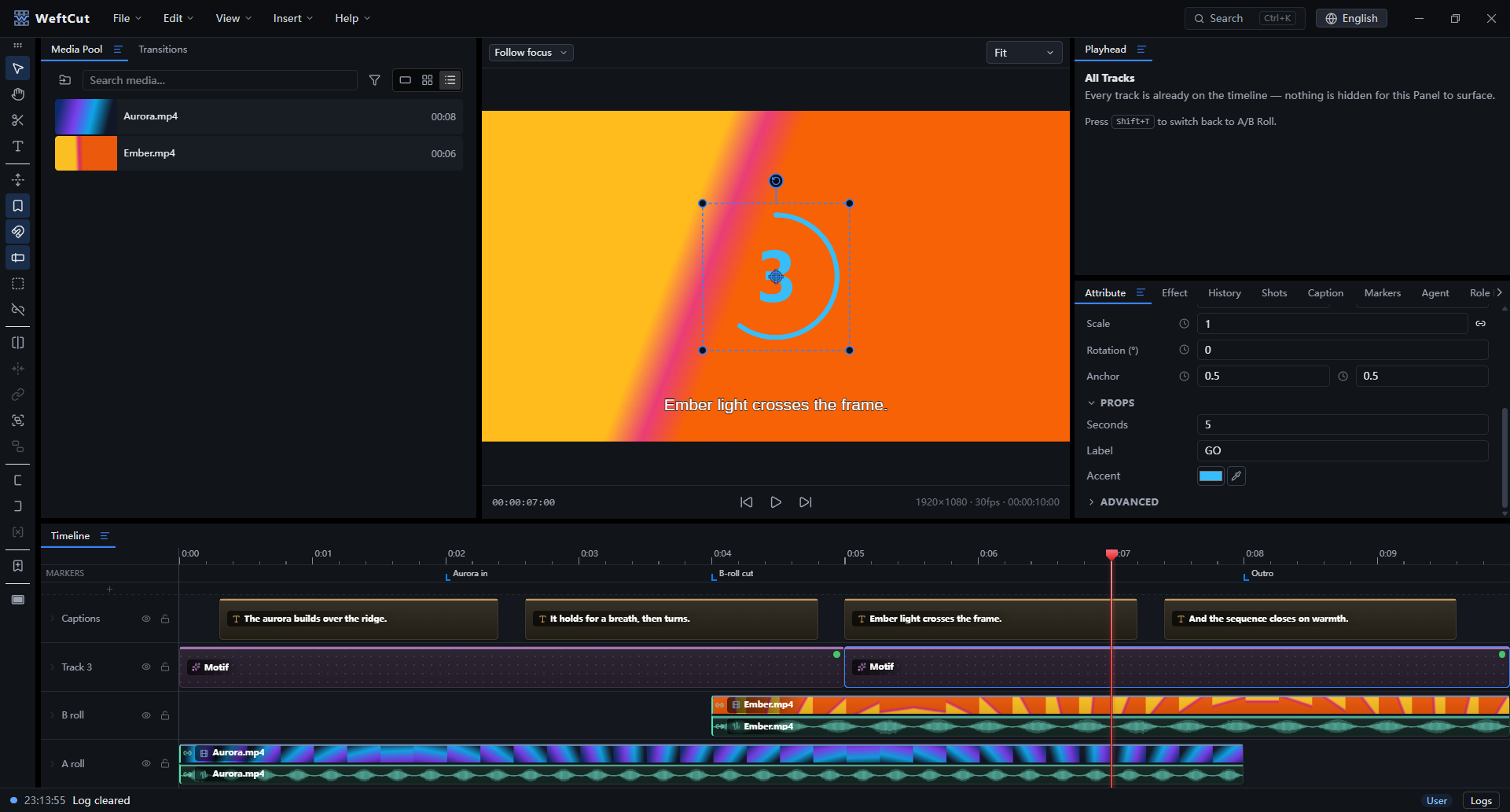
Writing a web page is the thing coding agents are already best at — so an agent can author a brand-new overlay for your edit instead of picking one from a catalog. The authoring spec ships inside the app as an agent skill, so the model gets the contract without you pasting documentation.
Lower thirds, countdowns, karaoke text and animated title cards are the obvious uses. Anything you can build on a page is the actual limit.
A complete editor underneath

Timeline — A/B-roll rows with filmstrips and waveforms, frame-accurate SMPTE editing, ripple delete that closes the gap behind it, linked A/V that trims as one clip, cross-track groups, and nested compositions.
<br/><sub>Agent: move_layers · trim_layer · split_layer · shift_layers · create_link · create_group · move_layers_to_composition</sub>
Keyframes — animate any parameter, with bézier easing, a curve editor, tangent control, motion paths and extrapolation.
<br/><sub>Agent: set_keyframe · update_keyframe · set_param_track · get_param_track</sub>
Speech and captions — transcribe a clip and get editable caption layers packed onto your caption tracks; import SRT/VTT/ASS into the media pool and drop it where it starts. Transcription runs against a cloud provider, or entirely on your machine once you let the app fetch a local engine (whisper.cpp, FunASR) — or an agent can pull the raw audio out and run its own model. Text-to-speech for scratch voiceover.
<br/><sub>Agent: transcribe_clip · extract_clip_audio · apply_transcripts · apply_subtitles · synthesize_speech</sub>
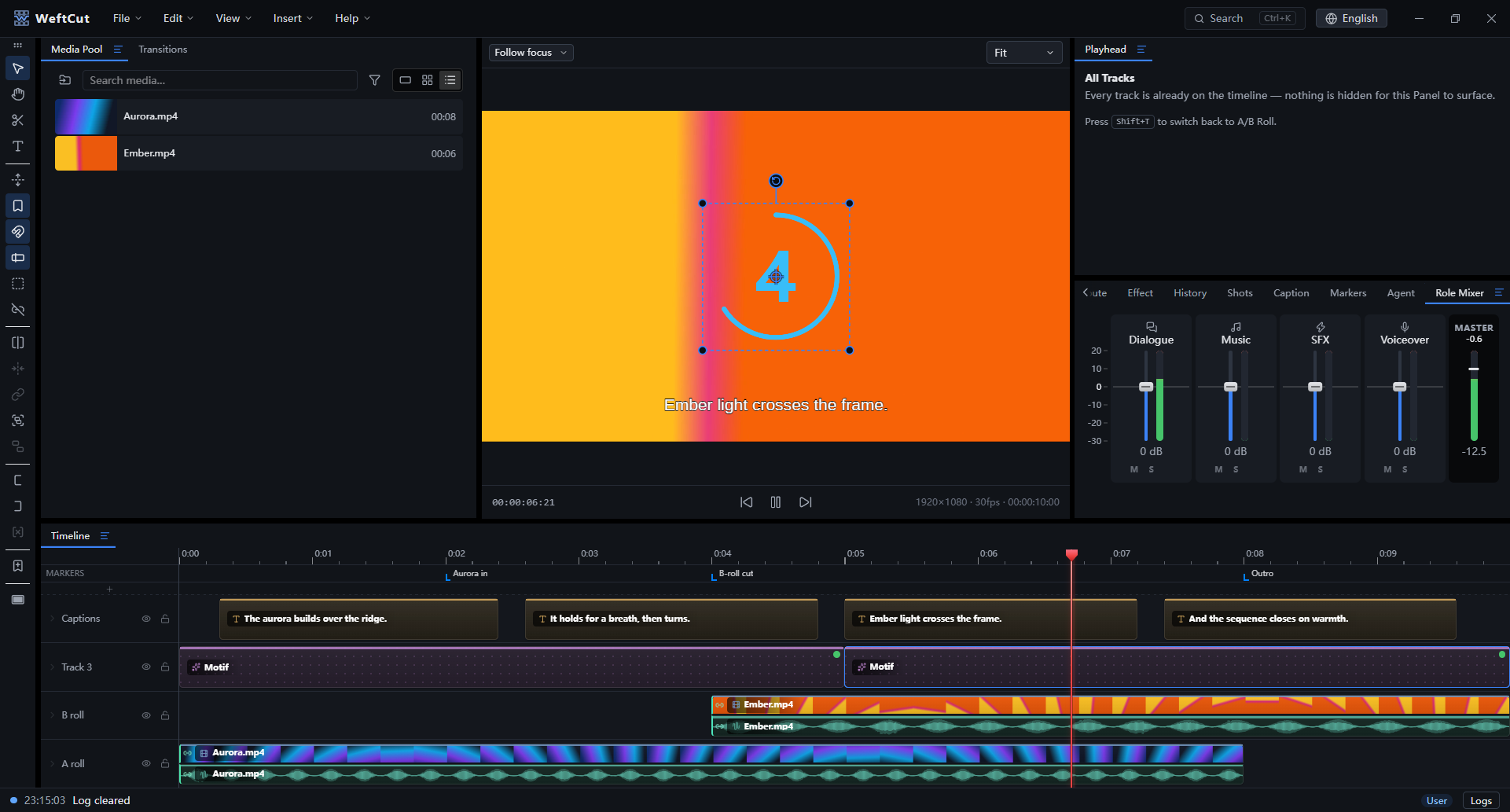
Audio — role-based mixing (dialogue / music / SFX / voiceover) with live per-role metering, gain, pan, fades and denoise. Pauses finds the dead air in a take and cuts it as one undoable edit, keeping a pad so speech still breathes.
<br/><sub>Agent: detect_pauses · remove_pauses · set_role_gain · set_role_flags</sub>
Understanding the footage — shot-boundary detection with per-shot brightness, motion and sharpness, frame comparison, and vision-model descriptions of what a clip actually contains. An agent can cut on content, not just on timecode.
<br/><sub>Agent: analyze_clip · auto_split_by_shot · describe_clip · compare_frames</sub>
Titles, effects and transitions — styled text layers with outlines, per-layer effect chains including chroma key with an eyedropper that picks from the live frame, and transitions between clips.
<br/><sub>Agent: add_effect · update_effect · add_transition · update_transition</sub>
Export — H.264 / HEVC / AV1, hardware or software encoders, resolution / fps / quality controls, and streamed muxing.
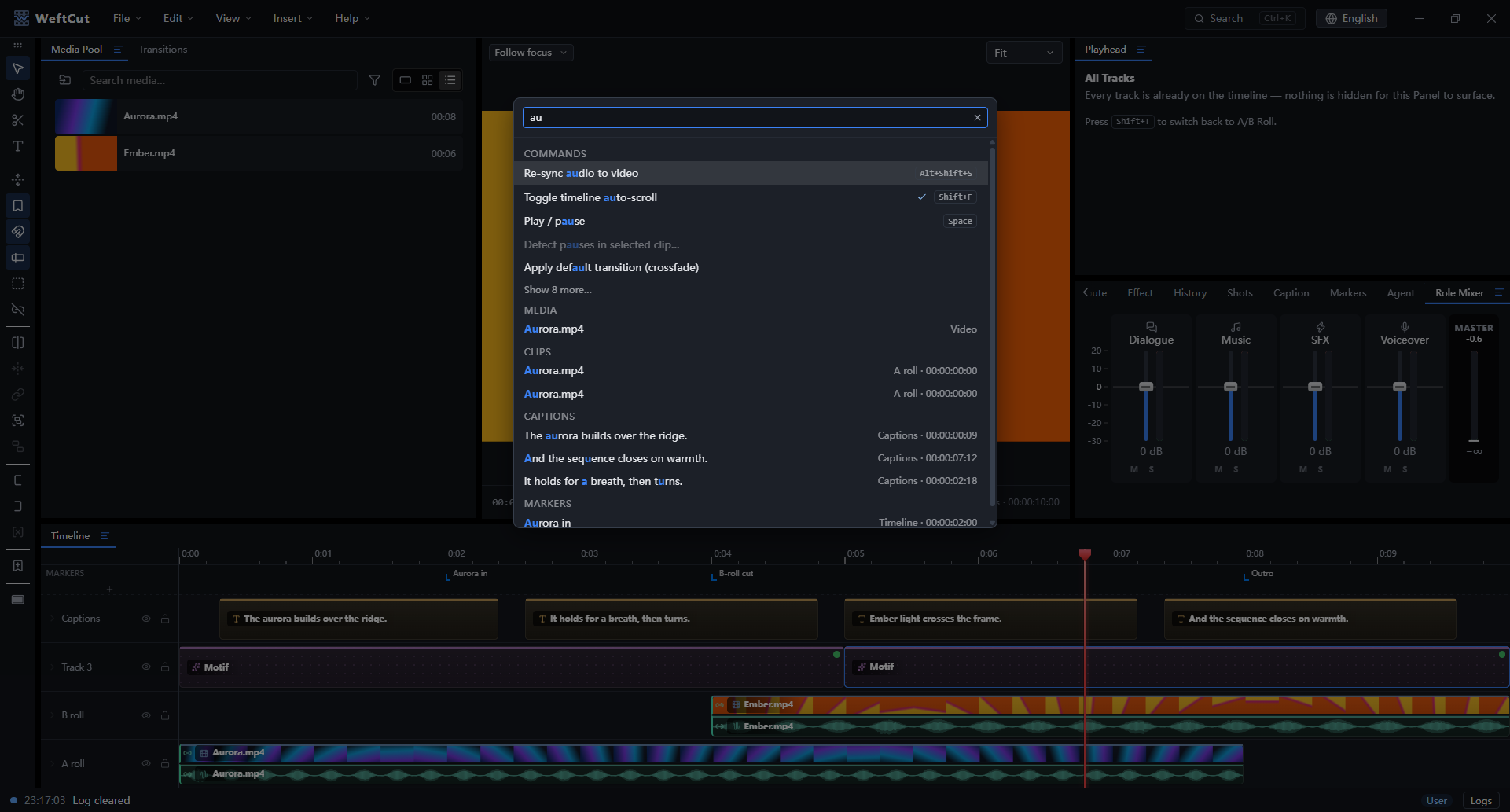
Find anything — one Ctrl+K palette over commands, media, clips, captions and markers, search for whatever you want.
Tech stack
| Layer | Stack |
|---|---|
| Shell | Electron 44 · TypeScript 7 · electron-vite · Vite 8 · Node 24 |
| UI | React 19 · Zustand · Immer · Tailwind CSS v4 · Base UI · shadcn/ui · Dockview · lucide · i18next (en-US / zh-CN) · fuzzysort |
| Preview | PixiJS v8 · WebGPU / WebGL · WebCodecs VideoDecoder pool · mediabunny · own YUV→RGB shaders · Web Audio clock |
| Export | Worker + OffscreenCanvas · GPU YUV pack pass · PBO readback · rawvideo over IPC · native ffmpeg sink · WebCodecs encoder (pin) · stream-copy mux |
| Native core | Rust · napi-rs 3 · Tokio · imbl · serde · schemars · blake3 · reqwest · ffmpeg-sidecar |
| Native decode | @weftcut/native-decode · ffmpeg-next · software + GPU lanes · sharedTexture (Windows) |
| Shared math | weftcut-eval crate · native + wasm32 · snap · keyframe eval · envelope · role gate |
| ffmpeg | GPL CLI sidecar (jobs, encode, mux) · LGPL shared libs (in-process decode) |
| Agent surface | MCP · streamable HTTP on localhost · stdio through the weftcut binary (Go, standard library only) · @modelcontextprotocol/sdk · bearer token · TS + Rust tool catalog |
| Motifs | Offscreen BrowserWindow · Chrome DevTools Protocol · motif: scheme · CSP default-src 'none' |
| Speech & vision | Cloud providers over reqwest · whisper.cpp · FunASR · on-demand model download |
| Tests & CI | Vitest · cargo test · go test · Playwright · node --test · Stryker · GitHub Actions (Windows / macOS / Linux) |
Design decisions: ADRs.
Build from source
Prerequisites: Node 24+, Rust (version pinned by rust-toolchain.toml, installed via rustup), Go (version named by apps/desktop/cli/go.mod), and your platform's C/C++ build tools and libclang — per-OS commands in docs/setup.md.
npm install       # JS dependencies
npm run bootstrap # one-time: fetch ffmpeg + build the Rust addons
npm run dev       # start the editor
Also useful: npm run typecheck, npm test, npm run e2e, npm run build, npm run package (installers).
Documentation
Start with architecture for the system map, or MCP server & agent UX for the tool surface, resources and multi-agent behavior. Motifs and motif authoring cover the overlay engine and its contract.
<details> <summary>Everything else</summary>- Data model — project state schema, history, persistence, validation.
- Render — PixiJS + WebCodecs renderer architecture.
- Preview — interactive preview surface and transport.
- Export — export pipeline, settings and range, audio, finalization, export jobs and presets.
- Captions · Audio — caption ingestion and the audio engine.
- Conformance — E2E gates that export real media and check frame alignment, audio sync and colour.
- Features — the concrete behavior of each editor capability: selection, links, groups, ripple delete, markers, shot review, pauses, search, gizmo, crop.
- Status / log system — the bottom-of-editor log bus.
- Setup — per-OS toolchain prerequisites and first-run flow.
- Licensing — MIT app plus the two FFmpeg lanes and their build-time compliance gates.
- v1 target — release scope and open work, tracked as an issue:
docs/describes what exists today.
Community
Join the WeftCut Discord community to share feedback, discuss feature ideas, and get help. Please use GitHub Issues for bug reports and feature requests so they can be tracked. Before opening a pull request, read the contributing guide.
Maintainer
WeftCut is built and maintained by UncleChair.
It exists to speed up my own video work. I wanted an editor an agent could actually drive, and a timeline I could keep watching while it did — so the MCP surface is the part I use daily, not a demo bolted onto the side. Motifs came from the other half of that: the overlays I wanted were easier to write than to find, and an agent that can write a web page can write one for the shot in front of it.
The project sits under the WeftCut organization so the name, domain and releases have a stable home, but it is a one-person project — issues and pull requests all reach me.
Star History
<p align="center"> <a href="https://www.star-history.com/?repos=WeftCut%2FWeftCut&type=date&legend=top-left"> <picture> <source media="(prefers-color-scheme: dark)" srcset="https://api.star-history.com/chart?repos=WeftCut/WeftCut&type=date&theme=dark&legend=top-left" /> <img alt="WeftCut GitHub Star History Chart" src="https://api.star-history.com/chart?repos=WeftCut/WeftCut&type=date&legend=top-left" /> </picture> </a> </p>License
WeftCut is licensed under the MIT License. Packaged installers bundle FFmpeg binaries under their own licenses (LGPL shared libraries for in-process decode, GPL command-line tools run as a separate process) — see THIRD-PARTY-NOTICES.md and docs/licensing.md for the full model.
WeftCut alternatives
View more →Similar mcp servers in Design & Media, ranked by GitHub stars. Compare licence, recent activity and scan status before you choose.
| Name | Stars | Licence | Last updated | Scan |
|---|---|---|---|---|
| WeftCut (this page) WeftCut | 295 | MIT | Nov 1, 2026 | Scanned, no flagged issues |
| Next AI Draw Io DayuanJiang | 37k | Apache-2.0 | Nov 1, 2026 | Scanned, no flagged issues |
| MCP For Blender ahujasid | 33k | MIT | Oct 29, 2026 | Scanned, no flagged issues |
| Figma Context MCP GLips | 16k | MIT | Oct 27, 2026 | Scanned, no flagged issues |
| Nginx UI 0xJacky | 12k | AGPL-3.0 | Nov 1, 2026 | Scanned, no flagged issues |
| Lamda firerpa | 8.7k | MIT | Sep 27, 2026 | Scanned, no flagged issues |